
1. Уводзіны
This manual provides instructions for the installation, operation, and maintenance of the Nexxt Solutions Naxos800 8-Port Fast Ethernet Network Switch. The Naxos800 is an unmanaged compact desktop switch designed for small office/home office (SOHO) environments, student dormitories, and small enterprises, offering reliable network connectivity.
2. Асноўныя магчымасці
- 8 хуткіх Ethernet-партоў: Provides 8 UTP/STP 10/100Mbps ports with auto MDI/MDIX.
- Plug and Play: Simple setup requiring no software configuration.
- Некіравальны камутатар: Operates without requiring complex management interfaces.
- Store-and-Forward Technology: Ensures efficient packet transmission.
- Вывучэнне MAC-адраса: Supports auto-learning and aging with a built-in 1000 MAC address table.
- Кампактны дызайн: Suitable for desktop or wall mounting.
- энергазберажэнне: Канструкцыя з нізкім энергаспажываннем.
- Кіраванне патокам: Full duplex and half duplex back pressure flow control.
- Трываласць: Integrated lightning protection and a sturdy metal case.
- Ціхая праца: Fanless design for silent performance.
3. Змесціва ўпакоўкі
Пераканайцеся, што ваш пакет змяшчае наступныя элементы:
- One (1) Nexxt Solutions Naxos800 8-Port Fast Ethernet Switch
- Адзін (1) адаптар сілкавання

Image: The Nexxt Solutions Naxos800 switch, its power adapter, and product packaging.
4. Прадукт скончыўсяview

Выява: спераду view of the Naxos800 switch, showing the Nexxt logo and eight green LED indicators for port activity.
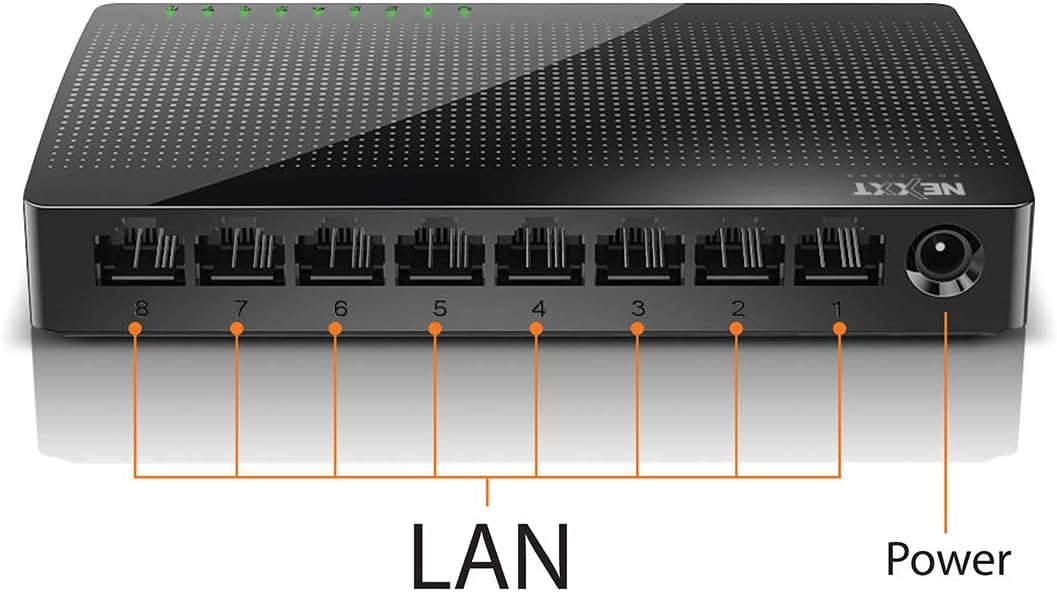
Выява: Задняя частка view of the Naxos800 switch, highlighting the eight LAN ports (numbered 1-8) and the power input port.
Святлодыёдныя індыкатары
The front panel features LED indicators for each port, providing visual status:
- Green LED (Solid): Indicates a stable link connection.
- Зялёны святлодыёд (мігае): Indicates data activity on the corresponding port.
- Святлодыёд выключаны: No link or connection detected.
5. Настройка і ўстаноўка
The Naxos800 switch is designed for simple plug-and-play installation. No software or complex configuration is required.
- Размяшчэнне: Place the switch on a stable, flat surface or mount it on a wall using appropriate hardware (not included). Ensure adequate ventilation around the device.
- Падключэнне да сілкавання: Connect the provided power adapter to the power input port on the switch and then plug the adapter into a standard electrical outlet. The power LED (if present, or the port LEDs will light up) should illuminate.
- Падключэнне да сеткі:
- Connect your router or modem to any of the 8 LAN ports on the Naxos800 switch using an Ethernet cable.
- Connect your network devices (e.g., computers, gaming consoles, IP cameras, Smart TVs, printers) to the remaining LAN ports on the Naxos800 switch using an Ethernet cable.
- Праверце злучэнне: Once devices are connected, the corresponding LED indicators on the switch's front panel should light up green (solid for link, flashing for activity).

Image: Diagram illustrating a typical network setup. An ADSL or Cable Modem connects to a Router, which then connects to the Naxos800 switch. Various devices like laptops, media players, game consoles, IP cameras, Smart TVs, and IP phones are connected to the Naxos800 switch.
6. Кіраванне перамыкачом
The Naxos800 is an unmanaged switch, meaning it operates automatically without user intervention once connected. It functions as an internet splitter, expanding the number of wired network connections available from your router or modem.
- Automatic Speed Detection: Each port automatically detects the speed of the connected device (10Mbps or 100Mbps) and adjusts accordingly.
- Аўтаматычны MDI/MDIX: Eliminates the need for crossover cables; the switch automatically detects and corrects for straight-through or crossover cable types.
- Перадача дадзеных: Data packets are forwarded between connected devices at Fast Ethernet speeds. The store-and-forward architecture ensures data integrity.
7. Тэхнічнае абслугоўванне
The Naxos800 switch requires minimal maintenance.
- Уборка: Для чысткі вонкавага боку перамыкача выкарыстоўвайце мяккую сухую тканіну. Не выкарыстоўвайце вадкія або аэразольныя ачышчальнікі.
- Вентыляцыя: Пераканайцеся, што вентыляцыйныя адтуліны не заблакіраваны, каб прадухіліць перагрэў.
- Цыкл харчавання: If the device experiences issues, a simple power cycle (unplugging and replugging the power adapter) can often resolve minor problems.
8. Выпраўленне непаладак
If you encounter issues with your Naxos800 switch, refer to the following common problems and solutions:
| праблема | Магчымая прычына | Рашэнне |
|---|---|---|
| Няма харчавання / Прылада не ўключаецца. | Блок харчавання не падключаны або няспраўны; разетка не працуе. | Пераканайцеся, што адаптар сілкавання надзейна падключаны да камутатара і спраўнай электрычнай разеткі. Паспрабуйце іншую разетку. |
| No link light for a connected device. | Няспраўны або няправільна падключаны кабель Ethernet; прылада не ўключана або няспраўная; няправільны порт. |
|
| Slow network speeds. | Network congestion; faulty cable; device limitations. |
|
9. Тэхнічныя характарыстыкі
| Атрыбут | Каштоўнасць |
|---|---|
| Нумар мадэлі | ASIDT084U3 |
| Парты | 8 x 10/100Mbps Fast Ethernet (UTP/STP) |
| Прапускная здольнасць задняй плоскасці | 1.6 Гбіт/с |
| Табліца MAC-адрасоў | 1000 запісаў |
| Кантроль доступу | CDMA |
| Кантроль патоку | Full duplex and half duplex back pressure |
| Памеры (Д х Ш х У) | 12.4 х 5.9 х 2.3 см |
| Вага | 140 г |
| Увод магутнасці | Знешні адаптар сілкавання (у камплекце) |
Заўвага: тэхнічныя характарыстыкі могуць быць зменены без папярэдняга паведамлення.
10. Гарантыя і падтрымка
The Nexxt Solutions Naxos800 8-Port Fast Ethernet Network Switch comes with a 5-гадовая абмежаваная гарантыя. For warranty claims or technical support, please contact Nexxt Solutions customer service. Refer to the official Nexxt Solutions webсайт, каб атрымаць найноўшую інфармацыю аб падтрымцы і кантактную інфармацыю.
Nexxt Solutions is a US company committed to quality and customer service.