
iFrogz IFFAWL-BL0
IFROGZ Aurora Wireless Headphones User Manual
Марка: iFrogz | мадэль: IFFAWL-BL0
Уводзіны
The IFROGZ Aurora Wireless Headphones are designed to provide a high-quality audio experience with the convenience of wireless connectivity. Featuring 40mm drivers for rich sound and a comfortable, foldable design, these headphones are suitable for various uses, including listening to music and taking calls on the go. This manual provides detailed instructions for setup, operation, and maintenance to ensure optimal performance and longevity of your headphones.
Змест пакета
Калі ласка, пераканайцеся, што ўсе прадметы прысутнічаюць у камплекце:
- IFROGZ Aurora Wireless Headphones
- USB-кабель для зарадкі
- 3.5 мм аўдыёкабель
- Кіраўніцтва карыстальніка (гэты дакумент)
Прадукт скончаныview

Малюнак 1: Вуглавы view of the IFROGZ Aurora Wireless Headphones, highlighting the overall design and earcups.

Малюнак 2: Збоку view of the headphones, illustrating the placement of control buttons for volume and track navigation.

Малюнак 3: Фронт view of the headphones, showcasing the iFrogz logo and the sleek design of the earcups.
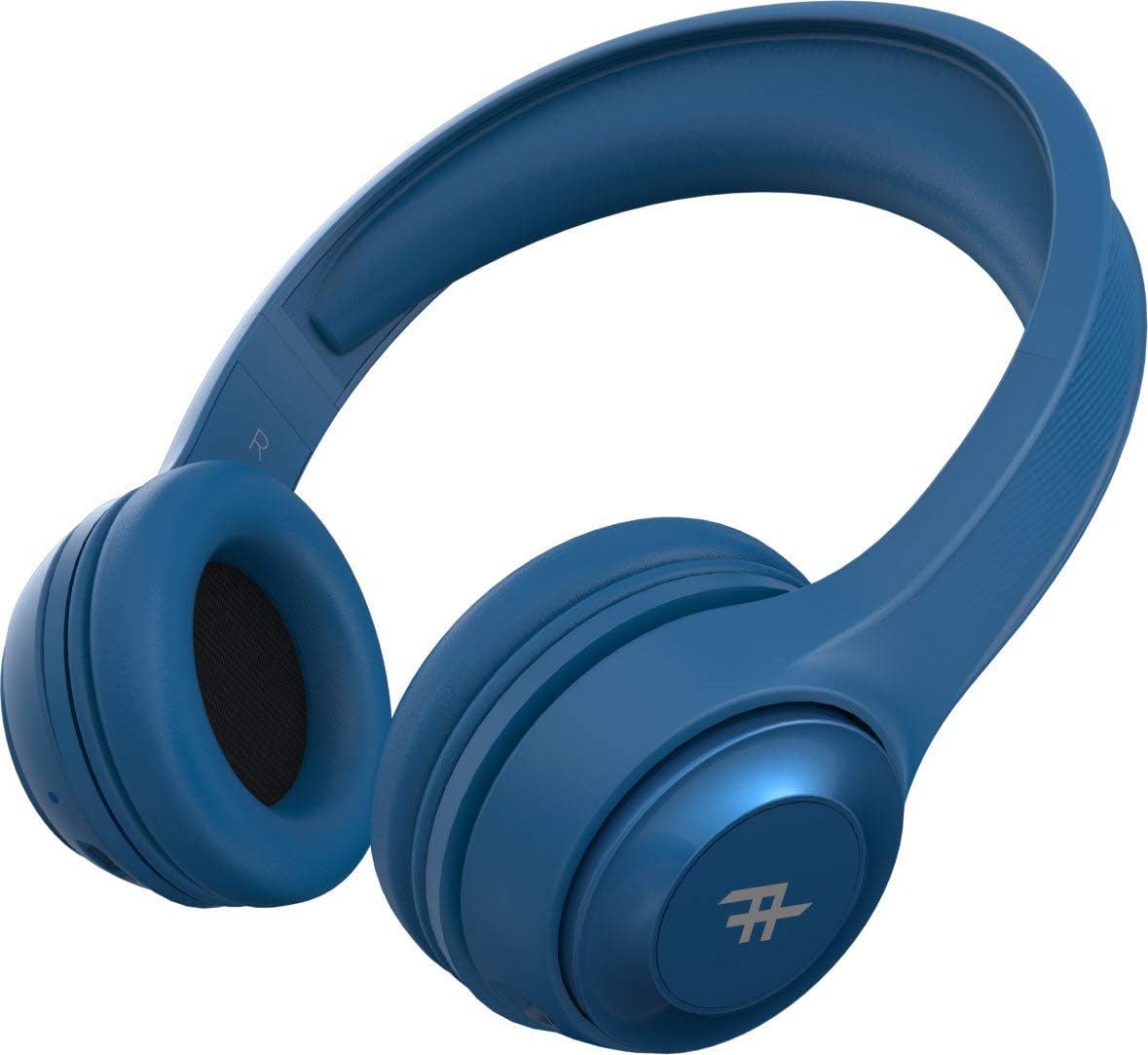
Малюнак 4: Топ view of the headphones, demonstrating the adjustable headband for a comfortable fit.
Асноўныя характарыстыкі:
- Бесправадное злучэнне Bluetooth: Enjoy freedom from cords with seamless Bluetooth pairing.
- Прэміум-гук: Equipped with 40mm drivers for rich and powerful audio output.
- Элементы кіравання на гарнітуры: Intuitive controls located on the earcup for easy management of music and calls.
- Доўгі тэрмін службы батарэі: Да 12 гадзін прайгравання на адной зарадцы.
- Убудаваны мікрафон: Allows for hands-free calling.
- Складаны дызайн: Compact and easy to store, ideal for travel.
- Выкарыстанне канвертабельнага аўтамабіля: Can be used wirelessly via Bluetooth or wired with the included 3.5mm audio jack cable.
- Пасіўная шумаізаляцыя: AeroFoam padding on earcups provides comfort and helps reduce ambient noise.
Налада і пачатковае выкарыстанне
1. Зарадка навушнікаў
Before first use, fully charge your headphones. Connect the small end of the USB charging cable to the charging port on the headphone earcup and the larger end to a USB power source (e.g., computer USB port, wall adapter). The LED indicator will show charging status and turn off or change color when fully charged.
2. Уключэнне / выключэнне харчавання
- Каб уключыць: Press and hold the Power button (usually the multi-function button) for approximately 3 seconds until the LED indicator lights up and you hear an audible prompt.
- Каб выключыць: Націсніце і ўтрымлівайце кнопку харчавання прыблізна 5 секунды, пакуль не згасне святлодыёдны індыкатар і не прагучыць гукавое паведамленне.
3. Спарванне Bluetooth
- Пераканайцеся, што навушнікі адключаны.
- Press and hold the Power button for about 5-7 seconds until the LED indicator flashes rapidly, indicating pairing mode.
- На вашай прыладзе (смартфоне, планшэце, камп'ютары) уключыце Bluetooth і знайдзіце даступныя прылады.
- Select "IFROGZ Aurora" from the list of found devices.
- Once paired, the LED indicator will stop flashing and remain solid blue, and you will hear a confirmation tone.
- Калі будзе запытаны пароль, увядзіце «0000».
Заўвага: Пры ўключэнні навушнікі аўтаматычна паспрабуюць падключыцца да апошняй спалучанай прылады.
4. Правадное падключэнне (неабавязкова)
If the battery is depleted or you prefer a wired connection, you can use the included 3.5mm audio jack cable. Plug one end into the audio input port on the headphone earcup and the other end into your device's 3.5mm audio output jack. The headphones will function as passive wired headphones in this mode.
Інструкцыя па эксплуатацыі
Элементы кіравання прайграваннем музыкі
- Прайграванне/Паўза: Press the Multi-function button (usually the iFrogz logo button).
- Наступны трэк: Press and hold the "Next" button (usually marked with >).
- Папярэдні трэк: Press and hold the "Previous" button (usually marked with <).
- Павялічыць гучнасць: Кароткачасова націсніце кнопку «+».
- Паменшыць гучнасць: Кароткачасова націсніце кнопку «-».
Кіраванне званкамі
- Адказ/завяршэнне выкліку: Націсніце шматфункцыянальную кнопку.
- Адхіліць выклік: Націсніце і ўтрымлівайце шматфункцыянальную кнопку на працягу 2 секунд.
- Паўторны набор апошняга нумара: Двойчы націсніце шматфункцыянальную кнопку.
Догляд і абслугоўванне
- Уборка: Працірайце навушнікі мяккай сухой тканінай. Не выкарыстоўвайце абразіўныя ачышчальнікі або растваральнікі.
- захоўванне: Калі навушнікі не выкарыстоўваюцца, захоўвайце іх у прахалодным, сухім месцы, удалечыні ад прамых сонечных прамянёў і экстрэмальных тэмператур. Складаная канструкцыя забяспечвае кампактнае захоўванне.
- Сыход за батарэяй: To preserve battery life, charge the headphones at least once every three months if not used regularly. Avoid fully discharging the battery frequently.
- Ўздзеянне вады: These headphones are not waterproof. Avoid exposure to liquids, moisture, or rain.
Ліквідацыю непаладак
| праблема | Магчымая прычына | Рашэнне |
|---|---|---|
| Навушнікі не ўключаюцься. | Нізкі акумулятар. | Поўнасцю зарадзіце навушнікі. |
| Немагчыма спалучыцца з прыладай Bluetooth. | Навушнікі не ў рэжыме спалучэння; Bluetooth прылады выключаны; занадта далёка ад прылады. | Ensure headphones are in pairing mode (flashing LED). Turn on Bluetooth on your device. Move headphones closer to the device (within 10 meters). |
| Няма гуку або нізкі ўзровень гучнасці. | Volume too low on headphones or device; incorrect audio source; headphones not connected. | Increase volume on both headphones and device. Ensure headphones are properly paired or connected via audio cable. Check audio output settings on your device. |
| Скажэнне гуку. | Too far from Bluetooth device; interference; audio file якасць. | Move closer to the Bluetooth device. Avoid strong electromagnetic interference. Try a different audio file. |
| Не працуе мікрафон. | Microphone muted on device; headphones not selected as input device. | Check microphone settings on your device. Ensure the headphones are selected as the audio input device during calls. |
Тэхнічныя характарыстыкі
| Асаблівасць | Дэталь |
|---|---|
| Нумар мадэлі | IFFAWL-BL0 |
| Сувязь | Wireless (Bluetooth), Wired (3.5mm Audio Jack) |
| Бесправадныя тэхналогіі | Bluetooth |
| Тып батарэі | Літый-палімерны (1 у камплекце) |
| Тэрмін службы батарэі | Да 12 гадзін |
| Формаў-фактар | Надвушныя |
| Колер | Сіні |
| Матэрыял | Пластык (ПУ) |
| Асаблівасці | Foldable design, Integrated microphone |
| Вытворца | ЗАГГ |
| Памеры ўпакоўкі | 8.4 х 19 х 21.2 см |
| Вага ўпакоўкі | 0.28 кг |
Гарантыя і падтрымка
For warranty information and customer support, please refer to the warranty card included in your product packaging or visit the official iFrogz webсайт. Захоўвайце пацвярджэнне пакупкі для любых гарантыйных прэтэнзій.
For further assistance or technical inquiries, please contact iFrogz customer service.
Звязаныя дакументы - IFFAWL-BL0
 |
IFROGZ Impulse Wireless Earbuds User Manual and Instructions Comprehensive user manual for IFROGZ Impulse Wireless Earbuds. Learn about setup, pairing, music playback, call management, Reflective Acoustics technology, and FCC compliance. |
 |
Інструкцыя па эксплуатацыі сапраўды бесправадных навушнікаў IFROGZ AIRTIME Кіраўніцтва карыстальніка для сапраўды бесправадных навушнікаў IFROGZ AIRTIME, у якім падрабязна апісаны этапы спалучэння, эксплуатацыі, зарадкі і ліквідацыі непаладак. |
 |
Кароткае кіраўніцтва па выкарыстанні сапраўды бесправадных навушнікаў-ўкладышаў IFROGZ Airtime Luxe 2 Гэта кіраўніцтва змяшчае інструкцыі па спалучэнні, выкарыстанні, зарадцы і скідзе налад бесправадных навушнікаў IFROGZ Airtime Luxe 2. Даведайцеся пра кіраванне музыкай і званкамі, функцыі хуткай зарадкі і індыкатары ўзроўню зараду батарэі. |
 |
Інструкцыя па эксплуатацыі бесправадных навушнікаў IFROGZ Summit Падрабязнае кіраўніцтва карыстальніка для бесправадных навушнікаў IFROGZ Summit, якое ахоплівае ўводзіны, функцыі бесправаднога хаба, функцыі кнопак, спалучэнне, прайграванне музыкі, апрацоўку выклікаў, зарадку і заявы FCC. |
 |
IFROGZ Airtime ANC Сапраўды бесправадныя навушнікі з актыўным шумапрыглушэннем - Кароткае кіраўніцтва карыстальніка Падрабязнае кіраўніцтва па цалкам бесправадных навушніках IFROGZ Airtime ANC, якое ахоплівае наладу, спалучэнне, кіраванне музыкай/званкамі, функцыі ANC, зарадку, падгонку і ліквідацыю непаладак. Маюць актыўнае шумапрыглушэнне і да 25 гадзін прайгравання. |
 |
Hepro Aurora Lift Chair: Ultimate Comfort and Mobility Solutions Discover the Hepro Aurora lift chair, engineered for exceptional comfort, ergonomic support, and enhanced mobility. Featuring advanced adjustability, integrated USB charging, and a wide range of customizable accessories, the Aurora chair is designed to improve quality of life for users of all ages and needs. |
Ask a question about this manual
Ask about setup, troubleshooting, compatibility, parts, safety, or missing instructions. Manuals+ will review the question and use this page’s manual context to help answer it.