
Уводзіны
Thank you for choosing the Brookstone Big Blue True Wireless Earbuds. These earbuds are designed to provide a seamless audio experience, allowing you to enjoy music and manage calls wirelessly. This manual provides essential information on setting up, operating, maintaining, and troubleshooting your new earbuds.
Асноўныя характарыстыкі:
- True wireless design for freedom of movement.
- Rich, full-range audio with deep bass.
- Integrated microphone with Qualcomm cVc noise-cancelling technology for clear calls.
- Bluetooth connectivity for easy pairing with your smartphone or device.

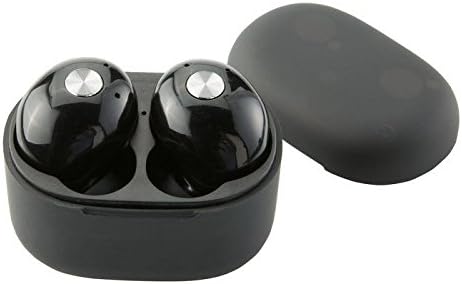
Image: Brookstone Big Blue True Wireless Earbuds in their black charging case.
Настройка
Што ў скрынцы
- Brookstone Big Blue True Wireless Earbuds (Left and Right)
- Чахол для бесправадной зарадкі
Зарадка навушнікаў і чахла
- Змесціце абодва навушнікі ў зарадны футляр. Пераканайцеся, што яны правільна ўсталяваныя.
- Connect the charging case to a USB power source using the provided charging cable.
- The indicator lights on the case and earbuds will show charging status. Refer to the specific light patterns in your product packaging for details.
- Перад першым выкарыстаннем дайце дастаткова часу для поўнай зарадкі.
Выява: Крупны план view of the earbuds within the charging case, illustrating proper placement for charging.
Спалучэнне Bluetooth
- Пераканайцеся, што навушнікі зараджаны.
- Remove both earbuds from the charging case. They will automatically enter pairing mode, indicated by flashing LED lights (refer to your product packaging for specific light patterns).
- На смартфоне або прыладзе з падтрымкай Bluetooth перайдзіце ў налады Bluetooth.
- Пошук new devices and select "BIG BLUE" (or similar name) from the list.
- Once connected, the earbud indicator lights will change, typically turning solid or off.
- Калі спалучэнне не атрымалася, вярніце навушнікі ў чахол, зачыніце яго і паўтарыце дзеянні.
Інструкцыя па эксплуатацыі
Уключэнне/выключэнне харчавання
- Уключэнне: Дастаньце навушнікі з зараднага футляра. Яны аўтаматычна ўключацца і паспрабуюць падключыцца да апошняй спалучанай прылады.
- Выключэнне: Змясціце навушнікі назад у зарадны футляр і зачыніце вечка. Яны аўтаматычна выключацца і пачнуць зараджацца.
Прайграванне музыкі і кіраванне званкамі
The earbuds feature integrated controls for media playback and call handling. Specific functions may vary slightly; refer to your product's quick start guide for exact button presses.
- Прайграванне/Паўза: Typically a single press on either earbud.
- Наступны трэк: Often a double press on the right earbud.
- Папярэдні трэк: Often a double press on the left earbud.
- Адказ/завяршэнне выкліку: A single press on either earbud during an incoming call or active call.
- Адхіліць выклік: A long press on either earbud during an incoming call.
- Актываваць галасавы памочнік: A triple press or long press on an earbud (check specific model instructions).

Image: A man wearing a Brookstone Big Blue True Wireless Earbud, demonstrating typical use.
Тэхнічнае абслугоўванне
Уборка
- Выкарыстоўвайце мяккую, сухую тканіну без ворса для чысткі навушнікаў і зараднага футляра.
- Не выкарыстоўвайце абразіўныя ачышчальнікі, растваральнікі або аэразольныя спрэі.
- Gently clean ear tips and speaker grilles with a dry cotton swab to remove earwax or debris.
Захоўванне
- Заўсёды захоўвайце навушнікі ў зарадным чахле, калі яны не выкарыстоўваюцца, каб абараніць іх і падтрымліваць зараджанымі.
- Захоўваць у прахалодным, сухім месцы, удалечыні ад экстрэмальных тэмператур і прамых сонечных прамянёў.
Сыход за батарэяй
- Каб падоўжыць тэрмін службы батарэі, пазбягайце частай поўнай разрадкі навушнікаў і кейса.
- Рэгулярна зараджайце прыладу, нават калі яна выкарыстоўваецца не так часта.
Ліквідацыю непаладак
| праблема | Магчымае рашэнне |
|---|---|
| Навушнікі не спалучаюцца з прыладай. |
|
| Sound skipping or cutting out. |
|
| У адным навушніку няма гуку. |
|
| Навушнікі не зараджаюцца. |
|
Тэхнічныя характарыстыкі
| Асаблівасць | Дэталь |
|---|---|
| Нумар мадэлі | BIG BLUE |
| Тэхналогія бесправадной сувязі | Bluetooth |
| Уключаныя кампаненты | Чахол для бесправадной зарадкі |
| Матэрыял | Пластыкавыя |
| Тып кіравання | Кіраванне СМІ |
| Функцыя кабеля | Без кабеля |
| Вага прадмета | 2.4 унцыі (0.15 фунта) |
| Памеры прадукту | 3.35 х 1.57 х 5.71 цалі |
| Асаблівасці | Мікрафон у камплекце, шумапрыглушэнне, бесправадная сувязь |
| Колер | Чорны |
| Формаў-фактар | У вуха |
| UPC / GTIN | 883594061516 |
Інфармацыя аб гарантыі
Brookstone products are designed with quality and reliability in mind. For specific warranty details regarding your Big Blue True Wireless Earbuds, please refer to the warranty card included in your product packaging or visit the official Brookstone webсайт. Захоўвайце пацвярджэнне пакупкі для любых гарантыйных прэтэнзій.
Падтрымка кліентаў
If you encounter any issues not covered in this manual or require further assistance, please contact Brookstone customer support. Contact information can typically be found on the product packaging or the official Brookstone webсайт.