
Уводзіны
This manual provides detailed instructions for the installation, operation, and maintenance of the ECS Elitegroup B350AM4-M2 Micro ATX Motherboard. This motherboard is designed to support AMD AM4 socket processors, including AMD Ryzen and 7th Gen Athlon processors. It features a 4+2 phase thermal design, 100% solid capacitor design, and dual-channel DDR4 memory architecture supporting up to 64 GB across four DIMM sockets.
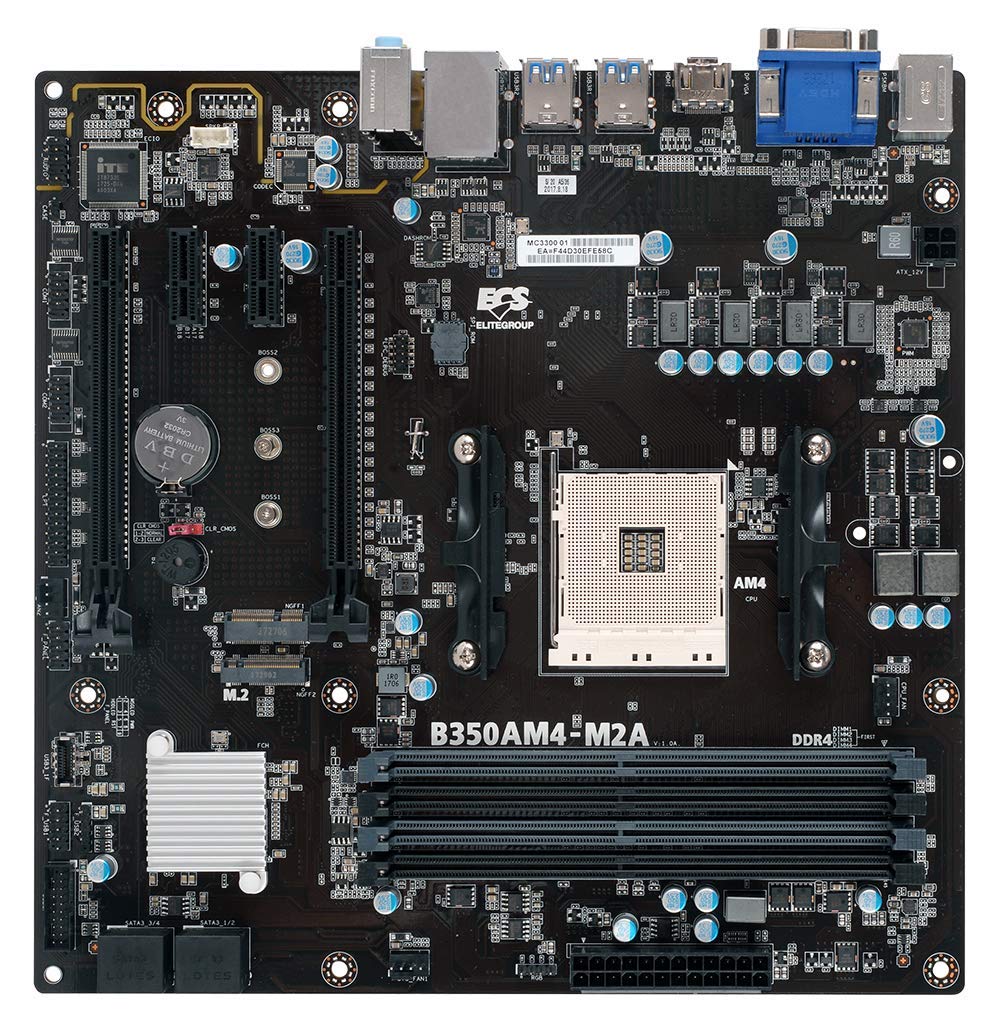
Малюнак 1: Закончанаview of the ECS B350AM4-M2 Motherboard, showing its general layout and components.
Змест пакета
Verify that all items listed below are present in the package. If any item is missing or damaged, contact your retailer.
- ECS B350AM4-M2 Motherboard
- Дыск з драйверам
- Кіраўніцтва карыстальніка (гэты дакумент)
- Кабелі SATA
Настройка і ўстаноўка
Перад пачаткам усталёўкі пераканайцеся, што сістэма выключана і адключана ад разеткі. Надзеньце антыстатычны бранзалет, каб прадухіліць пашкоджанне кампанентаў электрастатычным разрадам (ESD).
1. Усталёўка працэсара
- Знайдзіце раз'ём працэсара AM4 на матчынай плаце.
- Падніміце рычаг нагрузкі збоку разеткі.
- Carefully align the triangular mark on the CPU with the corresponding mark on the socket.
- Акуратна ўстаўце працэсар у раз'ём, не прыціскаючы яго да сілы.
- Lower the load lever back into its locked position to secure the CPU.
- Нанесці цеплаізаляцыйную пасту на паверхню працэсара і ўсталяваць кулер працэсара ў адпаведнасці з інструкцыямі вытворцы.
Figure 2: The AM4 CPU socket and surrounding area on the motherboard, where the processor is installed.
2. Усталёўка памяці (RAM)
The B350AM4-M2 motherboard has four 288-pin DDR4 DIMM sockets. For optimal performance, install memory modules in pairs for dual-channel operation. Refer to the motherboard's silkscreen for recommended slot population order.
- Адкрыйце зашчапкі з абодвух канцоў раздыма DIMM.
- Align the notch on the DDR4 memory module with the key in the DIMM socket.
- Шчыльна ўстаўце модуль у разетку, пакуль зашчапкі не зафіксуюцца.
- Repeat for additional memory modules.
Figure 3: Location of the four DDR4 DIMM slots for memory installation.
3. Storage Device Installation (SATA & M.2)
Connect SATA storage devices (HDDs/SSDs) to the SATA 6Gb/s ports. For M.2 SSDs, locate the M.2 slot.
- For SATA devices: Connect one end of the SATA data cable to the storage device and the other end to a SATA port on the motherboard. Connect the SATA power cable from your power supply to the device.
- For M.2 SSDs: Insert the M.2 SSD into the M.2 slot at an angle. Push it down and secure it with the provided screw.
4. Усталёўка платы пашырэння (PCIe)
Install graphics cards or other expansion cards into the appropriate PCI Express slots.
- Align the expansion card with the chosen PCIe slot.
- Press down firmly until the card is seated correctly and the retention clip (if present) locks into place.
- Замацуйце карту да корпуса шрубай.
5. Падключэння харчавання
Падключыце кабелі харчавання да матчынай платы.
- 24-кантактны раз'ём харчавання ATX: Connect the main 24-pin power cable from your power supply to the corresponding connector on the motherboard.
- 4-кантактны раз'ём харчавання працэсара: Connect the 4-pin CPU power cable (often labeled P4 or ATX12V) from your power supply to the connector near the CPU socket.
6. Пярэдняя панэль і USB-раздымы
Connect your chassis's front panel connectors (power button, reset button, HDD LED, power LED, front USB ports, front audio) to the corresponding headers on the motherboard. Refer to the motherboard layout diagram in the full manual for exact header locations.
Інструкцыя па эксплуатацыі
1. Налада BIOS/UEFI
The BIOS (Basic Input/Output System) or UEFI (Unified Extensible Firmware Interface) is the firmware that initializes hardware during startup. To access the BIOS/UEFI setup utility:
- Уключыце кампутар.
- Націсніце DEL key repeatedly during the initial boot screen. The exact key may vary; consult the on-screen prompts.
Within the BIOS/UEFI, you can configure system settings such as boot order, date/time, CPU/memory frequencies, and enable/disable integrated peripherals. Save changes before exiting.
2. Усталёўка аперацыйнай сістэмы
After assembling your system, you will need to install an operating system (e.g., Windows 10, Windows Vista, Linux).
- Insert your operating system installation media (USB drive or DVD) into the computer.
- Access the BIOS/UEFI setup and set the boot order to prioritize your installation media.
- Save changes and exit. The system will boot from the installation media.
- Выконвайце інструкцыі на экране, каб усталяваць аперацыйную сістэму.
- After installation, install the necessary drivers from the provided driver CD or the ECS Elitegroup webсайт.
Тэхнічнае абслугоўванне
Правільнае абслугоўванне гарантуе даўгавечнасць і стабільную працу вашай матчынай платы.
- Выдаленне пылу: Regularly clean dust from inside your computer case using compressed air. Ensure fans and heatsinks are free from obstructions.
- Абнаўленні BIOS: Periodically check the ECS Elitegroup website for updated BIOS versions. BIOS updates can improve compatibility, stability, and performance. Follow the update instructions carefully to avoid system damage.
- Кабельнае кіраванне: Пераканайцеся, што ўнутраныя кабелі акуратна пракладзены, каб палепшыць цыркуляцыю паветра і прадухіліць перашкоды.
Ліквідацыю непаладак
У гэтым раздзеле разглядаюцца распаўсюджаныя праблемы, з якімі вы можаце сутыкнуцца.
Няма харчавання / сістэма не ўключаецца
- Check all power connections: 24-pin ATX, 4-pin CPU, and power cables to peripherals.
- Пераканайцеся, што выключальнік сілкавання знаходзіцца ў становішчы «ON».
- Verify the front panel power button connector is correctly attached to the motherboard header.
- Test the power supply with another system or a power supply tester if available.
No Display / No POST (Power-On Self-Test)
- Ensure the monitor is connected to the correct display output (motherboard integrated graphics or discrete graphics card).
- Пераўсталюйце відэакарту і модулі памяці.
- Check if the CPU cooler is properly installed and connected.
- Listen for beep codes. A series of 9 short beeps often indicates a BIOS ROM error, suggesting a potential issue with the motherboard's firmware.
- Try booting with only essential components (CPU, one RAM stick, graphics card if no integrated graphics) to isolate the problem.
Нестабільнасць сістэмы / Збоі
- Пераканайцеся, што ўсе драйверы абноўленыя.
- Праверце тэмпературу працэсара і відэакарты, каб пазбегнуць перагрэву.
- Запусціце інструменты дыягностыкі памяці, каб праверыць наяўнасць няспраўных аператыўных прылад.
- Verify that the power supply provides sufficient wattagе для ўсіх кампанентаў.
Тэхнічныя характарыстыкі
| Асаблівасць | Дэталь |
|---|---|
| Марка | ECS Elitegroup |
| Нумар мадэлі | B350AM4-M2 |
| Гняздо працэсара | Гняздо AM4 |
| Сумяшчальныя працэсары | AMD Ryzen Processors, AMD 7th Gen Athlon Processors |
| Тып чыпсэта | AMD B350 |
| Тэхналогія аператыўнай памяці | DDR4 |
| Даступныя слоты памяці | 4 x 288-pin DDR4 DIMM sockets |
| Максімальны памер аператыўнай памяці | 64 ГБ |
| Тактавая частата памяці | 2667/2400 MHz (non-ECC, Un-buffered SDRAM) |
| Інтэрфейс відэакарты | PCI Express |
| Total Number of HDMI Ports | 1 (HDMI 1.4a) |
| DisplayPort | Integrated DP with up to 2560x1600 resolution |
| Парты USB 2.0 | 1 (internal header, total ports may vary) |
| Тып раздыма S/PDIF | Аптычны |
| Падтрымліваецца стандарт сістэмнай шыны | SATA 3 |
| Платформа | Windows 10, Windows Vista |
| Вага прадмета | 1.15 фунта |
Гарантыя і падтрымка
The ECS Elitegroup B350AM4-M2 Motherboard comes with a Гарантыя 2 год from the date of purchase. This warranty covers defects in materials and workmanship under normal use. For warranty claims or technical support, please contact your retailer or visit the official ECS Elitegroup webсайт з рэсурсамі падтрымкі і кантактнай інфармацыяй.
Інтэрнэт-падтрымка: For the latest drivers, BIOS updates, and additional support, please visit the ECS Elitegroup official webсайт.