
FVTLED Z0039
FVTLED WiFi RGBW LED Controller User Manual
Мадэль: Z0039
Уводзіны
This manual provides detailed instructions for the installation, operation, and maintenance of your FVTLED WiFi RGBW LED Controller. This controller is designed for wireless smart control of FVTLED RGBW LED Deck lights via a dedicated mobile application on Android and iOS devices. Please read this manual thoroughly before use to ensure proper functionality and safety.
Інфармацыя па бяспецы
- Перад устаноўкай або тэхнічным абслугоўваннем пераканайцеся, што крыніца харчавання адключаны.
- This controller is designed for use with FVTLED RGBW LED Deck lights only. Do not connect to other lighting systems.
- Праверце правільны томtagе (120 вольт) і ватtage (15 watts) compatibility.
- Трымайце прыладу далей ад вады і празмернай вільгаці.
- Не спрабуйце разбіраць або мадыфікаваць кантролер. Звяртайцеся па ўсё абслугоўванне да кваліфікаванага персаналу.
Змест пакета
Калі ласка, праверце ўпакоўку на наяўнасць наступных прадметаў:
- 1 x FVTLED WiFi RGBW LED Controller
- 1 x Remote Control (Batteries not included: Requires 2 AAA batteries)
- Кіраўніцтва карыстальніка (гэты дакумент)
Прадукт скончаныview
The FVTLED WiFi RGBW LED Controller allows you to manage your FVTLED RGBW deck lights with ease, offering both a physical remote control and a comprehensive mobile application for advanced features.

Image: FVTLED WiFi RGBW LED Controller and its accompanying remote control.

Image: Detailed layout of the remote control buttons, indicating functions such as ON/OFF, brightness adjustment, color temperature control, and RGB color cycling.
Настройка
1. Падключэнне правадоў
The controller features two connection ends:
- The 2-pin end connects to your power supply.
- The 5-pin end connects directly to your FVTLED RGBW LED deck lights.
Ensure all connections are secure and properly aligned before applying power.
2. Mobile Application Download
To utilize the smart control features, download the official FVTLED application. Пошук "FVTLED" in your device's app store:
- For Android devices: Google Play Store
- For iOS devices: Apple App Store

Image: Visual guide for downloading the FVTLED application and an overview of its key features, including 16 million colors, music sync, voice control, and scheduling.
3. Connecting the Controller to Wi-Fi
Follow these steps within the FVTLED app to connect your controller to your home Wi-Fi network:
- Open the FVTLED app.
- Зарэгіструйцеся for a new account or Увайсці калі ў вас ужо ёсць.
- From the main screen, tap the "Add device" button (often represented by a '+' icon).
- The app will automatically search for nearby devices. Select your controller (e.g., "DeviceBCF2").
- Увядзіце назву і пароль вашай сеткі Wi-Fi, калі будзе прапанавана.
- Once connected, you can name your device and assign it to a specific room for better organization.

Image: Step-by-step screenshots illustrating the process of signing up, logging in, adding a device, connecting to Wi-Fi, and organizing the device within the FVTLED app.
Кіраванне кантролерам
1. Выкарыстанне пульта дыстанцыйнага кіравання
The included remote control provides basic functions:
- ВКЛ/ВЫКЛ: Уключыць або выключыць святло.
- Яркасць: Adjust light intensity (10 levels of dimming).
- Каляровая тэмпература: Adjust between warm white (3000K), neutral white (4000K), and cool white (6500K).
- RGB Buttons: Cycle through various RGB colors and modes (three speeds for color cycling).
- Рэжым начнога святла: Activates a low-intensity light setting.
2. Using the FVTLED Mobile App
The mobile app unlocks the full potential of your RGBW LED Controller:
- 16 мільёнаў колераў: Select any color from a vast spectrum.
- Brightness & Saturation Control: Дакладна адрэгулюйце інтэнсіўнасць святла і насычанасць колераў.
- Рэжым музыкі: Lights can synchronize with music played through your device.
- Галасавое кіраванне: Integrate with smart home systems (Wi-Fi, Alexa, Google Assistant) for voice commands.
- Таймер і расклад: Set automated on/off times and lighting scenes.
- Некалькі рэжымаў: Access various pre-programmed lighting effects and scenes.

Image: A user demonstrating control of green deck lights using the FVTLED mobile application on a smartphone.
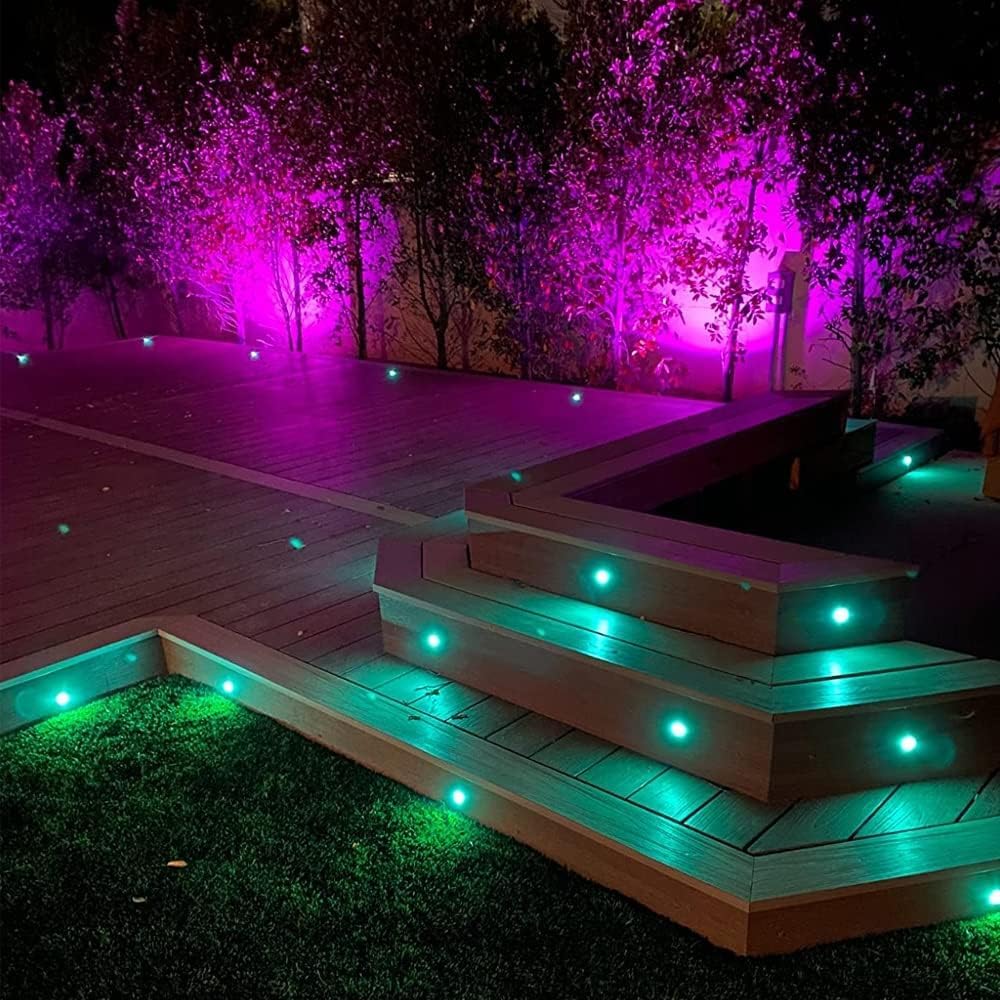
Image: An outdoor deck illuminated with FVTLED RGBW lights displaying vibrant purple and green colors, showcasing the controller's capabilities.

Image: An outdoor deck and stairs illuminated with warm white FVTLED deck lights, providing a cozy ambiance.

Image: A spacious outdoor deck area featuring FVTLED deck lights displaying a range of vibrant colors, demonstrating the RGB capabilities.
Тэхнічнае абслугоўванне
The FVTLED WiFi RGBW LED Controller requires minimal maintenance:
- Трымайце кантролер чыстым і без пылу і смецця. Выкарыстоўвайце для чысткі мяккую сухую тканіну.
- Ensure the controller is installed in a location that is protected from direct exposure to harsh weather conditions, although it is designed for outdoor use with appropriate protection.
- Рэгулярна правярайце злучэнні правадоў на наяўнасць прыкмет зносу або пашкоджанняў.
- Replace remote control batteries (2 x AAA) as needed to ensure proper function.
Ліквідацыю непаладак
| праблема | Магчымая прычына | Рашэнне |
|---|---|---|
| Святло не гарыць. | No power to controller; Loose connections; Incorrect wiring; Faulty lights. | Check power supply connection. Ensure 2-pin connector is secure. Verify 5-pin connector to lights is secure. Confirm lights are functional. |
| Кантролер не падключаецца да Wi-Fi. | Incorrect Wi-Fi password; Out of Wi-Fi range; Router issues. | Double-check Wi-Fi password. Move controller closer to router. Restart your Wi-Fi router. Ensure 2.4GHz network is used if applicable. |
| Не працуе пульт дыстанцыйнага кіравання. | Dead batteries; Remote out of range; Obstruction. | Replace AAA batteries. Ensure remote is within effective range of the controller. Remove any physical obstructions between remote and controller. |
| Lights not responding to app commands. | Controller offline; App glitch; Network interference. | Check app to confirm controller is online. Restart the app. Restart the controller by disconnecting and reconnecting power. Check for Wi-Fi interference. |
Тэхнічныя характарыстыкі
| Асаблівасць | Дэталь |
|---|---|
| Нумар мадэлі | Z0039 |
| Марка | FVTLED |
| Вытворца | SEVEN COLORS LIGHTING TECHNOLOGY CO., LTD |
| Колер | Wifi RGBW Controller |
| Крыніца харчавання | Харчаванне пастаяннага току |
| тtage | 120 вольт |
| Ватtage | 15 ват |
| Вага прадмета | 1.58 унцыі |
| Памеры ўпакоўкі | 7 х 6.26 х 0.89 цалі |
| Сувязь | WiFi |
| Сумяшчальнасць | Android, iOS, Alexa, Google Assistant |
| Уключаныя кампаненты | WiFi RGB controller and RGBW LED lights (controller only in this package) |
| Дата першай даступнасці | 16 кастрычніка 2015 г |
Гарантыя і падтрымка
For warranty information and customer support, please refer to the official FVTLED website or contact the manufacturer directly. Details regarding product registration, warranty claims, and technical assistance can typically be found through these channels.
вытворца: SEVEN COLORS LIGHTING TECHNOLOGY CO., LTD
Каб атрымаць дадатковую дапамогу, наведайце FVTLED Store on Amazon.