
Уводзіны
This manual provides instructions for the proper setup, operation, and maintenance of your Oneal OMX-6 6-Channel Audio Mixer. Please read this manual thoroughly before using the device to ensure optimal performance and safety.
The Oneal OMX-6 is a compact mixing console designed for versatile audio applications. It features 6 input channels plus an auxiliary input, 3-band equalization, and balanced microphone/line inputs, offering flexibility for various audio configurations.
Важныя інструкцыі па бяспецы
- Прачытайце гэтыя інструкцыі.
- Захоўвайце гэтыя інструкцыі.
- Звярніце ўвагу на ўсе папярэджанні.
- Выконвайце ўсе інструкцыі.
- Не выкарыстоўвайце гэты прыбор паблізу вады.
- Чысціце толькі сухой анучай.
- Не блакуйце вентыляцыйныя адтуліны. Усталюйце ў адпаведнасці з інструкцыямі вытворцы.
- Не ўстанаўлівайце побач з крыніцамі цяпла, такімі як радыятары, абагравальнікі, пліты або іншыя прылады (у тым ліку ampLifiers), якія вырабляюць цяпло.
- Не пагаршайце мэты бяспекі палярызаванай або зазямляльнай вілкі. Палярызаваная відэлец мае два леза, адзін шырэйшы за другі. Вілка з зазямленнем мае два ножы і трэці зазямляльны штырь. Шырокае лязо або трэці зубец прызначаны для вашай бяспекі. Калі вілка з камплекта не падыходзіць да вашай разеткі, звярніцеся да электрыка для замены састарэлай разеткі.
- Абараняйце сеткавы шнур ад наступання або заціскання, асабліва ў месцах вілкі, разеткі і месца выхаду з прылады.
- Выкарыстоўвайце толькі насадкі/аксэсуары, указаныя вытворцам.
- Адключайце гэты прыбор ад сеткі падчас навальніцы або калі ён не выкарыстоўваецца на працягу доўгага часу.
- Звяртайцеся да кваліфікаванага абслугоўваючага персаналу. Тэхнічнае абслугоўванне патрабуецца, калі прылада была пашкоджана якім-небудзь чынам, напрыклад, пашкоджаны шнур сілкавання або вілка, была праліта вадкасць або ў прыладу ўпалі прадметы, прылада падвяргалася ўздзеянню дажджу або вільгаці, не працуе належным чынам , або быў адкінуты.
Кіраўніцтва па ўстаноўцы
1. Распакаванне і праверка
Carefully remove the mixer from its packaging. Inspect the unit for any signs of damage during transit. Retain the packaging for future transport or storage.
2. Падключэнне сілкавання
Connect the power cord to the AC IN port on the rear panel of the mixer. Ensure the power switch is in the OFF position before connecting to a power outlet. This mixer supports a wide voltage дыяпазон 120-240 В.

Figure 1: Rear panel connections, including the AC IN port and power switch.
3. Уваходныя аўдыяпадключэнні
The OMX-6 features 6 channels with balanced microphone (XLR) and line (1/4" TRS) inputs, plus an additional auxiliary input.
- Мікрафонныя ўходы: Connect microphones to the XLR inputs (MIC) on each channel.
- Лінейныя ўваходы: Connect instruments or other line-level devices to the 1/4" TRS inputs (LINE) on each channel.
- Дапаможны ўваход: Use the dedicated auxiliary input for connecting CD players, DVD players, or MP3 devices.
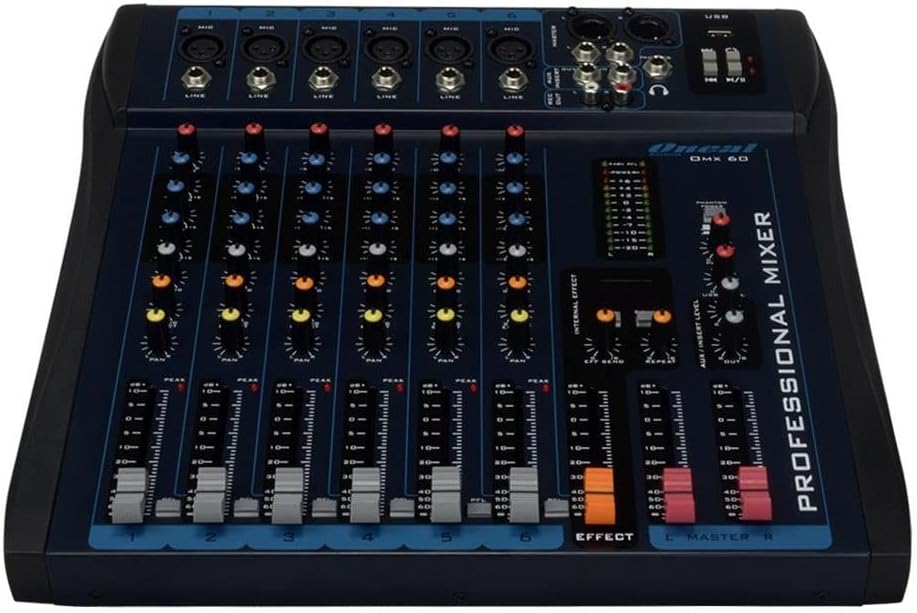
Figure 2: Front panel showing microphone and line inputs for each channel.
4. Падключэнні аўдыявыхаду
Connect your main speakers or recording devices to the master output ports. The mixer also includes a headphone output for monitoring.
Інструкцыя па эксплуатацыі
1. Уключэнне
After all connections are made, switch the power button to the ON position. The power indicator light should illuminate.
2. Рэгуляванне каналаў
Each of the 6 channels features the following controls:
- УЗБЕГАЦЬ: Adjusts the input sensitivity for the microphone or line input. Start with the GAIN knob fully counter-clockwise and gradually increase until the PEAK LED flashes only occasionally.
- HIGH, MID, LOW (3-Band EQ): Adjusts the treble, midrange, and bass frequencies for the respective channel.
- AUX: Controls the level of the channel signal sent to the auxiliary output for external effects or monitor mixes.
- ПАН: Рэгулюе стэрэапазіцыю сігналу канала (злева направа).
- LEVEL Fader: Кіруе агульным узроўнем выхаднога сігналу канала.
- PFL (праслухоўванне перад фейдэрам): Activates pre-fader monitoring for the channel through headphones.
- Пікавы святлодыёд: Indicates when the input signal is too high, potentially causing distortion. Reduce GAIN if this LED lights up frequently.
3. Equalization Turbo Loud
The Turbo Loud button provides an instant enhancement to the equalization, offering a more pronounced sound profile. Experiment with this feature to suit your audio needs.
4. Элементы кіравання галоўнай секцыяй
The master section controls the overall output of the mixer:
- MASTER L/R Faders: Control the main stereo output level.
- МЕРЫК УЗРОЎНЯ: Displays the output level of the main mix. Aim for levels around 0 dB during normal operation, avoiding consistent peaking into the red.
- ТЭЛЕФОНЫ: Headphone output jack and level control for monitoring.
- Прайграванне/запіс праз USB: If equipped, use the USB port for connecting a USB drive for playback or for connecting to a computer for recording. Refer to specific USB instructions if applicable.
5. Internal Effects (if applicable)
If your model includes internal effects, use the dedicated controls (e.g., EFFECT, REPEAT, SEND) to apply and adjust effects to your mix. The AUX/INSERT LEVEL control may also be used for external effects loops.
Тэхнічнае абслугоўванне
Уборка
Wipe the mixer with a soft, dry cloth. Do not use liquid cleaners or aerosols. Ensure the unit is powered off and unplugged before cleaning.
Захоўванне
When not in use for extended periods, store the mixer in a cool, dry place, away from direct sunlight and extreme temperatures. Keep it covered to prevent dust accumulation.
Ліквідацыю непаладак
Няма вываду гуку
- Check all power connections and ensure the mixer is powered on.
- Verify that the MASTER L/R faders are raised.
- Ensure individual channel LEVEL faders are raised and GAIN is set appropriately.
- Check connections to speakers or ampасаднікі.
- Confirm that input sources are active and sending a signal.
Скажоны гук
- Reduce the GAIN on individual channels if the PEAK LED is frequently lighting up.
- Lower the MASTER L/R faders if the main level meter is consistently in the red.
- Check input cables for damage or improper connection.
Гул або шум
- Пераканайцеся, што ўсе кабелі належным чынам экранаваныя і падлучаныя.
- Check for ground loops. Try connecting all audio equipment to the same power outlet or power conditioner.
- Трымайце аўдыёкабелі далей ад сілавых кабеляў.
Тэхнічныя характарыстыкі
| Асаблівасць | Дэталь |
|---|---|
| Марка | Oneal |
| мадэль | OMX-6 |
| Колькасць каналаў | 6 + 1 Auxiliary |
| Аўдыё ўваход | 6 channels (microphones, line, CD/DVD/MP3) + 1 auxiliary |
| Ураўноўванне | 3-Band (Low/Mid/Hi) per channel, Turbo Loud feature |
| Мікрафонныя ўваходы | Balanced per channel |
| Лінейныя ўваходы | Balanced per channel |
| Кантроль манітора | Individual per channel (MON/PFL) |
| Крыніца харчавання | Правадная электрычная |
| тtage | 120-240В |
| Максімальнае спажыванне | 7W |
| Памеры ўпакоўкі | 52 х 35 х 11 см |
| Вага прадмета | 4.4 кг |
| ASIN | B079F662Y4 |
| EAN/GTIN | 7898584231223, 7898934820107 |
Інфармацыя аб гарантыі
This product comes with a standard manufacturer's warranty against manufacturing defects for 90 days from the date of purchase.
Please retain your proof of purchase for warranty claims. The warranty does not cover damage caused by misuse, accidents, unauthorized modifications, or normal wear and tear.
Падтрымка кліентаў
For technical assistance, service, or warranty inquiries, please contact Oneal customer support through their official webсайт або ў аўтарызаваныя сэрвісныя цэнтры.
Webсайт: www.oneal.com.br