
Уводзіны
This manual provides instructions for the operation and maintenance of your Timex Expedition Digital Chrono Alarm Timer 33mm Watch, Model TW4B13100. This digital outdoor watch features a chronograph, alarm, and timer, designed for everyday use.

Малюнак 1: Фронт view of the Timex Expedition Digital Watch. The watch features a black case, a clear digital display showing the time and date, and a durable gray and blue striped fabric strap. Buttons for 'SET', 'MODE', 'START/SPLIT', and 'STOP/RESET' are visible on the sides of the watch case.
Настройка
Пачатковая актывацыя і ўстаноўка часу
Upon first use, or after a battery replacement, you may need to activate the watch and set the time and date.
- If a plastic guard is present under the SET button, remove it.
- Націсніце і ўтрымлівайце НАБОР button until the display flashes, indicating time setting mode.
- Выкарыстоўвайце СТАРТ/РАЗДЗЕЛ button to adjust the flashing segment (e.g., hours, minutes).
- Націсніце РЭЖЫМ button to advance to the next segment (e.g., minutes, AM/PM, month, day, year).
- Паўтарайце крокі 3 і 4, пакуль не будуць настроены ўсе патрэбныя параметры.
- Націсніце НАБОР зноў націсніце кнопку, каб выйсці з рэжыму налады часу.
Інфармацыя аб батарэі
Your watch comes with one product-specific battery included. When the display dims or functions become erratic, it may be time to replace the battery. Timex recommends having battery replacement performed by a qualified service center to maintain water resistance.
Рэжымы працы
Гадзіннік мае некалькі рэжымаў, даступных праз РЭЖЫМ кнопка.

Малюнак 2: Збоку view of the Timex Expedition Digital Watch. This image highlights the textured buttons on the right side of the watch case, labeled 'START/SPLIT' and 'STOP/RESET', which are used for various functions across different modes.
Рэжым часу
This is the default display mode, showing the current time, day of the week, and date.
Хранограф (секундамер)
The chronograph measures elapsed time.
- У рэжыме часу націсніце РЭЖЫМ until "CHRONO" or a similar indicator appears.
- Прэса СТАРТ/РАЗДЗЕЛ каб пачаць адлік часу.
- Прэса СТАРТ/РАЗДЗЕЛ again to record a split time (the display will freeze, but timing continues in the background). Press СТАРТ/РАЗДЗЕЛ again to return to current elapsed time.
- Прэса СТОП/СКІД каб прыпыніць хранограф.
- With the chronograph paused, press СТОП/СКІД again to reset it to zero.
Таймер (зваротны адлік)
The countdown timer allows you to set a specific duration, after which an alarm will sound.
- У рэжыме часу націсніце РЭЖЫМ пакуль не з'явіцца надпіс "TIMER" або падобны індыкатар.
- Націсніце і ўтрымлівайце НАБОР пакуль дысплей не міргае.
- Выкарыстоўвайце СТАРТ/РАЗДЗЕЛ to adjust the hours, minutes, or seconds.
- Прэса РЭЖЫМ пераключацца паміж гадзінамі, хвілінамі і секундамі.
- Прэса НАБОР каб пацвердзіць наладу таймера.
- Прэса СТАРТ/РАЗДЗЕЛ каб пачаць зваротны адлік.
- Прэса СТОП/СКІД to pause or resume the timer.
- Калі таймер дасягне нуля, прагучыць сігнал трывогі. Націсніце любую кнопку, каб адключыць яго.
Сігналізацыя
The watch features an alarm function to alert you at a set time.
- У рэжыме часу націсніце РЭЖЫМ пакуль не з'явіцца надпіс "ALARM" або падобны індыкатар.
- Націсніце і ўтрымлівайце НАБОР пакуль не пачне міргаць час будзільніка.
- Выкарыстоўвайце СТАРТ/РАЗДЗЕЛ to adjust the hours and minutes.
- Прэса РЭЖЫМ to move between hours, minutes, and AM/PM.
- Прэса НАБОР каб пацвердзіць час будзільніка.
- Каб уключыць/выключыць будзільнік, націсніце СТАРТ/РАЗДЗЕЛ while in Alarm Mode (a bell icon usually indicates activation).
- Калі гучыць будзільнік, націсніце любую кнопку, каб адключыць яго.
Начны свяцільня INDIGLO
The INDIGLO night-light illuminates the watch display for visibility in low-light conditions.
- Націсніце INDIGLO button (typically located on the front of the watch, below the display) to activate the backlight.
- Святло будзе гарэць некалькі секунд.
Тэхнічнае абслугоўванне
Воданепранікальнасць
This watch is water resistant to 100 meters (330 feet). This means it is suitable for showering, swimming, and snorkeling. It is not suitable for scuba diving.
- Не націскайце кнопкі, калі гадзіннік мокры або пагружаны ў ваду.
- Avoid exposing the watch to extreme temperature changes (e.g., hot shower then cold water).
- Пасля кантакту з салёнай вадой прамыйце гадзіннік прэснай вадой і старанна высушыце.
Уборка
Clean your watch regularly to remove dirt and debris.
- For the case and crystal, use a soft, damp тканіна.
- For the fabric strap, it can be gently hand-washed with mild soap and water. Ensure it is completely dry before wearing.
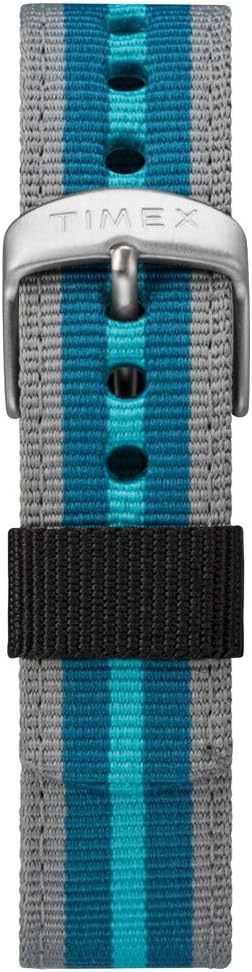
Малюнак 3: Буйны план view of the Timex Expedition watch's fabric strap. The strap features alternating stripes of gray and two shades of blue, secured by a silver-colored buckle with the Timex logo.
Ліквідацыю непаладак
| праблема | Магчымая прычына | Рашэнне |
|---|---|---|
| Дысплей пусты або цьмяны. | Нізкі або разраджаны акумулятар. | Заменіце батарэю. |
| Кнопкі не рэагуюць. | Магчыма, гадзіннік знаходзіцца ў рэжыме блакавання або ўнутраная памылка. | Try pressing all buttons simultaneously for a few seconds to reset (if applicable). If problem persists, consult service. |
| Час няправільны. | Time was not set correctly or battery is low. | Re-set the time and date. If issue recurs, replace battery. |
Тэхнічныя характарыстыкі
- Марка: Timex
- Нумар мадэлі: TW4B13100
- Тып дысплея: Лічбавы
- Дыяметр корпуса: 33 мм
- Воданепранікальнасць: 100 метраў (330 футы)
- Асаблівасці: Chronograph, Alarm, Timer, INDIGLO Night-Light
- Матэрыял папружкі: Тканіна
- акумулятар: 1 батарэя для канкрэтнага прадукту (у камплекце)
- аддзел: Унісекс-дарослы
Прадукт скончаныview Відэа
For a visual guide on the Timex Expedition Digital watch, please refer to the video below.
Відэа 1: Надview of the Timex Expedition Digital 33mm Nylon Strap watch. This video demonstrates the watch's design and features, providing a visual understanding of its appearance and basic functionalities.
Гарантыя і падтрымка
Timex watches are manufactured to high standards and are backed by a limited warranty. For specific warranty details, registration, or support inquiries, please refer to the official Timex website or contact Timex customer service.
Больш падрабязную інфармацыю можна знайсці ў афіцыйнай краме Timex: Крама Timex на Amazon