
1. Уводзіны
Welcome to the user manual for your Xfinity XR15 Voice Control Remote. This remote is designed to enhance your Xfinity X1 experience by providing intuitive control over your entertainment system. With its advanced voice command capabilities and user-friendly design, navigating your TV content has never been easier.

Малюнак 1: Спераду view of the Xfinity XR15 Voice Control Remote.
2. Асноўныя магчымасці
- Галасавое кіраванне: Find content, change channels, and control your DVR using simple voice commands.
- Клавіятура з падсветкай: Buttons illuminate automatically when the remote is moved, ideal for low-light environments.
- Aim Anywhere Feature: Operates without needing to be pointed directly at your TV Box.
- Аўтаматычнае спалучэнне: Simplifies the setup process with compatible Xfinity equipment.
- Спецыяльныя магчымасці: Easy access to Closed Captioning, video description, and voice guidance.
- TV Input Control: Manage your TV's input source directly from the remote.
3. Налада і спалучэнне
3.1. Устаноўка батарэі
The Xfinity XR15 remote requires two AAA batteries. To install:
- Знайдзіце батарэйны адсек на задняй панэлі пульта.
- Зрушыце вечка батарэйнага адсека ўніз і зніміце яго.
- Устаўце дзве батарэйкі тыпу AAA, сачыце за правільнай палярнасцю (+ і -).
- Адсуньце крышку батарэйнага адсека на месца, пакуль яна не зашчоўкнецца.

Figure 2: Battery compartment location.
3.2. Аўтаматычнае спалучэнне
The XR15 remote is designed for automatic pairing with Xfinity X1 TV Boxes (Xi6, Xi5, XG2, X1). Simply ensure your TV Box is powered on and follow these general steps:
- Point the remote at your TV Box.
- Націсніце і ўтрымлівайце Xfinity button (located below the directional pad) for 3-5 seconds.
- Follow any on-screen prompts that appear on your television.
- If prompted for a 3-digit pairing number, enter it even if it doesn't appear on screen.
The remote should automatically pair within a few minutes. If pairing is unsuccessful, ensure the remote is close to the TV and TV Box, and try again.
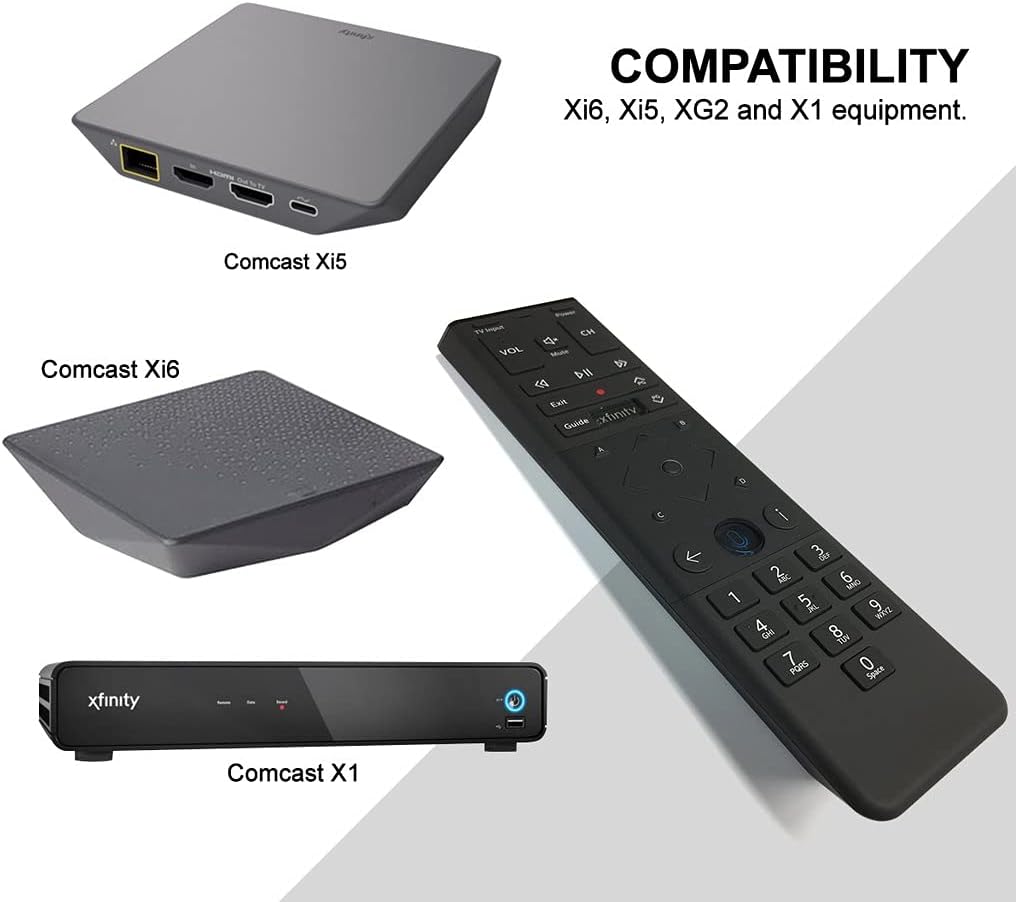
Figure 3: Compatible Xfinity TV Box models.
4. Функцыі кнопак
The XR15 remote features a comprehensive set of buttons for controlling your TV and Xfinity services. Refer to the diagram below for a visual guide.

Figure 4: Xfinity XR15 Remote Button Layout.
| Кнопка | Функцыя |
|---|---|
| Магутнасць | Turns the TV and TV Box on or off. |
| Тэлевізар | Switches to the next available input on your TV. |
| ГУЧНАСЦЬ +/- | Павялічвае або памяншае гучнасць. |
| Адключыць гук | Turns sound off or on. |
| CH +/- | Selects the next or previous channel. |
| Прайграванне/Паўза | Plays or pauses live TV, Xfinity On Demand, or DVR content. |
| FF (хуткая перамотка наперад) | Fast forwards Xfinity On Demand or DVR content. |
| Rew (Rewind) | Rewinds Xfinity On Demand or DVR content. |
| Выхад | Exits on-screen guides; stops and exits Xfinity On Demand and DVR content. |
| Record (red dot) | Records the current program or saves future programs to your DVR. |
| Xfinity | Displays the main menu of the guide, providing access to all guide features. |
| Кіраўніцтва | Displays TV listings. |
| інфармацыя (я) | Displays information about programs and notifications. |
| Назад | Navigates back in menus or returns to previous screens. |
| Лічбавыя клавішы (0-9) | Used for direct channel entry or predictive text (T9) for content search. |
5. Галасавое кіраванне
The voice control feature is a primary benefit of the XR15 remote. It allows you to quickly find content, change channels, and manage your DVR without typing.

Figure 5: Voice Control Button.
5.1. Using Voice Commands
- Націсніце і ўтрымлівайце Галасавое кіраванне button (microphone icon) on the remote.
- Гаварыце выразна ў мікрафон, размешчаны ў верхняй частцы пульта дыстанцыйнага кіравання.
- Адпусціце кнопку, калі скончыце гаварыць.
Exampспісы галасавых каманд:
- "Tune to CNN"
- «Знайсці баевікі»
- "Record this show"
- "What's on tonight?"
- "Launch Netflix"
6. Тэхнічныя характарыстыкі
| Атрыбут | Дэталь |
|---|---|
| Памеры прадукту | 7 х 2 х 1 цалі |
| Вага прадмета | 3.52 унцыі |
| Нумар мадэлі | 8541713007 |
| Патрабуюцца батарэі | 2 батарэйкі AAA (у камплекце) |
| Сумяшчальныя прылады | Xfinity X1 TV Boxes (Xi6, Xi5, XG2, X1) |
| Колер | Чорны |
| Асаблівасць | Consolidated All Power and TV Power functionality |
7. Тэхнічнае абслугоўванне
7.1. Замена батарэі
When the remote's performance declines or the backlight feature becomes dim, it's time to replace the batteries. Follow the battery installation steps in Section 3.1.
7.2. Уборка
To clean your remote, use a soft, dry cloth. Avoid using liquid cleaners or abrasive materials, as these can damage the remote's surface or internal components.
8. Падтрымка
For further assistance, please refer to the official Xfinity support resources or contact Xfinity customer service. Detailed troubleshooting guides and additional information can be found on the Xfinity webсайт.