
Уводзіны
Welcome to the user manual for your Mustool G600 Digital Portable Microscope. This guide provides detailed instructions to help you set up, operate, and maintain your device, ensuring optimal performance and longevity. Please read this manual thoroughly before using the microscope.
Прадукт скончаныview
The Mustool G600 is a versatile digital portable microscope designed for detailed observation of tiny objects. It features a high-definition display and adjustable magnification, making it suitable for various applications.
Асноўныя характарыстыкі
- 4.3-inch HD LCD display for clear viewінж.
- HD 3.6MP CCD sensor for high-resolution imaging.
- Adjustable magnification from 1x to 600x.
- Eight high-brightness LEDs for optimal illumination.
- Support for Micro SD card up to 64GB (not included) for storage.
- Built-in Li-ion battery providing approximately 6 hours of continuous working time.
- Auto turn-off function for power saving.
- Object distance: 15mm to infinity.
- Падтрымка некалькіх моў.
Кампаненты

Figure 1: Mustool G600 Digital Portable Microscope in operation, showing a circuit board under its lens and the magnified image on the display.
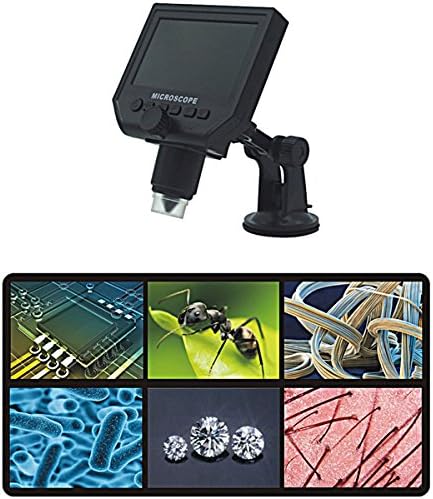
Figure 2: The Mustool G600 Digital Portable Microscope detached from its stand, showcasing the device's compact design and the adjustable stand.

Figure 3: The Mustool G600 Digital Portable Microscope display, illustrating various magnified views such as circuit components, an ant, textile fibers, bacteria, diamonds, and hair strands.

Малюнак 4: Спераду view of the Mustool G600 Digital Portable Microscope mounted on its suction cup stand, highlighting the 4.3-inch LCD screen and control buttons.

Малюнак 5: бок view of the Mustool G600 Digital Portable Microscope, illustrating the adjustable arm of the stand and the microscope's lens assembly.

Малюнак 6: Задняя частка view of the Mustool G600 Digital Portable Microscope, showing the various ports for power, data, and Micro SD card insertion.
Змест пакета
Калі ласка, пераканайцеся, што ўсе пералічаныя ніжэй прадметы ўваходзяць у камплект. Калі якія-небудзь прадметы адсутнічаюць або пашкоджаныя, звярніцеся ў службу падтрымкі кліентаў.
- 1 x Mustool G600 LCD Digital Microscope
- 1 x EU Plug Power supply (Note: Adapter may vary by region)
- 1 x Data line (USB cable)
- 1 x Multi-functional support (Stand)
- 1 x User’s manual (This document)
Настройка
Зарадка акумулятара
Before first use, fully charge the microscope's built-in Li-ion battery.
- Connect the provided power supply to the microscope's charging port.
- Падключыце блок харчавання да звычайнай электрычнай разеткі.
- Індыкатар зарадкі загарыцца. Пасля поўнай зарадкі індыкатар можа змяніць колер або выключыцца.
- A full charge provides approximately 6 hours of continuous operation.
Зборка стэнда
The multi-functional support allows for stable positioning of the microscope.
- Attach the microscope unit to the adjustable arm of the stand. Ensure it is securely fastened.
- Place the suction cup base on a clean, flat, non-porous surface. Press down firmly on the suction cup lever to secure the stand.
- Adjust the arm and microscope angle as needed for your viewтэму.
Устаўка карты Micro SD (неабавязкова)
To save images and videos, insert a Micro SD card (up to 64GB, not included).
- Locate the Micro SD card slot on the side or back of the microscope unit.
- Gently insert the Micro SD card with the gold contacts facing down (or as indicated by the slot diagram) until it clicks into place.
- Каб выняць, акуратна зноў націсніце на карту, пакуль яна не выскочыць.
Інструкцыя па эксплуатацыі
Уключэнне/выключэнне
Націсніце і ўтрымлівайце Магутнасць button (usually marked with a power symbol) for a few seconds to turn the microscope on or off. The LCD screen will illuminate.
Рэгуляванне павелічэння і факусоўкі
The microscope offers 1x to 600x continuous magnification.
- Place the object you wish to observe directly under the microscope lens.
- Павярніце вялікі Ручка фокуса (typically located on the side of the microscope body) to bring the image into sharp focus on the LCD screen.
- Adjust the distance between the lens and the object (object distance: 15mm to infinity) using the stand's adjustment mechanisms to achieve the desired magnification and clarity.
Рэгуляванне яркасці святлодыёдаў
The microscope is equipped with 8 adjustable high-brightness LEDs.
Знайдзіце Кантроль яркасці святлодыёдаў (often a small knob or button) on the microscope body. Rotate or press it to increase or decrease the illumination on your subject.
Захоп малюнкаў і відэа
To capture still images or record videos, ensure a Micro SD card is inserted.
- Пакуль viewing your subject, press the Рэжым button to switch between photo mode, video mode, and playback mode.
- У рэжыме фота націсніце кнопку OK/Захоп кнопку, каб зрабіць здымак.
- У рэжыме відэа націсніце кнопку OK/Захоп кнопку, каб пачаць запіс. Націсніце яе яшчэ раз, каб спыніць запіс.
- Захоплены files захоўваюцца на карце Micro SD.
Навігацыя па меню
Выкарыстоўвайце Меню button to access settings and options.
Выкарыстоўвайце Уверх/Уніз or Налева/направа кнопкі са стрэлкамі для навігацыі па пунктах меню.
Націсніце OK кнопку для пацверджання выбару.
Common settings include resolution (1080P, 720P, VGA), language, date/time, and auto-off timer.
Тэхнічнае абслугоўванне
Уборка
To ensure clear viewing and extend the life of your microscope:
- Gently wipe the LCD screen with a soft, lint-free cloth. For stubborn smudges, slightly dampпрацярыце тканіну вадой або сродкам для чысткі экранаў.
- Use a soft brush or air blower to remove dust from the lens. For smudges on the lens, use a specialized lens cleaning solution and cloth.
- Clean the microscope body with a dry or slightly damp тканіна. Не выкарыстоўвайце абразіўныя ачышчальнікі або растваральнікі.
Захоўванне
When not in use, store the microscope in a cool, dry place, away from direct sunlight and extreme temperatures.
Keep the lens covered to prevent dust accumulation.
Сыход за батарэяй
Каб падоўжыць тэрмін службы батарэі:
- Пазбягайце частай поўнай разрадкі акумулятара.
- Пры працяглым захоўванні зарадзіце акумулятар прыкладна да 50% яго ёмістасці.
- Recharge the battery every few months if not in use to prevent deep discharge.
Ліквідацыю непаладак
| праблема | Магчымая прычына | Рашэнне |
|---|---|---|
| Microscope does not turn on. | Акумулятар разраджаны. | Зарадзіце акумулятар з дапамогай блока харчавання, які ўваходзіць у камплект. |
| Выява размытая. | Incorrect focus or object distance. | Adjust the focus knob and/or the distance between the lens and the object. |
| Screen is too dark/bright. | LED brightness not adjusted. | Adjust the LED brightness control. |
| Немагчыма захаваць выявы/відэа. | Карта Micro SD не ўстаўлена або карта запоўненая/пашкоджаная. | Insert a Micro SD card, ensure it has sufficient space, or try formatting the card (this will erase all data). |
| Microscope turns off automatically. | Auto turn-off function is enabled or battery is low. | Charge the battery. Check menu settings to adjust or disable the auto turn-off timer. |
Калі праблема не знікне пасля выкарыстання гэтых рашэнняў, звярніцеся ў службу падтрымкі кліентаў.
Тэхнічныя характарыстыкі
| Асаблівасць | Дэталь |
|---|---|
| мадэль | Mustool G600 |
| Дысплей | 4.3-цалевы ВК-дысплей HD |
| піксель | HD 3.6MP CCD |
| дазвол | 1080P, 720P, VGA |
| Павелічэнне | 1-600x (Continuous) |
| Адлегласць ад аб'екта | 15mm - infinity |
| Крыніца святла | 8 Adjustable High Brightness LEDs |
| Падтрымка захоўвання | Micro SD card up to 64GB (Not included) |
| Крыніца харчавання | Убудаваны літый-іённы акумулятар |
| Тэрмін службы батарэі | Approx. 6 hours continuous working |
| Аўтаматычнае адключэнне | так |
| Моўная падтрымка | English, Spanish, Russian, Korean, Japanese, Thai, Hebrew, Portuguese, German, French, Italian, Turkish, Czech, Chinese |
| Матэрыял | Glass/Glass-like (Lens), Other components as per design |
| Колер | Чорны |
| UPC | 783050248461 |
Гарантыя і падтрымка
The Mustool G600 Digital Portable Microscope comes with a standard manufacturer's warranty. Please refer to the warranty card included in your package for specific terms and conditions.
For technical support, troubleshooting assistance beyond this manual, or warranty claims, please contact Mustool customer service through the retailer where you purchased the product or visit the official Mustool webсайт.
Please have your product model (G600) and purchase information ready when contacting support.