
1. Уводзіны
This manual provides instructions for the installation, operation, and maintenance of your VTech DS6151 DECT 6.0 2-Line Cordless Phone System. This system includes a main base unit and one DS6101 cordless handset. Please read this manual thoroughly before using your new telephone system.

Image 1.1: The VTech DS6151 DECT 6.0 2-Line Cordless Phone System, showing the main base unit and the cordless handset in its charging cradle.
2. Настройка
2.1 Змест пакета
Пераканайцеся, што ў вашай пасылцы ёсць наступныя рэчы:
- VTech DS6151 Base Unit
- DS6101 Cordless Handset
- Зарадная прылада для тэлефона
- Адаптар сілкавання для базавага блока
- Power Adapter for Handset Charger
- Telephone Line Cord (2)
- Rechargeable Battery Pack for Handset
- Кіраўніцтва карыстальніка (гэты дакумент)
2.2 Устаноўка батарэі
The cordless handset requires one AA rechargeable battery. Follow these steps to install the battery:
- Locate the battery compartment cover on the back of the cordless handset.
- Зрушыце вечка ўніз і зніміце яго.
- Connect the battery pack connector securely into the jack inside the compartment, ensuring correct polarity.
- Змесціце акумулятарную батарэю ў адсек.
- Slide the battery compartment cover back into place until it clicks.

Image 2.1: The VTech DS6101 cordless handset, showing its front display and keypad.
2.3 Падключэнне базавага блока
Connect the base unit as follows:
- Plug one end of the power adapter into the power jack on the back of the base unit.
- Падключыце другі канец адаптара харчавання да звычайнай электрычнай разеткі.
- Падключыце адзін канец тэлефоннага шнура да раздыма TEL LINE на задняй панэлі базавага блока.
- Plug the other end of the telephone line cord into a telephone wall jack. If you have two phone lines, connect the second line cord to the LINE 2 jack and the second telephone wall jack.
2.4 Handset Charger Connection
Connect the handset charger as follows:
- Plug one end of the power adapter into the power jack on the back of the handset charger.
- Падключыце другі канец адаптара харчавання да звычайнай электрычнай разеткі.

Image 2.2: The VTech DS6101 cordless handset placed in its charging cradle.
2.5 Першапачатковая зарадка
Place the cordless handset in the base unit or handset charger. The handset will begin charging. Allow the handset to charge for at least 16 hours before initial use. The CHARGE indicator on the handset will illuminate during charging.
3. Інструкцыя па эксплуатацыі
3.1 Здзяйсненне і прыём выклікаў
Здзяйсненне званка:
- From the handset, press ГОВОР / МІГАЦЬ or СПІКЕР. From the base, press РАДОК 1 or РАДОК 2.
- Набраць нумар тэлефона.
Прыём званка:
- Калі тэлефон зазвоніць, націсніце ГОВОР / МІГАЦЬ or СПІКЕР on the handset. From the base, press the flashing РАДОК 1 or РАДОК 2 кнопка.
Завяршэнне выкліку:
- Прэса ВЫКЛ on the handset or place the handset in the charger. From the base, press the active ЛІНІЯ кнопка.
3.2 2-Line Operation
The DS6151 system supports two separate telephone lines. You can make or receive calls on either line independently. When a line is in use, its corresponding button (РАДОК 1 or РАДОК 2) on the base will be lit. If a call comes in on an idle line, its button will flash.
3.3 Caller ID / Call Waiting
If you subscribe to Caller ID service, the caller's name and number will appear on the handset and base display. If you subscribe to Call Waiting Caller ID, the incoming call information will display during an active call.
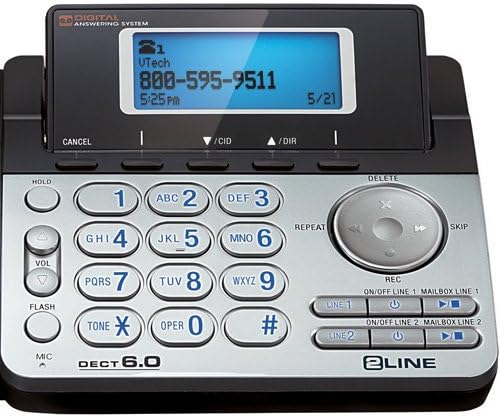
Image 3.1: Close-up of the VTech DS6151 base unit, highlighting the display and keypad for two-line operation.
Лічбавы аўтаадказчык 3.4
The base unit features a digital answering system with a 13-minute recording capacity and a dedicated mailbox for each line. You can access messages from the base unit or the cordless handset.
Прайграванне паведамленняў:
- On the base, press ПРАЙГРАЦЬ/СТОП.
- From the handset, press МЕНЮ/ВЫБАР, scroll to 'Answering System', then 'Play Messages'.
Turning Answering System On/Off:
- On the base, use the ЛІНІЯ УВІМК./ВЫКЛ. 1 і ЛІНІЯ УВІМК./ВЫКЛ. 2 кнопкі.
3.5 Тэлефонная кніга
The system can store up to 50 names and numbers in its phonebook directory. You can easily store frequently called numbers for quick dialing.
Adding a Phonebook Entry:
- Прэса МЕНЮ/ВЫБАР на трубцы.
- Scroll to 'Phonebook' and press МЕНЮ/ВЫБАР.
- Select 'Add New Entry' and follow the on-screen prompts to enter the name and number.
3.6 Громкая сувязь
Both the base unit and the cordless handset feature a dual speakerphone function, allowing hands-free communication. Press the СПІКЕР button on the handset or the speakerphone button on the base during a call to activate.
3.7 Паўторны набор
The system stores the last few numbers dialed. Press ПЕРАСУД on the handset to access the redial list.
3.8 Handset Locator / Paging
Калі вы згубілі слухаўку, націсніце кнопку СТАР кнопка на базавай прыладзе. Усе зарэгістраваныя трубкі будуць званіць, што дапаможа вам іх знайсці.
4. Тэхнічнае абслугоўванне
4.1 Cleaning Your Telephone
Clean the telephone and handset with a soft, slightly damp cloth. Do not use cleaning agents or abrasive materials, as these can damage the finish. Avoid getting moisture into any openings.
4.2 Сыход за акумулятарам
Каб забяспечыць аптымальную працу батарэі:
- Charge the handset for 16 hours before first use.
- Avoid overcharging by not leaving the handset on the charger for extended periods after it is fully charged.
- Replace the battery pack when the handset indicates low battery or when talk time significantly decreases. Use only the specified rechargeable battery pack.
5. Выпраўленне непаладак
If you experience issues with your VTech DS6151 system, try the following common troubleshooting steps:
- Няма сігналу набору:
Ensure all power adapters and telephone line cords are securely plugged in. Check if your telephone service is active. Try plugging a different phone into the wall jack to confirm the line is working. - Тэлефон не зараджаецца:
Verify the handset is correctly seated in the charger. Ensure the charger's power adapter is plugged into a working electrical outlet. Clean the charging contacts on both the handset and charger with a dry cloth. - Poor Call Quality / Static:
Move the handset closer to the base unit. Avoid placing the base unit near other electronic devices (e.g., microwaves, Wi-Fi routers) that may cause interference. Check for loose telephone line cord connections. - Дысплей тэлефона пусты:
Ensure the battery pack is correctly installed and fully charged. Place the handset on the charger for at least 30 minutes. - Answering System Not Recording:
Ensure the answering system for the respective line is turned ON. Check if the memory is full; delete old messages if necessary.
If problems persist, refer to the full troubleshooting section in the comprehensive user manual available on the VTech support website or contact VTech customer support.
6. Тэхнічныя характарыстыкі
The following are key specifications for the VTech DS6151 DECT 6.0 2-Line Cordless Phone System:
| Асаблівасць | Апісанне |
|---|---|
| Тэхналогіі | DECT 6.0 (1.9GHz) |
| Падтрымліваюцца лініі | 2-Line Operation |
| Магчымасць пашырэння | Да 12 трубак |
| Аўтаадказчык | 13 Minute Digital Answering System with dedicated mailbox per line |
| Дысплей | Large Backlit LCD Display (Handset & Base) |
| Гучная сувязь | Dual Speakerphone (Base & Handset) |
| Клавіятура | Клавіятура з падсветкай |
| Памяць ідэнтыфікатара абанента | 50 Station Name / Number |
| Тэлефонны даведнік | 50 Station Name / Number |
| Батарэі | 1 AA rechargeable battery required per handset |
| Матэрыял | Пластыкавыя |
| Вага прадмета | 4.13 фунта (уся сістэма) |
| Памеры ўпакоўкі | 12.09 х 9.84 х 6.73 цалі |
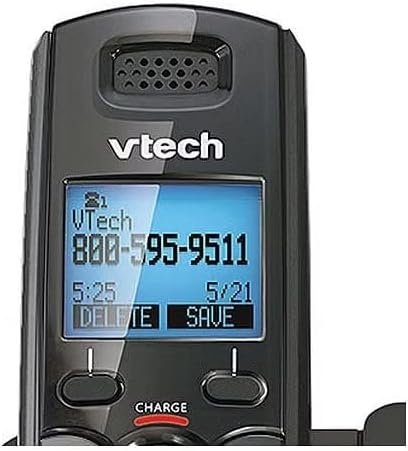
Image 6.1: Close-up of the VTech DS6101 cordless handset display, showing caller ID information.
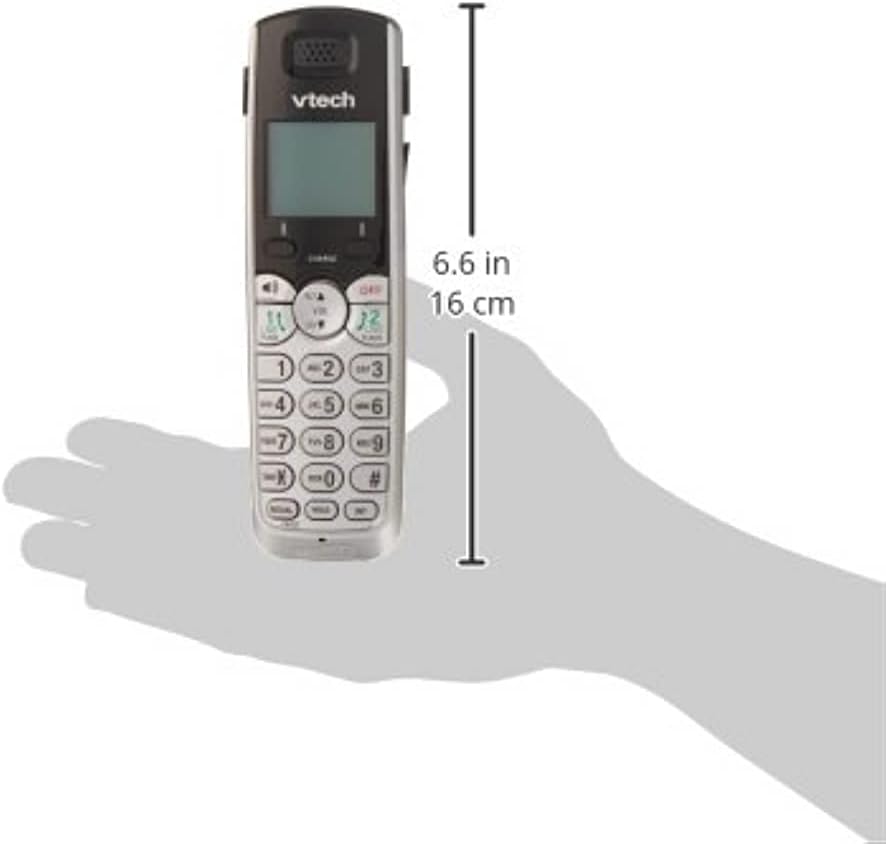
Image 6.2: The VTech DS6101 cordless handset with approximate dimensions indicated, showing its compact size.
7. Гарантыя і падтрымка
For warranty information, please refer to the warranty card included with your product or visit the official VTech website. VTech provides customer support for product assistance, troubleshooting, and service inquiries.
Каб атрымаць дадатковую дапамогу, наведайце Крама VTech на Amazon or the official VTech support webсайт.