
1. Уводзіны
Thank you for choosing the Baseus Encok S06 Magnetic Bluetooth In-Ear Earphones. This manual provides essential information for the proper setup, operation, maintenance, and troubleshooting of your new earphones. Please read this manual thoroughly before use to ensure optimal performance and longevity of the product.
The Baseus Encok S06 features a dual battery design for extended playback, Bluetooth 4.1 for stable connectivity, and a magnetic design for convenient storage. It includes an in-built microphone with CVC Noise Suppression and a 3-button remote for easy control of music and calls.

Выява 1.1: Канецview of the Baseus Encok S06 Earphones.
This image displays the complete Baseus Encok S06 earphones, highlighting their in-ear design, magnetic earbuds, and the inline control module. The black color and sleek design are visible.
2. Што ў скрынцы
Upon unboxing your Baseus Encok S06 earphones, please verify that all the following components are present:
- Baseus Encok S06 Earphones
- Ear-hooks (various sizes)
- Ear-muffs (small and big sizes)
- Зарадны кабель (Micro USB)

Малюнак 2.1: Змест упакоўкі прадукту.
This image shows all items included in the Baseus Encok S06 package: the earphones themselves, two pairs of ear-hooks, two pairs of ear-muffs (small and large), and a Micro USB charging cable.
3. Настройка
3.1 Зарадка навушнікаў
Перад першым выкарыстаннем цалкам зарадзіце навушнікі.
- Знайдзіце порт зарадкі на ўбудаваным модулі кіравання.
- Connect the provided Micro USB charging cable to the port.
- Падключыце другі канец кабеля да крыніцы харчавання USB (напрыклад, USB-порт кампутара, насценны адаптар).
- The indicator light will show charging status (refer to product specific LED behavior, typically red for charging, blue/off for fully charged).
- Звычайна поўная зарадка займае каля 1-2 гадзін.
3.2 Спалучэнне з прыладай Bluetooth
To connect your earphones to a smartphone, tablet, or other Bluetooth-enabled device:
- Пераканайцеся, што навушнікі выключаны.
- Press and hold the multi-function button (usually the center button on the inline remote) for approximately 5-7 seconds until the indicator light flashes red and blue alternately. This indicates pairing mode.
- На прыладзе ўключыце Bluetooth і пачніце пошук новых прылад.
- Select "Baseus Encok S06" (or similar name) from the list of available devices.
- Пасля падключэння індыкатар на навушніках звычайна павольна міргае сінім колерам або згасае.
- Калі будзе запытаны пароль, увядзіце «0000».
The earphones will automatically attempt to reconnect to the last paired device when turned on.
4. Інструкцыя па эксплуатацыі
The Baseus Encok S06 features an intuitive 3-button inline remote for easy control.
| Кнопка/Дзеянне | Функцыя |
|---|---|
| Шматфункцыянальная кнопка (цэнтральная) |
|
| Кнопка павелічэння гучнасці (+). |
|
| Кнопка памяншэння гучнасці (-) |
|
The magnetic design allows the earbuds to snap together when not in use, preventing tangles and making them easy to wear around your neck.
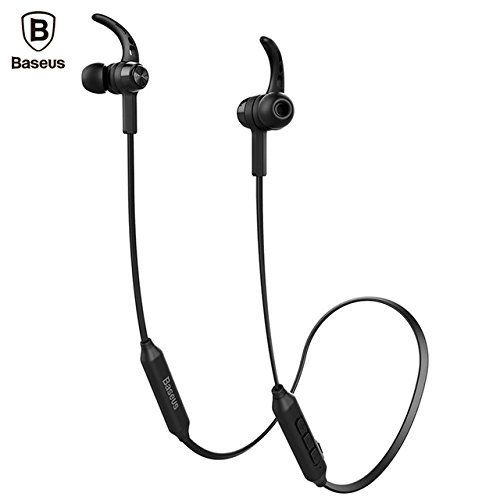
Image 4.1: Close-up of the inline control module.
Гэта выява дае падрабязную інфармацыю view of the Baseus Encok S06 earphones, specifically highlighting the inline control module with its three buttons and the magnetic earbuds.
5. Тэхнічнае абслугоўванне
Правільнае абслугоўванне забяспечвае даўгавечнасць і аптымальную працу вашых навушнікаў.
- Уборка: Use a soft, dry, lint-free cloth to clean the earphones. Do not use harsh chemicals, cleaning solvents, or strong detergents. For ear tips, remove them and clean with a mild soap solution, then rinse thoroughly and dry completely before reattaching.
- захоўванне: When not in use, store the earphones in a cool, dry place, away from direct sunlight and extreme temperatures. The magnetic design helps keep the cables tangle-free.
- Пазбягайце вільгаці: Do not expose the earphones to water or excessive moisture. While designed for daily use, they are not waterproof.
- Асцярожна звяртайцеся: Avoid dropping the earphones or subjecting them to strong impacts. Do not pull on the cable excessively.
6. Выпраўленне непаладак
If you encounter issues with your Baseus Encok S06 earphones, refer to the following common solutions:
| праблема | Магчымая прычына / рашэнне |
|---|---|
| Навушнікі не ўключаюцься. |
|
| Немагчыма спалучыць прыладу. |
|
| Няма гуку або нізкі ўзровень гучнасці. |
|
| Якасць званка дрэнная. |
|
7. Тэхнічныя характарыстыкі
| Асаблівасць | Дэталь |
|---|---|
| Назва мадэлі | ENCKS6 |
| Марка | Басейс |
| Тэхналогія падлучэння | Бесправадная сувязь (Bluetooth) |
| Тэхналогія бесправадной сувязі | Bluetooth 4.1 |
| Размяшчэнне вушэй | У вуха |
| Формаў-фактар | У вуха |
| Метад кантролю | Button (3-button inline remote) |
| Асаблівасці | Magnetic design, Built-in microphone with CVC Noise Suppression, Dual Battery |
| Вага прадмета | 60 грам |
8. Гарантыя і падтрымка
8.1 Інфармацыя аб гарантыі
Гэты прадукт пастаўляецца з a Гарантыя 6 месяцаў provided by the manufacturer from the date of purchase. Please retain your proof of purchase for warranty claims. The warranty covers manufacturing defects and malfunctions under normal use. It does not cover damage caused by misuse, accidents, unauthorized modifications, or normal wear and tear.
8.2 Падтрымка кліентаў
For further assistance, technical support, or warranty inquiries, please contact Baseus customer service through their official webсайт або прадаўца, у якога вы набылі тавар.
Важна: Do not attempt to disassemble or repair the earphones yourself, as this will void the warranty.