
1. Прадукт скончыўсяview
The Maxwest Nitro 5N is an Android 7.0 smartphone designed for reliable communication and multimedia use. It features a 5-inch display, a Quad Core processor, and dual SIM capability, making it suitable for various global GSM networks.

Малюнак 1.1: Пярэдняя і задняя часткі view of the Maxwest Nitro 5N smartphone, showcasing its sleek black design and display.
2. Што ў скрынцы
Upon opening your Maxwest Nitro 5N package, please ensure all the following items are present:
- Maxwest Nitro 5N Smartphone
- Акумулятар (2000 мАг)
- Адаптар для зараднай прылады
- Кабель USB
- Protective Case Cover
3. Пачатковая налада
3.1. Устаўка SIM-карты(-ак) і акумулятара
- Выключэнне: Ensure your Maxwest Nitro 5N is powered off before proceeding.
- Зняць заднюю крышку: Акуратна зніміце заднюю крышку тэлефона.
- Устаўце SIM-карту(ы): Locate the SIM card slots. This device supports dual SIM cards. Insert your GSM SIM card(s) into the designated slots with the gold contacts facing down. Ensure they are securely seated.
- Устаўце батарэю: Place the 2000 mAh battery into its compartment, aligning the gold contacts on the battery with those in the phone.
- Замяніць заднюю крышку: Carefully reattach the back cover until it clicks into place.
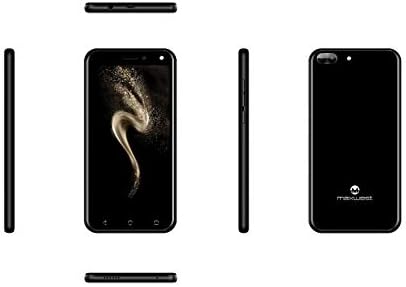
Малюнак 3.1: Збоку views of the Maxwest Nitro 5N, illustrating the location of buttons and ports for SIM/battery access.
3.2. Уключэнне і пачатковая канфігурацыя
- Уключэнне: Press and hold the Power button (usually on the side) until the Maxwest logo appears.
- Выбар мовы: Выконвайце падказкі на экране, каб выбраць патрэбную мову.
- Падключэнне Wi-Fi: Падключыцеся да сеткі Wi-Fi, каб завяршыць працэс налады і загрузіць неабходныя абнаўленні.
- Уліковы запіс Google: Увайдзіце ў свой уліковы запіс Google або стварыце новы. Гэта неабходна для доступу да крамы Google Play і іншых сэрвісаў Google.
- Дата і час: Усталюйце правільную дату і час або дазвольце сетцы ўсталяваць іх аўтаматычна.
- Бяспека: Configure screen lock options such as PIN, pattern, or password for device security.
Важная заўвага: This device is designed to work with GSM carriers such as AT&T, T-Mobile, and Metro PCS. It will NOT work with CDMA carriers like Verizon, Sprint, or Boost Mobile.
4. Operating Your Maxwest Nitro 5N
4.1. Базавая навігацыя
- Сэнсарны экран: Interact with the device by tapping, swiping, pinching, and spreading on the 5-inch LCD display.
- Галоўны экран: The central hub for your apps and widgets. Swipe left or right to access additional screens.
- Панэль апавяшчэнняў: Правядзіце пальцам уніз ад верхняй часткі экрана, каб атрымаць доступ да апавяшчэнняў і хуткіх налад.
- Кнопкі навігацыі: Use the on-screen navigation buttons (Back, Home, Recent Apps) at the bottom of the display.
4.2. Здзяйсненне званкоў і адпраўка паведамленняў
- Тэлефоннае прыкладанне: Tap the Phone icon to access the dialer, call logs, and contacts.
- Праграма для паведамленняў: Tap the Messages icon to send and receive SMS/MMS messages.
4.3. Выкарыстанне камеры
Your Nitro 5N is equipped with 5MP front and rear cameras.
- Адкрыць камеру: Націсніце на значок камеры на галоўным экране або ў панэлі праграм.
- Пераключэнне камер: Націсніце на значок пераключальніка камеры, каб пераключацца паміж пярэдняй і задняй камерамі.
- Зрабіць фота/відэа: Націсніце кнопку спуску засаўкі, каб зрабіць фотаздымак або пачаць/спыніць відэазапіс.
4.4. Screen Pinning Feature
Screen Pinning allows you to lock your phone to a single application, preventing others from accessing other apps or settings. This is useful when sharing your phone temporarily.
- Enable Screen Pinning: Перайсці да Settings > Security > Screen pinning і ўключыце яго.
- Pin an App: Open the app you wish to pin. Tap the Recent Apps button (square icon). Swipe up on the app's preview and tap the pin icon.
- Unpin an App: To unpin, simultaneously press and hold the Back and Recent Apps buttons. You may need to enter your PIN/pattern/password if required by your security settings.
5. Тэхнічнае абслугоўванне і догляд
5.1. Сыход за батарэяй
- Зарадка: Use only the provided charger and USB cable. Avoid overcharging by disconnecting the charger once the battery is full.
- тэмпература: Avoid exposing the phone to extreme temperatures, as this can degrade battery life.
- захоўванне: If storing the phone for an extended period, ensure the battery is partially charged (around 50%).
5.2. Ачыстка прылады
- экран: Выкарыстоўвайце мяккую тканіну без ворса, злёгкуampened with water or a screen cleaner, to gently wipe the display.
- Цела: Use a soft, dry cloth to clean the phone's body. Avoid harsh chemicals or abrasive materials.
5.3. Абнаўленне праграмнага забеспячэння
Periodically check for system updates to ensure optimal performance and security. Go to Налады > Аб тэлефоне > Абнаўленні сістэмы каб праверыць і ўсталяваць даступныя абнаўленні.
6. Ліквідацыю распаўсюджаных праблем
| праблема | Магчымае рашэнне |
|---|---|
| Тэлефон не ўключаецца. | Пераканайцеся, што акумулятар правільна ўстаўлены і зараджаны. Падключыце зарадную прыладу і паспрабуйце яшчэ раз. |
| Няма сігналу сеткі. | Verify SIM card insertion. Check if you are within network coverage. Ensure your carrier is GSM compatible (e.g., AT&T, T-Mobile). Restart the phone. |
| Праграмы працуюць павольна або выходзяць з ладу. | Закрыйце фонавыя праграмы. Ачысціце кэш праграм (Налады > Праграмы > [Назва праграмы] > Памяць > Ачысціць кэш). Restart the phone. Ensure sufficient storage space. |
| Акумулятар хутка разраджаецца. | Reduce screen brightness. Disable Wi-Fi, Bluetooth, and GPS when not in use. Close unnecessary background apps. Check battery usage in settings to identify power-hungry apps. |
| Немагчыма падключыцца да Wi-Fi. | Пераканайцеся, што Wi-Fi уключаны. Перазагрузіце маршрутызатар і тэлефон. Забудзьцеся пра сетку і падключыцеся зноў. |
7. Тэхнічныя характарыстыкі прадукту
| Асаблівасць | Дэталь |
|---|---|
| Назва мадэлі | Nitro 5N |
| Аперацыйная сістэма | Android 7.0 |
| Працэсар | Quad Core 1.2 GHz (1.2GHz Cortex A9 Processor) |
| АЗП | 1 ГБ |
| Унутраная памяць | 8 GB (approximately 5.6 GB user available) |
| Дысплей | 5.0 inch LCD, 480 x 854 pixels, 2.5D TP |
| Задняя камера | 5 МП |
| Пярэдняя камера | 5 МП |
| Ёмістасць батарэі | 2000 мАг літый-іённы |
| Сумяшчальнасць сеткі | 3G H+ 850/1900/2100 MHz, 2G: 850/900/1800/1900 MHz (GSM Carriers only) |
| Сувязь | USB, Cellular, GPS, Wi-Fi, Bluetooth (Wireless) |
| Аўдыёраз'ём | 3.5 мм |
| Памеры (Д х Ш х У) | 5.73 х 2.83 х 0.38 цалі |
| Вага | 5.4 унцыі (153 грам) |
| Колер | Чорны |
8. Інфармацыя аб гарантыі
The Maxwest Nitro 5N comes with a one-year parts and labor warranty from the date of purchase. This warranty covers manufacturing defects and workmanship under normal use. It does not cover damage caused by misuse, accidents, unauthorized repairs, or normal wear and tear.
Калі ласка, захавайце доказы пакупкі для прэтэнзій па гарантыі.
9. Падтрымка кліентаў
For technical assistance, troubleshooting beyond this manual, or warranty inquiries, please contact Maxwest customer support. Refer to the contact information provided with your product packaging or visit the official Maxwest webсайт для атрымання найбольш актуальнай інфармацыі аб падтрымцы.
When contacting support, please have your product model (Nitro 5N) and proof of purchase readily available.