
Уводзіны
Thank you for choosing the Awei B923BL Wireless Magnetic Sports Bluetooth Earphones. This manual provides essential information for setting up, operating, maintaining, and troubleshooting your new earphones. Please read it carefully before use to ensure optimal performance and longevity of your device.
Змест пакета
Калі ласка, праверце ўпакоўку на наяўнасць наступных прадметаў:
- Awei B923BL Wireless Magnetic Sports Bluetooth Earphones
- USB-кабель для зарадкі
- Розныя памеры вушных насадак
- Кіраўніцтва карыстальніка
Прадукт скончаныview
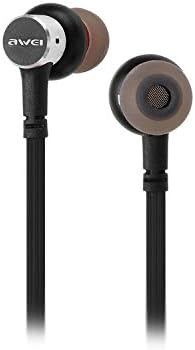
The Awei B923BL earphones are designed for active lifestyles, featuring a wireless Bluetooth connection and a magnetic design for convenient storage around your neck when not in use. They include an integrated microphone for hands-free calling.

Настройка
1. Зарадка навушнікаў
Before first use, fully charge your earphones. Connect the provided USB charging cable to the charging port on the earphones and the other end to a USB power source (e.g., computer USB port, wall adapter). The indicator light will show charging status and turn off or change color when fully charged.
2. Спарванне Bluetooth
- Пераканайцеся, што навушнікі выключаны.
- Press and hold the multi-function button (usually the power button) until the indicator light flashes red and blue alternately, indicating pairing mode.
- На мабільным тэлефоне або прыладзе з падтрымкай Bluetooth перайдзіце ў налады Bluetooth і ўключыце Bluetooth.
- Пошук available devices. You should see "Awei B923BL" or a similar name in the list.
- Select "Awei B923BL" to connect. Once connected, the indicator light will usually flash blue slowly or turn off, and you may hear a confirmation tone.
- Калі будзе запытаны пароль, увядзіце «0000».
Once paired, the earphones will automatically connect to the last paired device when turned on, if the device's Bluetooth is active and within range.
Інструкцыя па эксплуатацыі
Уключэнне/выключэнне харчавання
- Уключэнне: Націсніце і ўтрымлівайце шматфункцыянальную кнопку прыблізна 3 секунды, пакуль не пачне міргаць сіні індыкатар.
- Выключэнне: Націсніце і ўтрымлівайце шматфункцыянальную кнопку прыблізна 5 секунд, пакуль чырвоны індыкатар не пачне міргаць, а потым не згасне.
Прайграванне музыкі
- Прайграванне/Паўза: Адзін раз націсніце шматфункцыянальную кнопку.
- Наступны трэк: Націсніце і ўтрымлівайце кнопку «Гучнасць +».
- Папярэдні трэк: Націсніце і ўтрымлівайце кнопку рэгулявання гучнасці.
Кіраванне званкамі
- Адказ/завяршэнне выкліку: Адзін раз націсніце шматфункцыянальную кнопку.
- Адхіліць выклік: Націсніце і ўтрымлівайце шматфункцыянальную кнопку прыблізна 2 секунды.
- Паўторны набор апошняга нумара: Двойчы націсніце шматфункцыянальную кнопку.
Рэгулятар гучнасці
- Павялічыць гучнасць: Націсніце кнопку Volume +.
- Паменшыць гучнасць: Націсніце кнопку "Гучнасць -".
Тэхнічнае абслугоўванне
- Clean the earphones regularly with a soft, dry cloth. Do not use harsh chemicals or abrasive materials.
- Зніміце вушныя насадкі і пры неабходнасці памыйце іх мяккім мылам і вадой, пераканаўшыся, што яны цалкам сухія, перш чым прымацаваць іх назад.
- Захоўвайце навушнікі ў прахалодным, сухім месцы, удалечыні ад прамых сонечных прамянёў і экстрэмальных тэмператур.
- Avoid exposing the earphones to water or excessive moisture.
- Do not attempt to disassemble or modify the earphones, as this will void the warranty.
Ліквідацыю непаладак
- Навушнікі не ўключаюцься: Пераканайцеся, што навушнікі цалкам зараджаныя.
- Немагчыма спалучыць прыладу з:
- Make sure the earphones are in pairing mode (flashing red and blue).
- Пераканайцеся, што Bluetooth уключаны на вашай прыладзе.
- Падсуньце навушнікі бліжэй да прылады.
- Try restarting both the earphones and your device.
- Ачысціце папярэднія падключэнні Bluetooth на прыладзе, калі ў вас іх занадта шмат.
- Няма гуку або нізкі гук:
- Праверце ўзровень гучнасці як на навушніках, так і на падлучанай прыладзе.
- Пераканайцеся, што навушнікі правільна падключаны да прылады.
- Паспрабуйце прайграваць розныя крыніцы аўдыё.
- Праблемы з якасцю званкоў:
- Пераканайцеся, што мікрафон нічым не перакрыты.
- Перамясціцеся ў месца з меншымі перашкодамі.
Тэхнічныя характарыстыкі
| Асаблівасць | Дэталь |
|---|---|
| Фірмовае найменне | Авей |
| Нумар мадэлі | B923BL |
| Колер | Чорны |
| Формаў-фактар навушнікаў | У вуха |
| Тэхналогія падлучэння | Бесправадная сувязь |
| Тэхналогія бесправадной сувязі | Бесправадная сувязь |
| Апісанне ўзроставага дыяпазону | Дарослы |
| Матэрыял | Гумавая |
| Сумяшчальныя прылады | Мабільныя тэлефоны |
| Функцыя кабеля | Без кабеля |
| Метад кантролю | Дакранацца |
| Колькасць элементаў | 1 |
| Вытворца | Авей |
| Асаблівасці | Microphone Included (Note: This model does not feature active noise cancellation as per product description.) |
Гарантыя і падтрымка
Інфармацыя аб гарантыі
This product comes with a 1-year manufacturer's warranty from the date of purchase. For warranty claims or service, please contact the manufacturer or their authorized service agent. For further details, you may also contact the retailer where the product was purchased.
Падтрымка кліентаў
If you encounter any issues not covered in this manual or require further assistance, please refer to the contact information provided with your product packaging or visit the official Awei webсайт для рэсурсаў падтрымкі.