
Уводзіны
This manual provides detailed instructions for the proper use and care of your Vivitar DVR917HD 4K Action Camera. Please read this manual thoroughly before operating the device to ensure safe and effective use. The Vivitar DVR917HD is designed to capture high-quality video and photos in various environments, including underwater, thanks to its durable waterproof casing and versatile mounting options.
Асаблівасці прадукту
- 2-inch Color LCD Display: For precise image capture, video playback, and photo viewінж.
- Запіс відэа 4K: Capture stunning video at 4640 x 3480 resolution, along with 1080p and 720p options.
- 16 Megapixel CMOS Sensor: For high-resolution still photographs.
- Воданепранікальны корпус: Enables use in wet conditions and underwater adventures.
- Убудаваны Wi-Fi: Allows direct streaming of content to compatible smartphones or tablets.
- Шырокавугольны аб'ектыў: Designed for capturing expansive scenes.
- Некалькі інтэрфейсаў: Supports microSD, microSDHC, HDMI, and USB 2.0.
- Кампактны дызайн: Dimensions of 2.6 inches x 2.5 inches x 1.5 inches and a weight of 0.5 pounds.
Змест пакета
Праверце, ці ўсе пералічаныя ніжэй прадметы ўваходзяць у вашу ўпакоўку:
- Экшн-камера Vivitar DVR917HD 4K
- Воданепранікальны корпус
- Бесправадны пульт дыстанцыйнага кіравання
- Адаптар пераменнага току
- Кабель USB
- Кабель HDMI
- Helmet Mounting Kit
- Веласіпеднае мацаванне

Image: The Vivitar DVR917HD camera shown with its full set of accessories, including the waterproof case, remote, various mounts, and cables.
Настройка
1. Устаўка карты MicroSD
- Знайдзіце слот для карты microSD на бакавой панэлі камеры.
- Gently insert a compatible microSD or microSDHC card (Class 4 or higher recommended) into the slot until it clicks into place. Ensure the card is oriented correctly.
2. Зарадка акумулятара
- Connect the camera to the AC power adapter using the provided USB cable.
- Падключыце адаптар пераменнага току да разеткі.
- The charging indicator light will illuminate. Charging is complete when the light changes color or turns off.
3. Using the Waterproof Housing
- Open the latch on the waterproof housing.
- Carefully place the camera inside the housing, ensuring it fits snugly.
- Close the latch securely. Before first use in water, perform a leak test without the camera inside.
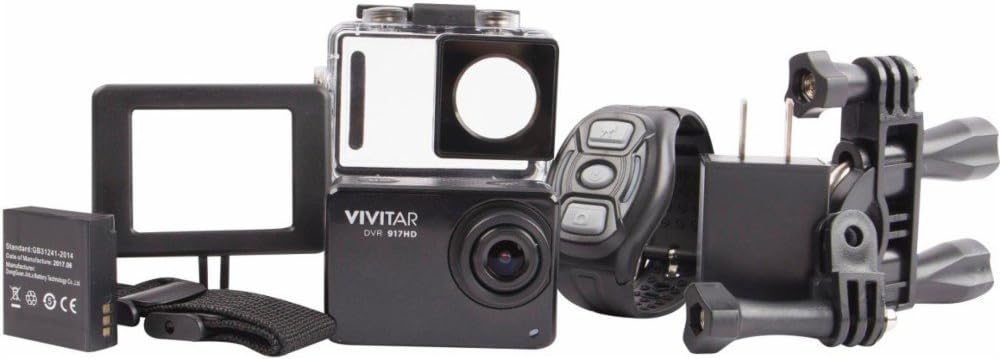
Image: The Vivitar DVR917HD camera positioned within its clear waterproof housing, with the back cover open.
4. Мацаванне мацаванняў
The camera comes with a helmet mounting kit and a bicycle mount. Follow the instructions provided with each mount to securely attach the camera for your desired activity.

Image: The Vivitar DVR917HD camera enclosed in its waterproof case, securely attached to a mounting accessory.

Image: A person wearing a ski helmet with the Vivitar DVR917HD action camera visibly mounted on the top, against a snowy mountain backdrop.
Інструкцыя па эксплуатацыі
1. Уключэнне / выключэнне харчавання
- To power on, press and hold the Power/Mode button (usually labeled 'MODE') until the screen illuminates.
- To power off, press and hold the Power/Mode button again until the screen turns off.

Выява: буйны план view of the Vivitar DVR917HD action camera, highlighting its front lens and top control buttons.
2. Запіс відэа
- Ensure the camera is in video recording mode. Use the Mode button to cycle through modes if necessary.
- Press the 'OK' button to start recording. A red indicator light or on-screen icon will typically show recording is active.
- Press the 'OK' button again to stop recording.
3. Фатаграфаванне
- Switch the camera to photo mode using the Mode button.
- Скампануйце кадр з дапамогай 2-цалевага ВК-дысплея.
- Press the 'OK' button to capture a photo.

Image: The Vivitar DVR917HD camera's rear screen displaying a live view from a first-person perspective of someone riding a bicycle.
4. Падключэнне да Wi-Fi
- Enable Wi-Fi on the camera through the settings menu.
- On your smartphone or tablet, search for the camera's Wi-Fi network and connect to it.
- Open the Vivitar app (if available) or a compatible action camera app to stream content or control the camera remotely.
5. Выкарыстанне бесправаднога пульта дыстанцыйнага кіравання
The included wireless remote control allows for convenient operation of the camera from a distance. Refer to the remote control's specific instructions for pairing and function details.
Тэхнічнае абслугоўванне
Cleaning the Camera and Housing
- Use a soft, lint-free cloth to clean the camera body and lens. Avoid abrasive materials.
- For the waterproof housing, rinse with fresh water after use in saltwater and allow to air dry. Ensure the O-ring seal is free of debris.
Сыход за батарэяй
- Поўнасцю зараджайце акумулятар перад кожным выкарыстаннем.
- Не падвяргайце батарэю ўздзеянню экстрэмальных тэмператур.
- Калі вы захоўваеце камеру працяглы час, выміце акумулятар.
Захоўванне
Store the camera in a cool, dry place away from direct sunlight and excessive humidity. Keep it protected from dust and impacts.
Ліквідацыю непаладак
- Камера не ўключаецца: Пераканайцеся, што батарэя зараджана і правільна ўстаўлена.
- Праблемы з запісам: Check if a microSD card is inserted and has sufficient free space. Ensure the card is not corrupted.
- Дрэнная якасць гуку: The waterproof housing can significantly muffle sound. For better audio, use the camera outside the housing in dry conditions.
- Праблемы з падключэннем да Wi-Fi: Ensure Wi-Fi is enabled on the camera and your smart device. Try restarting both devices.
- Camera freezing: Выміце і зноў устаўце акумулятар, каб скінуць налады камеры.
Тэхнічныя характарыстыкі
| Асаблівасць | Спецыфікацыя |
|---|---|
| Назва мадэлі | DVR917HD |
| Нумар мадэлі тавару | 3216565590 |
| Эфектыўнае рашэнне | 16 МП |
| Дазвол відэазахопу | 4K, 1080p, 720p |
| Фармат захопу відэа | MP4 |
| Тэхналогія фотадатчыка | CMOS |
| Памер экрана | 2 цалі |
| Тэхналогія падлучэння | Wi-Fi |
| Тып флэш-памяці | Micro SD |
| Асаблівасць | Воданепранікальны |
| Тып аб'ектыва | Шырокі кут |
| Тып фокусу | Аўтафокус |
| Кантроль экспазіцыі | Аўтаматычны |
| Вага прадмета | 717 г |
| Памеры | 2.6 х 2.5 х 1.5 цалі (прыблізна) |
Інфармацыя аб гарантыі
For detailed warranty information regarding your Vivitar DVR917HD 4K Action Camera, please refer to the warranty card included in your product packaging or visit the official Vivitar webсайт. Умовы гарантыі могуць адрознівацца ў залежнасці ад рэгіёна і даты пакупкі.
Падтрымка кліентаў
If you require further assistance, have questions not covered in this manual, or need technical support, please contact Vivitar customer service. Contact details can typically be found on the Vivitar official webсайце або на ўпакоўцы вашага прадукту.