
1. Уводзіны
Thank you for choosing the NeeGo Portable Boombox B07CLH45SL. This versatile audio system combines a CD player, cassette player, AM/FM radio, and includes a NeeGo Bluetooth receiver for wireless audio streaming. This manual provides detailed instructions for setup, operation, maintenance, and troubleshooting to ensure you get the best experience from your device.
2. Інфармацыя па бяспецы
- Перад эксплуатацыяй прылады прачытайце ўсе інструкцыі.
- Трымайце прыладу далей ад вады, вільгаці і прамых сонечных прамянёў.
- Не перакрывайце вентыляцыйныя адтуліны.
- Use only the power sources specified in this manual.
- Не спрабуйце рамантаваць прыладу самастойна. Звяртайцеся па любыя паслугі па абслугоўванні да кваліфікаванага персаналу.
- Утылізуйце батарэйкі адказна ў адпаведнасці з мясцовымі правіламі.
3. Змесціва ўпакоўкі
Калі ласка, праверце, ці ўсе пералічаныя ніжэй прадметы ўваходзяць у ваш пакет:
- NeeGo Portable Boombox (Main Unit)
- NeeGo Bluetooth Receiver
- Шнур сілкавання
- 3.5mm Audio Cable (for Bluetooth receiver connection)
- USB Charging Cable for Bluetooth Receiver

Figure 3.1: Contents of the NeeGo Portable Boombox bundle, including the main unit, Bluetooth receiver, and necessary cables.
4. Прадукт скончыўсяview
4.1. Main Boombox Unit
The main unit features controls for CD, cassette, and radio functions, along with volume and input selection. Key features include:
- AM/FM-радыё цюнэр
- CD Player (supports standard and MP3 CDs)
- Касетны прайгравальнік/магнітафон
- Headphone Output (3.5mm stereo mini)
- Дапаможны ўваход (3.5 мм)
- Automatic Shut-off Sleep Timer

Figure 4.1: Front panel and key features of the NeeGo Portable Boombox.
4.2. NeeGo Bluetooth Receiver
The included NeeGo Bluetooth receiver allows you to stream audio wirelessly to your boombox. It is compact and connects via the 3.5mm auxiliary port.
- Universal 3.5mm Stereo Port
- Micro Charge Port (for charging the receiver)
- Built-in Microphone (for hands-free calls, if supported by your device)

Малюнак 4.2: падрабязна view of the NeeGo Bluetooth Receiver ports.
5. Настройка
5.1. Powering the Boombox
Бумбокс можа працаваць як ад сеткі пераменнага току, так і ад батарэек.
Падключэнне да сеткі пераменнага току:
- Ensure the boombox is turned off.
- Connect the supplied AC power cord to the AC IN jack on the back of the boombox.
- Plug the other end of the AC power cord into a standard wall outlet.
Ўстаноўка батарэі:
For portable use, the boombox requires 6 'C' size batteries (not included).
- Адкрыйце вечка адсека для батарэй, размешчаную ў ніжняй частцы прыбора.
- Insert 6 'C' size batteries, ensuring correct polarity (+/-) as indicated inside the compartment.
- Надзейна зачыніце крышку батарэйнага адсека.
5.2. Connecting and Charging the Bluetooth Receiver
The NeeGo Bluetooth receiver allows your boombox to receive wireless audio signals.
Зарадка прымача Bluetooth:
Before first use, fully charge the Bluetooth receiver.
- Connect the micro USB charging cable to the micro charge port on the Bluetooth receiver.
- Падключыце другі канец USB-кабеля да крыніцы харчавання USB (напрыклад, USB-порта кампутара, насценнага адаптара USB).
- The indicator light on the receiver will show charging status (e.g., red while charging, off when fully charged). A full charge provides approximately 6 hours of operation.
Connecting to the Boombox:
- Plug the 3.5mm audio cable into the universal 3.5mm stereo port on the Bluetooth receiver.
- Plug the other end of the 3.5mm audio cable into the AUX IN jack on the boombox.
- Set the boombox's function selector to 'AUX' or 'AUDIO IN'.

Figure 5.1: The NeeGo Bluetooth Receiver connected to the boombox for wireless audio.
6. Інструкцыя па эксплуатацыі
6.1. Асноўная аперацыя
- Уключэнне/выключэнне харчавання: Націсніце кнопку POWER, каб уключыць або выключыць прыладу.
- Рэгулятар гучнасці: Паварочвайце ручку ГУЧНОСЦІ, каб наладзіць узровень гуку.
- Выбар функцыі: Use the FUNCTION selector (e.g., CD, TAPE, RADIO, AUX) to choose your desired audio source.
6.2. Праца CD-плэера
- Set the FUNCTION selector to 'CD'.
- Open the CD compartment cover by pressing the 'OPEN/CLOSE' button or lifting the cover.
- Пакладзеце кампакт-дыск на шпіндзель этыкеткай уверх.
- Зачыніце вечка адсека для кампакт-дыскаў. На дысплеі будзе паказана агульная колькасць трэкаў.
- Press the PLAY/PAUSE button (►/❚❚) to start playback.
- Націсніце кнопку STOP (■), каб спыніць прайграванне.
- Use the SKIP buttons (◀◀ / ►►) to skip tracks or fast forward/rewind within a track.
- The unit may feature a 'REPEAT' or 'PROGRAM' function for customized playback. Refer to the on-unit labels for specific controls.
6.3. Праца касетнага прайгравальніка
- Усталюйце селектар FUNCTION у становішча «TAPE».
- Press the STOP/EJECT button (■/▲) to open the cassette compartment.
- Устаўце касету адкрытым краем уверх.
- Зачыніце адсек для касеты.
- Press the PLAY button (►) to start playback.
- Press the FAST FORWARD (FF) or REWIND (REW) buttons to advance or reverse the tape. Note that the unit may not have an auto-stop feature for FF/REW, so manually press STOP when desired.
- Press the STOP/EJECT button (■/▲) to stop playback and eject the tape.
6.4. Праца з AM/FM-радыё
- Усталюйце селектар FUNCTION у становішча «RADIO».
- Select 'AM' or 'FM' band using the band selector switch.
- Rotate the TUNING knob to find your desired station.
- Extend and adjust the telescopic antenna for optimal FM reception. For AM reception, rotate the unit for best signal.
6.5. Bluetooth Connectivity (via NeeGo Receiver)
- Ensure the NeeGo Bluetooth receiver is charged and connected to the boombox's AUX IN port (as described in Section 5.2).
- Set the boombox's FUNCTION selector to 'AUX' or 'AUDIO IN'.
- Turn on the NeeGo Bluetooth receiver. It will automatically enter pairing mode (indicated by a flashing LED).
- On your Bluetooth-enabled device (smartphone, tablet, etc.), go to its Bluetooth settings and search for available devices.
- Select 'NeeGo BT' or a similar name from the list to pair.
- Once paired, the receiver's LED will stop flashing and remain solid. You can now play audio from your device, and it will be heard through the boombox speakers.
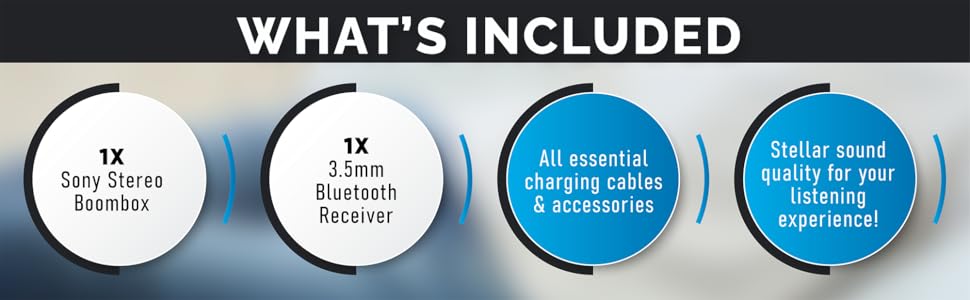
Figure 6.1: The boombox's classic stereo functions enhanced by the NeeGo Bluetooth receiver.
6.6. Дапаможны ўваход
To play audio from an external device directly:
- Connect a 3.5mm audio cable from the headphone jack or line-out of your external device to the AUX IN jack on the boombox.
- Set the boombox's FUNCTION selector to 'AUX' or 'AUDIO IN'.
- Пачніце прайграванне на знешняй прыладзе.
6.7. Выхад для навушнікаў
For private listening, plug any standard 3.5mm stereo headphones into the HEADPHONE jack on the boombox. The speakers will automatically mute when headphones are connected.
6.8. Automatic Shut-off / Sleep Timer
This feature allows the unit to automatically turn off after a set period. Consult the specific buttons or menu options on your unit for activating and setting the sleep timer, typically labeled 'SLEEP' or 'TIMER'.
7. Тэхнічнае абслугоўванне
7.1. Ачыстка прылады
- Працярыце знешнія паверхні прылады мяккай сухой тканінай.
- Не выкарыстоўвайце абразіўныя ачышчальнікі, воск або растваральнікі, бо яны могуць пашкодзіць пакрыццё.
- Для лінзаў кампакт-дыскаў выкарыстоўвайце спецыяльны сродак для чысткі лінзаў кампакт-дыскаў.
- For the cassette head, use a cassette head cleaning kit periodically to ensure optimal sound quality.
7.2. Замена батарэі
When the unit's performance degrades or the battery indicator (if present) shows low power, replace all 6 'C' batteries with new ones. Do not mix old and new batteries, or different types of batteries.
8. Выпраўленне непаладак
If you encounter issues with your NeeGo Portable Boombox, refer to the following common problems and solutions:
| праблема | Магчымая прычына | Рашэнне |
|---|---|---|
| Прылада не ўключаецца. | Шнур пераменнага току няправільна падключаны; батарэйкі разраджаныя або няправільна ўстаўленыя. | Праверце падключэнне шнура харчавання; заменіце батарэйкі або пераканайцеся ў правільнай палярнасці. |
| Няма гуку з дынамікаў. | Volume too low; Headphones connected; Incorrect function selected. | Increase volume; Disconnect headphones; Select correct function (CD, TAPE, RADIO, AUX). |
| Кампакт-дыск не прайграваецца або прайграванне перарываецца. | CD is dirty, scratched, or inserted incorrectly; CD lens is dirty. | Clean or replace CD; Reinsert CD correctly; Clean CD lens with a specialized cleaner. |
| Cassette tape not playing or poor sound. | Tape is damaged; Cassette head is dirty or demagnetized. | Try a different tape; Clean cassette head with a cleaning kit. |
| Poor radio reception (static). | Antenna not extended or adjusted; Weak signal. | Extend and adjust the telescopic antenna; Try repositioning the unit for AM. |
| Bluetooth receiver not pairing. | Receiver not in pairing mode; Receiver battery low; Device too far. | Ensure receiver is on and flashing; Charge receiver; Move device closer (within 10 meters). |
Sound quality is
Ask a question about this manualAsk about setup, troubleshooting, compatibility, parts, safety, or missing instructions. Manuals+ will review the question and use this page’s manual context to help answer it. |