
1. Уводзіны
This manual provides detailed instructions for the installation, operation, and maintenance of your Zerone 5.5" HD OBD II Car GPS HUD Head Up Speed Display. Please read this manual thoroughly before using the device to ensure proper function and safety.

Figure 1: Zerone 5.5" HD OBD II Car GPS HUD Head Up Speed Display
This image shows the Zerone 5.5" HD OBD II Car GPS HUD, a rectangular device with a digital display showing speed, RPM, and other vehicle data.
2. Прадукт скончыўсяview
2.1 Асноўныя магчымасці
- Аўтаматычнае ўключэнне/выключэнне харчавання: The HUD powers on and off with the vehicle's ignition, preserving the car battery. A manual switch mode is also available.
- 5.5-цалевы HD-дысплей: Features a large, high-definition, multi-color display for enhanced readability.
- Рэгуляванне яркасці: Supports both automatic and manual brightness adjustment to optimize visibility in various lighting conditions.
- Поўнае адлюстраванне дадзеных: Shows vehicle speed, engine speed (RPM), water temperature, voltage, fuel consumption, and engine fault codes. Units can be switched between kilometers and miles.
- Over Speed Warning: Provides alerts for exceeding preset speed limits.
- Сігналізацыя абаротаў рухавіка: Assists in fuel-efficient driving by indicating optimal shift points.
2.2 Элементы адлюстравання
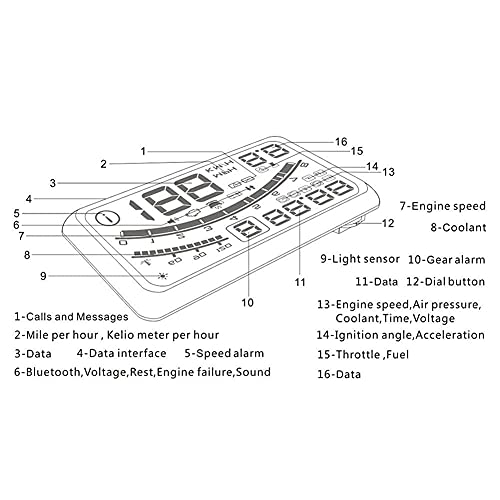
Figure 2: Labeled Diagram of HUD Display Elements
This diagram illustrates the various indicators on the HUD display, including speed, RPM, fuel level, temperature, and warning icons.
- Calls and Messages Indicator
- Speed Unit (MPH/KM/H)
- Data Display Area
- Data Interface Indicator
- Speed Alarm Indicator
- Bluetooth, Voltage, Rest, Engine Failure, Sound Indicators
- Хуткасць рухавіка (а/хв)
- Тэмпература астуджальнай вадкасці
- Датчык святла
- Gear Alarm
- Data Display Area
- Dial Button (for settings)
- Engine Speed, Air Pressure, Coolant, Time, Voltagе Індыкатары
- Ignition Angle, Acceleration Indicators
- Throttle, Fuel Indicators
- Data Display Area
3. Інструкцыі па ўсталёўцы
Follow these steps to properly install your Zerone HUD in your vehicle.
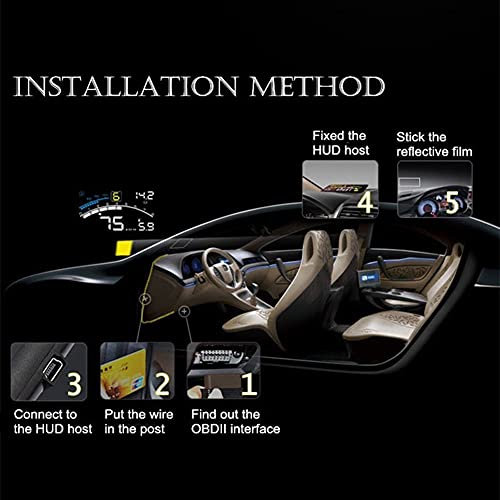
Figure 3: HUD Installation Method
This diagram illustrates the five steps for installing the HUD: locating the OBDII interface, routing the wire, connecting to the HUD, fixing the HUD host, and sticking the reflective film.
- Locate the OBDII Interface: Identify the OBDII diagnostic port in your vehicle. This is typically located under the dashboard on the driver's side.
- Правядзіце провад: Carefully route the OBDII cable from the interface to the desired location for the HUD, ensuring it does not interfere with driving controls or airbags. You may need to tuck the wire into the vehicle's trim.
- Connect to the HUD Host: Plug the other end of the OBDII cable into the HUD device.
- Fix the HUD Host: Place the HUD device on your dashboard in a position that does not obstruct your view of the road. Use the provided anti-slip mat or adhesive to secure it.
- Нанесці святлоадбівальную плёнку (неабавязкова): For clearer projection onto the windshield, apply the included reflective film to the desired area on your windshield. Ensure the area is clean and dry before application.
3.1 OBD II Cable Types

Figure 4: OBD II Cable Types
This image displays two types of OBD II cables: a 'New Type' with a smaller connector and a 'Old Type' with a larger, more traditional OBD II connector. Both serve the same function.
The product may come with either a new or old type of OBD II cable. Both are functionally identical for connecting the HUD to your vehicle's OBD II port.
4. Інструкцыя па эксплуатацыі
4.1 Уключэнне/выключэнне сілкавання
- Аўтаматычны рэжым: The HUD will power on automatically when the vehicle engine starts and power off when the engine is shut down.
- Ручной рэжым: Use the power button (if available) on the device to manually turn the HUD on or off.
4.2 Рэжымы адлюстравання
The HUD offers various display modes, including default, high-speed, and automatic modes. Refer to the device's dial button or specific menu options to cycle through these modes.
4.3 Рэгуляванне яркасці
- Аўтаматычная яркасць: The built-in light sensor (refer to Figure 2, item 9) will automatically adjust the display brightness based on ambient light conditions.
- Ручная яркасць: Access the settings menu using the dial button (refer to Figure 2, item 12) to manually adjust the brightness level.
4.4 Data Display and Switching
The HUD can display various vehicle parameters. Use the dial button to navigate through the available data, which includes:
- Хуткасць аўтамабіля
- Хуткасць рухавіка (а/хв)
- Тэмпература вады
- тtage
- Выдатак паліва
- Engine Fault Code
- Kilometers (KM/H) and Miles (MPH)
To switch between kilometers and miles, access the unit settings via the dial button.

Figure 5: HUD in use on a dashboard
This image shows the Zerone HUD placed on a car dashboard, displaying vehicle information clearly visible to the driver while driving on a road.
5. Тэхнічнае абслугоўванне
To ensure the longevity and optimal performance of your HUD, follow these maintenance guidelines:
- Уборка: Use a soft, dry cloth to clean the display and exterior of the device. Avoid abrasive cleaners or solvents that could damage the surface.
- Размяшчэнне: Ensure the device is securely mounted to prevent movement or damage during vehicle operation.
- Сыход за кабелем: Periodically check the OBD II cable for any signs of wear or damage. Ensure it is not pinched or exposed to excessive heat.
- Умовы навакольнага асяроддзя: Avoid exposing the HUD to extreme temperatures or direct sunlight for prolonged periods when the vehicle is parked, as this may affect its performance and lifespan.
6. Выпраўленне непаладак
If you encounter issues with your Zerone HUD, refer to the following common problems and solutions:
- HUD does not power on:
- Check if the OBD II cable is securely connected to both the HUD and the vehicle's OBD II port.
- Пераканайцеся, што запальванне аўтамабіля ўключана.
- Verify the vehicle's OBD II port is functional (you can test with another OBD II device if available).
- Display is dim or unreadable in bright daylight:
- Ensure the automatic brightness adjustment is enabled.
- Manually increase the brightness setting via the device's menu.
- Confirm the reflective film (if used) is properly applied and clean.
- Inaccurate speed or data readings:
- Verify that the correct speed unit (KM/H or MPH) is selected in the settings.
- Ensure the HUD is compatible with your vehicle's OBD II protocol.
- If persistent, consult the vehicle's manual or a professional mechanic to check the OBD II data output.
- HUD turns off unexpectedly:
- Праверце наяўнасць аслабленых злучэнняў кабеляў.
- Ensure the vehicle's battery voltage з'яўляецца стабільным.
- If the issue persists, it may indicate a power supply problem or a fault with the device.
7. Тэхнічныя характарыстыкі
| Асаблівасць | Спецыфікацыя |
|---|---|
| Марка | Нуль |
| Нумар мадэлі | Zeroneeq0twua7pb |
| Памер дысплея | 5.5 цаляў |
| Памеры прадукту | 9.84 х 5.91 х 3.94 цалі |
| Вага прадмета | 271 грам (9.56 унцый) |
| Матэрыял | Пластыкавыя |
| Сувязь | OBD II |
| UPC | 741870022449 |
| Першы даступны | 24 красавіка 2018 г |

Figure 6: HUD Device Dimensions
This image provides a visual representation of the HUD device's dimensions, showing a length of 150mm and a width of 85mm, with a height of 14mm.
8. Гарантыя і падтрымка
For warranty information or technical support, please refer to the documentation included with your purchase or contact Zerone customer service. Keep your purchase receipt for warranty claims.