
Прадукт скончаныview
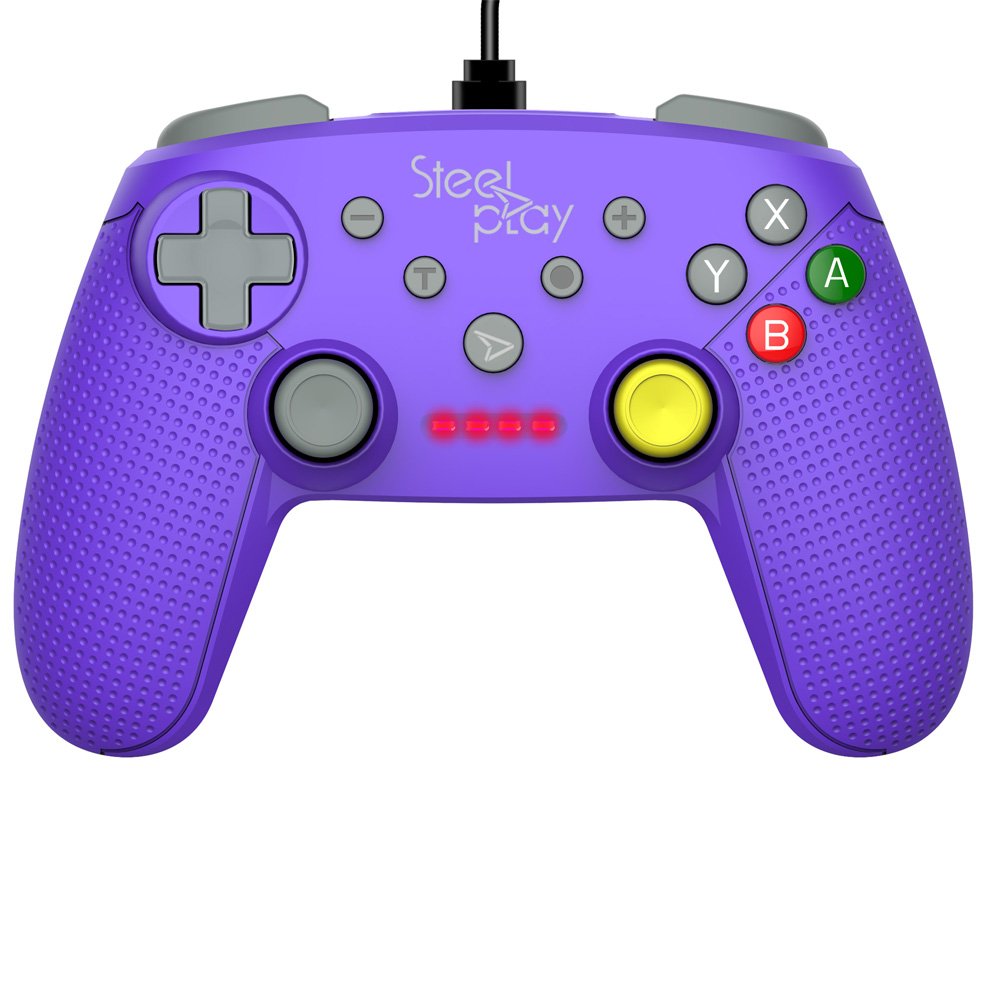
The Steelplay Wired Controller GCUBE (model ECO0622) is designed for use with the Nintendo Switch console, providing a reliable wired connection for uninterrupted gameplay. This controller features a comfortable ergonomic grip, a 2.5-meter USB cable, and includes advanced functionalities such as a gyro sensor, dual vibration feedback, and a turbo function button.
Інструкцыя па наладзе
- Падключыце кантролер: Insert the USB connector of the Steelplay Wired Controller GCUBE into an available USB port on your Nintendo Switch dock.
- Power On the Console: Ensure your Nintendo Switch console is powered on and connected to your TV or in handheld mode with the dock.
- Аўтаматычнае распазнаванне: The console should automatically detect the controller. The player indicator lights on the controller will illuminate to show its assigned player number.
- Begin Gameplay: You can now use your Steelplay Wired Controller GCUBE for gaming.
Кіраванне кантролерам
The Steelplay Wired Controller GCUBE features a standard layout for intuitive gameplay.
Функцыі кнопак:
- Левы/правы аналагавыя джойсцікі: Для кіравання рухам і камерай.
- D-Pad (клавіша кіравання): Для дакладнага накіраванага ўводу.
- Кнопкі A/B/X/Y: Кнопкі дзеянняў, якія звычайна выкарыстоўваюцца для скачкоў, атакі, узаемадзеяння і г.д.
- L/R Buttons (Shoulder Buttons): Often used for quick actions or menu navigation.
- ZL/ZR Buttons (Trigger Buttons): Analog or digital triggers for specific in-game actions.
- Кнопка мінус (-): Звычайна адкрывае ўнутрыгульнявое меню або выконвае пэўныя дзеянні.
- Кнопка плюс (+): Typically pauses the game or opens system menus.
- Кнопка дадому: Вяртае ў галоўнае меню Nintendo Switch.
- Кнопка захопу: Takes screenshots of your gameplay.
Асаблівасці:
- Gyro Function: The controller includes a built-in gyro sensor for motion control in compatible games. This allows for intuitive aiming or steering by tilting the controller.
- Dual Vibration Feedback: Experience enhanced immersion with haptic feedback that responds to in-game events.
- Функцыя турба: The turbo function allows for rapid, repeated input of a button press. To activate, press and hold the Турба button, then press the desired action button (e.g., A, B, X, Y, L, R, ZL, ZR). To deactivate, repeat the process.
Тэхнічнае абслугоўванне
Proper care ensures the longevity and optimal performance of your controller.
- Уборка: Выкарыстоўвайце мяккую сухую тканіну для працірання кантролера. Для ўстойлівага бруду злёгкуampпрамыйце тканіну вадой. Пазбягайце выкарыстання агрэсіўных хімікатаў, растваральнікаў або абразіўных ачышчальнікаў.
- захоўванне: Захоўвайце кантролер у прахалодным, сухім месцы, удалечыні ад прамых сонечных прамянёў і экстрэмальных тэмператур.
- Сыход за кабелем: Avoid bending or twisting the USB cable excessively. Do not pull the cable to disconnect the controller; always grasp the plug.
- Пазбягайце вадкасці: Keep the controller away from liquids to prevent internal damage.
Ліквідацыю непаладак
- Кантролер не адказвае:
- Ensure the USB cable is securely connected to both the controller and the Nintendo Switch dock.
- Try connecting the controller to a different USB port on the dock.
- Restart your Nintendo Switch console.
- Buttons or Joysticks Not Working Correctly:
- Check for any physical obstructions or debris around the buttons or joysticks.
- Ensure the controller's firmware is up to date. Firmware updates may be necessary and typically require connection to a PC. Refer to the Steelplay official website for specific instructions and update tools.
- Вібрацыя не працуе:
- Verify that vibration is enabled in your Nintendo Switch system settings and within the game you are playing.
- Пераканайцеся, што кантролер надзейна падключаны.
Тэхнічныя характарыстыкі
| Асаблівасць | Дэталь |
|---|---|
| Нумар мадэлі | ECO0622 |
| Сумяшчальнасць | Nintendo Switch |
| Сувязь | Правадной (USB) |
| Даўжыня кабеля | 2.5 метраў |
| Памеры | 17.2 х 7 х 20.3 см |
| Вага | 360 г |
| Асаблівасці | Gyro Function, Dual Vibration Feedback, Turbo Function Button, Rubberized Grip Surface, Ergonomic Grip |
Інфармацыя аб гарантыі
For detailed warranty information regarding your Steelplay Wired Controller GCUBE, please refer to the warranty card included with your product or visit the official Steelplay webсайт. Умовы гарантыі могуць адрознівацца ў залежнасці ад рэгіёна і прадаўца.
Падтрымка кліентаў
If you encounter any issues or have questions not covered in this manual, please contact Steelplay customer support. Contact information can typically be found on the official Steelplay webсайце або на ўпакоўцы прадукту.