
1. Уводзіны
The Gembird EG-SST-01 is an external DVD±RW drive designed for convenient reading and writing of CD and DVD media. This device connects to your computer via a USB 2.0 interface, offering broad compatibility with various Windows operating systems. Its compact and lightweight design makes it an ideal portable solution for laptops and desktop computers without an integrated optical drive.
This manual provides essential information on setting up, operating, maintaining, and troubleshooting your Gembird EG-SST-01 drive to ensure optimal performance and longevity.
2. Змесціва ўпакоўкі
Калі ласка, пераканайцеся, што ўсе прадметы прысутнічаюць у камплекце:
- Gembird EG-SST-01 External DVD±RW Drive (Black)
- USB-кабель
- Кіраўніцтва карыстальніка
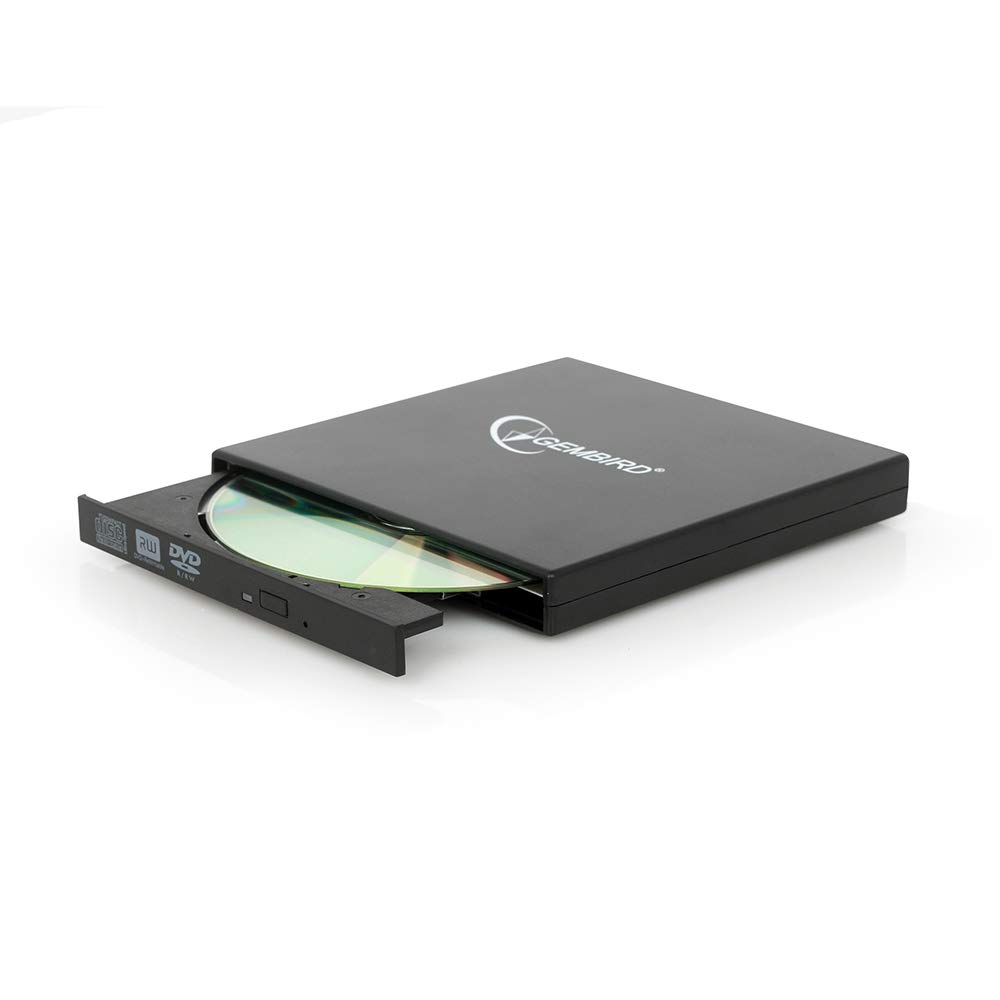
Image: The Gembird EG-SST-01 External DVD±RW Drive in black, shown with its USB connection cable. This image illustrates the compact design and the included accessories.
3. Інструкцыі па ўсталёўцы
- Падключыце дыск: Plug the USB cable into the Gembird EG-SST-01 drive and then connect the other end to an available USB 2.0 port on your computer. For optimal performance, use a direct USB port on your computer rather than a USB hub.
- Распазнаванне сістэмы: Your operating system (Windows 7, Windows 8, or Windows 10) should automatically detect and install the necessary drivers for the drive. No manual driver installation is typically required.
- Праверце ўстаноўку: Once connected, the drive should appear in 'This PC' or 'My Computer' as a new optical drive. If it does not appear, try connecting to a different USB port or restarting your computer.
4. Інструкцыя па эксплуатацыі
4.1. Загрузка дыска
- Gently press the eject button on the front of the drive to open the disc tray.
- Place the CD or DVD onto the tray with the label side facing up. Ensure the disc is seated correctly on the spindle.
- Акуратна ўстаўце латок назад у прывад, пакуль ён не зачыніцца.
4.2. Чытанне дыскаў
- After loading a disc, your computer's operating system may automatically prompt you to choose an action (e.g., play a movie, open files, install software).
- If no prompt appears, navigate to 'This PC' or 'My Computer', locate the optical drive icon, and double-click it to browse the disc's contents.
- The drive supports CD read speeds of up to 24x and DVD read speeds of up to 8x (DVD-ROM).
4.3. Writing Discs
- To write data to a blank CD-R/RW or DVD±R/RW/RAM disc, you will need compatible burning software (not included).
- Устаўце ў прывад чысты дыск, прыдатны для запісу.
- Follow the instructions provided by your chosen burning software to select files, configure burning options, and start the writing process.
- The drive supports CD-R/RW write speeds of up to 24x and DVD±R/RW write speeds of up to 8x (5x for DVD-R DL, DVD+R DL, and DVD-RAM).
5. Тэхнічнае абслугоўванне
- Уборка: Use a soft, dry, lint-free cloth to clean the exterior of the drive. Do not use liquid cleaners or solvents. Avoid opening the drive casing.
- Сыход за дыскамі: Always handle discs by their edges. Keep discs clean and free from scratches, dust, and fingerprints to ensure reliable reading and writing.
- захоўванне: Store the drive in a cool, dry place away from direct sunlight, extreme temperatures, and high humidity when not in use.
- Транспарт: When transporting the drive, ensure no disc is inside the tray and the tray is fully closed.
6. Выпраўленне непаладак
- Дыск не распазнаецца:
- Пераканайцеся, што USB-кабель надзейна падключаны як да дыскавода, так і да кампутара.
- Паспрабуйце падключыць дыск да іншага USB-порта на вашым кампутары.
- Перазагрузіце кампутар.
- Check Device Manager (Windows) to see if the drive is listed without errors.
- Disc Not Reading/Writing:
- Ensure the disc is clean and free from scratches or damage.
- Verify that the disc type (CD-R, DVD-RW, etc.) is compatible with the drive and the operation you are attempting.
- For writing, ensure you are using a blank, writable disc and appropriate burning software.
- Паспрабуйце іншы дыск, каб выключыць магчымасць яго пашкоджання.
- Нізкая прадукцыйнасць:
- Ensure the drive is connected to a USB 2.0 port or higher for optimal data transfer speeds.
- Зачыніце ўсе непатрэбныя праграмы, якія працуюць у фонавым рэжыме і могуць спажываць сістэмныя рэсурсы.
7. Тэхнічныя характарыстыкі
| Асаблівасць | Спецыфікацыя |
|---|---|
| Нумар мадэлі | EG-SST-01 |
| Тып прадукту | External DVD±RW Drive |
| Інтэрфейс | USB 2.0 |
| Disc Loading Type | паднос |
| Колер | Чорны |
| Памеры (Д х Ш х У) | 135 мм x 130 мм x 17 мм |
| Вага | 290 г |
| Падтрымліваюцца аперацыйныя сістэмы | Windows 10, Windows 7, Windows 8 |
| CD Write Speed | 24x (CD-R, CD-RW) |
| DVD Write Speed | 8x (DVD+R, DVD-R, DVD+RW, DVD-RW), 5x (DVD-R DL, DVD+R DL, DVD-RAM) |
| Хуткасць чытання кампакт-дыскаў | 24x (CD, CD-R, CD-RW, CD-ROM) |
| Хуткасць чытання DVD-дыскаў | 8x (DVD+R, DVD-R, DVD-RW, DVD+RW, DVD-ROM), 6x (DVD-RAM), 4x (Video DVD) |
| Optical Disc Diameter | 80 мм, 120 мм |
| Сертыфікаты | ISO 9002, CE, RoHS |
8. Гарантыя і падтрымка
The Gembird EG-SST-01 External DVD±RW Drive comes with a двухгадовая гарантыя against factory defects. This warranty covers manufacturing faults and material defects under normal use conditions.
For technical support, warranty claims, or further assistance, please contact your retailer or visit the official Gembird website for contact information. Please have your product model number (EG-SST-01) and proof of purchase ready when seeking support.