
1. Уводзіны
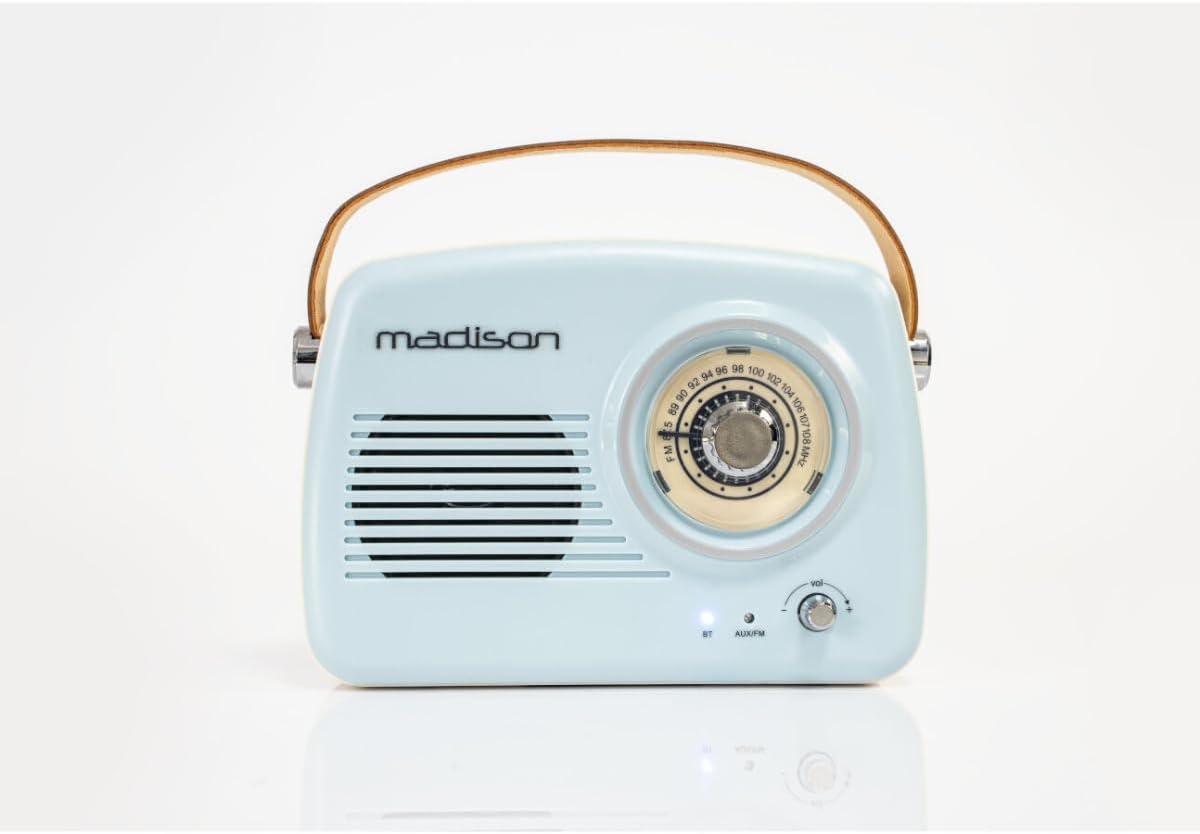
The Madison FREESOUND-VR30 is a vintage-style portable radio designed to combine classic aesthetics with modern audio technology. This device features FM radio, Bluetooth connectivity, and an AUX input, allowing you to enjoy your favorite music and radio stations from various sources. Its compact design, long-lasting rechargeable battery, and integrated carrying handle make it ideal for portable use.

Малюнак 1: Спераду view of the Madison FREESOUND-VR30 radio.
2. Асаблівасці прадукту
- Analog Dial Tuner: For precise FM radio station selection.
- Злучэнне Bluetooth: Wirelessly stream audio from compatible devices.
- Уваход AUX: Падключыце знешнія крыніцы гуку праз аўдыёкабель 3.5 мм.
- FM-радыё: Enjoy local and national radio broadcasts.
- Bass Reinforcement: Integrated subwoofer at the rear for enhanced low-frequency sound.
- USB акумулятар: Convenient charging via USB (cable included).
- Ручка для пераноскі: Durable faux leather handle for easy portability.
- Тэлескапічная антэна: Высуўная антэна для паляпшэння прыёму FM.
- Доўгі тэрмін службы батарэі: Up to 16 hours of playback at medium volume.
3. Усталёўка і першае выкарыстанне
3.1 Распакаванне
Carefully remove the radio from its packaging. Ensure all components, including the USB charging cable and this user manual, are present.
3.2 Зарадка акумулятара
Before first use, fully charge the radio's internal lithium-polymer battery. Connect the supplied USB charging cable to the micro-USB port on the back of the radio and plug the other end into a compatible USB power adapter (not included) or a computer's USB port. The charging indicator light will illuminate during charging and turn off or change color when fully charged.
Малюнак 2: Задняя частка view of the radio with charging and AUX ports.
3.3 Extending the Antenna
For optimal FM radio reception, extend the telescopic antenna located on the back of the unit to its full length and adjust its direction as needed.
4. Інструкцыя па эксплуатацыі
4.1 Уключэнне/выключэнне харчавання і рэгуляванне гучнасці
To power on the radio, rotate the volume knob clockwise. Continue rotating to increase the volume. To power off, rotate the volume knob counter-clockwise until it clicks.
4.2 Selecting Modes (FM / Bluetooth / AUX)
Press the 'MODE' button located on the back of the radio to cycle through the available input modes: FM Radio, Bluetooth (BT), and AUX. The indicator light on the front will change to reflect the selected mode.
Праца з радыё 4.3 FM
- Ensure the telescopic antenna is fully extended.
- Select FM mode using the 'MODE' button.
- Rotate the large tuning dial on the front of the radio to scan for FM stations. The frequency scale will indicate the current tuning position.
- Адрэгулюйце гучнасць з дапамогай ручкі гучнасці.

Figure 3: Analog tuning dial for FM radio.
4.4 Спалучэнне па Bluetooth
- Select Bluetooth mode using the 'MODE' button. The Bluetooth indicator light on the front will blink, indicating it is in pairing mode.
- На смартфоне, планшэце або іншай прыладзе з падтрымкай Bluetooth уключыце Bluetooth і знайдзіце даступныя прылады.
- Select "FREESOUND-VR30" from the list of devices.
- Once paired, the Bluetooth indicator light will stop blinking and remain solid. You can now stream audio wirelessly to the radio.
4.5 Праца з AUX-уваходам
- Connect one end of a 3.5mm audio cable (not included) to the AUX input port on the back of the radio.
- Падключыце другі канец аўдыёкабеля да раздыма для навушнікаў або аўдыёвыхаду вашай знешняй прылады.
- Select AUX mode using the 'MODE' button.
- Play audio from your external device. Control the volume using the radio's volume knob and your external device's volume controls.
Відэа 1: Скончанаview of Madison FREESOUND-VR30 features, including tuning, volume, antenna extension, and AUX connection.
5. Тэхнічнае абслугоўванне
To ensure the longevity and optimal performance of your Madison FREESOUND-VR30 radio, follow these maintenance guidelines:
- Уборка: Для чысткі вонкавага боку радыё выкарыстоўвайце мяккую сухую тканіну. Не выкарыстоўвайце абразіўныя ачышчальнікі, воск або растваральнікі.
- захоўванне: Калі радыё не выкарыстоўваецца працяглы час, захоўвайце яго ў прахалодным, сухім месцы, удалечыні ад прамых сонечных прамянёў і экстрэмальных тэмператур.
- Сыход за батарэяй: To maintain battery health, avoid fully discharging the battery frequently. Recharge the radio periodically if it is not used for a long time.
6. Выпраўленне непаладак
| праблема | Магчымая прычына | Рашэнне |
|---|---|---|
| Радыё не ўключаецца. | Акумулятар разраджаны. | Connect the radio to a USB power source using the charging cable and allow it to charge. |
| Слабы прыём FM-радыё. | Антэна не выцягнутая або сігнал слабы. | Fully extend the telescopic antenna and adjust its position. Try moving the radio to a different location. |
| Прылада Bluetooth не можа быць спалучана. | Radio not in Bluetooth pairing mode or device too far. | Press the 'MODE' button until the Bluetooth indicator light blinks. Ensure your device's Bluetooth is on and within range (approx. 10 meters). Forget previous pairings on your device if necessary. |
| Няма гуку ў рэжыме AUX. | Incorrect mode selected or cable not fully inserted. | Ensure AUX mode is selected. Check that the 3.5mm audio cable is securely connected to both the radio and the external device. Verify volume levels on both devices. |
7. Тэхнічныя характарыстыкі

Малюнак 4: Памеры вырабу.
| Асаблівасць | Дэталь |
|---|---|
| Нумар мадэлі | 10-5546MA |
| Марка | Мэдысан |
| Тэхналогія падлучэння | Bluetooth, дапаможны |
| Тэхналогія цюнэра | FM |
| Крыніца харчавання | Харчаванне ад батарэі |
| Тып батарэі | 1 літый-палімерны акумулятар (у камплекце) |
| Памеры прадукту (Д х Ш х У) | 21 х 8 х 16 см |
| Max Product Power Output | 30 ват |
| Сумяшчальныя прылады | Smartphone, Tablet, Laptop, Speaker (any device with Bluetooth or AUX output) |
| Тып дысплея | Аналаг |
| Унутраны матэрыял | Пластыкавыя |
8. Гарантыя і падтрымка
This Madison FREESOUND-VR30 radio is covered by a legal warranty. Spare parts availability is guaranteed for 2 years from the date of purchase.
For further assistance, technical support, or warranty claims, please refer to the contact information provided with your purchase documentation or visit the official Madison webсайт.