
Уводзіны
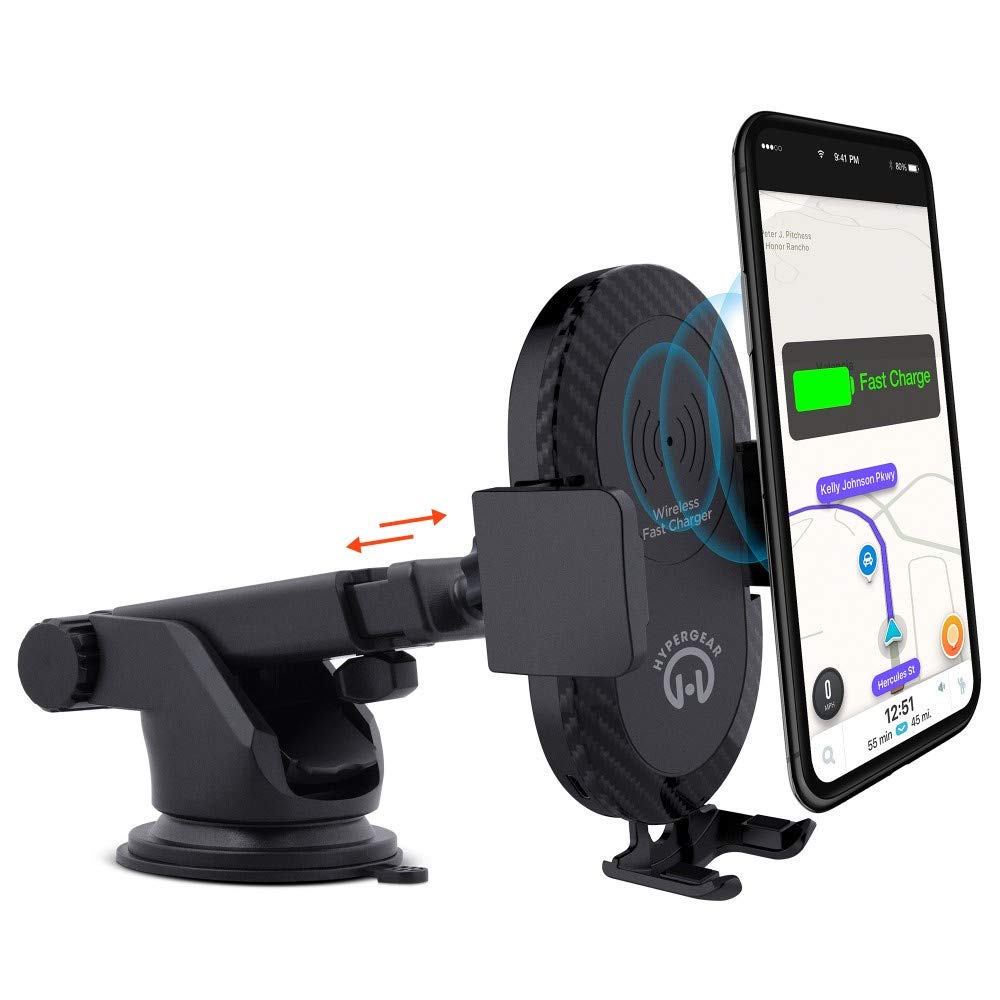
This manual provides instructions for the HyperGear HYG-14590 Wireless Fast Charging Car Dash Mount. This device is designed to securely hold and wirelessly charge Qi-enabled smartphones in your vehicle, offering hands-free navigation and communication.
Змест пакета
Праверце наяўнасць усіх прадметаў у камплекце:
- Telescopic Mount
- Fast Charge Car Adapter
- Кабель Micro USB
- Кіраўніцтва карыстальніка (гэты дакумент)
Інструкцыя па наладзе
- Выберыце месца ўстаноўкі: Select a clean, flat surface on your dashboard or windshield. Ensure the location does not obstruct your view або перашкаджаць кіраванню аўтамабілем.
- Прымацаваць мацаванне:
- Clean the chosen surface thoroughly.
- Remove the protective film from the sticky gel suction cup.
- Моцна прыцісніце прысоску да паверхні.
- Engage the 2-step locking lever to secure the mount in place.
- Падключыце харчаванне:
- Insert the Micro USB cable into the charging port on the mount.
- Plug the other end of the Micro USB cable into the Fast Charge Car Adapter.
- Insert the Fast Charge Car Adapter into your vehicle's 12V power outlet (cigarette lighter socket).
- Adjust the Mount:
- Extend the telescopic arm up to 8 inches as needed.
- Pivot the arm up to 230° to achieve the desired angle.
- Rotate the cradle head 360° to switch between portrait and landscape orientation.
Інструкцыя па эксплуатацыі
- Размяшчэнне прылады: Gently open the adjustable padded cradle grips and place your Qi-enabled smartphone into the mount. The grips will automatically secure the device.
- Бесправадная зарадка: Once your device is placed in the mount and the mount is powered, wireless charging will begin automatically. Ensure your device is centered on the charging pad for optimal performance.
- Выдаленне вашай прылады: To remove your device, gently open the cradle grips and lift your smartphone out.
- Выкарыстанне гучнай сувязі: The mount allows for hands-free use of navigation, calls, and other applications while driving. Always ensure your device is positioned safely and does not obstruct your view дарогі.
Тэхнічнае абслугоўванне
- Уборка: Use a soft, dry cloth to clean the mount. Do not use abrasive cleaners or solvents.
- Сыход за прысоскай: If the sticky gel suction cup loses adhesion, rinse it with warm water and let it air dry. This can help restore its stickiness.
- захоўванне: Калі мацаванне не выкарыстоўваецца працяглы час, захоўвайце яго ў прахалодным, сухім месцы, удалечыні ад прамых сонечных прамянёў.
Ліквідацыю непаладак
- Прылада не зараджаецца па бесправадной сеткі:
- Ensure your smartphone is Qi-enabled or has a Qi-enabled receiver.
- Verify the Micro USB cable is securely connected to both the mount and the car adapter.
- Check that the car adapter is firmly seated in the vehicle's 12V power outlet.
- Ensure your phone is centered on the charging pad of the mount.
- Зніміце з тэлефона ўсе тоўстыя чахлы, якія могуць перашкаджаць бесправадной зарадцы.
- Mount not sticking to surface:
- Clean the dashboard or windshield surface thoroughly before attachment.
- Ensure the 2-step locking lever is fully engaged.
- Rinse the sticky gel suction cup with warm water and air dry to restore adhesion.
- Avoid mounting on textured or porous surfaces.
- Тэлефон не трымаецца надзейна:
- Ensure the adjustable padded cradle grips are properly closed around your device.
- Verify that your phone's size is compatible with the mount's adjustable range.
Тэхнічныя характарыстыкі
| Нумар мадэлі | HYG-14590 |
| Марка | HyperGear |
| Тэхналогія падлучэння | Бесправадная сувязь |
| Тып раздыма | USB, бесправадная сетка |
| Сумяшчальныя прылады | Cellular Phones (Qi-enabled) |
| Сумяшчальныя мадэлі тэлефонаў | iPhone X/8/8 Plus, Samsung Galaxy S9/S9+, S8/S8+, Note 8, and other Qi-enabled devices |
| Асаблівасць | Хуткая зарадка, бесправадная зарадка |
| Ватtage | 10 ват |
| Крыніца харчавання | Vehicle 12V Power Outlet |
| Асноўны тып раздыма харчавання | USB Type C (for car adapter) |
| Вага прадмета | 11.84 унцыі |
| Матэрыял корпуса | Gel (suction cup) |
| Колер | Чорны |
| UPC | 633755145902 |
Інфармацыя аб гарантыі
This HyperGear product comes with a Гарантыя 30 дзён from the date of purchase. This warranty covers manufacturing defects. Please retain your proof of purchase for warranty claims. For further details or to initiate a claim, please refer to the HyperGear official webсайт або звярніцеся ў службу падтрымкі кліентаў.
Падтрымка кліентаў
For technical assistance, product inquiries, or warranty support, please visit the official HyperGear webсайт або звярніцеся ў аддзел абслугоўвання кліентаў. Кантактную інфармацыю звычайна можна знайсці на ўпакоўцы прадукту або на афіцыйным сайце брэнда ў Інтэрнэце.


