
1. Уводзіны
The Temtop H2 is a professional air quality detector designed for real-time monitoring of Formaldehyde (HCHO) and Total Volatile Organic Compounds (TVOC). This device provides accurate readings to help assess indoor air quality. This manual provides essential information for the safe and effective use of your Temtop H2 detector.

Image: Temtop H2 Air Quality Detector and accessories in its box.
2. Інфармацыя па бяспецы
- Read all instructions thoroughly before operating the device.
- Не спрабуйце разбіраць або мадыфікаваць прыладу. Гэта можа прывесці да пашкоджання і анулявання гарантыі.
- Keep the device away from water, high humidity, and extreme temperatures.
- Avoid placing the device near strong chemical sources or in areas with high dust concentration, as this may affect sensor accuracy.
- Выкарыстоўвайце толькі пазначаныя батарэйкі і зарадны кабель.
3. Кампаненты прадукту
The Temtop H2 package includes the following items:
- Temtop H2 Air Quality Detector
- Зарадны кабель
- Скід Pin
- Кіраўніцтва карыстальніка (гэты дакумент)
Прылада скончыласяview
The Temtop H2 features a clear display, intuitive control buttons, and a high-accuracy sensor for detecting HCHO and TVOC levels.

Выява: Крупны план view of the Temtop H2 detector showing the high-accuracy sensor for HCHO/TVOC.

Выява: Задняя частка view of the Temtop H2 detector, showing the sensor vent and battery compartment cover.
4. Настройка
4.1. Устаноўка батарэі
- Locate the battery compartment on the back of the Temtop H2 detector.
- Адкрыйце крышку адсека для батарэй.
- Insert 3 AA batteries (included), ensuring correct polarity (+/-).
- Надзейна зачыніце крышку батарэйнага адсека.

Image: The open battery compartment of the Temtop H2, showing the placement for 3 AA batteries.
4.2. Пачатковае ўключэнне
After installing the batteries, press and hold the red power button (U) located on the front of the device to turn it on. The device will perform a brief self-check before displaying readings.
5. Інструкцыя па эксплуатацыі
5.1. Уключэнне/выключэнне харчавання
- To power on: Press and hold the red power button (U) until the screen illuminates.
- To power off: Press and hold the red power button (U) until the screen turns off.
5.2. Адлюстраванне інфармацыі
The device's screen displays real-time measurements and status indicators:
- HCHO: Formaldehyde concentration in milligrams per cubic meter (mg/m³).
- TVOC: Total Volatile Organic Compounds concentration in milligrams per cubic meter (mg/m³).
- Індыкатар батарэі: Паказвае бягучы ўзровень батарэі.
- Audio Alarm Icon: Indicates if the audible alarm is active.
- Backlight Icon: Indicates if the screen backlight is active.

Image: The Temtop H2 detector displaying real-time HCHO and TVOC readings in an indoor setting.
5.3. Функцыі кнопак
The control panel features several buttons for device operation:

Image: Close-up of the Temtop H2 control buttons, including Set, OK, Up, Down, Speaker, and Backlight.
- Кнопка ўстаноўкі: Enters the settings menu.
- Кнопка ОК: Пацвярджае выбар або выходзіць з меню.
- Кнопкі са стрэлкамі ўверх/уніз: Перамяшчаецца па пунктах меню або змяняе значэнні.
- Speaker Icon Button: Toggles the audible alarm on or off.
- Lightbulb Icon Button: Toggles the screen backlight on or off.
5.4. Гукавы сігнал трывогі
The Temtop H2 is equipped with an audible alarm that activates when HCHO or TVOC levels exceed preset thresholds. To enable or disable the alarm, press the Speaker Icon Button. When enabled, an alarm icon will appear on the display.
5.5. Health Parameter Guide
Refer to the following guide for understanding the health implications of detected HCHO and TVOC levels:
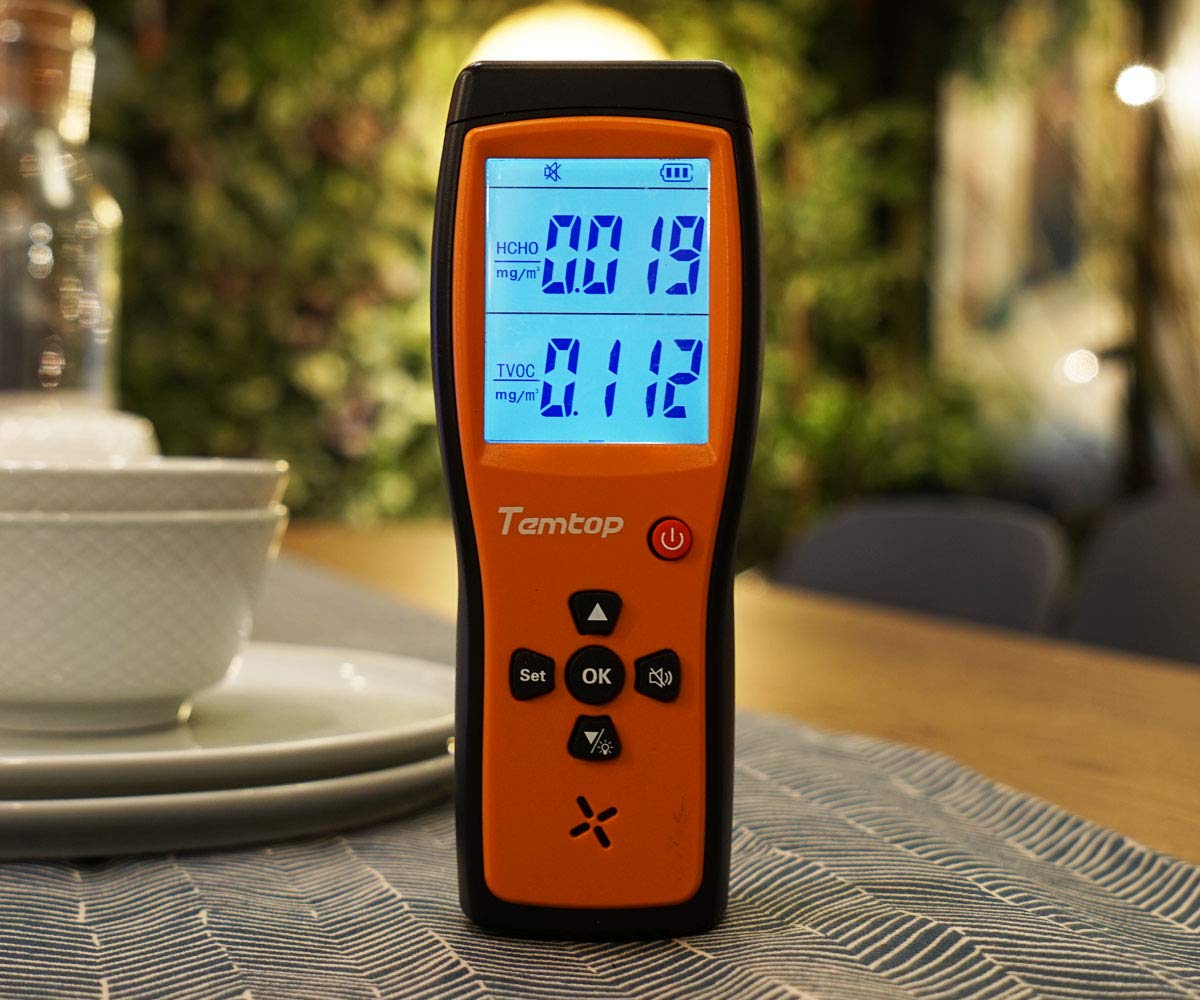
Image: A table illustrating HCHO and TVOC concentration ranges and their corresponding levels of health concern (Healthy or Unhealthy).
| HCHO (мг/м³) | TVOC (мг/м³) | Узроўні занепакоенасці здароўем |
|---|---|---|
| 0 - 0.1 гг | 0 - 0.5 гг | Здаровы |
| > 0.1 | > 0.5 | Нездаровае |
6. Тэхнічнае абслугоўванне
6.1. Уборка
To clean the device, gently wipe the exterior with a soft, dry cloth. Do not use liquid cleaners, abrasive materials, or solvents, as these can damage the device or affect sensor performance.
6.2. Захоўванне
When not in use for extended periods, store the Temtop H2 in a cool, dry place, away from direct sunlight and extreme temperatures. Remove batteries if storing for several months to prevent leakage.
6.3. Замена батарэі
Replace the 3 AA batteries when the low battery indicator appears on the screen to ensure continuous and accurate operation. Follow the battery installation steps outlined in Section 4.1.
7. Выпраўленне непаладак
- Прылада не ўключаецца:
Check if the batteries are installed correctly with the right polarity. Ensure the batteries have sufficient charge. Try replacing the batteries. - Readings appear inaccurate or fluctuate significantly:
Allow the device to stabilize for at least 5-10 minutes after powering on, especially in a new environment. Ensure the device is not placed near strong sources of chemicals (e.g., cleaning products, fresh paint) or in areas with high airflow that could interfere with readings. - Сігналізацыя гучыць бесперапынна:
Check the HCHO and TVOC readings on the display. If levels are genuinely high, ventilate the area. If readings appear normal but the alarm persists, try resetting the device using the provided reset pin by inserting it into the reset hole. - Screen is dim or off:
Націсніце Lightbulb Icon Button to toggle the screen backlight. Check battery level and replace if low.
8. Тэхнічныя характарыстыкі
| Асаблівасць | Спецыфікацыя |
|---|---|
| Марка | Тэмп |
| мадэль | H2 |
| Тып датчыка | HCHO, TVOC |
| Крыніца харчавання | Battery Powered (3 AA batteries required, 1 Lithium Metal battery included) |
| Вага прадмета | 0.49 кілаграма (1.08 фунта) |
| Памеры прадукту | 6.02 х 1.81 х 8.86 цалі |
| Сігналізацыя | Чутны |
| Працоўная вільготнасць | Да 90% (без кандэнсацыі) |
| Верхняя адзнака тэмпературы | 50 градусы па Цэльсіі |
| Матэрыял | Пластыкавыя |
9. Гарантыя і падтрымка
9.1. Інфармацыя аб гарантыі
Please refer to the warranty card included with your product or visit the official Temtop webпадрабязныя ўмовы гарантыі глядзіце на сайце. Захоўвайце чэк аб куплі як пацвярджэнне пакупкі для прэтэнзій па гарантыі.
9.2. Падтрымка кліентаў
For technical assistance, troubleshooting not covered in this manual, or other inquiries, please contact Temtop customer support. Contact information can typically be found on the official Temtop webсайце або на ўпакоўцы прадукту.