
1. Уводзіны
Thank you for choosing the SportPlus SP-TM-1006 Compact Treadmill. This manual provides essential information for the safe assembly, operation, and maintenance of your new fitness equipment. Please read all instructions carefully before use and retain this manual for future reference.
The SportPlus SP-TM-1006 is designed for home use, offering a compact solution for walking and light jogging, suitable for various environments including home offices and under standing desks.
2. Інструкцыі па тэхніцы бяспекі
To reduce the risk of serious injury, read the following important safety instructions before using the treadmill:
- Заўсёды стаўце бегавую дарожку на роўную, устойлівую паверхню.
- Забяспечце дастатковую прастору вакол бегавой дарожкі (не менш за 2 метры ззаду і 0.6 метра з кожнага боку).
- Трымайце дзяцей і хатніх жывёл далей ад бегавой дарожкі падчас працы.
- Не карыстайцеся бегавой дарожкай, калі ваша вага перавышае 120 кг (264 фунтаў).
- Насіце адпаведную спартыўную вопратку і абутак.
- Калі вы адчуваеце боль, галавакружэнне або дыхавіцу, неадкладна спыніце практыкаванні.
- Адключайце бегавую дарожку ад разеткі, калі яна не выкарыстоўваецца або перад чысткай/тэхнічным абслугоўваннем.
- Не выкарыстоўвайце бегавую дарожку, калі шнур сілкавання або вілка пашкоджаныя.
- This treadmill is not compatible with external applications.
3. Змесціва ўпакоўкі
Праверце наяўнасць усіх кампанентаў у камплекце:
- SportPlus SP-TM-1006 Walking Pad
- Пульт дыстанцыйнага кіравання
- Power Supply Cable (European and UK plugs may be included)
- Silicone Oil for Lubrication
- Кіраўніцтва па эксплуатацыі
4. Настройка
The SportPlus SP-TM-1006 treadmill requires minimal setup. It arrives largely pre-assembled.
- Распакаванне: Асцярожна дастаньце бегавую дарожку з упакоўкі.
- Размяшчэнне: Размясціце бегавую дарожку на цвёрдай, роўнай паверхні. Пераканайцеся, што вакол прылады дастаткова месца для бяспечнай працы.
- Падключэнне сілкавання: Connect the power cable to the treadmill and then to a suitable electrical outlet.
- Пульт дыстанцыйнага кіравання: Устаўце батарэйку з камплекта ў пульт дыстанцыйнага кіравання.

5. Інструкцыя па эксплуатацыі
5.1 Асноўныя аперацыі
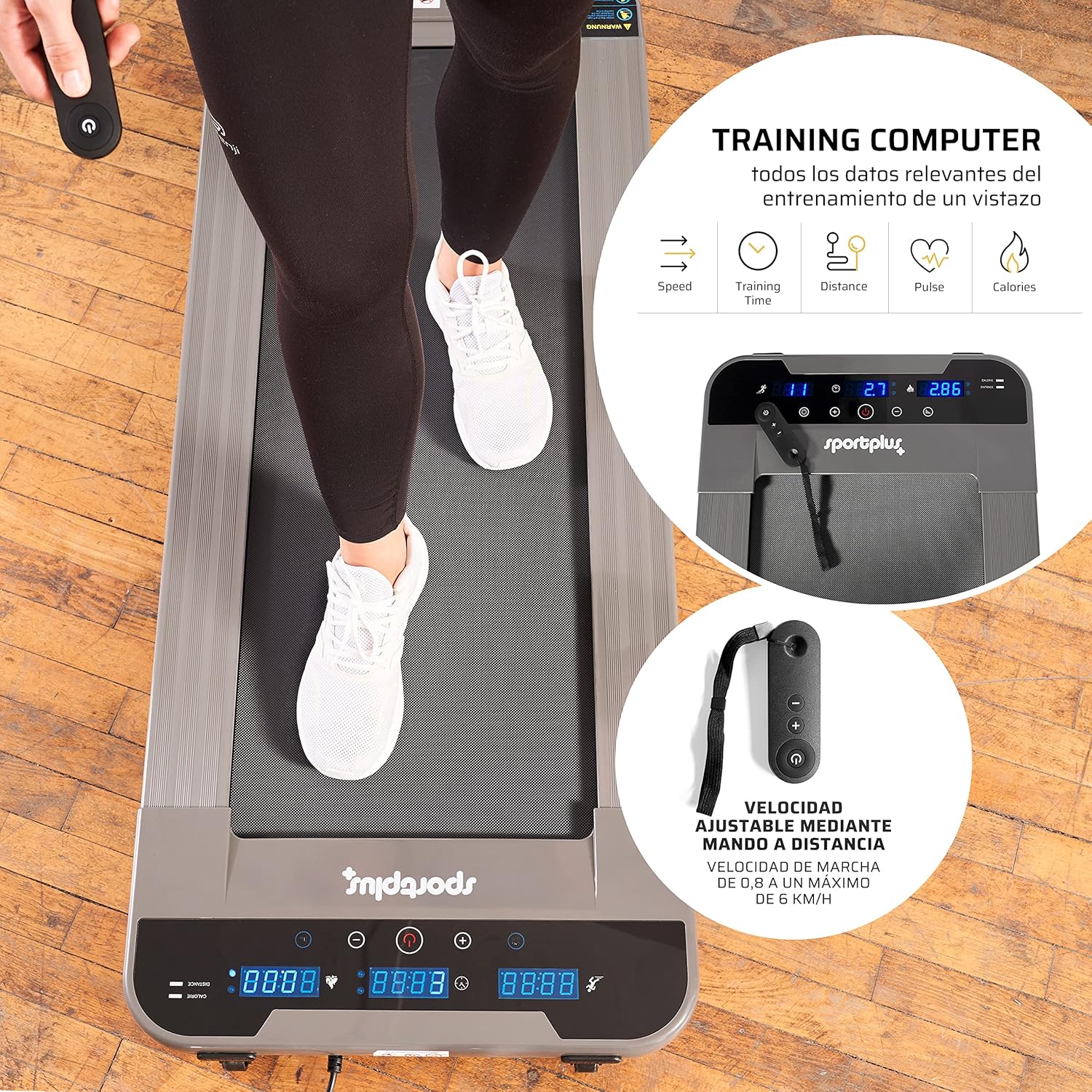
The treadmill is operated using the included remote control.
- Уключэнне: Press the power button on the remote control to turn on the treadmill. The LED display will illuminate.
- Пуск/Стоп: Press the 'Start' button on the remote to begin the walking belt movement. Press 'Stop' to halt the belt.
- Рэгуляванне хуткасці: Use the '+' and '-' buttons on the remote control to adjust the speed. The speed can be adjusted in increments of 0.1 km/h, ranging from 0.8 km/h to a maximum of 6 km/h.
- Выключэнне: Press and hold the power button on the remote control to turn off the treadmill.
5.2 Функцыі дысплея
The illuminated LED display provides real-time workout data:
- Час: Працягласць вашай трэніроўкі.
- хуткасць: Current walking speed in km/h.
- Адлегласць: Агульная адлегласць, пройдзеная падчас трэніроўкі.
- Калорыі: Прыблізная колькасць спаленых калорый.
- Крокі: Number of steps taken.
5.3 Рэжымы выкарыстання
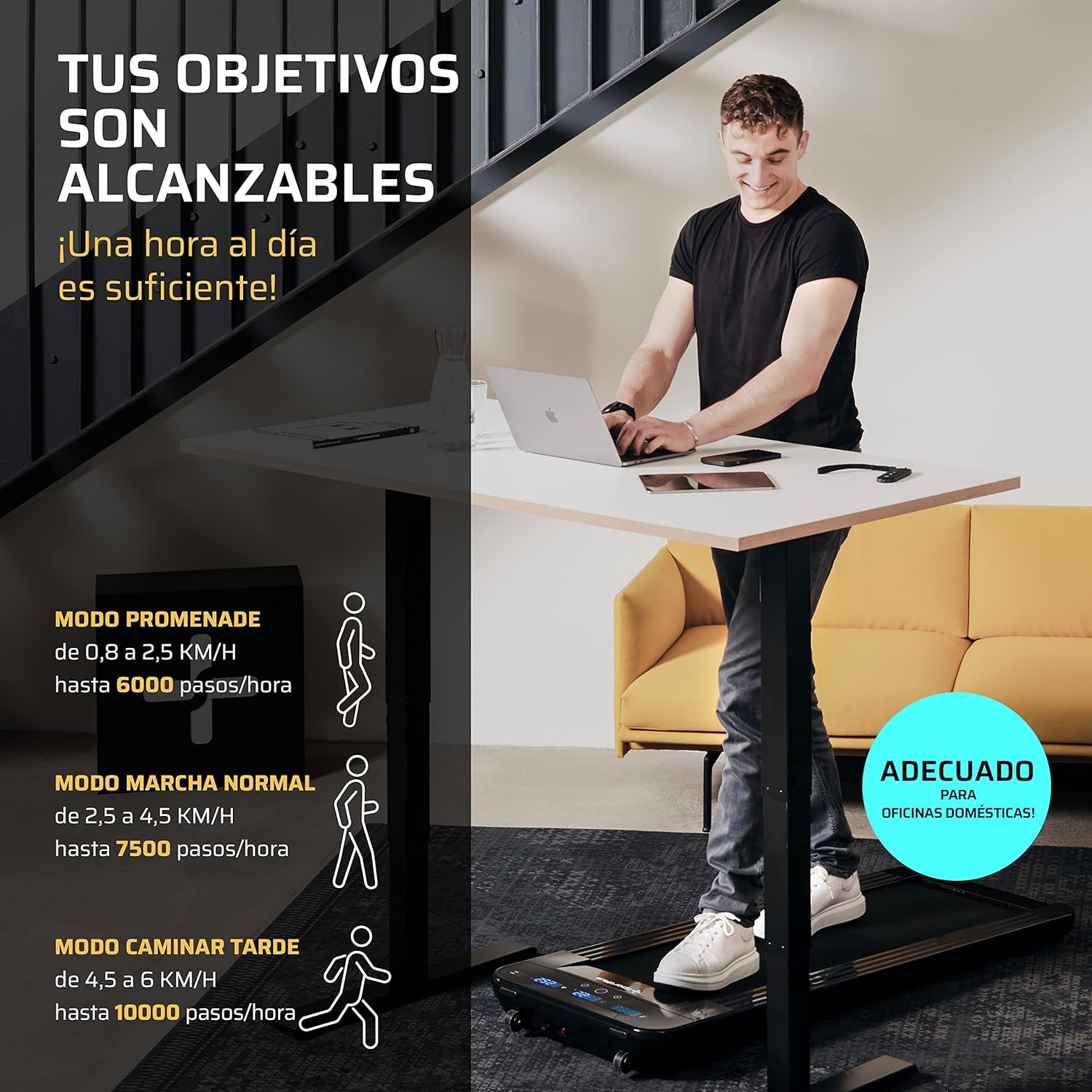
The treadmill supports various walking modes to suit your activity level:
- Promenade Mode: 0.8 to 2.5 km/h (up to 6000 steps/hour) - Ideal for light activity.
- Normal Walk Mode: 2.5 to 4.5 km/h (up to 7500 steps/hour) - Suitable for a brisk walk.
- Late Walk Mode: 4.5 to 6 km/h (up to 10000 steps/hour) - For faster walking or light jogging.
6. Тэхнічнае абслугоўванне
Рэгулярнае тэхнічнае абслугоўванне забяспечвае даўгавечнасць і аптымальную прадукцыйнасць вашай бегавой дарожкі.
6.1 Змазка
The walking belt requires periodic lubrication with the provided silicone oil to reduce friction and wear.
- Выключыце і адключыце бегавую дарожку.
- Lift the edge of the walking belt and apply a small amount of silicone oil directly onto the running deck, underneath the belt.
- Repeat on both sides of the belt.
- Plug in the treadmill and run it at a low speed (e.g., 1 km/h) for a few minutes to distribute the lubricant evenly.
- Frequency of lubrication depends on usage; generally, every 30-50 hours of use.
6.2 Ачыстка
Clean the treadmill regularly to prevent dust and debris buildup.
- Turn off and unplug the treadmill before cleaning.
- Працярыце паверхні з рэкламайamp тканіна. Не выкарыстоўвайце абразіўныя ачышчальнікі або растваральнікі.
- Vacuum underneath the treadmill periodically to remove dust and lint.
6.3 Рэгуляванне рамяня
If the walking belt becomes off-center or slips, it may require adjustment. Refer to the detailed instructions in the full manual for specific steps, which typically involve using an Allen key to adjust tension bolts at the rear of the treadmill.
7. Выпраўленне непаладак
У гэтым раздзеле разглядаюцца распаўсюджаныя праблемы, з якімі вы можаце сутыкнуцца пры выкарыстанні бегавой дарожкі.
| праблема | Магчымая прычына | Рашэнне |
|---|---|---|
| Бегавая дарожка не ўключаецца. | Power cable not connected, power outlet issue, main power switch off. | Check power cable connection. Ensure the power outlet is functional. |
| Не працуе пульт дыстанцыйнага кіравання. | Battery depleted, remote out of range, sensor obstruction. | Replace remote control battery. Ensure remote is pointed towards the treadmill's sensor (typically at the front display). Maintain close proximity (within 30 cm). |
| Walking belt slips or is off-center. | Belt tension too loose, belt alignment issue. | Adjust belt tension and alignment according to the detailed instructions in the full manual. |
| Незвычайны шум падчас працы. | Lack of lubrication, loose components, foreign object. | Lubricate the walking belt. Check for and tighten any loose screws. Inspect for foreign objects. If the noise persists, contact customer support. |
8. Тэхнічныя характарыстыкі
| Асаблівасць | Спецыфікацыя |
|---|---|
| Нумар мадэлі | SP-TM-1006 |
| Памеры (Д х Ш х У) | 134 х 54 х 12 см (52.4 х 20.9 х 3.9 цалі) |
| Бегавая паверхня (Д х Ш) | 101 х 36 см |
| Вага прадукту | 25 кг (55 фунтаў) |
| Максімальная вага карыстальніка | 120 кг (264 фунтаў) |
| Матэрыял | Сталёвы сплаў |
| Максімальная хуткасць | 6 км/г |
| Асаблівасці | Electric with cable, LED indicator, Remote Control |
| Рэкамендуемае выкарыстанне | Walking, light jogging |
| Мэтавая аўдыторыя | Дарослы |

9. Гарантыя і падтрымка
SportPlus has been producing high-quality sports equipment for 20 years. We are committed to providing durable products and excellent customer service.
If you have any questions or require assistance, our customer service department in Hamburg will be happy to help. We maintain a stock of spare and wear parts to ensure the long-term usability and sustainability of your equipment.
For support, please visit the official SportPlus webсайт або звярніцеся да прадаўца.
Кантактная інфармацыя:
- Webсайт: www.sportplus.de (Напрample, please refer to your product documentation for exact contact details)
- электронная пошта: service@sportplus.org