
1. Уводзіны
Thank you for choosing the Technoline WT 538 Wireless Projection Alarm Clock. This modern device features a touch sensor for projection and illumination, designed to integrate seamlessly into your digital lifestyle. It offers a radio-controlled clock with manual setting options, date and weekday display in 7 languages, 12/24 hour format, time zone adjustment, and indoor temperature display in Celsius or Fahrenheit. The alarm includes a customizable snooze function, and the time can be projected onto a wall or ceiling. This manual provides detailed instructions for setup, operation, and maintenance to ensure optimal performance of your alarm clock.

Выява 1.1: Спераду view of the Technoline WT 538 Wireless Projection Alarm Clock in use, showing its display and projection feature.
2. Інфармацыя па бяспецы
- Перад выкарыстаннем прылады ўважліва прачытайце ўсе інструкцыі.
- Трымайце прыладу далей ад вады, вільгаці і экстрэмальных тэмператур.
- Use only the specified power adapter (4.5V) and battery type (2 x 1.5V AAA).
- Не спрабуйце разбіраць або рамантаваць прыладу самастойна. Звяртайцеся да кваліфікаванага персаналу па любыя паслугі па абслугоўванні.
- Утылізуйце выкарыстаныя батарэі адказна ў адпаведнасці з мясцовымі правіламі.
3. Змесціва ўпакоўкі
Калі ласка, праверце наяўнасць усіх прадметаў і іх стан:
- Technoline WT 538 Wireless Projection Alarm Clock
- 4.5В адаптар сілкавання
- 2 батарэйкі 1.5 В ААА
- Кіраўніцтва карыстальніка (гэты дакумент)
4. Прадукт скончыўсяview
Familiarize yourself with the main components and controls of your WT 538 alarm clock.
4.1 Front Display and Projection
The front of the device features a clear digital display showing time, date, weekday, and indoor temperature. The projection lens is located on the side, allowing time to be projected onto a surface.

Малюнак 4.1: Падрабязны view of the alarm clock's digital display.
4.2 Rear Controls and Connections
The back of the alarm clock houses the control buttons, battery compartment, and power adapter input.

Малюнак 4.2: ззаду view showing buttons (SET, ALARM, +, -, WAVE), projection ON/OFF switch, alarm ON/OFF switch, battery compartment, and DC 4.5V power input.
5. Настройка
5.1 Устаноўка батарэі
- Адкрыйце крышку батарэйнага адсека на задняй панэлі прылады.
- Insert 2 x 1.5V AAA batteries, ensuring correct polarity (+ and -).
- Надзейна зачыніце крышку батарэйнага адсека.
5.2 Power Adapter Connection
For continuous operation and permanent projection, connect the included 4.5V power adapter.
- Plug the small end of the power adapter into the DC 4.5V input jack on the back of the alarm clock.
- Plug the other end of the power adapter into a standard wall outlet.
5.3 Пачатковая налада
Upon first power-on (either with batteries or power adapter), the clock will attempt to synchronize with the radio-controlled time signal. This process may take a few minutes. If the signal is not received, you can set the time manually.
6. Інструкцыя па эксплуатацыі
6.1 Time Setting (Radio-Controlled and Manual)
- Радыёкіраваны час: The clock automatically attempts to receive the DCF-77 radio signal for accurate time. A signal icon on the display indicates reception status.
- Ручная ўстаноўка часу: If radio reception is poor, press and hold the 'SET' button to enter manual time setting mode. Use the '+' and '-' buttons to adjust hours, minutes, and other settings. Press 'SET' again to confirm each step.
- 12/24-гадзінны фармат: During manual time setting, you can switch between 12-hour (with AM/PM indicator) and 24-hour formats.
- Настройка гадзіннага пояса: Adjust the time zone offset if needed, typically during manual setup.
6.2 Адлюстраванне даты і дня тыдня
The display shows the current date and weekday. The weekday can be displayed in 7 different languages. Refer to the manual setting section to cycle through language options.
6.3 Дысплей тэмпературы ў памяшканні
The alarm clock continuously displays the indoor temperature. Press the '°C/°F' button to switch between Celsius and Fahrenheit units.
6.4 Функцыя сігналізацыі
- Націсніце кнопку «Трывога» адзін раз, каб view бягучы час будзільніка.
- Press and hold the 'ALARM' button to enter alarm setting mode. Use '+' and '-' to adjust the alarm hour and minute. Press 'ALARM' to confirm.
- Use the 'ALARM ON/OFF' switch on the back to activate or deactivate the alarm. An alarm icon will appear on the display when active.
6.5 Функцыя паўтору
When the alarm sounds, gently touch the top of the alarm clock (touch sensor area) to activate the snooze function. The alarm will pause for a preset duration (adjustable during alarm setup) and sound again later.
6.6 Backlight Activation
The display backlight can be activated by gently touching the top of the alarm clock (touch sensor area). This provides temporary illumination for easy viewва ўмовах нізкай асветленасці.
6.7 Projection Function
The WT 538 can project the time onto a wall or ceiling.
- Temporary Projection: Gently touch the top of the alarm clock (touch sensor area) to activate the projection temporarily.
- Permanent Projection: Permanent projection is only possible when the alarm clock is powered by the included 4.5V power adapter. Use the 'Projection ON/OFF' switch on the back of the device to enable continuous projection.
- Adjust the angle of the projection lens to achieve the desired position and focus.
7. Тэхнічнае абслугоўванне
7.1 Ачыстка
Wipe the device with a soft, dry cloth. Do not use abrasive cleaners or solvents, as these may damage the surface.
7.2 Замена батарэі
When the display dims or the device functions become unreliable, it is time to replace the batteries. Follow the battery installation steps in Section 5.1.
8. Выпраўленне непаладак
- Няма дысплея/прылады не ўключаецца: Check battery polarity, ensure batteries are fresh, or verify the power adapter is correctly connected and plugged into a working outlet.
- Poor Radio Signal Reception: Move the alarm clock to a location away from electronic devices that may cause interference. Try different orientations.
- Projection Unclear/Out of Focus: Adjust the projection lens to focus the image. Ensure the projection surface is within the optimal range.
- Projection Not Permanent: Ensure the alarm clock is connected to the power adapter and the 'Projection ON' switch is activated. Permanent projection is not available when running on batteries alone.
- Будзільнік не гучыць: Check if the alarm is set correctly and the 'ALARM ON' switch is activated.
9. Тэхнічныя характарыстыкі
| Асаблівасць | Спецыфікацыя |
|---|---|
| Марка | Тэхналінія |
| мадэль | ВТ 538 |
| Тып дысплея | Лічбавы |
| Асаблівасці | Alarm, Calendar Display, Multiple Time Zones, Snooze, Silent Clock, Illuminated, Projection |
| Памеры вырабу (Д х В х Г) | 15 cm x 9 cm x 1.5 cm (with battery compartment: 4 cm) |
| Вага (уключаючы батарэі) | 0.202 кг |
| Крыніца харчавання | 4.5V Power Adapter (included) or 2 x 1.5V AAA Batteries (included) |
| Тып мацавання | Стальніца |
| Матэрыял каркаса | Акрыланітрыл бутадыен стырол |
| Дыяпазон вымярэння тэмпературы | -9.9 °C да 50 °C |
| Тэмпературнае дазвол | 0.1 °F |
| Дакладнасць тэмпературы | 0 °C to 40 °C: ± 1 °C; -9.9 °C to -0.1 °C: ± 2 °C; 40 °C to 50 °C: ± 2 °C |
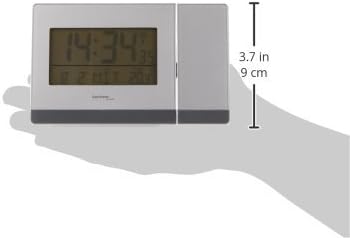
Малюнак 9.1: Збоку view illustrating the dimensions of the alarm clock.
10. Гарантыя і падтрымка
Каб атрымаць інфармацыю аб гарантыі або тэхнічную падтрымку, звярніцеся да дакументацыі, якая пастаўляецца з пакупкай, або звярніцеся да прадаўца. Захоўвайце пацвярджэнне пакупкі для любых гарантыйных прэтэнзій.


