
1. Уводзіны
This manual provides comprehensive instructions for the Came ZBK Electronic Control Board, model 88001-0063. This control board is designed for use with Came BK series sliding gate motors, specifically compatible with BK800, BK1200, and BK1800 models. It serves as a direct replacement for the older 3199ZBK generation control board. Please read this manual thoroughly before installation and operation to ensure proper function and safety.
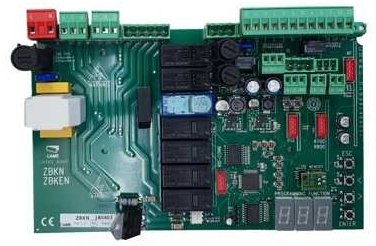
Image showing the Came ZBK Electronic Control Board, model 88001-0063, a replacement part for gate automation systems.
2. Інфармацыя па бяспецы
Важна: Installation and maintenance of this electronic control board should only be performed by qualified personnel. Failure to follow these safety guidelines may result in serious injury or damage to property.
- Always disconnect the main power supply to the gate motor before performing any installation, maintenance, or troubleshooting.
- Пераканайцеся, што ўсе электрычныя злучэнні адпавядаюць мясцовым электрычным нормам і правілам.
- Protect the control board from moisture, dust, and extreme temperatures.
- Do not attempt to modify the control board. Use only genuine Came replacement parts.
- Keep children and unauthorized persons away from the gate area during installation and operation.
3. Усталёўка і налада
3.1 Змест пакета
- 1 x Came ZBK Electronic Control Board (Model 88001-0063)
3.2 Сумяшчальнасць
This control board is compatible with Came BK series sliding gate motors: BK800, BK1200, and BK1800. It is designed as a direct replacement for the previous generation 3199ZBK control board.
3.3 Этапы ўстаноўкі
- Адключыць харчаванне: Ensure the main power supply to the gate motor is completely disconnected at the circuit breaker. Verify with a voltagэлектронны тэстар.
- Блок кантролю доступу: Open the gate motor's control box cover.
- Падключэнні дакументаў: Carefully photograph or sketch the existing wiring connections on the old control board (if replacing). This will be crucial for correct re-connection.
- Зняць старую дошку: Disconnect all wires from the old 3199ZBK control board and carefully remove it from its mounting.
- Усталяваць новую плату: Mount the new Came ZBK 88001-0063 control board in the same position.
- Падключэнне правадоў: Reconnect all wires to the new control board according to your documentation from step 3. Refer to the specific wiring diagram provided with your Came BK series motor for detailed connection points. Pay close attention to power, motor, safety device, and accessory connections.
- Бяспечныя злучэнні: Ensure all terminal connections are tight and secure.
- Закрыць блок кіравання: Securely close the control box cover, ensuring no wires are pinched.
- Аднавіць сілу: Reconnect the main power supply to the gate motor.
Note: For detailed wiring diagrams and specific motor configurations, always refer to the original instruction manual for your Came BK800, BK1200, or BK1800 motor.
4. Аперацыя
After successful installation, the Came ZBK control board will manage the operation of your sliding gate motor. Initial setup and programming typically involve:
- Кірунак рухавіка: Verifying and setting the correct motor rotation direction.
- Гранічныя выключальнікі: Adjusting and programming the open and close limit switches for precise gate positioning.
- Пульты дыстанцыйнага кіравання: Pairing and programming remote control transmitters.
- Ахоўныя прылады: Testing and configuring safety photocells and other safety devices.
- Працоўныя параметры: Setting parameters such as opening/closing speed, pause time, and force.
Consult the specific programming guide for your Came BK series motor for detailed instructions on configuring these settings. The ZBK board's functionality is integrated with the motor's overall system.
5. Тэхнічнае абслугоўванне
Regular maintenance ensures the longevity and reliable operation of your Came ZBK control board and gate system.
- Візуальны агляд: Перыядычна правярайце плату кіравання на наяўнасць пашкоджанняў, карозіі або няшчыльных злучэнняў.
- Чысціня: Keep the control box interior clean and free from dust, insects, and debris. Use a soft, dry brush or compressed air.
- Wiring Checks: Ensure all wiring connections remain secure and free from wear or damage.
- Прафесійная праверка: It is recommended to have the entire gate automation system, including the control board, inspected by a qualified technician at least once a year.
Заўсёды адключайце электраэнергію перад выкананнем любога тэхнічнага абслугоўвання.
6. Выпраўленне непаладак
If you encounter issues with your gate system, refer to the following common troubleshooting steps. For complex problems, contact a qualified technician.
| праблема | Магчымая прычына | Рашэнне |
|---|---|---|
| Брама не рэагуе на каманды. | Няма харчавання на плату кіравання. Батарэйка пульта дыстанцыйнага кіравання разрадзілася. Safety devices (photocells) obstructed or faulty. | Праверце асноўную крыніцу харчавання і аўтаматычны выключальнік. Заменіце батарэю пульта дыстанцыйнага кіравання. Clear obstruction from photocells; check their alignment and wiring. |
| Брама адчыняецца, але не зачыняецца. | Safety devices (photocells) obstructed or faulty. Close limit switch not registering. | Check photocells for obstructions or malfunction. Inspect and adjust the close limit switch. |
| Рухавік працуе, але вароты не рухаюцца. | Motor clutch disengaged. Mechanical issue with the gate or motor. | Check if the motor's manual release is engaged. Re-engage clutch. Inspect gate for obstructions or damage to gears/rack. |
| Control board LEDs are off. | No power supply to the board. | Verify main power supply and check fuses on the board (if present). |
Always disconnect power before inspecting internal components.
7. Тэхнічныя характарыстыкі
| Асаблівасць | Дэталь |
|---|---|
| Нумар мадэлі | 88001-0063 |
| Марка | Прыехаў |
| Сумяшчальнасць | Came BK800, BK1200, BK1800 series sliding gate motors |
| Замяняе | Came 3199ZBK control board |
| ASIN | B07FW83F4Y |
| Вытворца | ПРЫЙШЛА |
| Дата першай даступнасці | 25 ліпеня 2018 г |
| Наяўнасць запасных частак | Інфармацыя недаступная |
8. Гарантыя і падтрымка
For information regarding the warranty period and terms for your Came ZBK Electronic Control Board, please refer to the documentation provided at the time of purchase or contact your authorized Came dealer. For technical support, installation assistance, or spare parts inquiries, please contact Came customer service or an authorized service center.
You can typically find contact information on the official Came webсайт або праз пастаўшчыка вашай прадукцыі.