
1. Уводзіны
This manual provides essential information for setting up, operating, and maintaining your Amazon Echo Dot (3rd Generation) smart speaker. The Echo Dot is a voice-controlled smart speaker with Alexa, designed to integrate seamlessly into your daily life, offering assistance with tasks, entertainment, and smart home control.
Калі ласка, уважліва прачытайце гэта кіраўніцтва, каб забяспечыць правільнае выкарыстанне прылады і максімальна выкарыстоўваць яе магчымасці.
2. Прадукт скончыўсяview
The Echo Dot (3rd Generation) is a compact smart speaker featuring a fabric design and improved sound quality. It connects to the Alexa voice service to play music, answer questions, make calls, send messages, provide information, news, sports scores, weather, and more.
2.1 Кампаненты прылады
- Кнопка дзеянняў: Activates Alexa without using the wake word.
- Кнопка выключэння мікрафона: Disables the microphones for privacy. The light ring will turn red when microphones are off.
- Кнопкі павелічэння / памяншэння гучнасці: Рэгулюе гучнасць дынаміка.
- Светлавое кольца: Provides visual feedback on device status (e.g., blue for listening, red for mic off, orange for setup).
- Порт харчавання: Connects the device to a power outlet using the included adapter.
- 3.5 мм аўдыявыхад: Allows connection to external speakers.

Малюнак 1: Спераду view of the Echo Dot (3rd Generation) showing its compact design and fabric finish.

Figure 2: The Echo Dot (3rd Generation) highlighting its various functionalities such as music playback, setting timers, smart home control, providing information, intercom features, and news updates.

Figure 3: The top view of the Echo Dot (3rd Generation) showing the microphone off button. Pressing this button disconnects the microphones, indicated by a red light ring, ensuring privacy.
3. Настройка
3.1 Што ў камплекце
- Amazon Echo Dot (3-е пакаленне)
- Адаптар сілкавання (15 Вт)
- Кароткае кіраўніцтва
3.2 Пачатковая налада
- Plug In Your Echo Dot: Connect the included power adapter to your Echo Dot and then to a power outlet. The light ring will turn blue, then orange, indicating it's ready for setup.
- Спампаваць праграму Alexa: On your smartphone or tablet, download the Amazon Alexa app from your device's app store (iOS App Store or Google Play Store).
- Set Up Your Echo Dot:
- Адкрыйце праграму Alexa і ўвайдзіце ў свой уліковы запіс Amazon.
- Tap the 'Devices' icon in the bottom right corner.
- Tap the '+' icon in the top right corner, then select 'Add Device'.
- Choose 'Amazon Echo', then 'Echo Dot', and select '3rd Generation'.
- Follow the on-screen instructions to connect your Echo Dot to your Wi-Fi network. The Echo Dot supports dual-band Wi-Fi (2.4 GHz and 5 GHz).
- Наладзіць налады: Once connected, you can customize settings such as device name, location, and preferred music services within the Alexa app.
4. Інструкцыя па эксплуатацыі
The Echo Dot is primarily controlled by voice commands using the wake word "Alexa."
4.1 Basic Voice Commands
To activate Alexa, simply say "Alexa," followed by your command. The light ring will turn blue when Alexa is listening.
- "Алекса, якое надвор'е?"
- Алекса, пастаў таймер на 10 хвілін.
- "Alexa, tell me a joke."
- "Alexa, what's the news?"
4.2 Музыка і аўдыё
You can stream music from various services or connect via Bluetooth.
- Сэрвісы струменевай перадачы: "Alexa, play music by [artist] on Amazon Music/Spotify/Apple Music."
- Bluetooth: "Alexa, pair Bluetooth." Then connect from your device's Bluetooth settings. "Alexa, connect to my phone."
- Знешнія дынамікі: Connect your Echo Dot to external speakers using a 3.5mm audio cable for enhanced sound.
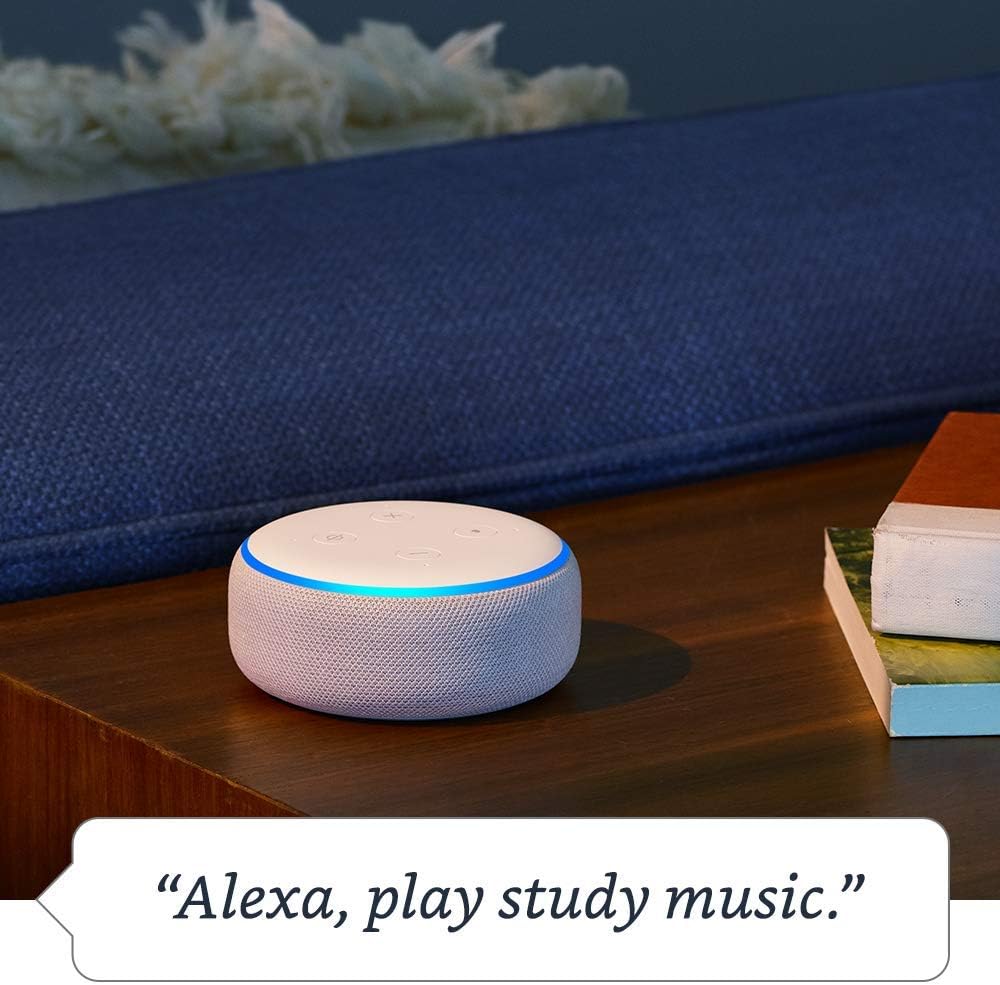
Figure 4: The Echo Dot (3rd Generation) responding to a voice command to play music, demonstrating its audio playback capabilities.
4.3 Кіраванне разумным домам
Control compatible smart home devices with your voice.
- «Алекса, уключы святло ў гасцінай».
- Алекса, усталюй тэрмастат на 72 градусы.
- "Alexa, show me the front door camera." (Requires compatible Echo device with screen)

Figure 5: The Echo Dot (3rd Generation) demonstrating smart home integration by controlling a lamp з дапамогай галасавой каманды.
4.4 Камунікацыя
Use your Echo Dot to connect with others.
- Выклік: "Alexa, call Mom." (Requires contacts synced in Alexa app)
- Drop In: "Alexa, drop in on the kitchen Echo." (Allows instant two-way communication with other Echo devices)
- Аб'явы: "Alexa, announce dinner's ready." (Broadcasts a message to all Echo devices in your home)

Figure 6: The Echo Dot (3rd Generation) being used for household announcements, simplifying communication within the home.
4.5 Кантроль прыватнасці
Amazon Echo devices are designed with multiple layers of privacy protection.
- Кнопка выключэння мікрафона: Press the microphone off button on top of the device to electronically disconnect the microphones. The light ring will turn red.
- Гісторыя голасу: Вы можаце паўторнаview and delete your voice recordings in the Alexa app or at amazon.com/alexaprivacy.
4.6 Функцыі даступнасці
The Echo Dot includes various accessibility features configurable through the Alexa app (Settings → Accessibility).
- Адаптыўнае праслухоўванне: Provides more time to speak before Alexa responds.
- Пажаданы тэмп маўлення: Adjust Alexa's speaking speed (e.g., "Alexa, speak slower").
- Request Sound: Plays an audible tone when Alexa starts listening.
- Kindle Чытанне ўслых: Alexa можа чытаць вашы кнігі Kindle уголас.
4.7 Amazon Sidewalk
Amazon Sidewalk is a shared network that helps compatible devices work better at home and beyond. It uses a small portion of your internet bandwidth to provide benefits to you and your neighbors via Sidewalk Bridges (participating Echo and Ring devices). Sidewalk is turned on by default but can be turned off at any time in the Alexa app settings.
5. Тэхнічнае абслугоўванне
5.1 Ачыстка
To clean your Echo Dot, unplug the device and wipe it with a soft, lint-free cloth. Do not use abrasive cleaners or sprays. Keep the device dry and away from liquids.
5.2 Абнаўленне праграмнага забеспячэння
Ваш Echo Dot аўтаматычна атрымлівае абнаўленні праграмнага забеспячэння праз Wi-Fi. Пераканайцеся, што ваша прылада падключана да Інтэрнэту, каб атрымліваць найноўшыя функцыі і паляпшэнні бяспекі.
6. Выпраўленне непаладак
- Echo Dot is not responding:
- Ensure the microphone is not muted (red light ring).
- Check if the device is plugged in and has power.
- Verify Wi-Fi connectivity in the Alexa app.
- Try restarting the device by unplugging it for 30 seconds and plugging it back in.
- Не магу падключыцца да Wi-Fi:
- Пераканайцеся, што ваш пароль Wi-Fi правільны.
- Move the Echo Dot closer to your Wi-Fi router.
- Перазагрузіце маршрутызатар і мадэм.
- Confirm your network is 802.11 a/b/g/n/ac (2.4 or 5 GHz) and not an ad-hoc network.
- Poor audio quality or no sound:
- Adjust the volume using the buttons on the device or via voice command.
- If connected to external speakers, ensure they are powered on and connected correctly.
- If using Bluetooth, ensure the Bluetooth device is connected and within range.
For more detailed troubleshooting, refer to the help section within the Amazon Alexa app or visit Amazon's support webсайт.
7. Тэхнічныя характарыстыкі
| Асаблівасць | Апісанне |
|---|---|
| Памер | 3.9 цалі x 3.9 цалі x 1.7 цалі (99 мм x 99 мм x 43 мм) |
| Вага | 10.6 унцыі (300 грама) |
| Падключэнне да Wi-Fi | Dual-band Wi-Fi supports 802.11 a/b/g/n/ac (2.4 and 5 GHz) networks. Does not support ad-hoc (peer-to-peer) networks. |
| Злучэнне Bluetooth | Пашыраны Audio Distribution Profile (A2DP) for audio streaming. Audio/Video Remote Control Profile (AVRCP) for voice control of connected mobile devices. Bluetooth speakers requiring PIN codes are not supported. |
| Сумяшчальнасць прылад разумнага дома | WiFi, Bluetooth Low Energy Mesh, and Matter. |
| Абнаўленні бяспекі праграмнага забеспячэння | Automatic updates provided. |
| Спецыяльныя магчымасці | Adaptive Listening, Preferred Speaking Rate, Request Sound, Kindle Read Aloud, Notify When Nearby, and other settings for vision, hearing, mobility, and speech. |
| Амазонскі тратуар | Shared network for compatible devices, uses a small portion of internet bandwidth. User-configurable. |
8. Гарантыя і падтрымка
8.1 Гарантыя на выраб
Information regarding the limited warranty for your Amazon Echo Dot (3rd Generation) can be found in the original product packaging or on the Amazon webсайт. Калі ласка, захавайце пацвярджэнне пакупкі для прэтэнзій па гарантыі.
8.2 Падтрымка кліентаў
For further assistance, technical support, or warranty inquiries, please contact Amazon Customer Service through the Alexa app or by visiting the Amazon support webсайт (amazon.com/devicesupport).