
1. Уводзіны
The Azpen Dockall D101 is a versatile device combining a Qi wireless charging dock station, a Bluetooth speaker, and a phone stand. It is designed to enhance your audio experience while conveniently charging your compatible smartphones and tablets.
2. Што ў скрынцы
- 1 x DockAll Slim D101
- 1 х адаптар сілкавання пастаяннага току
- 1 х Кіраўніцтва карыстальніка

Image: Box contents including the DockAll D101 unit, DC power adapter, and user manual.
3. Прадукт скончыўсяview
The Dockall D101 features an innovative design that integrates multiple functionalities into one device for home and office use. Key components include:
- Бесправадная падстаўка для зарадкі Qi: Для сумяшчальных прылад.
- Дынамік Bluetooth: For audio streaming.
- Рэгуляваная падстаўка для тэлефона: Provides an upright viewкут нахілу.
- Кнопкі кіравання: For power, volume, and playback.
- Слот MicroSD: Supports cards up to 64 GB.

Выява: спераду view of the Azpen Dockall D101 with a smartphone placed on the charging pad, illustrating wireless charging capability.
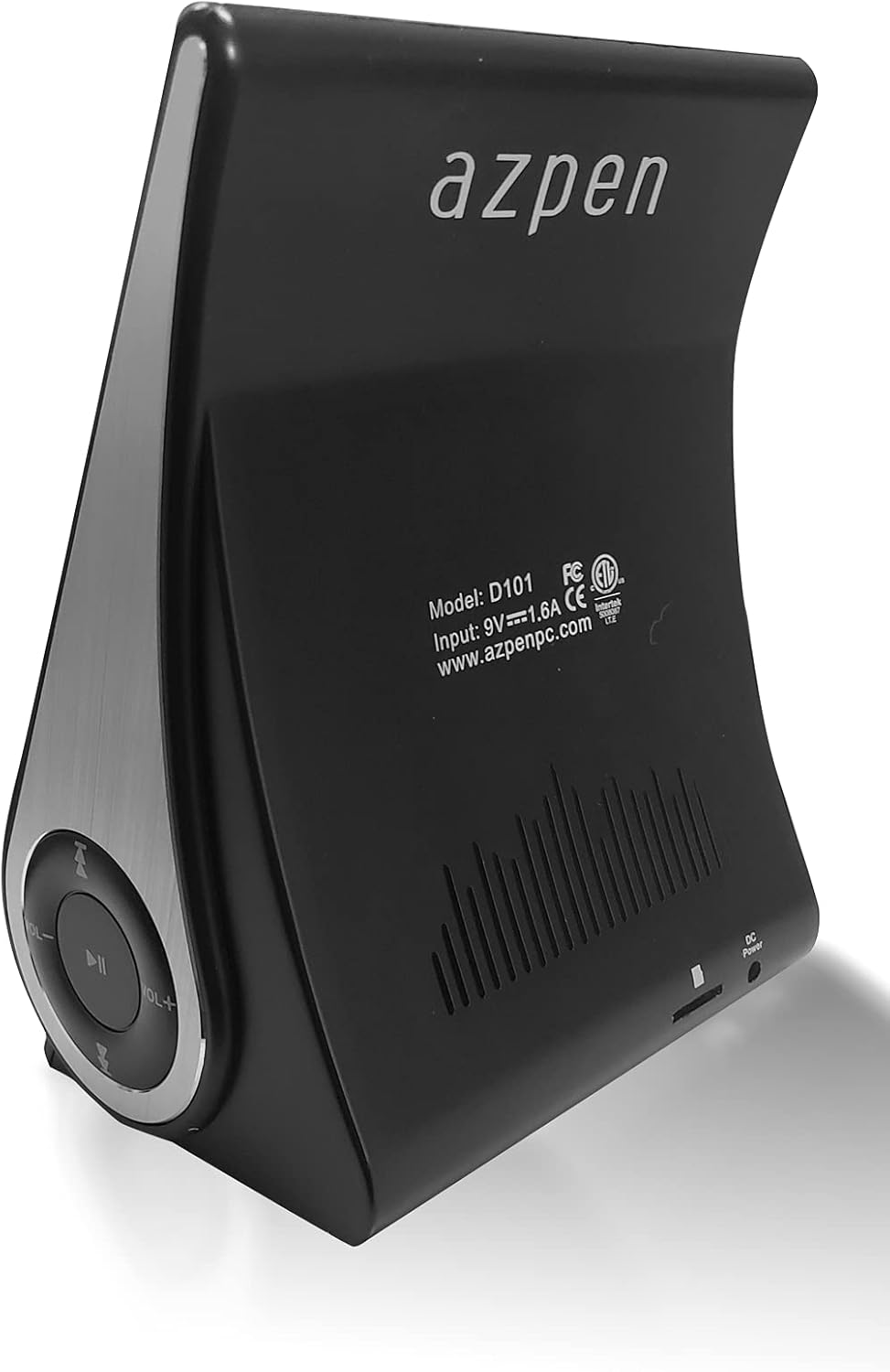
Выява: Задняя частка view of the Azpen Dockall D101, displaying the model number (D101), input specifications, and regulatory certifications.

Выява: Side profile of the Azpen Dockall D101, highlighting the circular control panel with volume, playback, and phone call buttons.
4. Настройка
- Падключэнне сілкавання: Connect the provided DC Power Adapter to the "DC Power" port on the back of the Dockall D101. Plug the adapter into a standard wall outlet.
- пазіцыянаванне: Place the Dockall D101 on a stable, flat surface.
- Adjust Phone Stand: Gently pull up the phone stand to your desired viewing angle. Ensure the stand is securely locked in place.
5. Інструкцыя па эксплуатацыі
5.1 Уключэнне/выключэнне сілкавання
- To power on, press and hold the Power button (usually indicated by a circle with a vertical line) on the control panel until the device activates.
- Каб выключыць прыладу, зноў націсніце і ўтрымлівайце кнопку харчавання, пакуль яна не выключыцца.
5.2 Qi Wireless Charging
- Ensure the Dockall D101 is powered on.
- Place your Qi-compatible smartphone or tablet onto the charging pad on the adjustable stand.
- Adjust the position of your device until the solid blue light appears, indicating that wireless charging has begun.
- The Dockall D101 supports fast Qi wireless charging (10W).
- Note: Charging may not work through metal cases or excessively thick phone cases (e.g., OtterBox Defender).
5.3 Функцыянальнасць Bluetooth-дынаміка
- Спалучэнне:
- Power on the Dockall D101.
- Уключыце Bluetooth на вашым смартфоне або аўдыёпрыладзе.
- Пошук "Dockall D101" (or similar name) in your device's Bluetooth settings and select it to pair.
- Паспяховае спалучэнне будзе пацверджана гукавым сігналам.
- Прайграванне аўдыя:
- Use the control buttons on the Dockall D101 to play/pause, skip tracks (forward/backward), and adjust volume.
- You can also control playback directly from your paired device.
- Гучная сувязь:
- When a call comes in, press the Phone button (usually indicated by a phone icon) to answer.
- Speak into the built-in microphone on the Dockall D101.
- Press the Phone button again to end the call.

Image: A smartphone positioned on the Dockall D101 stand, displaying a music player interface, highlighting the device's audio capabilities.
Відэа: Оверview of the Azpen DockAll Mini, demonstrating its features and functionality. While the video showcases a "Mini" model, the core operations for charging and Bluetooth are similar to the D101.
6. Тэхнічнае абслугоўванне
- Уборка: Use a soft, dry cloth to clean the surface of the Dockall D101. Do not use liquid cleaners or aerosols.
- захоўванне: Калі прылада не выкарыстоўваецца працяглы час, захоўвайце яе ў прахалодным, сухім месцы, удалечыні ад прамых сонечных прамянёў.
- Апрацоўка: Пазбягайце падзення прылады або ўздзеяння экстрэмальных тэмператур або вільгаці.
7. Выпраўленне непаладак
| праблема | Магчымае рашэнне |
|---|---|
| Прылада не ўключаецца. | Ensure the DC Power Adapter is securely connected to both the device and a working power outlet. |
| Бесправадная зарадка не працуе. |
|
| Bluetooth не падключаецца. |
|
| Нізкая якасць гуку. |
|
8. Тэхнічныя характарыстыкі
- Назва мадэлі: D101
- Тып дынаміка: Bluetooth-дынамік
- Асаблівасці: Wireless Charger, Upright View Angle, Bluetooth Speaker, 3-in-1 Hub
- Рэкамендуемае выкарыстанне: Для смартфонаў або планшэтаў
- Сумяшчальныя прылады: For iPhone 15/14/13/12/11, for Samsung Galaxy S24/S23/S22/S21/S20/S10
- колер: Чорны
- Вага прадмета: 11.2 унцыі
- Воданепранікальны: ХЛУСНЯ
- Тып гарантыі: Абмежаваны
- Колькасць элементаў: 1
- Метад кантролю: Дакранацца
- Тэхналогія бесправадной сувязі: Bluetooth
- Памер дынаміка: 5 сантыметраў
- Крыніца харчавання: Харчаванне ад батарэі
- Тып аўдыё драйвера: Дынамічны драйвер
- UPC: 859592006828
- вытворца: Азпен
- Памеры прадукту: 5.9 х 4.3 х 3.75 цалі
- Максімальная выхадная магутнасць дынаміка: 5 ват
- Тэхналогія падключэння: Bluetooth
- Рэжым вываду гуку: Мона
- Тып мацавання: Док

Image: Diagram showing the dimensions of the Azpen Dockall D101, with measurements in centimeters.
9. Гарантыя і падтрымка
The Azpen Dockall D101 comes with a Limited Warranty. For specific details regarding warranty coverage and to access customer support, please refer to the warranty information provided in the original packaging or visit the official Azpen webсайт.
For further assistance, you may also contact Azpen customer service directly.