
Уводзіны
This manual provides instructions for the installation, operation, and maintenance of your Audiovox ELEAUDAX80EXT Wireless Extension. This device is designed to expand the functionality of compatible Audiovox phone models, specifically the AX8001, AX8001E, and AX8101AM, by providing an additional wireless handset.
Змест пакета
Please verify that all items are present in the package before proceeding with the setup.
- Audiovox ELEAUDAX80EXT Wireless Extension Unit
- Адаптар сілкавання (калі ёсць)
- Акумулятарная батарэя (папярэдне ўсталяваная або асобна)
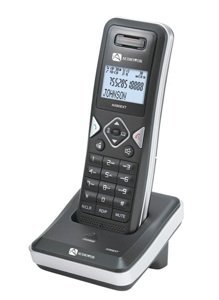
Image: The Audiovox ELEAUDAX80EXT Wireless Extension Unit. This image displays the compact design of the extension handset.
Настройка
- Зарадзіць акумулятар: If the battery is not pre-installed, insert it into the extension unit according to the markings. Place the extension unit on its charging cradle (if included) or connect the power adapter directly to the unit and a power outlet. Allow the unit to charge for at least 12-16 hours before initial use.
- Register the Extension:
- Ensure your main Audiovox phone base (AX8001, AX8001E, or AX8101AM) is powered on.
- On the main phone base, locate and press the "Register" or "Page" button. Hold it until the indicator light on the base begins to flash (refer to your main phone's manual for exact instructions).
- While the base is in registration mode, on the ELEAUDAX80EXT extension unit, navigate to the "Menu" and select "Register Handset" or a similar option. Follow the on-screen prompts.
- Once registration is successful, the extension unit will display a confirmation message, and the indicator light on the base will stop flashing.
- Тэставае злучэнне: Make a test call from the extension unit to ensure proper functionality.
Інструкцыя па эксплуатацыі
Тэлефанаванне
- Вазьміце слухаўку альбо націсніце ГАВАРЫЦЬ кнопка.
- Набярыце патрэбны нумар тэлефона.
- Націсніце ГАВАРЫЦЬ button again or place the handset back on the cradle to end the call.
Адказ на званок
- Калі тэлефон зазваніць, падніміце слухаўку або націсніце ГАВАРЫЦЬ кнопка.
- Каб завяршыць выклік, націсніце КАНЕЦ кнопку або пакладзеце трубку назад на падстаўку.
Intercom Function (if supported by base unit)
- Націсніце ІНТЭРКОМ кнопка.
- Dial the number of the extension you wish to call (e.g., "2" for the second handset).
- Прэса ГАВАРЫЦЬ каб пачаць інтэрком-званок.
Тэхнічнае абслугоўванне
- Уборка: Працярыце прыладу мяккай дamp тканіна. Не выкарыстоўвайце агрэсіўныя хімікаты або абразіўныя ачышчальнікі.
- Сыход за батарэяй: For optimal battery life, avoid fully discharging the battery frequently. Keep the unit on its charger when not in use.
- захоўванне: If storing the unit for an extended period, remove the battery and store it in a cool, dry place.
Ліквідацыю непаладак
| праблема | Рашэнне |
|---|---|
| Няма гудка / Немагчыма рабіць званкі |
|
| Тэлефон не зараджаецца |
|
| Дрэнная якасць званка / Статычны шум |
|
Тэхнічныя характарыстыкі
- Нумар мадэлі: ELEAUDAX80EXT
- Сумяшчальныя базавыя прылады: Audiovox AX8001, AX8001E, AX8101AM
- Памеры (Д х Ш х У): 20 х 40 х 30 міліметраў
- Вага: 20 грам
- UPC: 044476082719
Гарантыя і падтрымка
For specific warranty information and technical support, please refer to the documentation included with your original Audiovox phone system or visit the official Audiovox webсайт. Захоўвайце чэк аб куплі як пацвярджэнне пакупкі для гарантыйных прэтэнзій.
For further assistance, please contact Audiovox customer service.