
Уводзіны
This manual provides essential instructions for the safe and effective use of your Andoer Portable 1080P Digital Camera D11773S. Please read this manual thoroughly before operating the device and retain it for future reference. This digital camera is designed for capturing high-resolution photos and videos, featuring a 48MP image sensor, 1080P video recording, 8X digital zoom, and a 2.7-inch LCD screen.
Інфармацыя па бяспецы
- Не падвяргайце камеру ўздзеянню вады ці вільгаці.
- Пазбягайце падзення камеры або моцных удараў.
- Трымайце камеру далей ад моцных магнітных палёў.
- Do not attempt to disassemble or modify the camera. Repairs should only be performed by qualified personnel.
- Use only the specified battery type and charging cable.
- Калі камера не выкарыстоўваецца, захоўвайце яе ў прахалодным сухім месцы.
- Захоўваць у месцах, недаступных маленькім дзецям.
Змест пакета
Праверце наяўнасць усіх прадметаў у камплекце:
- Andoer Portable Digital Camera (Model D11773S)
- Lithium Battery (3.7V 550mAh)
- Зарадны кабель Type-C
- Папружка
- Пераносіце сумку
- Кіраўніцтва карыстальніка

Image: Contents of the camera package, showing the camera, battery, USB-C cable, wrist strap, carry bag, and user manual.
Камера скончыласяview
Азнаёмцеся з асноўнымі кампанентамі вашай камеры.
Фронт View

Выява: спераду view of the Andoer D11773S camera. Key features visible include the digital lens, built-in flash, and the 2.7" TFT display and 48 Mega pixels indicators.
- Аб'ектыў: Захоплівае выявы і відэа.
- Успышка: Забяспечвае падсвятленне ў цёмных умовах.
- Мікрафон: Запісвае гук падчас відэаздымкі.
Тыл View

Выява: Задняя частка view of the Andoer D11773S camera, displaying the 2.7-inch LCD screen and various control buttons for navigation and settings.
- LCD Screen (2.7 Inch): Паказвае ў прамым эфіры view, меню і прайграванне.
- Кнопкі кіравання: For menu navigation, mode selection, zoom, and playback.
- Дакладчык: Для прайгравання аўдыё.
Збоку View і Памеры

Image: Diagram illustrating the dimensions of the Andoer D11773S camera: 9.2cm length, 6.1cm width, and 1.4cm thickness.
- USB-порт (тыпу C): Для зарадкі і перадачы дадзеных.
- Слот для карты памяці: For inserting a Micro SD card.
- Батарэйны адсек: Змяшчае акумулятарную літыевую батарэю.
Настройка
1. Зарадка акумулятара
- Insert the provided lithium battery into the camera's battery compartment.
- Connect the camera to a power source (e.g., computer USB port or USB wall adapter) using the supplied Type-C charge cable.
- Індыкатар зарадкі загарыцца. Пасля поўнай зарадкі індыкатар можа змяніць колер або выключыцца.
2. Устаўка карты памяці
The camera requires a Class-10 external Micro SD memory card (not included) with a maximum capacity of 128GB.
- Знайдзіце слот для карты памяці збоку камеры.
- Insert the Micro SD card with the metal contacts facing the front of the camera until it clicks into place.
- Каб выняць, акуратна націсніце на карту ўнутр, пакуль яна не выскочыць.
Інструкцыя па эксплуатацыі
Уключэнне/выключэнне харчавання
- Каб уключыць, націсніце і ўтрымлівайце кнопку харчавання.
- Каб выключыць прыладу, зноў націсніце і ўтрымлівайце кнопку харчавання.
Фатаграфаванне
The camera supports picture resolutions up to 48MP.
- Уключыце камеру.
- Скампануйце кадр з дапамогай 2.7-цалевага ВК-экрана.
- Press the Shutter button halfway to focus (if applicable), then fully press to capture the photo.

Image: Visual representation of the camera's capabilities, showing a 48MP photo example and a 1080P video exampле.
Запіс відэа
The camera supports video resolution up to 1920x1080 (1080P).
- Switch the camera to video recording mode (refer to on-screen icons or mode button).
- Націсніце кнопку Запіс, каб пачаць запіс.
- Каб спыніць запіс, націсніце кнопку Запіс яшчэ раз.
Функцыя маштабавання
The camera features 8X digital zoom.
- Use the zoom buttons (often marked 'W' for Wide and 'T' for Telephoto) to adjust the zoom level.
Налады ўспышкі
The built-in flash can be used in dark conditions.
- Access the flash settings through the camera's menu to select modes like Auto Flash, Fill-in Flash, Red-eye Reduction, or Flash Off.
Special Features: Anti-Shake, Face Detect, Smile Capture, Self-Timer
These features enhance your photography experience.
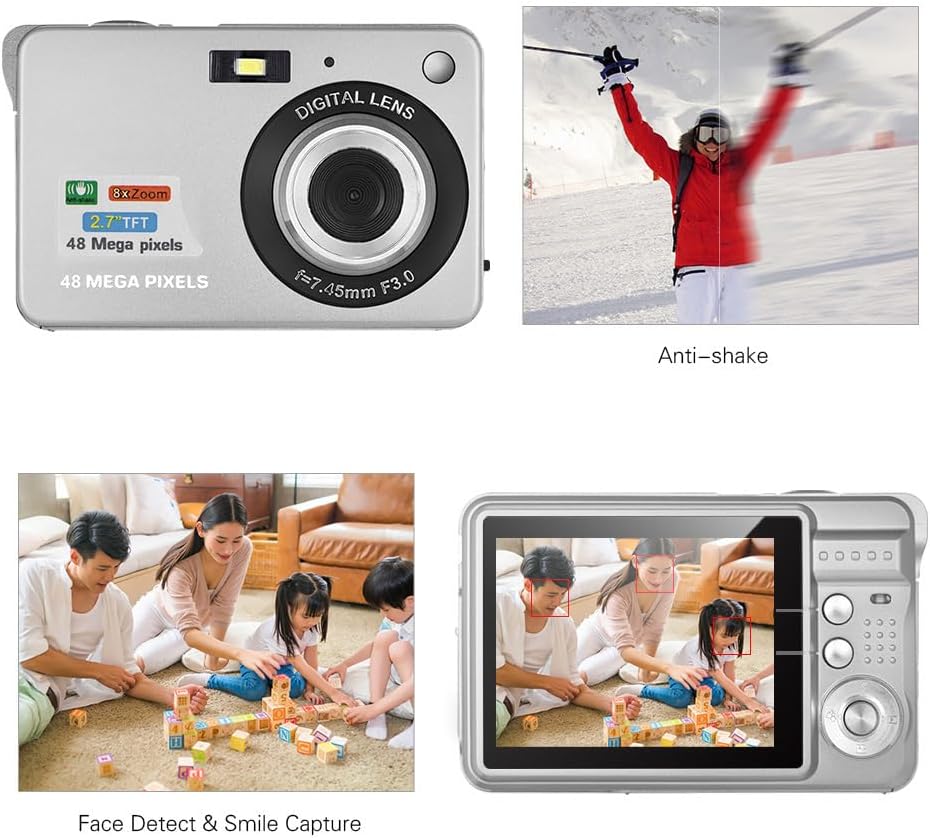
Image: Demonstrations of the camera's Anti-shake function (reducing blur from movement) and Face Detect & Smile Capture (identifying faces and automatically taking a photo when a smile is detected).
- Анты-трасенне: Helps reduce blur caused by camera movement. This feature is typically enabled by default or can be toggled in settings.
- Face Detect & Smile Capture: The camera can detect faces and automatically capture a photo when a smile is detected. Enable these options in the camera's menu.
- Аўтаспуск: Set a delay (2, 5, or 10 seconds) before the photo is taken, allowing you to be in the shot.
Макрарэжым
Для здымкі дробных аб'ектаў буйным планам.

Image: A close-up photograph of an ant, demonstrating the camera's Macro Mode capability for detailed shots of small subjects.
- Activate Macro Mode through the camera's menu or a dedicated button for close-up shots.
Рэжым прайгравання
- Press the Playback button to review зробленыя фатаграфіі і відэа на LCD-экране.
- Выкарыстоўвайце кнопкі навігацыі для пракруткі медыяфайлаў.
Падключэнне да кампутара
You can transfer photos and videos to a computer using the supplied Type-C USB cable.
- Пераканайцеся, што камера ўключана.
- Connect one end of the Type-C USB cable to the camera's USB port and the other end to an available USB port on your computer.
- The camera should appear as a removable disk or media device on your computer.
- Open the camera's folder to access and transfer your files.
- Перад адключэннем кабеля бяспечна адключыце прыладу ад кампутара.
Тэхнічнае абслугоўванне
- Уборка: Use a soft, dry cloth to clean the camera body. For the lens and LCD screen, use a specialized lens cleaning cloth and solution. Do not use abrasive cleaners.
- захоўванне: When not in use for extended periods, remove the battery and store the camera in a cool, dry place, preferably in its carry bag.
- Сыход за батарэяй: Recharge the battery periodically even if not in use to maintain its lifespan.
Ліквідацыю непаладак
| праблема | Магчымае рашэнне |
|---|---|
| Камера не ўключаецца. | Пераканайцеся, што акумулятар цалкам зараджаны і правільна ўстаўлены. |
| Нельга рабіць фота/запісваць відэа. | Check if a memory card is inserted and has sufficient free space. Ensure the camera is in the correct mode. |
| Выявы размытыя. | Ensure the lens is clean. Hold the camera steady during capture. Check lighting conditions and use flash if necessary. |
| Кампутар не распазнае камеру. | Ensure the USB cable is securely connected. Try a different USB port or restart the computer. |
| Акумулятар хутка разраджаецца. | Reduce LCD brightness. Limit flash usage. Ensure the camera is powered off when not in use. |
Тэхнічныя характарыстыкі
| Асаблівасць | Дэталь |
|---|---|
| Датчык выявы | Датчык CMOS |
| Дысплей | 2.7-цалевы ВК-экран |
| File фармат | JPEG (Photo), AVI (Video) |
| Дазвол выявы | Up to 48M (8000x6000) |
| Дазвол відэа | 1920x1080 (1080P), 1280x720 |
| Лічбавы зум | 8X |
| Кампенсацыя экспазіцыі | EV-3 to EV+3 |
| Аўтаспуск | Выкл. / 2 сек. / 5 сек. / 10 сек |
| Асаблівасці | Anti-Shake, Face Detect, Smile Capture |
| Электразабеспячэнне | 1 * Lithium battery (3.7V 550mAh) |
| Падтрымліваецца карта памяці | Class-10 Micro SD, max. 128GB (not included) |
| Інтэрфейс | Type-C USB |
| Памеры (Д*Ш*У) | 9.2 * 6.1 * 1.4 cm / 3.6 * 2.4 * 0.5 inch |
| Вага | 99 г / 3.5 унцый |
| Падтрымоўваная сістэма | Windows XP, VISTA, WIN7, MAC |
Гарантыя і падтрымка
This product comes with a standard manufacturer's warranty. Please refer to the warranty card included in your package for specific terms and conditions. For technical support, troubleshooting assistance, or further inquiries, please visit the official Andoer webсайт або звярніцеся ў службу падтрымкі кліентаў. Захоўвайце чэк аб куплі як пацвярджэнне пакупкі для прэтэнзій па гарантыі.
Інтэрнэт-падтрымка: Visit the Andoer Store on Amazon