
1. Уводзіны
This manual provides detailed instructions for the setup, operation, and maintenance of your OWLENZ SD60 Wi-Fi Mini Projector. Please read this manual thoroughly before using the product to ensure proper functionality and safety. The SD60 features advanced LED light technology with 1500 lumens brightness, Wi-Fi screen sharing capabilities (Miracast/Airplay), and multiple media playback options for a versatile home theater experience. Its portable and compact design allows for easy installation and use.
2. Важная інфармацыя па бяспецы
- Не глядзіце непасрэдна ў аб'ектыў праектара, калі ён уключаны.amp уключаны.
- Забяспечце належную вентыляцыю вакол праектара, каб прадухіліць перагрэў.
- Трымайце праектар далей ад вады або іншых вадкасцей.
- Выкарыстоўвайце толькі адаптар сілкавання, які пастаўляецца з праектарам.
- Пазбягайце размяшчэння праектара на няўстойлівых паверхнях.
- The LED light technology is designed to be gentle on the eyes and has no radiation.
3. Змесціва ўпакоўкі
Праверце, ці ўсе пералічаныя ніжэй прадметы ўваходзяць у камплект. Калі якія-небудзь прадметы адсутнічаюць або пашкоджаныя, звярніцеся ў службу падтрымкі кліентаў.
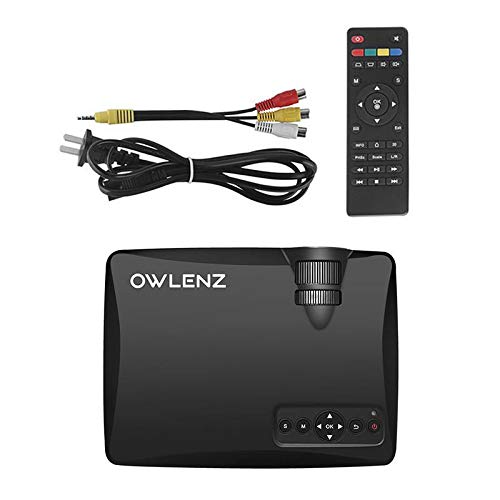
Image: OWLENZ SD60 Projector, remote control, power cable, and AV cables.
- OWLENZ SD60 Mini Projector
- Пульт дыстанцыйнага кіравання
- Сілавы кабель
- AV-кабель
- Кіраўніцтва карыстальніка (гэты дакумент)
4. Прадукт скончыўсяview
Familiarize yourself with the various parts and controls of your OWLENZ SD60 projector.
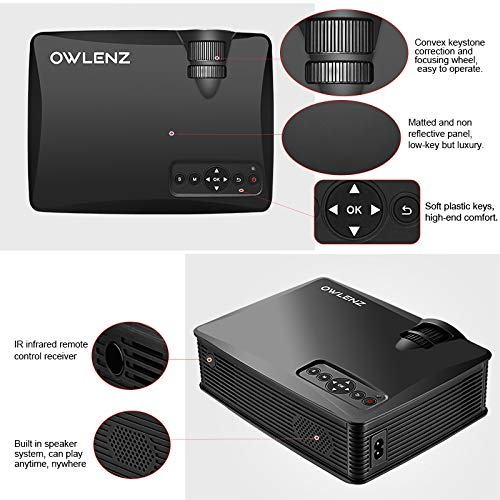
Image: Key features of the OWLENZ SD60 projector, including the focusing wheel, keystone correction, control panel, IR receiver, and built-in speaker.
- Convex Keystone Correction and Focusing Wheel: Located on the top, these allow for easy image adjustment.
- Matted and Non-Reflective Panel: Provides a sleek, low-key appearance.
- Soft Plastic Keys: For comfortable and responsive control.
- IR Infrared Remote Control Receiver: For remote operation.
- Built-in Speaker System: A 3W speaker for integrated audio playback.
- Парты ўводу: HDMI, USB, AV, SD Card slot (located on the side/rear).
5. Настройка
5.1 Падключэнне харчавання
- Падключыце кабель харчавання да ўваходнага порта харчавання праектара.
- Падключыце другі канец кабеля харчавання да адпаведнай электрычнай разеткі.
- Націсніце кнопку харчавання на праектары або пульце дыстанцыйнага кіравання, каб уключыць яго.
5.2 Падключэнне крыніц уваходнага сігналу
The projector supports various input options:
- HDMI: Connect an HDMI cable from your device (laptop, gaming console, etc.) to the projector's HDMI port.
- USB: Insert a USB drive into the USB port for direct media playback.
- АВ: Выкарыстоўвайце AV-кабель, які ўваходзіць у камплект, для падлучэння прылад з AV-выхадам.
- SD-карта: Insert an SD card into the SD card slot for media playback.
After connecting, select the appropriate input source from the projector's menu using the remote or control panel.
5.3 Wi-Fi Screen Sharing (Miracast / Airplay)
The SD60 supports wireless screen sharing from compatible smartphones and tablets.
- Ensure your mobile device and the projector are connected to the same Wi-Fi network.
- On the projector, navigate to the "Screen Share" or "Miracast/Airplay" option in the main menu.
- On your mobile device, activate the screen mirroring function (e.g., "Smart View«на Android, «Дзеркальнае адлюстраванне экрана» на iOS).
- Выберыце назву праектара са спісу даступных прылад, каб усталяваць злучэнне.
5.4 Рэгуляванне фокусу і трапецападобнага скажэння
- Фокус: Rotate the focusing wheel near the lens until the projected image is clear and sharp.
- Карэкцыя трапецеідальных скажэнняў: Use the keystone correction wheel to adjust the image shape if it appears trapezoidal (wider at the top or bottom).
6. Аперацыя
6.1 Асноўныя элементы кіравання
Для навігацыі па меню і налады выкарыстоўвайце панэль кіравання на праектары або пульт дыстанцыйнага кіравання.
- Кнопка харчавання: Уключае/выключае праектар.
- Navigation Buttons (Arrows/OK): Для навігацыі па меню і выбару.
- Кнопка крыніцы: Switches between input sources (HDMI, USB, AV, SD Card, Wi-Fi).
- Кнопка меню: Доступ да меню налад праектара.
6.2 Прайграванне медыяфайлаў
Once an input source is selected, the projector will display content. For USB/SD card playback, navigate through the file browser to select your desired media.
6.3 Аўдыёвыхад
- Убудаваны дынамік: The projector has a built-in 3W speaker suitable for small viewныя раёны.
- Знешні дынамік: For a better listening experience, connect external speakers or headphones to the 3.5mm audio port.
6.4 Projection Size
The projector supports projection sizes ranging from 40 to 150 inches, offering a large screen experience.
7. Тэхнічнае абслугоўванне
7.1 Ачыстка
- Выкарыстоўвайце мяккую сухую тканіну для чысткі вонкавай паверхні праектара.
- Для лінзаў выкарыстоўвайце сурвэтку для чысткі лінзаў і спецыяльны раствор для чысткі лінзаў. Не выкарыстоўвайце абразіўныя матэрыялы.
- Рэгулярна чысціце вентыляцыйныя адтуліны, каб забяспечыць належную цыркуляцыю паветра і прадухіліць назапашванне пылу.
7.2 LED Bulb Lifespan
The OWLENZ SD60 features an LED bulb with a lifespan of up to 30,000+ hours, significantly longer than traditional projector lamps. No regular bulb replacement is typically required under normal usage conditions.
8. Выпадкі выкарыстання
The OWLENZ SD60 Mini Projector is versatile and suitable for various applications:
- хатні кінатэатр: Enjoy movies, TV shows, and sports on a large screen.
- Гульні: Connect gaming consoles for an immersive gaming experience.
- Навучальныя мэты: Project educational content, videos, and presentations.
- Children's Entertainment: Ideal for playing videos and cartoons for children.
- Маленькі ViewАбласці: Its compact design and built-in speaker make it perfect for use in smaller rooms or spaces.
9. Выпраўленне непаладак
| праблема | Магчымая прычына | Рашэнне |
|---|---|---|
| Не адлюстроўваецца выява | Incorrect input source selected; loose cable connection; source device not powered on. | Select the correct input source. Check all cable connections. Ensure the source device is powered on. |
| Відарыс размыты | Фокус адрэгуляваны няправільна. | Паварочвайце кола факусоўкі, пакуль выява не стане выразнай. |
| Выява мае трапецападобную форму | Keystone not adjusted correctly. | Адрэгулюйце кола карэкцыі трапецападобнага скажэння. |
| Няма гуку | Занадта нізкі гук; знешнія дынамікі падключаны няправільна; аўдыёфармат не падтрымліваецца. | Increase volume. Check external speaker connection or use built-in speaker. Ensure audio format is compatible. |
| Wi-Fi screen sharing not working | Devices not on the same Wi-Fi network; screen mirroring function not activated on mobile device. | Ensure both devices are on the same Wi-Fi. Activate screen mirroring on your mobile device and select the projector. |
10. Тэхнічныя характарыстыкі
| Асаблівасць | Дэталь |
|---|---|
| Марка | АВЛЕНЦ |
| мадэль | SD60 |
| Памеры прадукту (ДxШxВ) | 20.8 х 16.5 х 8 см |
| Вага прадмета | 949 г |
| Абсталяванне інтэрфейсу | HDMI, USB |
| Тэхналогія падлучэння | HDMI, USB, Wi-Fi |
| Сумяшчальныя прылады | Смартфоны, планшэты, ноўтбукі |
| Асаблівасці | Убудаваны дынамік, партатыўны |
| Тэхналогія адлюстравання | ВК |
| Яркасць | 1500 люмен |
| LED Bulb Lifespan | Да 30,000+ гадзін |
| Памер праекцыі | Ад 40 да 150 цаляў |
| Магутнасць убудаванага дынаміка | 3W |
| Формаў-фактар | Партатыўны |
| Тып мацавання | Настольнае мацаванне |
| Ватtage | 24 ват |
| Патрабуюцца батарэі | Yes (for remote control, not included) |
11. Відэа прадуктуview
Паглядзіце гэта кароткае відэа для хуткага азнаямленняview of the OWLENZ SD60 Mini Projector's features and capabilities.
Відэа: Кароткі аглядview highlighting the OWLENZ SD60 projector's display, sound, smart features, other features, portability, and use cases.
12. Гарантыя і падтрымка
The OWLENZ SD60 Mini Projector comes with a standard brand warranty. For detailed warranty information, technical support, or service inquiries, please refer to the product detail page on Amazon.in or contact OWLENZ customer service directly.
For further information, visit the product detail page: Старонка прадукту Amazon