
Уводзіны
Дзякуй за пакупкуasing the VTech VT1091 Cordless Phone. This manual provides essential information for setting up, operating, and maintaining your new phone. Please read these instructions carefully to ensure proper use and to fully benefit from its features.
Змест пакета
Перад пачаткам пераканайцеся, што ў вашай упакоўцы ёсць усе неабходныя рэчы:
- Бесправадная трубка
- Базавая адзінка
- Адаптар сілкавання для базавага блока
- Тэлефонны шнур
- Акумулятары (папярэдне ўсталяваныя або асобныя)
- Кіраўніцтва карыстальніка (гэты дакумент)
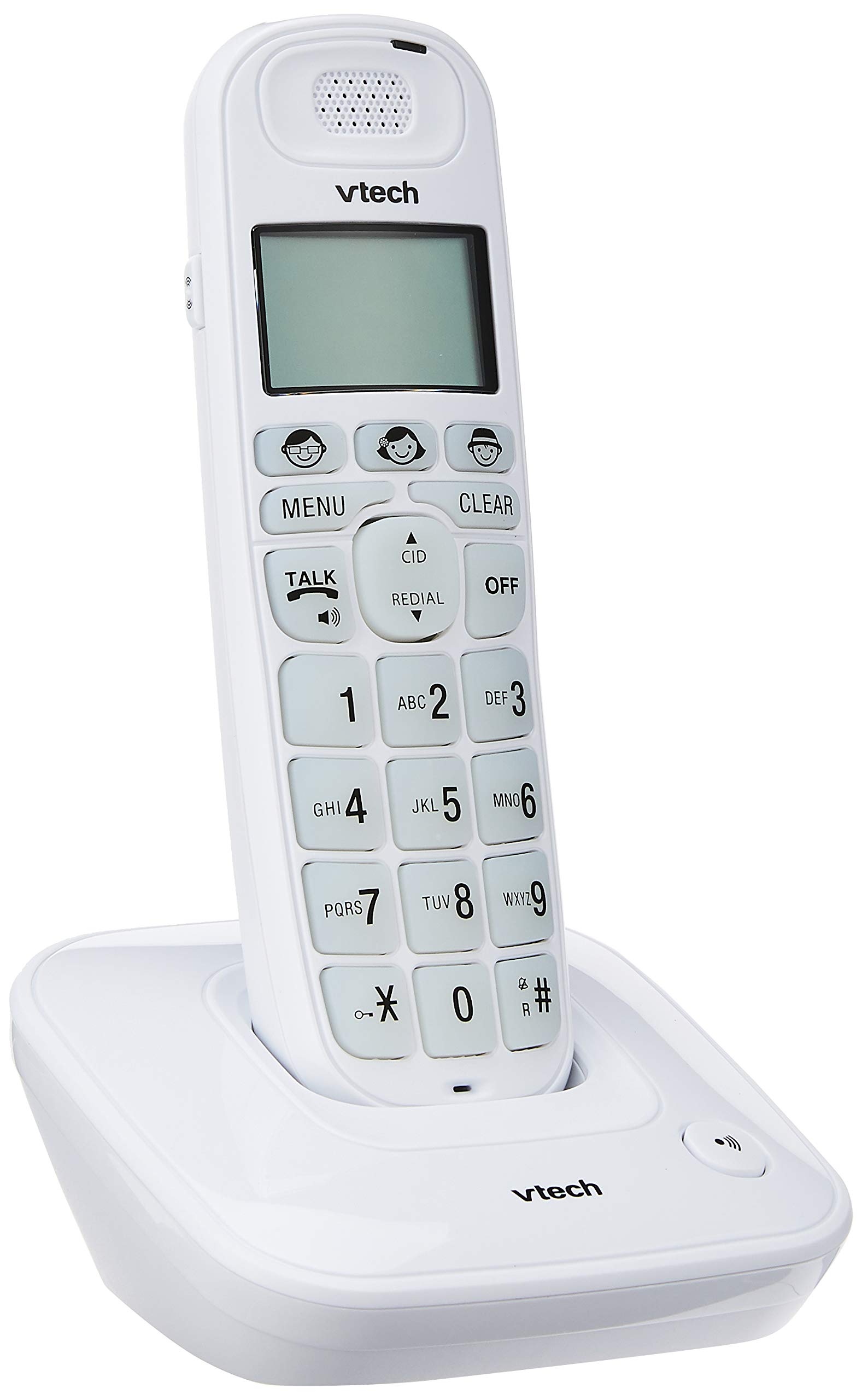
Image: The VTech VT1091 cordless phone handset resting in its base unit, showing the front view of the keypad and screen.
Настройка
1. Устаноўка батарэі
- Знайдзіце вечка батарэйнага адсека на задняй панэлі тэлефона.
- Зрушыце вечка ўніз, каб адкрыць.
- Устаўце акумулятарныя батарэйкі, якія ўваходзяць у камплект, выконваючы правільную палярнасць (+ і -).
- Замяніце крышку батарэйнага адсека.
2. Падключэнне базавага блока
- Падключыце адзін канец тэлефоннага шнура да раздыма TEL LINE на задняй панэлі базавага блока.
- Падключыце другі канец тэлефоннага шнура да тэлефоннай разеткі на сцяне.
- Connect the small end of the power adapter to the DC IN jack on the back of the base unit.
- Падключыце вялікі канец адаптара харчавання да звычайнай электрычнай разеткі.

Выява: Задняя частка view of the VTech VT1091 base unit, showing the ports for the telephone line cord and the power adapter.
3. Зарадка трубкі
Place the handset on the base unit with the display facing forward. The handset will begin charging. For optimal battery performance, allow the handset to charge for at least 16 hours before initial use.

Выява: Збоку view of the VTech VT1091 cordless phone handset securely placed in its charging base.
Асноўныя характарыстыкі
- Ampвызваленне: Amplification of incoming sounds by up to 30 decibels.
- Ultra-low Radiation Mode: Operates with reduced radiation levels.
- BOOSTER Button: One-touch button for easy sound ampвызваленне.
- Вялікая клавіятура: Big buttons with backlit keypad for improved visibility.
- ВК -дысплей з падсветкай: Large display with orange backlight.
- Гучная сувязь трубкі: Для сувязі без рук.
- Page/Handset Locator: Helps locate a misplaced handset.
- Auto Answer/Keypad Lock: Convenient call handling and security features.
- Alarm/Secrecy: Includes alarm function and call secrecy feature.
- GAP Compliant: Compatible with other GAP-enabled DECT devices.
- Даведнік тэлефоннай кнігі: 20 name and number entries.
- Ідэнтыфікатар абанента: Displays the last 10 caller numbers.
- Паўторны набор: Stores the last 5 numbers dialed.
- Ringer Melodies: 10 selectable ringer melodies (5 polyphonic and 5 standard).
- Тэрмін службы батарэі: Approximately 10 hours talk time / 100 hours standby time.
- Кнопкі памяці: 3 one-touch memory buttons.
- Хуткі набор: 8 number (2-9) speed dial memories.
- Сумяшчальнасць са слыхавым апаратам: Designed for use with hearing aids.
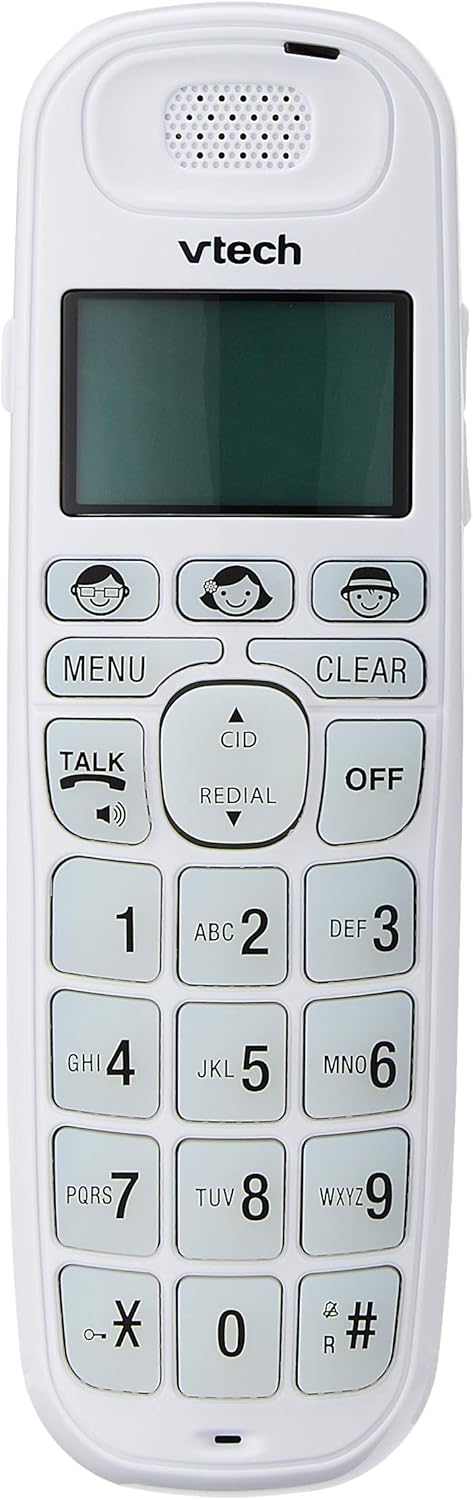
Image: Close-up of the VTech VT1091 handset, highlighting the large backlit keypad, LCD display, and dedicated function buttons.
Інструкцыя па эксплуатацыі
Тэлефанаванне
- Націсніце ГАВАРЫЦЬ button to get a dial tone.
- Набярыце патрэбны нумар тэлефона.
- Каб завяршыць выклік, націсніце ВЫКЛ кнопку або пакладзеце трубку назад на базу.
Адказ на званок
Калі тэлефон звоніць, націсніце кнопку ГАВАРЫЦЬ кнопку, каб адказаць на выклік.
Выкарыстанне гучнай сувязі
Падчас размовы націсніце ГАВАРЫЦЬ button again (with the speaker icon) to activate the speakerphone function. Press it again to switch back to the earpiece.
Рэгуляванне гучнасці
Падчас размовы выкарыстоўвайце UP і УНІЗ arrow buttons on the side of the handset to adjust the earpiece or speakerphone volume.
Тэлефонная кніга
- Націсніце МЕНЮ кнопка.
- Navigate to "Phonebook" using the arrow buttons and press МЕНЮ каб выбраць.
- Follow the on-screen prompts to add, edit, or delete entries.
Функцыя паўторнага набору
Націсніце ПЕРАСУД кнопка для view a list of the last 5 dialed numbers. Use the arrow buttons to select a number and press ГАВАРЫЦЬ набраць.
Ідэнтыфікатар абанента
When the phone rings, the caller's number (if available) will be displayed on the screen. Press the CID кнопку паўторнаview the caller ID list. Use the arrow buttons to scroll through entries.
BOOSTER Function
Падчас размовы націсніце адпаведную кнопку БУСТЭР button (if available, often integrated with volume or a specific key) to instantly amplify the incoming audio by up to 30 decibels. Press again to deactivate.
Лакатар тэлефона
To locate a misplaced handset, press the СТАР button on the base unit. The handset will ring.
Тэхнічнае абслугоўванне
Уборка
Працярыце трубку і базу мяккай губкайamp cloth. Do not use cleaning sprays or abrasive cleaners, as these can damage the finish or electrical components.
Сыход за батарэяй
- Only use the supplied rechargeable batteries.
- Калі тэлефон не будзе выкарыстоўвацца працяглы час, выміце батарэйкі, каб прадухіліць іх уцечку.
- Не выкідвайце батарэі ў агонь.
Ліквідацыю непаладак
| праблема | Рашэнне |
|---|---|
| Няма сігналу набору |
|
| Тэлефон не зараджаецца |
|
| Дрэнная якасць гуку |
|
| Ідэнтыфікатар абанента не адлюстроўваецца |
|
Тэхнічныя характарыстыкі
| Марка | VTech |
| мадэль | VT1091 |
| Тып тэлефона | Бесправадная |
| Колер | Белы |
| Матэрыял | Пластыкавыя |
| Крыніца харчавання | Электрычны шнур (для базавага блока) |
| Тып дазвону | Адзіная клавіятура |
| Тып аўтаадказчыка | Digital (Note: This model's primary features do not highlight an integrated answering machine, but refers to general digital phone capabilities.) |
| Шматлінейная аперацыя | Халасты |
| Час размовы па тэлефоне | 10 гадзін |
| Час чакання тэлефона | 100 гадзін |
| Ідэнтыфікатар абанента | так |
| UPC | 735078026569 |

Image: The VTech VT1091 cordless phone in its base, with a measurement overlay indicating a height of 8.3 inches (21 cm).
Гарантыя і падтрымка
This VTech VT1091 Cordless Phone comes with a 2 год гарантыі мясцовага (Сінгапурскага) вытворцы. For warranty claims or technical support, please refer to the contact information provided with your purchase documentation or visit the official VTech Singapore webсайт.
For further assistance, please contact VTech customer service.