
1. Уводзіны
Thank you for choosing the Green Extreme Dual Smart Charger. This charger is designed to efficiently and reliably charge two Sony NP-FZ100 batteries simultaneously. Featuring an intuitive LCD screen, it provides real-time charging status, ensuring your camera batteries are always ready for use. Its universal power input allows for flexible charging from various power sources, making it ideal for both studio and on-location photography.
2. Інфармацыя па бяспецы
- Прачытайце ўсе інструкцыі перад выкарыстаннем.
- Не падвяргайце зарадную прыладу ўздзеянню дажджу або вільгаці.
- Do not disassemble the charger. Refer servicing to qualified personnel.
- Use only with compatible batteries (Sony NP-FZ100 or other batteries with appropriate plates).
- Avoid charging damaged or leaking batteries.
- Захоўваць у месцах, недаступных дзецям.
- Калі зарадная прылада не выкарыстоўваецца, адключыце яе ад крыніцы сілкавання.
3. Змесціва ўпакоўкі
- Green Extreme Dual Smart Charger Unit
- Шнур сілкавання
- DC Car Charger Adapter
- NP-FZ100 Battery Plates (pre-installed or included separately)
4. Прадукт скончыўсяview
Familiarize yourself with the components of your Green Extreme Dual Smart Charger.
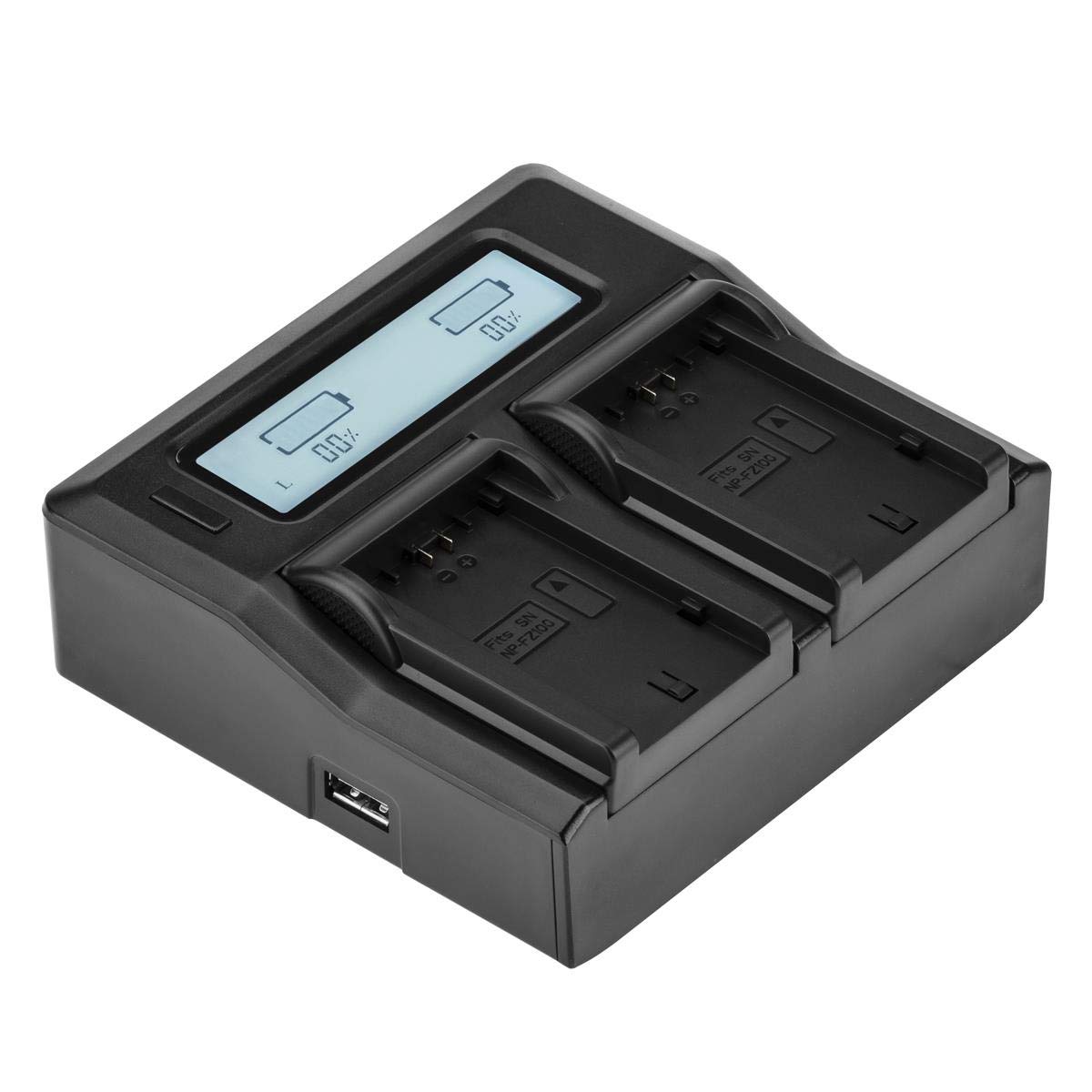
Малюнак 4.1: Топ view of the Green Extreme Dual Smart Charger, showing the LCD screen and two charging bays.

Малюнак 4.2: The charger unit with two NP-FZ100 battery plates installed in the charging bays.

Малюнак 4.3: Буйны план view of a single NP-FZ100 battery plate, showing the battery contacts and model designation.

Малюнак 4.4: Demonstration of how to correctly insert or remove a battery plate from the charger bay.

Малюнак 4.5: Close-up of the power input ports on the side of the charger, including the AC and DC inputs.
5. Настройка
- Install Battery Plates: Ensure the correct battery plates for Sony NP-FZ100 are securely installed in both charging bays. If not, align the plate with the bay and slide it into place until it clicks.
- Падключыце харчаванне:
- Магутнасць пераменнага току: Connect the provided AC power cord to the charger's AC input port and then to a standard wall outlet (110-240V).
- Магутнасць пастаяннага току: For in-vehicle charging, connect the provided DC car charger adapter to the charger's DC input port and then to your vehicle's 12-24V accessory socket.
- The LCD screen will illuminate, indicating the charger is powered on.
6. Інструкцыя па эксплуатацыі
6.1 Зарадка акумулятараў
- With the charger powered on, carefully insert one or two Sony NP-FZ100 batteries into the installed battery plates. Ensure the battery contacts align correctly with the plate contacts.
- The charger will automatically detect the battery and begin the charging process.
- Monitor the LCD screen for charging status.

Малюнак 6.1: The charger with two NP-FZ100 batteries inserted, displaying their charge status on the LCD screen.
6.2 Інфармацыя пра ВК-дысплей
The backlit LCD screen provides clear, real-time information about the charging process:
- Зарад у працэнтахtage: Displays the current charge level of each battery numerically.
- Charge Bar Indicator: A graphical bar fills up as the battery charges, providing a quick visual reference.
- Стан зарадкі: The display will indicate when charging is active and when a battery is fully charged.
6.3 Universal Voltage Выяўленне
The charger features intelligent design that automatically detects and adjusts to the voltage of the attached battery. This ensures optimal and safe charging for compatible battery types when using the correct battery plates.
7. Тэхнічнае абслугоўванне
- Уборка: Disconnect the charger from power before cleaning. Use a soft, dry cloth to wipe the exterior. Do not use liquid cleaners or solvents.
- захоўванне: Захоўвайце зарадная прылада ў прахалодным, сухім месцы, удалечыні ад прамых сонечных прамянёў і экстрэмальных тэмператур.
- Battery Plates: Ensure battery plates are free from dust and debris to maintain good contact with batteries.
8. Выпраўленне непаладак
- Зарадная прылада не ўключаецца: Ensure the power cord is securely connected to both the charger and the power outlet/vehicle socket. Try a different outlet or power source.
- Акумулятар не зараджаецца: Verify that the battery is correctly inserted and making proper contact with the battery plate. Ensure the battery is compatible and not damaged. Check if the battery plate is securely installed.
- Не працуе ВК-дысплей: If the charger is powered on but the LCD is blank, try disconnecting and reconnecting the power. If the issue persists, contact customer support.
- Павольная зарадка: Ensure you are using a stable power source. Charging speed can vary based on battery condition and ambient temperature.
9. Тэхнічныя характарыстыкі
| Нумар мадэлі | NP-FZ100 Charger |
| Уваходны кнtage | Пераменны ток 110-240 В, пастаянны ток 12-24 В |
| Выхад Voltage | 7.4 Volts (auto-detect) |
| Памеры прадукту | 7 х 4.8 х 1.7 цалі |
| Вага прадмета | 14.1 унцыі |
| Сертыфікаты | UL, CE, FCC |
10. Гарантыя і падтрымка
Green Extreme products are manufactured to high-quality standards. For warranty information, technical support, or service inquiries, please contact Green Extreme customer support through the retailer where the product was purchased or visit the official Green Extreme webсайт.