
1. Уводзіны
This manual provides detailed instructions for the assembly, operation, and maintenance of your FLEXISPOT Electric Sit Stand Desk Base. Designed for a DIY desktop workstation, this adjustable desk frame offers flexibility and ergonomic benefits for both home and office environments. It includes an integrated power strip and a cable management tray to enhance your workspace efficiency and organization.

This image displays the assembled FLEXISPOT standing desk frame within a modern office environment, showcasing its sleek design and how it fits into a professional workspace.
2. Важная інфармацыя па бяспецы
Please read and understand all safety instructions before assembly and operation to prevent injury or damage to the product.
- Заўсёды выконвайце інструкцыі па зборцы.
- Keep the desk away from water and heat sources.
- Do not use the desk if the cord is damaged.
- Always use the desk within its weight limit.
- Keep the desk away from children and pets when in use.
3. Змесціва ўпакоўкі
Verify that all components are present before beginning assembly. If any parts are missing or damaged, please contact FLEXISPOT customer support.

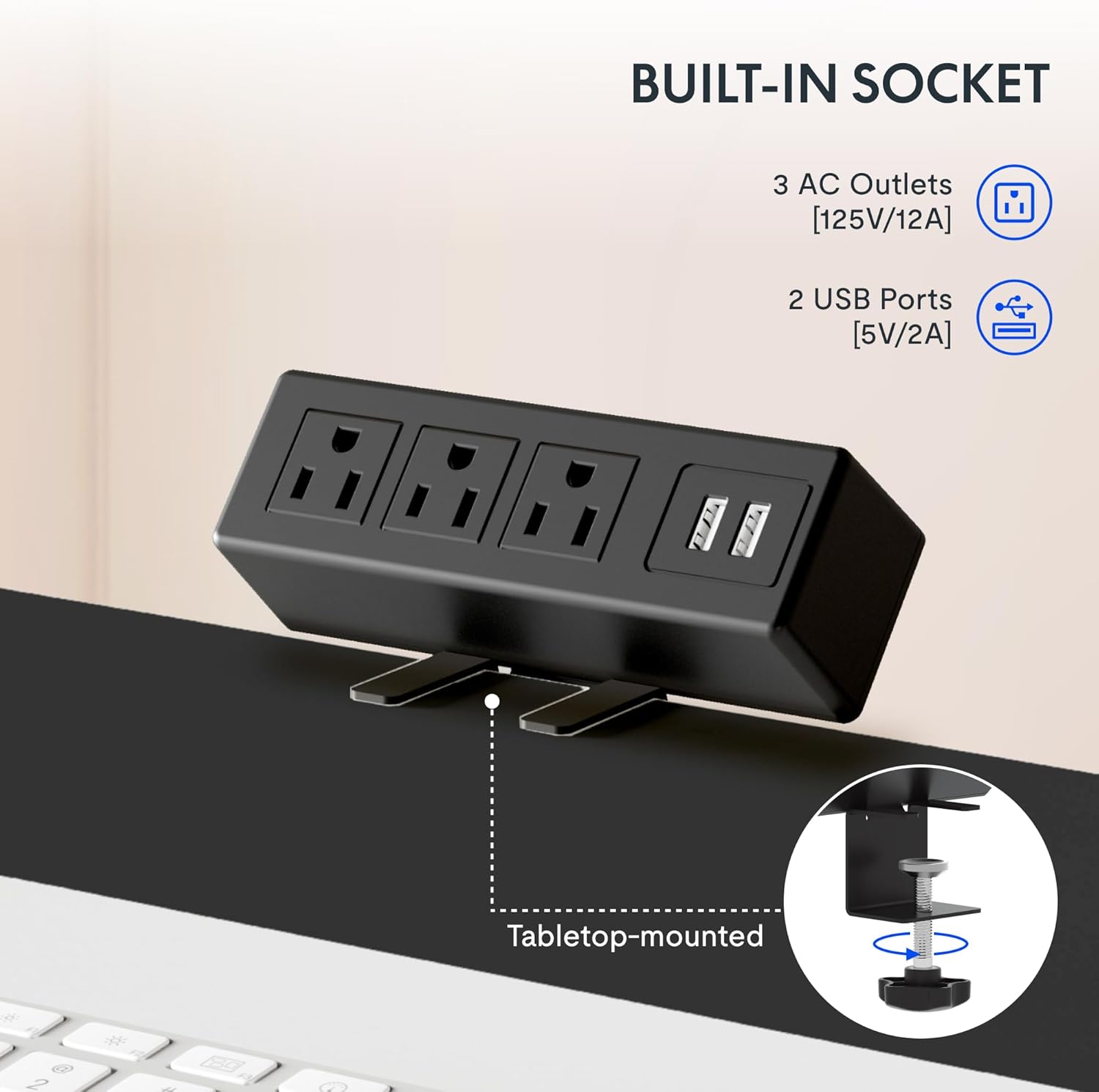
Гэта выява паказвае буйны план view з клamp-on power strip, highlighting its three AC outlets and two USB ports, designed for convenient tabletop mounting.
Спіс кампанентаў:
- Adjustable Desk Legs (2)
- Crossbar/Frame Support
- Control Panel with Memory Functions
- Clamp Power Strip (3 AC outlets, 2 USB ports)
- Латок для пракладкі кабеляў
- Mounting Hardware and Tools (as provided)
- Cable Clips/Ties
4. Налада і зборка
Assembly of the FLEXISPOT desk frame is designed to be straightforward and typically takes less than 30 minutes. Follow these steps carefully.
4.1 Prepare Your Workspace
Clear an area large enough to assemble the desk frame. Ensure you have all components and the provided tools readily available.
4.2 Збярыце каркас
Attach the adjustable desk legs to the crossbar according to the detailed instructions in the included assembly guide. Ensure all screws are tightened securely.
4.3 Attach Your Desktop
The frame is compatible with various desktop sizes. Recommended desktop sizes are a width of 39.3" to 63" and a depth of 19.7" to 31.5". Secure your chosen desktop to the assembled frame using appropriate screws (may not be included with frame only purchase).

This diagram illustrates the recommended dimensions for a desktop panel to be used with the FLEXISPOT desk frame, ensuring proper fit and stability.
4.4 Install Power Strip and Cable Management
Прымацаваць клamp power strip to the edge of your desktop for easy access to power outlets. Install the cable management tray and use the provided cable clips to organize and conceal your cords, maintaining a clean and clutter-free workspace.

Гэта выява паказвае буйны план view з клamp-on power strip, highlighting its three AC outlets and two USB ports, designed for convenient tabletop mounting.
This side-by-side comparison demonstrates the significant improvement in desk organization achieved by utilizing the integrated cable management tray, transforming a cluttered setup into a tidy workspace.
5. Інструкцыя па эксплуатацыі
Your FLEXISPOT desk frame features an electric height adjustment system with a memory controller for personalized comfort.
5.1 Рэгуляванне вышыні
Use the up (▲) and down (▼) arrow buttons on the control panel to smoothly raise or lower the desk to your desired height. The adjustable height range is 28.1'' to 45.7''.

This visual demonstrates the extensive height adjustment capabilities of the desk, showing its minimum height of 28.1 inches and maximum height of 45.7 inches, allowing for versatile use.
5.2 Выкарыстанне прэсетаў памяці
The control panel allows you to save up to four preferred height settings. To save a height, adjust the desk to the desired level, then press and hold one of the numbered memory buttons (1, 2, 3, or 4) until the display confirms the setting is saved. To recall a saved height, simply press the corresponding numbered button.
This detailed image highlights the desk's control panel, featuring a digital display, up/down adjustment buttons, and four memory preset buttons for convenient height recall.
5.3 Прадукт скончыўсяview Відэа
Для візуальнага аглядуview of the FLEXISPOT desk and its features, please watch the official product video below.
Гэта відэа дае агульны аглядview of FlexiSpot products, showcasing the ergonomic benefits and various uses of their adjustable desks in different settings. It demonstrates the smooth height adjustment and integrated features.
6. Тэхнічнае абслугоўванне
To ensure the longevity and optimal performance of your FLEXISPOT Standing Desk Frame, follow these simple maintenance guidelines:
- Уборка: Wipe down the frame and control panel with a soft, damp тканінай. Пазбягайце выкарыстання агрэсіўных хімікатаў або абразіўных ачышчальнікаў, якія могуць пашкодзіць пакрыццё.
- Кабельнае кіраванне: Periodically check and re-organize cables to prevent tangles and ensure smooth operation of the desk's height adjustment mechanism.
- Сыход за рухавіком: The motor is designed for maintenance-free operation. Avoid obstructing the movement of the legs during adjustment.
- Рэгулярны агляд: Occasionally check all screws and connections to ensure they remain tight. Re-tighten if necessary.
7. Выпраўленне непаладак
If you encounter any issues with your FLEXISPOT Standing Desk Frame, refer to the following common troubleshooting tips:
| праблема | Магчымая прычына | Рашэнне |
|---|---|---|
| Стол не рухаецца і не рэагуе на элементы кіравання. | Power cable disconnected; overload protection activated; motor error. | Check power connections. Unplug and re-plug the desk. Reduce weight on the desk. Refer to the specific error codes in your detailed manual if available. |
| Стол рухаецца няроўна або выдае незвычайныя гукі. | Слабыя злучэнні; нераўнамернае размеркаванне вагі; перашкода. | Ensure all assembly screws are tight. Distribute weight evenly on the desktop. Check for any obstructions under or around the desk. |
| Не працуюць загадзя настроеныя налады памяці. | Няправільная працэдура захавання. | Ensure you press and hold the memory button until the setting is confirmed. Re-save your desired heights. |
If the problem persists after attempting these solutions, please contact FLEXISPOT customer support for further assistance.
8. Тэхнічныя характарыстыкі
Key technical specifications for the FLEXISPOT Standing Desk Frame (Model E1):
| Асаблівасць | Дэталь |
|---|---|
| Марка | ФЛЕКСІСПОТ |
| Нумар мадэлі | E1 |
| Памеры прадукту (Д х Ш х У) | 19.7"D x 63"W x 45.7"H (frame only, max extension) |
| Рэгуляваны дыяпазон вышыні | 28.1" (Min) - 45.7" (Max) |
| Recommended Desktop Width | ад 39.3 да 63 цаляў |
| Recommended Desktop Depth | ад 19.7 да 31.5 цаляў |
| Базавы матэрыял | Легаваная сталь |
| Колер | Шэры |
| Рэкамендацыя па максімальнай вазе | 70 кілаграма (прыблізна 154 фунта) |
| Асаблівасці панэлі кіравання | Digital Display, Up/Down Adjustment, 4 Memory Presets |
| Сілавая сетка | 3 разеткі пераменнага току (125 В/12 А), 2 порты USB (5 В/2 А) |
| Неабходная зборка | так |
| UPC | 855427008913 |
9. Гарантыя і падтрымка
FLEXISPOT stands behind the quality of its products. Your Standing Desk Frame is covered by the following warranty:
- 5-гадовая гарантыя: Covers the frame, motor, and other mechanisms.
- 2-гадовая гарантыя: Covers the controller, switch, and electronics.
For warranty claims, technical assistance, or any questions regarding your product, please visit the official FLEXISPOT website or contact their customer support directly. Please have your model number (E1) and proof of purchase ready when contacting support.