
1. Уводзіны
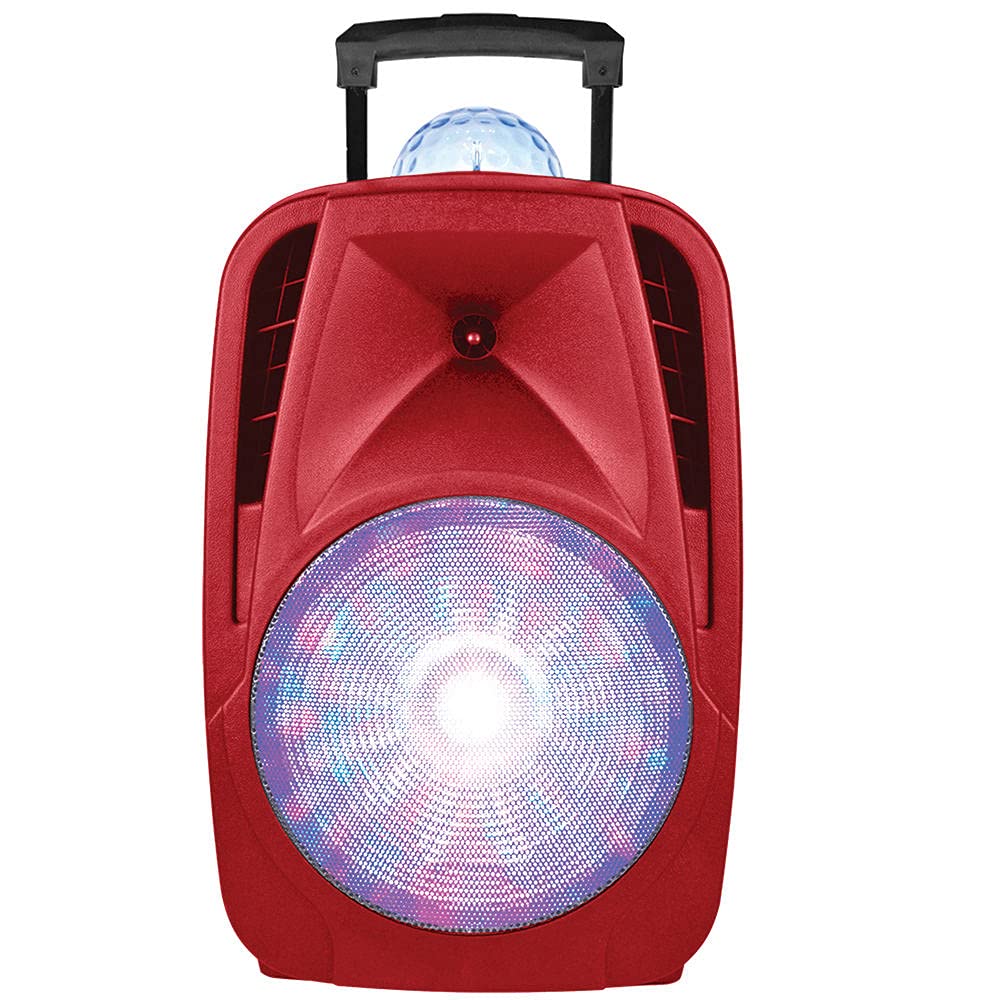
This manual provides essential instructions for the safe and efficient operation of your SuperSonic IQ-6112DJBT Portable Bluetooth DJ Speaker. Please read this manual thoroughly before using the product and retain it for future reference.
2. Інфармацыя па бяспецы
Каб забяспечыць бяспечную працу і прадухіліць пашкоджанні, выконвайце наступныя меры засцярогі:
- Не падвяргайце дынамік уздзеянню вады, вільгаці або экстрэмальных тэмператур.
- Не адчыняйце дынамік casing. Па ўсіх пытаннях тэхнічнага абслугоўвання звяртайцеся да кваліфікаванага персаналу.
- Трымайце дынамік далей ад крыніц цяпла і прамых сонечных прамянёў.
- Выкарыстоўвайце толькі адаптар сілкавання, які пастаўляецца з прыладай.
- Забяспечце належную вентыляцыю вакол дынаміка падчас працы.
- Пазбягайце працяглага праслухоўвання на высокім узроўні гучнасці, каб пазбегнуць пашкоджання слыху.
3. Змесціва ўпакоўкі
Праверце наяўнасць усіх прадметаў у камплекце:
- SuperSonic IQ-6112DJBT Portable Bluetooth DJ Speaker
- Правадной мікрафон
- Пульт дыстанцыйнага кіравання
- Адаптар сілкавання
- Кіраўніцтва карыстальніка (гэты дакумент)
4. Прадукт скончыўсяview
The SuperSonic IQ-6112DJBT is a versatile portable DJ speaker featuring a 12-inch high-efficiency woofer, built-in Bluetooth connectivity, USB/Micro SD card inputs, and an AUX input. It also includes a disco light feature for enhanced ambiance.
4.1 Included Accessories: Microphone and Remote Control
This image displays the included wired microphone and the multi-function remote control. The microphone features a standard 1/4 inch audio jack for connection to the speaker. The remote control includes buttons for mute, record, play, volume adjustment, track navigation, scan, and EQ settings, along with a numeric keypad for direct track selection.
4.2 Элементы кіравання пярэдняй панэлі
The speaker features various controls for audio playback, input selection, and light effects. These typically include:
- Асноўны аб'ём: Рэгулюе агульны гук.
- Гучнасць мікрафона: Рэгулюе ўзровень уваходнага сігналу мікрафона.
- Кіраванне рэхам: Рэгулюе эфект рэха для мікрафона.
- Кнопка рэжыму ўводу: Switches between Bluetooth, USB, Micro SD, and AUX inputs.
- Кнопка рэжыму святла: Controls the disco light effects.
- Элементы кіравання прайграваннем: Прайграванне/Паўза, Наступны/Папярэдні трэк.
4.3 Злучэнні задняй панэлі
The rear panel provides ports for power and external devices:
- Спажываная магутнасць: Падключаецца да адаптара сілкавання.
- AUX-уваход (3.5 мм): Connects external audio devices via an audio cable.
- Порт USB: Для USB-флэш-назапашвальнікаў.
- Слот для карты Micro SD: Для карт памяці Micro SD.
- Microphone Input (1/4 inch): Connects the wired microphone.
5. Настройка
5.1 Падключэнне харчавання
- Connect the supplied power adapter to the speaker's power input port.
- Падключыце адаптар сілкавання да стандартнай электрычнай разеткі.
- Turn on the speaker using the power switch, usually located on the rear or front panel.
5.2 Initial Charging (Battery Powered)
The speaker is battery-powered. For optimal performance, fully charge the speaker before its first use. The charging indicator light will typically change color or turn off when charging is complete.
6. Інструкцыя па эксплуатацыі
6.1 Спалучэнне па Bluetooth
- Уключыце дынамік.
- Націсніце Рэжым button on the speaker or remote control until "Bluetooth" mode is selected. The speaker will indicate it is in pairing mode (e.g., a flashing LED or an audible prompt).
- На прыладзе з падтрымкай Bluetooth (смартфоне, планшэце і г.д.) перайдзіце ў налады Bluetooth і знайдзіце даступныя прылады.
- Выберыце «IQ-6112DJBT» са спісу прылад.
- Once paired, the speaker will confirm the connection (e.g., a solid LED or an audible prompt). You can now play audio wirelessly from your device.
6.2 Прайграванне з USB/Micro SD
- Insert a USB flash drive or Micro SD card (pre-loaded with MP3 audio files) into the respective port/slot on the speaker.
- Націсніце Рэжым button to select "USB" or "SD" mode. The speaker will automatically begin playing audio from the inserted media.
- Use the playback controls (Play/Pause, Next/Previous Track) on the speaker or remote control to manage your music.
6.3 AUX ўваход
- Падключыце адзін канец аўдыёкабеля 3.5 мм (не ўваходзіць у камплект) да ўваходнага порта AUX на дынаміку.
- Connect the other end of the audio cable to the headphone jack or audio output of your external audio device (e.g., MP3 player, laptop).
- Націсніце Рэжым button to select "AUX" mode.
- Play audio from your external device. Adjust volume on both the speaker and the external device.
6.4 Выкарыстанне мікрафона
- Plug the wired microphone into the 1/4 inch microphone input jack on the speaker.
- Adjust the microphone volume knob on the speaker to your desired level.
- Adjust the echo control knob for an echo effect, if desired.
6.5 светлавыя эфекты
The speaker features built-in disco lights. Press the Светлавы рэжым button on the speaker or remote control to cycle through different light patterns or to turn the lights off.
6.6 Функцыі дыстанцыйнага кіравання
The included remote control provides convenient access to various speaker functions:
- МУК: Выключэнне або ўключэнне гуку.
- ЗАПІС: Initiates recording (if supported by the speaker's firmware and connected media).
- ПРАЙГРАВАННЕ: Прайграе запісаны аўдыёзапіс.
- ГУЧНОСТЬ+/ГУЧНОСТЬ-: Increases or decreases the main volume.
- CH+/CH- (Next/Previous): Skips to the next or previous track/station.
- СКАНІРАВАЦЬ: Scans for radio stations (if FM radio is supported).
- EQ: Пераключэнне паміж прадусталяванымі наладамі эквалайзера.
- Лічбавая клавіятура (0-9): Direct selection of tracks on USB/SD media.
7. Тэхнічнае абслугоўванне
7.1 Ачыстка
Працірайце вонкавую паверхню дынаміка мяккай сухой тканінай. Не выкарыстоўвайце абразіўныя ачышчальнікі, воск або растваральнікі. Сачыце за тым, каб вадкасці не траплялі ў адтуліны дынаміка.
7.2 Захоўванне
When not in use for extended periods, store the speaker in a cool, dry place, away from direct sunlight and extreme temperatures. If battery-powered, charge the battery periodically to maintain its lifespan.
8. Выпраўленне непаладак
| праблема | Магчымая прычына | Рашэнне |
|---|---|---|
| Няма ўлады | Power adapter not connected; Battery depleted; Power switch off. | Ensure power adapter is securely connected and plugged into a working outlet. Charge the battery. Turn the power switch ON. |
| Няма гуку | Занадта нізкі гук; няправільны рэжым уводу; прылада не спалучаная (Bluetooth); кабель не падключаны (AUX). | Increase volume on speaker and source device. Select the correct input mode. Re-pair Bluetooth device. Check AUX cable connection. |
| Bluetooth не падключаецца | Дынамік не ў рэжыме спалучэння; Прылада занадта далёка; Перашкоды; Падключана раней спалучаная прылада. | Ensure speaker is in Bluetooth pairing mode. Move device closer to speaker. Turn off other Bluetooth devices. Disconnect from previously paired devices. |
| Не працуе мікрафон | Microphone not plugged in; Microphone volume too low; Faulty microphone. | Ensure microphone is securely plugged into the correct input. Increase microphone volume. Test with another microphone if available. |
9. Тэхнічныя характарыстыкі
- Марка: Звышгукавы
- Нумар мадэлі: IQ-6112DJBT
- Памер НЧ-дынаміка: 12 цаляў
- Тэхналогія падключэння: AUX, Bluetooth, USB
- Крыніца харчавання: Харчаванне ад батарэі
- Імпеданс: 4 Ом
- Колькасць каналаў: 2
- Аўдыё ўваход: Headphone jack (for AUX), 1/4 inch (for Microphone)
- Вага прадмета: 17.9 фунта
- UPC: 639131861121
10. Гарантыя і падтрымка
10.1 Інфармацыя аб гарантыі
This product is covered by a Manufacturer Warranty. For specific details regarding warranty coverage, duration, and terms, please refer to the warranty card included in your package or contact Supersonic customer support.
10.2 Падтрымка кліентаў
If you encounter any issues not covered in this manual or require further assistance, please contact Supersonic customer support. Contact information can typically be found on the product packaging, the official Supersonic webсайт або гарантыйны талон.