
1. Уводзіны
This manual provides essential information for the safe and effective operation of your Vangoa 65W Electric Drum Amplifier. Designed for electronic percussion products, this amplifier delivers 65 watts of power, suitable for various performance and practice environments. It features an 8-inch woofer and a 2-inch tweeter for balanced sound reproduction, along with multiple connectivity options including dual microphone inputs, instrument inputs, headphone output, USB, and wireless input.
2. Асноўныя магчымасці
- Высокая выхадная магутнасць 65 Вт: Provides sufficient amplification for electronic drum practice, studio rehearsals, street performances, karaoke, and live stagвыкарыстанне е.
- Rich and Dynamic Tone: Equipped with an 8-inch woofer and a 2-inch tweeter for expressive classic tones and responsive audio. Features 3-band EQ (High, Mid, Low) for sound shaping.
- Разнастайныя падключэнні: Includes dual independent microphone channels, headphone output, USB interface, and wireless input for devices like phones and audio players.
- Multiple Instrument Inputs: Two independent drum input interfaces for connecting electronic drums, electric guitars, keyboards, and other instruments.
- Інтуітыўна зразумелая панэль кіравання: Simple and practical operating area on the top for easy adjustment of equalizer settings and volume.
3. Прадукт скончыўсяview

Малюнак 1: Спераду view of the Vangoa 65W Electric Drum Ampлайфэр, які падкрэслівае ключавыя асаблівасці.
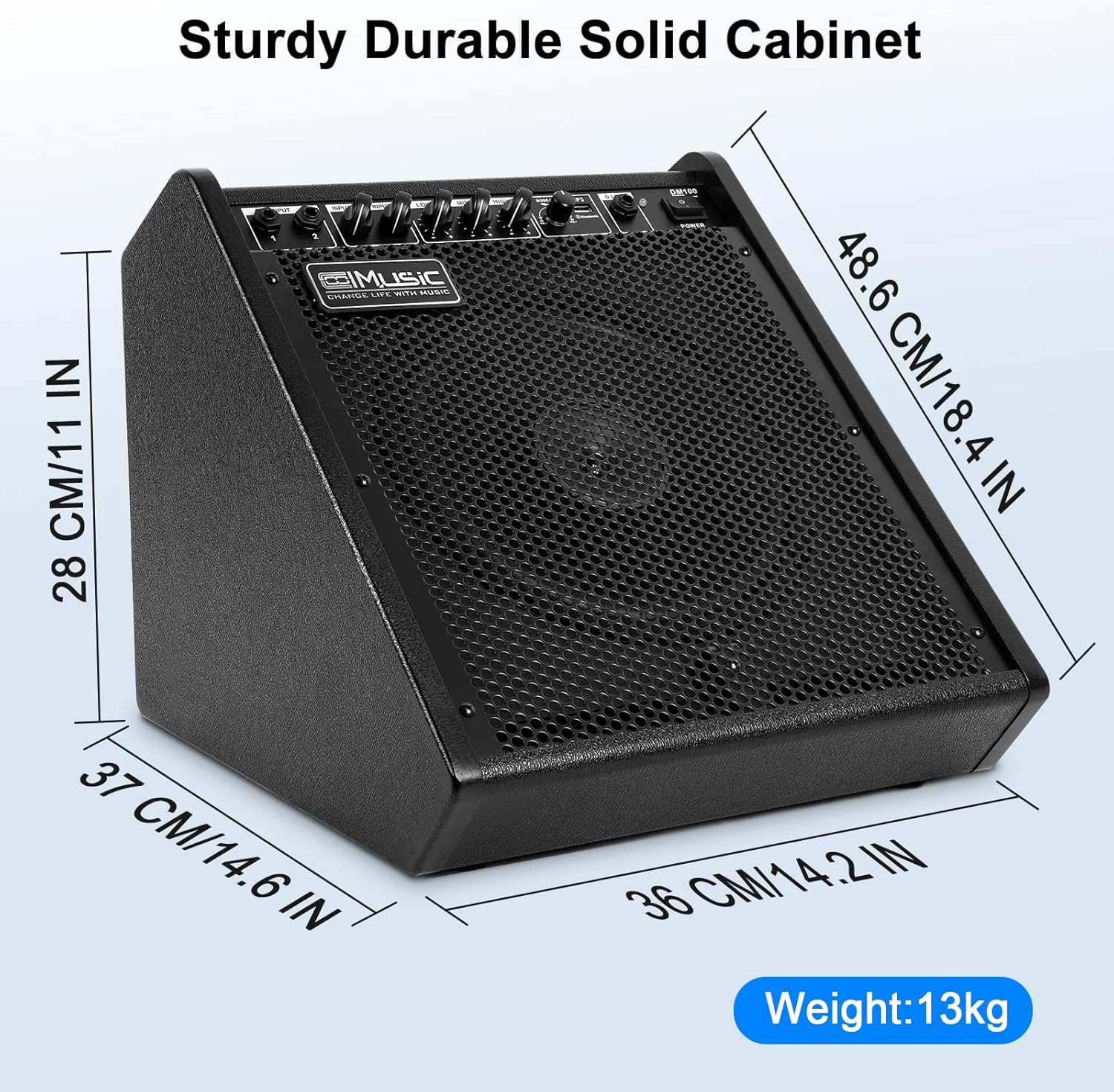
Малюнак 2: Amplifier dimensions (16.14 x 14.17 x 13.39 inches).

Figure 3: Top panel showing diverse connection options and controls.

Figure 4: Illustration of the 8-inch woofer and 2-inch tweeter for professional sound.

Figure 5: USB and Bluetooth connectivity for wide compatibility.

Figure 6: Detailed diagram of inputs for microphones, drums, line-in, and USB/Bluetooth.
Відэа аб прадуктах
Відэа 1: Кароткі агляд прадуктуview demonstrating the amplifier's features and design.
Video 2: Short demonstration of the Vangoa 65W Electric Drum Amp in action, showcasing its powerful sound.
4. Кіраўніцтва па наладцы
- Распакаванне: Акуратна зніміце amplifier from its packaging. Retain all packaging materials for future transport or storage.
- Размяшчэнне: Месца amplifier on a stable, flat surface. Ensure adequate ventilation around the unit. The amplifier is designed with an elevation angle for optimal sound projection towards the user.
- Падключэнне сілкавання: Падключыце прадастаўлены шнур харчавання да amplifier's power input and then to a suitable electrical outlet. Ensure the power switch is in the 'OFF' position before connecting.
- Першапачатковае ўключэнне: Flip the power switch to the 'ON' position. The power indicator light should illuminate.
- Рэгуляванне гучнасці: Before connecting any instruments, ensure all volume knobs (Master, Drum, Line, Mic) are set to their minimum positions to prevent sudden loud sounds.
5. Інструкцыя па эксплуатацыі
5.1 Падключэнне інструментаў і мікрафонаў
- Electronic Drums: Connect your electronic drum module's output to the 'DRUM IN' input using a standard instrument cable. Adjust the 'DRUM' volume knob to control the drum sound level.
- Other Instruments (Keyboard, Guitar): Use the 'LINE IN' inputs for connecting other instruments. Adjust the 'LINE' volume knob.
- Мікрафоны: Connect microphones to the 'MIC 1' or 'MIC 2' inputs. Each microphone input has an independent volume control ('MIC VOL').
- Навушнікі: For private practice, connect headphones to the 'PHONES' output. This will mute the main speaker output.
5.2 Рэгуляванне эквалайзера (EQ)
The amplifier features a 3-band equalizer to shape your sound:
- БАС: Adjusts the low-frequency response. Turn clockwise to boost bass, counter-clockwise to cut.
- СЯРЭДЗІНА: Adjusts the mid-range frequency response. Turn clockwise to boost mids, counter-clockwise to cut.
- ТРЭБЛЯ: Adjusts the high-frequency response. Turn clockwise to boost treble, counter-clockwise to cut.
Experiment with these controls to achieve your desired tone for different instruments and musical styles.
5.3 Wireless and USB Playback
- Wireless (Bluetooth): Activate Bluetooth on your external device (e.g., smartphone, tablet). Select the amplifier from the list of available devices to pair. Once connected, you can play audio through the amplifier. Use the 'BT/MP3' volume control on the amplifier and your device's volume control.
- Прайграванне праз USB: Устаўце USB-назапашвальнік з аўдыё files into the 'USB' port. The amplifier аўтаматычна выявіць і пачне прайграваць files. Use the playback controls (play/pause, next/previous track) and the 'BT/MP3' volume control.
5.4 Галоўны том
The 'MASTER' volume knob controls the overall output level of the amplifier. Adjust this after setting individual input volumes to achieve the desired total loudness.
6. Тэхнічныя характарыстыкі
| Асаблівасць | Спецыфікацыя |
|---|---|
| Выхад ватtage | 65 ват |
| Канфігурацыя дынаміка | 8-цалевы нізкачастотны дынамік, 2-цалевы высокачастотны дынамік |
| АЧХ | ад 45 Гц да 20 кГц |
| Уваходы | 2x Drum/Line Inputs (6.35mm Jack), 2x Mic Inputs, Aux Input, USB |
| Выхады | Выхад для навушнікаў |
| Бесправоднае падключэнне | Bluetooth |
| Эквалайзер | 3-Band (Bass, Mid, Treble) |
| Памеры (Д х Ш х У) | 16.14 х 14.17 х 13.39 цалі |
| Вага прадмета | 17.06 фунта |
| Матэрыял | Метал, пластык |
| Колер | Чорны |
7. Тэхнічнае абслугоўванне
- Уборка: Выкарыстоўвайце мяккую сухую тканіну для ачысткі вонкавага боку ampвыратавальнік. Не выкарыстоўвайце вадкія ачышчальнікі або растваральнікі, бо яны могуць пашкодзіць пакрыццё або ўнутраныя кампаненты.
- захоўванне: Калі прылада не выкарыстоўваецца працяглы час, захоўвайце яе ampзахоўвайце ў прахалодным, сухім месцы, удалечыні ад прамых сонечных прамянёў і экстрэмальных тэмператур.
- Вентыляцыя: Пераканайцеся, што amplifier's ventilation openings are not blocked to prevent overheating.
- Сыход за кабелем: Regularly inspect all cables for signs of wear or damage. Replace any damaged cables immediately to ensure safe operation.
8. Выпраўленне непаладак
- Няма харчавання:
- Праверце, ці надзейна падключаны шнур харчавання да абодвух amplifier and the electrical outlet.
- Пераканайцеся, што разетка працуе.
- Пераканайцеся, што выключальнік сілкавання ўключаны amplifier is in the 'ON' position.
- Няма выхаду гуку:
- Confirm that all volume knobs (Master, Drum, Line, Mic, BT/MP3) are turned up to an audible level.
- Check all instrument and microphone cables for secure connections and proper functionality.
- If using headphones, ensure they are properly connected and that the main speaker output is not muted unexpectedly.
- If using wireless or USB input, ensure the device is properly paired/connected and playing audio.
- Скажоны гук:
- Reduce the volume levels of the input source, individual channels, and the Master volume.
- Adjust the EQ settings (Bass, Mid, Treble) to reduce excessive boosting of certain frequencies.
- Ensure instrument cables are not damaged or faulty.
- Праблемы з бесправадным падключэннем:
- Забяспечце amplifier's wireless function is active.
- Move the external device closer to the amplifier для паляпшэння магутнасці сігналу.
- Disconnect and re-pair the Bluetooth device.
9. Гарантыя і падтрымка
Vangoa products are designed and manufactured to high-quality standards. For warranty information, please refer to the warranty card included with your product or visit the official Vangoa website. For technical support, troubleshooting assistance, or service inquiries, please contact Vangoa customer support through their official channels.
Калі ласка, захавайце пацвярджэнне пакупкі для любых гарантыйных прэтэнзій.