
1. Уводзіны
Дзякуй за пакупкуasing the Yenkee YKB 3200 Gaming Keyboard. This manual provides essential information for the proper setup, operation, and maintenance of your new keyboard. Please read this manual thoroughly before using the product to ensure optimal performance and longevity.
2. Інфармацыя па бяспецы
- Трымайце клавіятуру далей ад вадкасцей і празмернай вільгаці.
- Не падвяргайце клавіятуру ўздзеянню экстрэмальных тэмператур.
- Пазбягайце падзення клавіятуры і моцных удараў.
- Do not attempt to disassemble or repair the keyboard yourself. Refer all servicing to qualified personnel.
- Выкарыстоўвайце для чысткі толькі сухую, мяккую тканіну.
3. Змесціва ўпакоўкі
Калі ласка, праверце змесціва ўпакоўкі пасля распакавання. Калі якія-небудзь прадметы адсутнічаюць або пашкоджаныя, звярніцеся да прадаўца.
- Yenkee YKB 3200 Gaming Keyboard with integrated smartphone holder
- USB-кабель (прыкладаецца)
4. Прадукт скончыўсяview
The Yenkee YKB 3200 is a robust gaming keyboard designed for an enhanced gaming experience. It features a durable metal construction, responsive rubber dome keys, and dynamic rainbow backlighting.
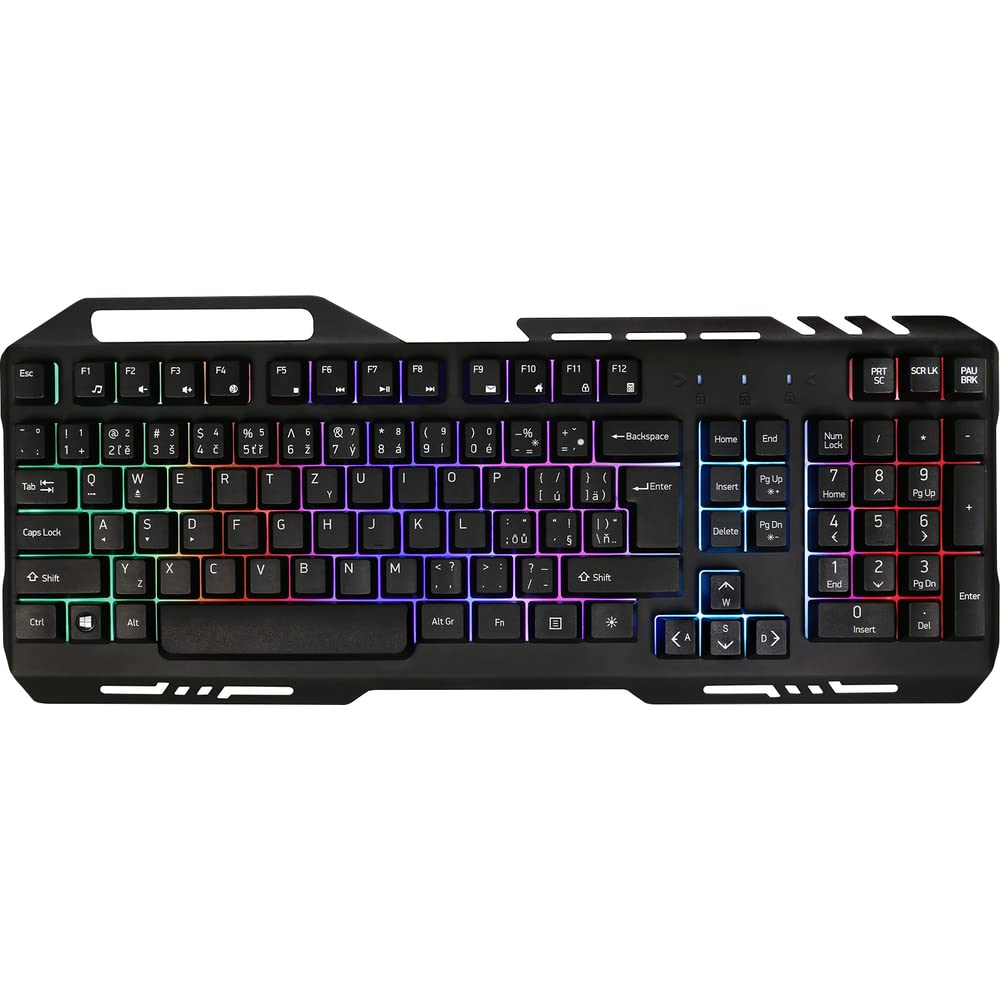
Image 1: Yenkee YKB 3200 Gaming Keyboard. This image displays the full keyboard with its metal frame and illuminated keys, highlighting the integrated smartphone holder at the top.
Асноўныя характарыстыкі:
- Metal Keyboard Design: Provides enhanced durability and a premium feel.
- Integrated Smartphone Holder: Conveniently located at the top of the keyboard for easy access to your mobile device.
- Durable Rubber Dome Keys: Offers a comfortable and responsive typing experience.
- Nine Rainbow Backlight Modes: Customizable lighting effects to suit your preference and gaming atmosphere.
- Падключэнне USB: Simple plug-and-play connection to your computer.
- 1.5m Cable Length: Забяспечвае ample дасягнуць для розных налад.
5. Настройка
- Распакуйце клавіятуру: Асцярожна дастаньце клавіятуру з упакоўкі.
- Падключыцеся да кампутара: Locate an available USB port on your computer (PC or laptop). Insert the USB connector of the keyboard into the USB port.
- Ўстаноўка драйвера: The keyboard is plug-and-play and typically does not require additional driver installation. Your operating system should automatically detect and install the necessary drivers.
- Размяшчэнне: Place the keyboard on a stable, flat surface. You can use the integrated smartphone holder to position your mobile device.
- Праверка функцыянальнасці: Open a text editor or browser to test if the keys are responding correctly.
6. Інструкцыя па эксплуатацыі
Кіраванне падсветкай:
The Yenkee YKB 3200 features nine distinct rainbow backlight modes. These modes can typically be cycled through using a dedicated function key combination.
- Змена рэжыму: Look for a key labeled 'FN' (Function) and a key with a light bulb icon or 'Scroll Lock' / 'Pause Break'. Pressing FN + Light Bulb / Scroll Lock / Pause Break (depending on keyboard layout) will cycle through the available backlight modes.
- Рэгуляванне яркасці: Some keyboards allow brightness adjustment using FN + Up/Down Arrow keys. Refer to your specific keyboard layout for exact key combinations.
- Turning Backlight On/Off: A long press of the backlight control key or a specific FN combination might turn the backlight on or off.
Мультымедыйныя і функцыянальныя клавішы:
The keyboard may include additional function keys (F1-F12) that, when combined with the 'FN' key, provide multimedia control or quick access to applications. Common functions include:
- FN + F1-F12: Volume control, media playback, email, web browser, etc. (Specific functions vary by model).
7. Тэхнічнае абслугоўванне
Уборка:
- Генеральная ўборка: Выкарыстоўвайце мяккую, сухую тканіну без ворса, каб праціраць паверхню клавіятуры.
- Выдаленне пылу: Выкарыстоўвайце сціснутае паветра, каб выдаліць пыл і смецце паміж клавішамі.
- Устойлівыя плямы: Для ўстойлівых плям злёгку dampen the cloth with water or a mild, non-abrasive cleaning solution. Ensure no liquid enters the keyboard.
захоўванне:
When not in use for extended periods, store the keyboard in a cool, dry place, away from direct sunlight and extreme temperatures.
8. Выпраўленне непаладак
| праблема | Магчымая прычына | Рашэнне |
|---|---|---|
| Клавіятура не адказвае | Слабае падключэнне USB, няспраўны порт USB, праблема з драйверам. | Пераканайцеся, што кабель USB надзейна падключаны. Паспрабуйце іншы порт USB. Перазагрузіце камп'ютар. |
| Падсвятленне не працуе | Backlight turned off, low brightness setting. | Press the backlight control key combination (e.g., FN + Scroll Lock) to cycle modes or adjust brightness. |
| Клавішы заліпаюць або не рэагуюць | Бруд або смецце пад клавішамі. | Clean the keyboard using compressed air and a soft cloth. |
9. Тэхнічныя характарыстыкі
| Асаблівасць | Спецыфікацыя |
|---|---|
| Марка | Yenkee |
| Нумар мадэлі | YKB 3200 |
| Тэхналогія падлучэння | USB |
| Даўжыня кабеля | 1.5 метраў |
| Апісанне клавіятуры | Гульнявая |
| Backlight Theme | Rainbow (9 modes) |
| Сумяшчальныя прылады | Ноўтбук, ПК |
| Памеры прадукту | 45.2 х 20 х 3.5 см |
| Вага прадукту | 841 г |
| Уключаныя кампаненты | USB cable (attached) |
10. Гарантыя і падтрымка
Yenkee products are designed and manufactured to the highest quality standards. For information regarding warranty terms and conditions, please refer to the warranty card included with your purchase or visit the official Yenkee website. For technical support or service inquiries, please contact your local retailer or the Yenkee customer support team.