
1. Уводзіны
Дзякуй за пакупкуasing the SENCOR SSS 3200 Kids Bluetooth Speaker with Karaoke Microphone. This portable speaker is designed to provide entertainment with its Bluetooth connectivity, karaoke function, and vibrant LED lighting. Please read this manual carefully before using the product to ensure proper operation and to maximize its lifespan. Keep this manual for future reference.
2. Інструкцыі па тэхніцы бяспекі
- Не падвяргайце прыладу ўздзеянню экстрэмальных тэмператур, прамых сонечных прамянёў або высокай вільготнасці.
- Use only the supplied charger to recharge the product.
- Пазбягайце падзення дынаміка і не падвяргайце яго моцным ударам.
- Не разбірайце і не спрабуйце рамантаваць прыладу самастойна. Звяртайцеся да кваліфікаванага персаналу па любыя паслугі па абслугоўванні.
- Keep the speaker away from water or other liquids to prevent electric shock.
- Забяспечце належную вентыляцыю вакол дынаміка падчас выкарыстання.
3. Змесціва ўпакоўкі
Carefully unpack your SENCOR SSS 3200 Kids speaker and check that all items are present and in good condition. The package should include:
- SENCOR SSS 3200 Kids Bluetooth Speaker
- Правадной мікрафон
- 3.5mm Audio Cable (AUX cable)
- USB-кабель для зарадкі
- Адаптар сілкавання
- Плечавы рэмень
- Кіраўніцтва карыстальніка (гэты дакумент)

Image 3.1: Included accessories for the SENCOR SSS 3200 Kids speaker, including the wired microphone, various cables, power adapter, and shoulder strap.
4. Прадукт скончыўсяview
4.1 Пярэдняя панэль

Выява 4.1: Спераду view of the SENCOR SSS 3200 Kids Bluetooth Speaker, showcasing the main speaker grille with LED backlighting and the SENCOR logo.
The front of the speaker features the main speaker grille, which is equipped with multi-color flashing LED backlighting for an enhanced visual experience. The SENCOR brand logo is prominently displayed.
4.2 Задняя панэль і элементы кіравання

Image 4.2: Rear panel of the SENCOR SSS 3200 Kids Bluetooth Speaker, showing various input ports, control buttons, and adjustment knobs.
The rear panel houses all the essential controls and connectivity ports:
- УХОД МІКРАФОНА: Раз'ём 6.3 мм для падключэння праваднога мікрафона.
- GUITAR-IN: 6.3mm jack for connecting a guitar (if applicable).
- LINE IN EAR MIC: 3.5mm AUX input.
- Порт USB: Для прайгравання з USB-флэшкі.
- Слот TF карты: Для прайгравання з карты microSD.
- 9 В пастаяннага току: Уваходная магутнасць для зарадкі.
- Выключальнік сілкавання: To turn the speaker ON/OFF.
- Дысплей: Digital display for mode and track information.
- Кнопкі кіравання: Play/Pause, Skip tracks, Mode/Shift, Record/Delete.
- Ручкі: VOLUME+, -TREBLE+, -ECHO+, -MIC VOL+ for audio adjustments.
- Індыкатар батарэі: Паказвае стан батарэі.
5. Настройка
5.1 Зарадка акумулятара
Before first use, fully charge the speaker's built-in rechargeable battery. Connect the supplied power adapter to the DC 9V input on the rear panel and plug it into a power outlet. The battery indicator will show charging status. A full charge typically takes 3-5 hours. Ensure the product is fully charged before initial operation to ensure proper functionality.
5.2 Падключэнне мікрафона
Insert the plug of the wired microphone into the MIC-IN jack on the rear panel of the speaker. Ensure the microphone's ON/OFF switch is in the 'ON' position when in use.
6. Інструкцыя па эксплуатацыі
6.1 Уключэнне/выключэнне сілкавання
To turn the speaker ON, slide the Power switch on the rear panel to the 'ON' position. To turn it OFF, slide the switch to the 'OFF' position.
6.2 Спалучэнне па Bluetooth
- Уключыце дынамік. Ён аўтаматычна пяройдзе ў рэжым спалучэння Bluetooth, пра што будзе сведчыць мігценне значка Bluetooth на дысплеі.
- Уключыце Bluetooth на вашым смартфоне, планшэце або іншай сумяшчальнай прыладзе.
- Пошук available Bluetooth devices and select "SSS 3200 Kids" from the list.
- Once paired, the speaker will emit a confirmation sound, and the Bluetooth icon on the display will stop flashing.
- Цяпер вы можаце прайграваць аўдыё з прылады праз дынамік.
6.3 Прайграванне з USB/TF-карты
Insert a USB flash drive or a TF (microSD) card into the respective port/slot on the rear panel. The speaker will automatically detect the storage device and begin playing audio files. Use the control buttons (Play/Pause, Skip tracks) to manage playback.
6.4 AUX ўваход
Connect an external audio device (e.g., MP3 player, laptop) to the LINE IN EAR MIC (3.5mm AUX) port using the supplied 3.5mm audio cable. Press the 'MODE/SHIFT' button to switch to AUX input mode. Audio will then play from your connected device.
6.5 Karaoke Function and Recording
With the microphone connected to the MIC-IN port, you can sing along to music playing from any source (Bluetooth, USB, TF, AUX). Adjust the microphone volume using the 'MIC VOL+' knob and add echo effects with the '-ECHO+' knob. The speaker also supports recording your karaoke performance. Refer to the 'REC/DEL' button for recording and deleting functions.
6.6 святлодыёдных рэжымаў святла
The speaker features multi-color flashing LED backlighting. These lights automatically activate when the speaker is on, enhancing the party atmosphere. There may be a dedicated button or a combination of buttons to cycle through different light modes or turn them off, if available (refer to specific product documentation for details).
6.7 Налады гуку
Use the 'VOLUME+' knob to adjust the overall speaker volume. The '-TREBLE+' knob allows you to fine-tune the treble levels for clearer sound. The '-ECHO+' and '-MIC VOL+' knobs are specifically for microphone effects and volume, respectively.
7. Тэхнічнае абслугоўванне
7.1 Ачыстка
Працірайце вонкавую паверхню дынаміка мяккай сухой тканінай. Не выкарыстоўвайце абразіўныя ачышчальнікі, воск або растваральнікі. Сачыце за тым, каб вадкасці не траплялі ў адтуліны дынаміка.
7.2 Захоўванне
When not in use for extended periods, store the speaker in a cool, dry place, away from direct sunlight and extreme temperatures. It is recommended to fully charge the battery every few months to maintain its health.
8. Выпраўленне непаладак
- Няма харчавання: Ensure the speaker is charged. Connect the power adapter and allow it to charge for a few hours. Check the power switch is in the 'ON' position.
- Няма гуку: Check the volume levels on both the speaker and the connected device. Ensure the correct input mode (Bluetooth, USB, AUX) is selected.
- Bluetooth не падключаецца: Make sure the speaker is in pairing mode. Disable and re-enable Bluetooth on your device. Move your device closer to the speaker.
- Мікрафон не працуе: Ensure the microphone is securely plugged into the MIC-IN jack and its ON/OFF switch is in the 'ON' position. Adjust the 'MIC VOL+' knob.
- Скажоны гук: Reduce the volume on both the speaker and the connected device. Ensure audio files не пашкоджаны.
9. Тэхнічныя характарыстыкі
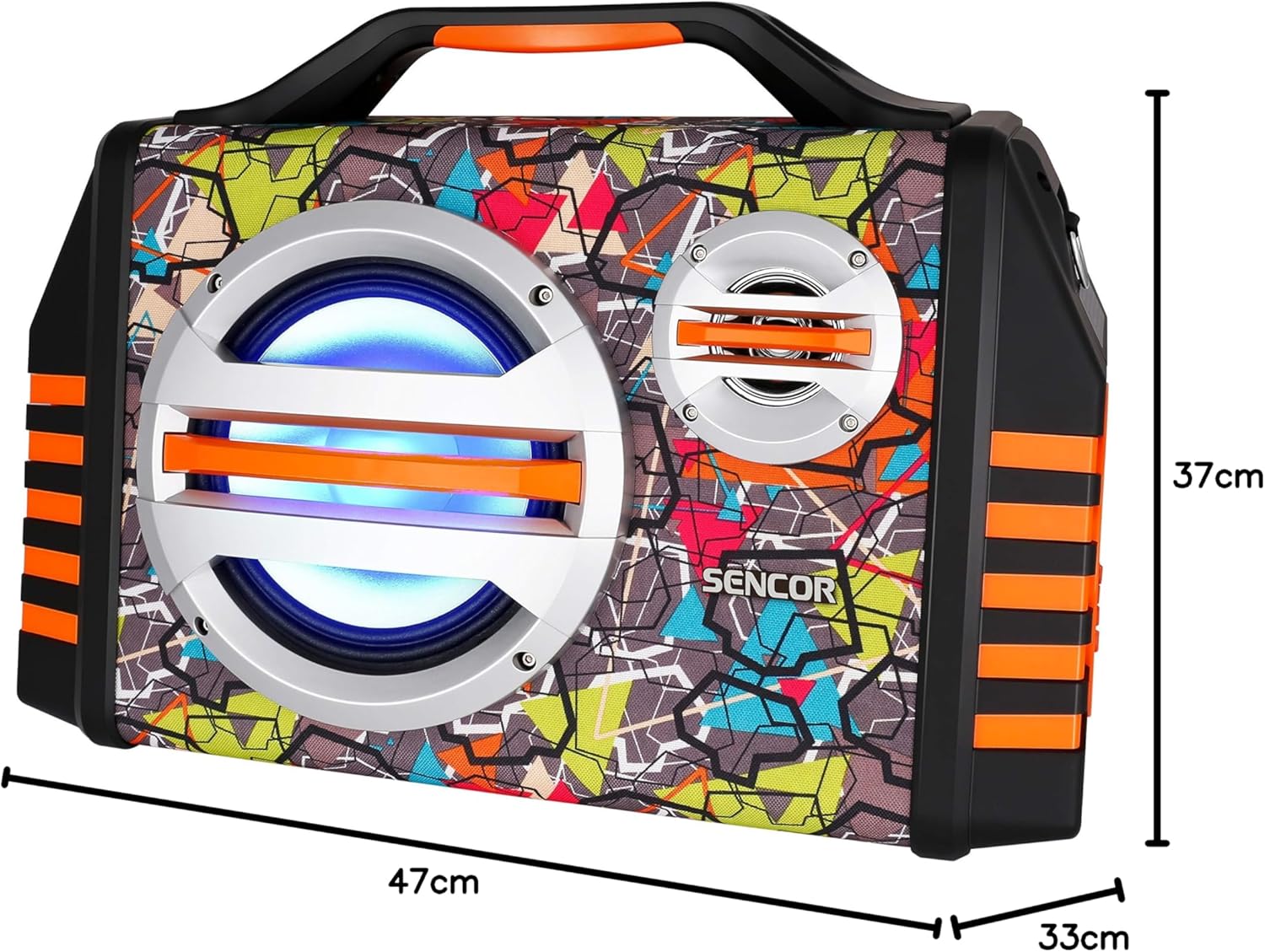
Image 9.1: Dimensions of the SENCOR SSS 3200 Kids Bluetooth Speaker, showing approximate measurements of 47cm (width), 37cm (height), and 33cm (depth).
| Асаблівасць | Спецыфікацыя |
|---|---|
| Марка | СЕНСАР |
| Нумар мадэлі | SSS3200KIDS |
| Колер | Рознакаляровы |
| Тэхналогія падлучэння | Bluetooth |
| Парты падключэння | Гняздо 3.5 мм, USB |
| Асаблівасці | Integrated Microphone, Multi-color LED Backlight |
| Усяго партоў USB | 1 |
| Імпеданс | 4 Ом |
| Сумяшчальныя прылады | Ноўтбук, смартфон, планшэт |
| Рэкамендуемае выкарыстанне | Children's Entertainment, Music Activities |
| Крыніца харчавання | Харчаванне ад батарэі |
| Колькасць выступоўцаў | 1 |
10. Гарантыя і падтрымка
SENCOR products are designed and manufactured to the highest quality standards. For warranty information, please refer to the warranty card included with your purchase or contact your local SENCOR distributor. For technical support or service inquiries, please visit the official SENCOR webсайт або звярніцеся ў іх аддзел абслугоўвання кліентаў.