
1. Уводзіны
Дзякуй за пакупкуasing the auna V-20 Vertical Stereo System. This manual provides essential information for the safe and efficient operation of your device. Please read it thoroughly before use and keep it for future reference.
2. Інструкцыі па тэхніцы бяспекі
- Перад эксплуатацыяй прылады ўважліва прачытайце ўсе інструкцыі.
- Трымайце прыладу далей ад вады, вільгаці і экстрэмальных тэмператур.
- Не закрывайце вентыляцыйныя адтуліны.
- Выкарыстоўвайце толькі насадкі/аксэсуары, указаныя вытворцам.
- Адключайце прыладу ад сеткі падчас навальніцы або калі яна не выкарыстоўваецца на працягу доўгага часу.
- Звяртайцеся да кваліфікаванага абслугоўваючага персаналу.
- Не адчыняйце casinг; унутры няма дэталяў, якія можна абслугоўваць самастойна.
3. Змесціва ўпакоўкі
Калі ласка, праверце наяўнасць усіх прадметаў:
- 1 x auna V-20 Vertical Stereo System
- 1 x Remote Control (including 2 x 1.5V AAA batteries)
- 1 х адаптар сілкавання
- 1 x Removable Stand Base
- 1 x Wire Antenna
- Кіраўніцтва карыстальніка (англійская і нямецкая)
4. Прадукт скончыўсяview
The auna V-20 is a versatile micro stereo system featuring a vertical design. It includes a CD player, DAB+ and FM radio, Bluetooth, NFC, USB, and AUX connectivity. The system can be used with its stand or mounted on a wall.

Figure 4.1: The auna V-20 Vertical Stereo System shown with its remote control in a modern living room environment.
Элементы кіравання і дысплей на пярэдняй панэлі
The front panel features a sleek design with a motorized CD drive cover and an LED display that shows time and operational information. Control buttons are located on the top edge of the unit.
Злучэнні задняй панэлі
The rear panel provides various connection ports for external devices and power.
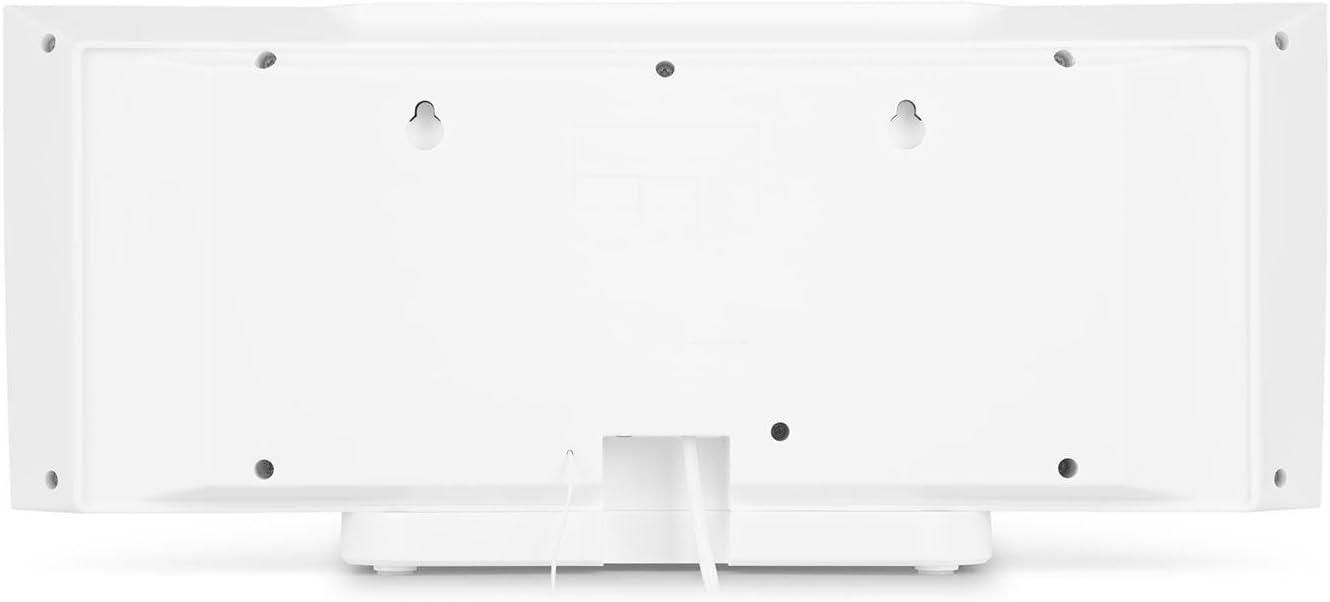
Малюнак 4.2: Задняя частка view of the auna V-20, highlighting the USB port and AUX input.
Пульт дыстанцыйнага кіравання
The included remote control allows for convenient operation of all functions from a distance.

Малюнак 4.3: падрабязна view of the remote control for the auna V-20 stereo system.
5. Настройка
5.1 Варыянты размяшчэння
The auna V-20 offers flexible placement:
- Мацаванне падстаўкі: Attach the removable stand base for desktop or shelf placement. Ensure the unit is stable on a flat surface.
- Насценны мантаж: The unit can be mounted on a wall to save space. Use appropriate wall mounting hardware (not included) and ensure the wall can support the unit's weight.

Малюнак 5.1: Задняя частка view illustrating the wall mounting points and the stand attachment area.
5.2 Падключэнне харчавання
Connect the provided power adapter to the DC IN port on the rear of the unit, then plug it into a standard wall outlet (AC 230V, 50 Hz).
5.3 Падключэнне антэны
Extend the wire antenna for optimal DAB+ and FM radio reception. Adjust its position for the best signal quality.
6. Інструкцыя па эксплуатацыі
6.1 Power On/Off and Standby
Націсніце УКЛ./У РЭЖЫМЕ ЧЫКАВАННЯ button on the unit or remote control to switch the system on or put it into standby mode.
6.2 Выбар рэжыму
Націсніце ФУНКЦЫЯ button on the unit or the dedicated mode buttons (FM/DAB, USB, CD, AUDIO IN, BLUETOOTH) on the remote control to switch between different audio sources.
6.3 Рэгулятар гучнасці
Адрэгулюйце гучнасць, выкарыстоўваючы ГУЧНАСЦЬ+ і ГУЧ- buttons on the unit or remote control. The LED display will show the current volume level.
6.4 Налады эквалайзера
The system features a 2-band equalizer and equalizer presets. Use the EQ button on the remote control to cycle through presets or adjust bass/treble. The Х-БАС function can be activated for enhanced bass.
7. Bluetooth and NFC Connectivity
7.1 Спалучэнне па Bluetooth
To stream music wirelessly from your smartphone, tablet, or laptop:
- Switch the stereo system to Bluetooth mode. The LED display will indicate pairing mode.
- Уключыце Bluetooth на мабільнай прыладзе і знайдзіце даступныя прылады.
- Select "auna V-20" from the list to pair. Once connected, you can play audio from your device.

Figure 7.1: A smartphone being used to connect to the auna V-20 via Bluetooth.
7.2 Злучэнне NFC
For intuitive pairing with NFC-enabled devices:
- Пераканайцеся, што NFC уключаны на вашай мабільнай прыладзе.
- Gently swipe your NFC-enabled device over the NFC sensor on the auna V-20.
- The devices will automatically pair via Bluetooth.

Малюнак 7.2: Буйны план view of the NFC sensor for quick device pairing.
8. Праца CD-плэера
The auna V-20 features an MP3-compatible CD player with a motorized drive.

Figure 8.1: The motorized CD player mechanism with a disc inserted.
8.1 Загрузка кампакт-дыска
- Націсніце АДКРЫЦЬ/ЗАКРЫЦЬ button to open the motorized CD cover.
- Carefully place a CD (CD, CD-R/RW, MP3-CD) onto the spindle with the label side facing you.
- Прэса АДКРЫЦЬ/ЗАКРЫЦЬ again to close the cover. The system will automatically switch to CD mode and begin playback.
8.2 Элементы кіравання прайграваннем
- Прайграванне/Паўза: Прэса ПРАЙГРАЦЬ/Паўза каб пачаць або прыпыніць прайграванне.
- Прапусціць трэкі: Выкарыстоўвайце ПЕРАХОДЗІЦЬ НАПЕРАД or ПРАПУСК НАЗАД кнопкі для перамяшчэння паміж трэкамі.
- Stop: Націсніце СТОП кнопку, каб спыніць прайграванне.
- Паўтарэнне/Выпадковы выбар: Выкарыстоўвайце Паўтор і ВЫПАДКОВАЯ buttons on the remote for playback options.
- Праграмуемае прайграванне: The system supports programmable title display for custom playlists.
9. Праца з радыё (DAB+/FM)
The auna V-20 features both DAB+ digital radio and analog FM radio with RDS function.
9.1 Selecting Radio Mode
Націсніце FM/DAB button on the remote control to switch between FM and DAB+ modes.
9.2 Аўтаматычнае сканаванне станцый
In either FM or DAB+ mode, press the СКАНІРАВАЦЬ button on the remote control to automatically scan and store available stations. The system can store up to 20 presets per reception type.
9.3 Manual Tuning and Presets
- Ручная настройка: Выкарыстоўвайце НАСТРОЙКА +/- buttons on the remote control for fine-tuning.
- Захаванне налад: Once a station is found, press the ПРАДУСТАЎКА button, then use the number buttons (0-9, 10+) to assign a preset number. Press УВОД каб пацвердзіць.
- Успамінаючы прасеты: Press the corresponding number button on the remote control to quickly access a saved station.
- Інфармацыйная кнопка: У рэжыме DAB+ націсніце ІНФА button to display additional information such as artist, title, album, or news.
10. Прайграванне з USB
The auna V-20 allows playback of MP3 audio files непасрэдна з USB-назапашвальніка.
10.1 Падключэнне прылады USB
- Insert your USB stick into the USB port on the rear of the unit.
- Switch the stereo system to USB mode using the USB кнопку на пульце.
- Сістэма аўтаматычна распазнае і пачне прайграваць MP3 files.
10.2 USB Playback Controls
Playback controls (Play/Pause, Skip, Stop, Repeat, Random) are similar to CD player operation. Use the тэчку button on the remote to navigate through folders on the USB device.
11. Увод AUX
Connect external audio devices such as MP3 players, CD players, or computers using the AUX input.
11.1 Падключэнне знешняй прылады
- Connect a 3.5mm audio cable (not included) from the headphone jack or audio output of your external device to the AUX IN port on the rear of the auna V-20.
- Switch the stereo system to AUDIO IN mode using the Аўдыё кнопку на пульце.
- Play audio from your external device. The sound will be output through the auna V-20 speakers.
12. Тэхнічнае абслугоўванне
12.1 Ачыстка
- Перад чысткай заўсёды адключайце прыладу ад электрычнай разеткі.
- Для ачысткі вонкавых паверхняў выкарыстоўвайце мяккую сухую тканіну.
- Не выкарыстоўвайце абразіўныя ачышчальнікі, воск або растваральнікі, бо яны могуць пашкодзіць пакрыццё.
- For the CD lens, use a specialized CD lens cleaner if necessary.
12.2 Агульны догляд
- Пазбягайце размяшчэння цяжкіх прадметаў на прыладзе.
- Трымайце прыладу далей ад прамых сонечных прамянёў і крыніц цяпла.
- Забяспечце належную вентыляцыю вакол прылады, каб прадухіліць перагрэў.
13. Выпраўленне непаладак
| праблема | Магчымая прычына | Рашэнне |
|---|---|---|
| Няма ўлады | Сеткавы кабель не падключаны; разетка няспраўная | Check power cable connection; try a different outlet |
| Няма гуку | Volume too low; incorrect source selected; mute activated | Increase volume; select correct source; deactivate mute |
| Кампакт-дыск не прайграваецца | CD inserted incorrectly; CD dirty/scratched; unsupported format | Reinsert CD correctly; clean or replace CD; ensure CD is compatible (CD, CD-R/RW, MP3-CD) |
| Дрэнны прыём радыё | Antenna not extended; weak signal | Extend and adjust antenna position; try moving the unit to a different location |
| Збой спалучэння Bluetooth | Device too far; Bluetooth not enabled; incorrect pairing procedure | Ensure devices are close; enable Bluetooth on mobile device; follow pairing instructions (Section 7.1) |
14. Тэхнічныя характарыстыкі
| Асаблівасць | Дэталь |
|---|---|
| Марка | ауна |
| мадэль | V-20 |
| Нумар дэталі | AUVZ-1100-ghfr |
| Памеры прадукту | 51 х 25 х 16 см |
| Вага | 2.6 кг |
| Крыніца харчавання | Электрычны |
| Ватtage | 27 ват |
| Рэжым выхаду гуку | Стэрэа |
| Канфігурацыя дынаміка | 2.0 |
| Падтрымліваюцца аўдыяфарматы | MP3 |
| Тып носьбіта | CD, MP3 |
| Тыпы раздымаў | Bluetooth, NFC, USB, AUX |
| Сумяшчальны з Bluetooth | так |
| Версія Bluetooth | 2.1+EDR |
| Bluetooth Profile | A2DP |
| Сумяшчальныя прылады | Smartphone, tablet, MP3 player |
| Асаблівасці | Прастата выкарыстання |
| Батарэі для пульта дыстанцыйнага кіравання | 2 x 1.5 В AAA (у камплекце) |
| Дыяпазон частот DAB+ | 174 - 240 MHz (Band III) |
15. Гарантыя і падтрымка
This product is covered by a manufacturer's warranty. For detailed warranty information, please refer to the documentation provided at the time of purchase or contact auna customer support.
If you encounter any issues not covered in the troubleshooting section, or require further assistance, please contact auna customer service through their official webсайт або ваш прадавец.