
1. Уводзіны
Thank you for choosing the LECLSTAR Motion Sensor Closet Light. This manual provides essential information for the safe and effective use of your new lighting product. Please read these instructions carefully before installation and operation, and retain them for future reference.
This wireless, battery-operated light features 51 LEDs, motion sensing capabilities, and is designed for various indoor applications such as closets, cabinets, kitchens, and stairs.
2. Інфармацыя па бяспецы
- Не падвяргайце прыладу ўздзеянню вады або празмернай вільгаці.
- Do not attempt to disassemble, repair, or modify the light. This will void the warranty and may cause damage or injury.
- Для зарадкі выкарыстоўвайце толькі кабель USB, які ўваходзіць у камплект.
- Пазбягайце прамога траплення святлодыёднага святла ў вочы, бо яно можа быць вельмі яркім.
- Захоўваць у месцах, недаступных дзецям.
3. Змесціва ўпакоўкі
Калі ласка, праверце ўпакоўку, каб пераканацца ў наяўнасці ўсіх прадметаў:
- 1 x LECLSTAR Motion Sensor Closet Light
- 1 x Magnetic Plastic Bracket
- 2 клейкія падушачкі 3M
- 4 х крапежных шруб
- 1 х USB-кабель для зарадкі
- 1 х Кіраўніцтва карыстальніка
4. Прадукт скончыўсяview
Familiarize yourself with the components of your LECLSTAR Motion Sensor Closet Light.

Малюнак 1: Product Components. This diagram illustrates the various parts of the light, including the USB charging port, magnetic strip for mounting, LED light board, durable aluminum alloy casing, ON/OFF switch, infrared motion sensor receiver, and protective ABS cover.
- Порт USB: Для зарадкі ўнутранай батарэі.
- Магнітная паласа: Allows for easy attachment to magnetic surfaces or the included bracket.
- LED Light Board: Contains 51 bright LEDs for illumination.
- Алюмініевы сплаў Матэрыял: Provides a durable and lightweight housing.
- Кнопка ON/OFF: Controls the power and operating modes.
- Інфрачырвоны прыёмнік: Detects signals from the remote control (if applicable).
- ABS Cover: Protects the LEDs and diffuses light.
5. Настройка і ўстаноўка
The LECLSTAR Motion Sensor Closet Light offers flexible installation options.
5.1 Charging Before First Use
Before installation, fully charge the light. Refer to Section 6 for detailed charging instructions.
5.2 Варыянты мантажу
You can install the light using the magnetic plastic bracket with 3M adhesive or screws.
- Magnetic Adhesion: Peel off the protective film from the 3M adhesive pads and attach them to the magnetic plastic bracket. Press the bracket firmly onto a clean, dry surface where you wish to install the light. The light can then be magnetically attached to the bracket.
- Шрубавае мацаванне: Use the provided screws to secure the magnetic plastic bracket to a desired surface. Once the bracket is securely mounted, attach the light magnetically.

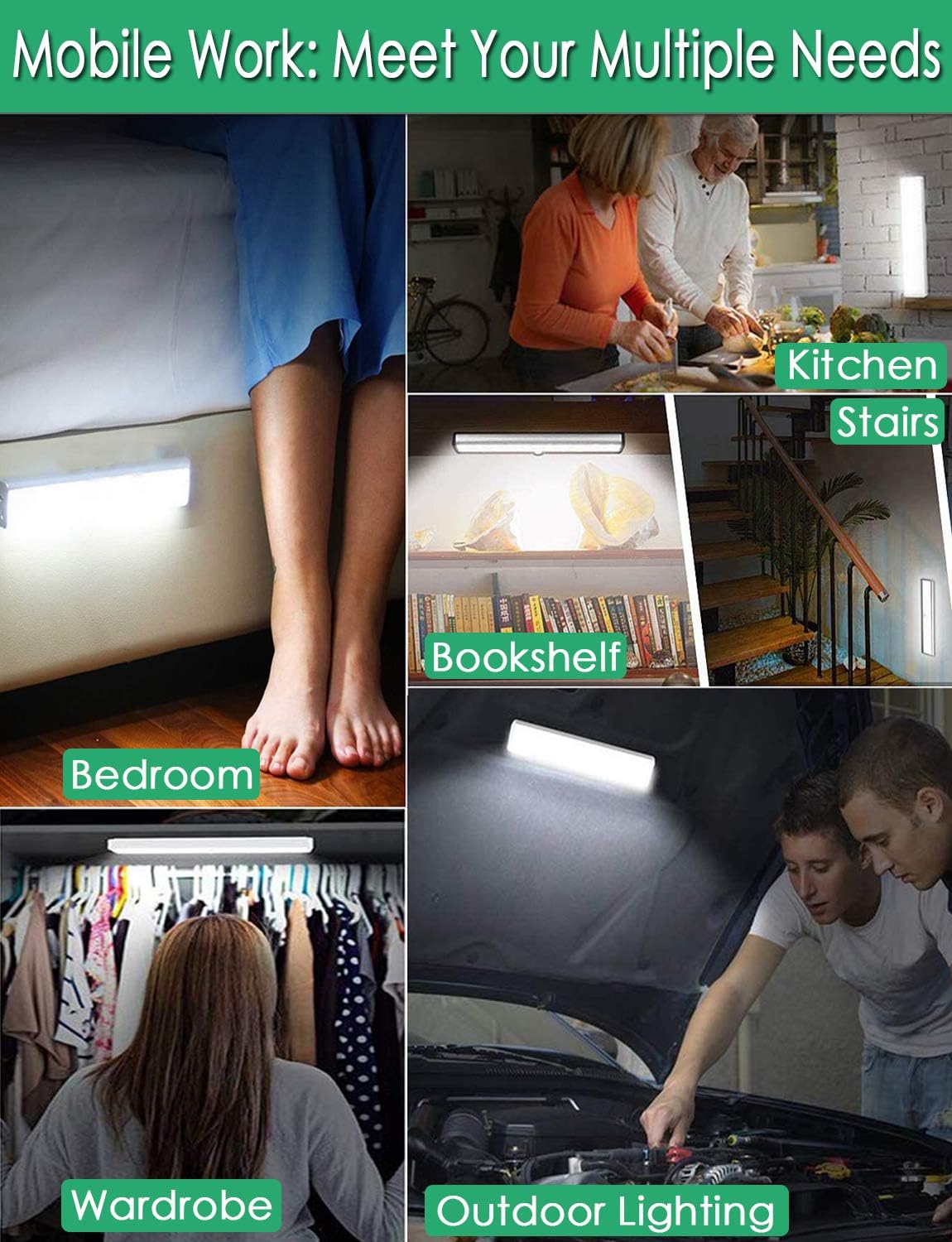
Малюнак 2: Versatile Installation. This image illustrates the light's adaptability, showing it mounted under a bed, in a kitchen, on a bookshelf, along stairs, inside a wardrobe, and providing illumination for outdoor tasks, highlighting its ease of placement in diverse environments.
5.3 Меркаванні па размяшчэнні
- For optimal motion detection, position the sensor ball to face the direction of expected movement.
- When using multiple motion sensor lights, avoid placing them too close together in motion-sensing mode, as they may interfere with each other's sensitivity.
- Ensure the installation surface is clean and dry for secure adhesion.
6. Інструкцыі па зарадцы
The LECLSTAR Motion Sensor Closet Light is equipped with a built-in 2400mAh lithium battery.
- Connect the provided USB charging cable to the light's USB port.
- Падключыце другі канец USB-кабеля да стандартнага USB-адаптара харчавання (не ўваходзіць у камплект) або да USB-порта кампутара.
- During charging, the indicator light on the device will be блакітны.
- Пасля поўнай зарадкі індыкатар загарыцца чырвоны.
- Поўная зарадка звычайна займае каля 4 гадзін.
Малюнак 3: Charging Status. This image demonstrates the charging process, showing the light connected to a power source. The indicator light is red when charging and turns blue when the battery is fully charged, indicating its status clearly.
7. Інструкцыя па эксплуатацыі
The light features multiple operating modes and can be controlled via its ON/OFF button or an optional remote control.
7.1 Mode Selection (ON/OFF Button)
Locate the ON/OFF button on the side of the light. Toggle the switch to select the desired mode:
- OFF: Святло цалкам выключана.
- ВКЛ: The light stays on continuously.
- AUTO (Motion Sensor Mode): The light will automatically turn on when motion is detected in a dark environment. It will turn off approximately 30 seconds after no motion is detected.

Малюнак 4: Motion Sensor Operation. This image demonstrates how the motion sensor works: the light remains off in bright environments, automatically turns on when movement is detected in the dark within a 3-meter, 120-degree range, and then automatically turns off after 30 seconds of inactivity.
7.2 Motion Sensor Details
- Кут выяўлення: 120 градусаў.
- Выяўленне адлегласці: Up to 3 meters (approximately 10 feet).
- The sensor is designed to activate only in low-light conditions to conserve battery life.
7.3 Remote Control Functions (Optional)
If your model includes a remote control, you can access additional features:

Малюнак 5: Remote Control Functions. This image displays the remote control, highlighting its various buttons: ON/OFF for power, 'S' for sensor mode, '1', '2', '3' for different light modes or brightness levels, '+' and '-' for adjusting brightness, and '15', '30', '60', '120' for setting a timer.
- ВКЛ/ВЫКЛ: Уключае або выключае святло.
- S (Sensor Mode): Activates the motion sensor mode.
- 1, 2, 3 (Light Modes): Selects different light modes or brightness levels.
- 50%, 100%, +, - (Adjustable Brightness): Рэгулюе інтэнсіўнасць святла.
- 15, 30, 60, 120 (Timer Function): Sets the light to turn off automatically after a specified duration.
8. Тэхнічнае абслугоўванне
- Уборка: Працірайце лямпу мяккай сухой тканінай. Не выкарыстоўвайце абразіўныя ачышчальнікі або растваральнікі.
- Сыход за батарэяй: To prolong battery life, avoid fully discharging the battery frequently. Charge the light regularly, especially if it will not be used for an extended period.
9. Выпраўленне непаладак
- Не гарыць святло:
- Пераканайцеся, што акумулятар зараджаны.
- Check that the light is switched to the 'ON' or 'AUTO' mode.
- Датчык руху не працуе:
- Ensure the light is in 'AUTO' mode.
- Verify that the ambient light is dark enough for the sensor to activate.
- Check that the sensor is not obstructed and is facing the area of expected movement.
- If multiple motion sensor lights are nearby, they might interfere with each other. Try repositioning them.
- Святло нечакана мігціць або цьмянее:
- The battery level may be low. Recharge the light.
10. Тэхнічныя характарыстыкі
| мадэль | B07JRBSJDR |
| Светлы колер | Чысты белы (6000K) |
| Колькасць святлодыёдаў | 51 святлодыёда |
| Люмен выхад | 240 лм |
| Motion Detecting Angle | 120 градусаў |
| Motion Detecting Distance | Да 3 метраў (10 футаў) |
| Тэрмін службы святлодыёда | Больш за 80,000 гадзіны |
| Тып батарэі | Літыевая батарэя 2400 мАг |
| Час зарадкі USB | Прыкладна 4 гадзіны |
| Аперацыйная Voltage | 4.2В |
| Ватtage | 3W |
| Памеры | 15.3 х 0.8 х 0.8 цалі |
| Матэрыял | Метал, пластык |
| Крыніца харчавання | Харчаванне ад батарэі |
| Асаблівасці | Імгненнае ўключэнне |
11. Гарантыя і падтрымка
LECLSTAR provides a lifetime warranty for this product. If you encounter any issues or have questions regarding your Motion Sensor Closet Light, please contact the LECLSTAR service team for assistance. Our dedicated support team is ready to help you.
For warranty claims or technical support, please refer to the contact information provided on the product packaging or the official LECLSTAR webсайт.