
Уводзіны
This manual provides essential information for the installation, operation, and maintenance of your SilverStone SST-ST65F-GS 650W 80 Plus Gold Fully Modular ATX Power Supply. The SST-ST65F-GS is designed to meet the demands of modern desktop computers, offering a compact, fully modular design with 80 PLUS Gold level efficiency. It features a 650W maximum DC output, strict voltage regulation, low ripple and noise, and a silent 120mm fan for continuous 24/7 operation at 40°C.
Інфармацыя па бяспецы
- Always disconnect the AC power cord from the wall outlet before installing, removing, or cleaning the power supply unit (PSU).
- The PSU contains high voltage components. Do not open the PSU casing. Унутры няма дэталяў, якія можа абслугоўваць карыстальнік.
- Пераканайцеся, што блок харчавання ўсталяваны ў добра вентыляваным памяшканні. Не блакуйце вентылятар або вентыляцыйныя адтуліны.
- Use only the modular cables provided with this power supply. Using third-party cables may cause damage to the PSU or connected components.
- Connect the correct cables to the appropriate ports on the PSU and your system components. Incorrect connections can cause severe damage.
- Гэты прадукт прызначаны для выкарыстання ў персанальных камп'ютарах. Не выкарыстоўвайце яго для іншых мэтаў.
- Трымайце блок харчавання далей ад вады, вільгаці і экстрэмальных тэмператур.
Змест пакета
Перад устаноўкай пераканайцеся, што ўсе элементы прысутнічаюць у камплекце.
- SilverStone SST-ST65F-GS 650W Power Supply Unit
- Modular Cable Set (including ATX 24-pin, EPS/ATX 8-pin, PCIe 6+2-pin, SATA, Peripheral 4-pin cables)
- Шнур сілкавання
- Крапежныя шрубы
- Cable Ties / Velcro Straps
- Кіраўніцтва карыстальніка / Інфармацыя аб гарантыі

Image: The SilverStone SST-ST65F-GS power supply unit shown with its full set of modular cables, mounting screws, and documentation.
Прадукт скончаныview
The SilverStone SST-ST65F-GS is a high-performance, fully modular power supply designed for reliability and efficiency. Key features include:
- 650 Watt Maximum DC Output: Забяспечвае ample power for most gaming and workstation systems.
- Кампактны дызайн: With a depth of 140mm, it allows for easy integration into various PC cases.
- 100% Modular Cables: Enables users to connect only the necessary cables, reducing clutter and improving airflow.
- Залаты сертыфікат 80 PLUS: Ensures high power efficiency, reducing heat generation and operating costs.
- Class-Leading Single +12V Rail: Delivers stable and reliable power to demanding components.
- Strict Voltagе Палажэнне: Падтрымлівае аб'ём выхаднога сігналуtages within 3% of the nominal value.
- Low Ripple & Noise: Ensures clean power delivery to sensitive components.
- 24/7 Continuous Power Output: Capable of sustained operation at 40°C ambient temperature.
- Silent Running 120mm Fan: Operates with a minimum noise level of 18dBA for quiet performance.
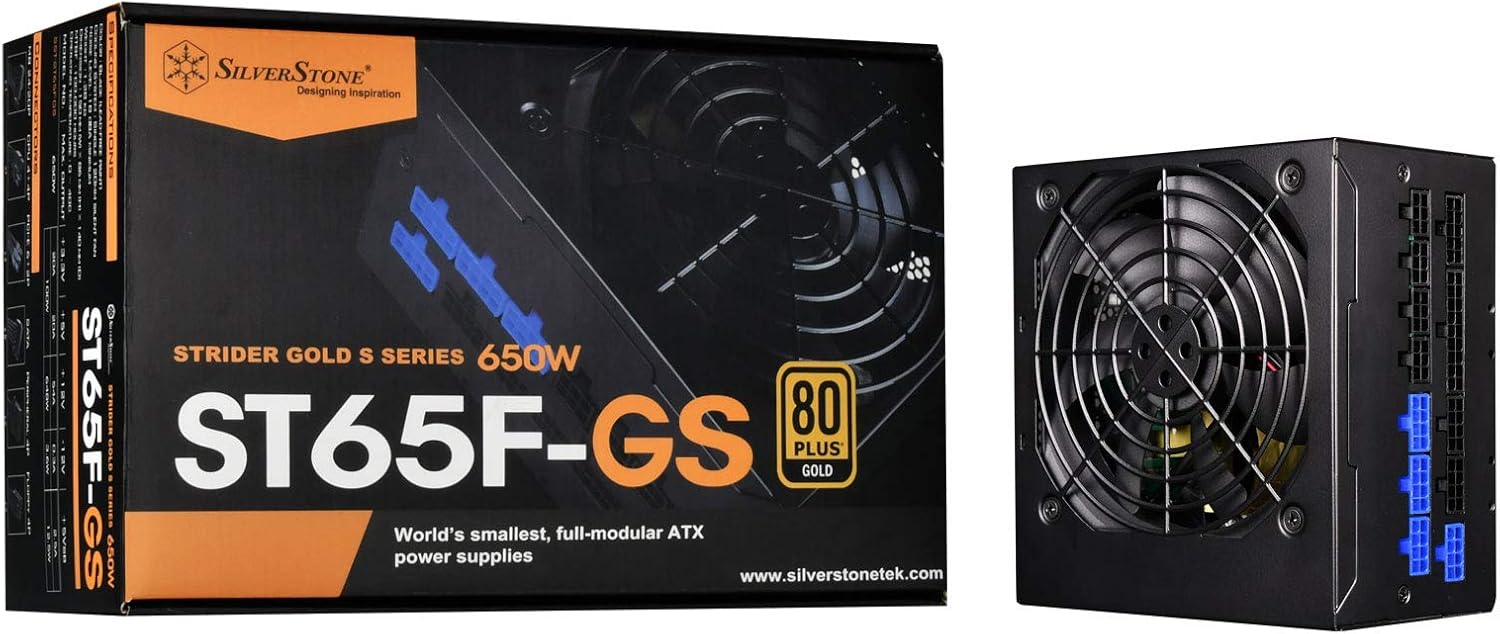
Image: The SilverStone SST-ST65F-GS power supply unit alongside its retail packaging, highlighting its compact size and 80 PLUS Gold certification.

Выява: Пад вуглом view of the SilverStone SST-ST65F-GS power supply, showing the fan grill and modular cable connectors.

Выява: Крупны план view of the fully modular cable connection panel on the SilverStone SST-ST65F-GS, with blue connectors for main power and black for peripherals.

Выява: зверху ўніз view of the 120mm cooling fan and grill on the SilverStone SST-ST65F-GS power supply.

Выява: Задняя частка view of the SilverStone SST-ST65F-GS power supply, showing the AC power inlet, ventilation grille, and the main power switch.
Настройка і ўстаноўка
- Падрыхтуйце сваю сістэму: Пераканайцеся, што камп'ютар цалкам выключаны і адключаны ад разеткі. Адкрыйце корпус камп'ютара, каб атрымаць доступ да месца мацавання блока харчавання.
- Зняць стары блок харчавання (калі ёсць): Disconnect all cables from your old power supply and remove its mounting screws. Carefully slide the old PSU out of the case.
- Усталюйце новы блок харчавання: Slide the SilverStone SST-ST65F-GS into the designated PSU bay in your computer case. Align the screw holes and secure the PSU with the provided mounting screws. Ensure the fan is facing the correct direction for optimal airflow (typically facing down if there's a bottom vent, or up if there isn't).
- Падключэнне модульных кабеляў:
- Main ATX Power (20+4 pin): Connect the 24-pin cable to the corresponding port on the PSU and the motherboard.
- CPU Power (4+4 pin EPS/ATX): Connect the 8-pin (or 4+4 pin) CPU power cable to the PSU and the motherboard's CPU power connector.
- PCIe Power (6+2 pin): Connect the necessary PCIe cables to the PSU and your graphics card(s). Each 6+2 pin connector can be used for either 6-pin or 8-pin PCIe power.
- Магутнасць SATA: Падключыце кабелі харчавання SATA да SSD, HDD і аптычных прывадаў.
- Peripheral (Molex) Power: Connect peripheral cables for case fans, older drives, or other accessories as needed.
Важна: Ensure all cable connections are firm and correctly oriented. Do not force connectors.
- Кабельнае кіраванне: Route cables neatly to improve airflow and aesthetics within your case. Use the provided cable ties or Velcro straps.
- Зачыніце корпус і падключыце сілкаванне пераменнага току: Once all internal connections are made, close your computer case. Connect the AC power cord to the PSU's inlet and then to a wall outlet or surge protector.
- Уключэнне: Flip the power switch on the back of the PSU to the "I" (On) position. Then, power on your computer.
Інструкцыя па эксплуатацыі
The SilverStone SST-ST65F-GS power supply operates automatically once installed and powered on. It is designed for continuous operation under normal computing loads.
- Уключэнне/выключэнне харчавання: Use the main power switch on the back of the PSU to completely cut power to the unit. For daily use, power your computer on and off via the operating system or case power button.
- Праца вентылятара: The integrated 120mm fan will automatically adjust its speed based on the PSU's internal temperature and load to maintain optimal cooling and quiet operation.
- Эфектыўнасць: The 80 PLUS Gold certification indicates high efficiency, meaning less power is wasted as heat, contributing to lower energy consumption and a cooler system.
Тэхнічнае абслугоўванне
Правільнае абслугоўванне забяспечвае даўгавечнасць і аптымальную прадукцыйнасць вашай крыніцы харчавання.
- Ачыстка ад пылу: Periodically (e.g., every 6-12 months), disconnect the PSU from AC power and use compressed air to gently clean dust from the fan grille and ventilation openings. Do not open the PSU casing.
- Забяспечце паток паветра: Make sure that the PSU's intake and exhaust vents are not obstructed by cables, dust, or other components within the PC case. Good airflow is crucial for cooling.
- Праверка кабеля: Час ад часу правярайце, ці ўсе модульныя кабелі надзейна падключаны як да блока харчавання, так і да кампанентаў.
Ліквідацыю непаладак
Калі ў вас узніклі праблемы з блокам харчавання, звярніцеся да наступных распаўсюджаных крокаў па ліквідацыі непаладак:
- Няма харчавання:
- Пераканайцеся, што шнур харчавання пераменнага току надзейна падключаны як да блока харчавання, так і да разеткі.
- Check that the power switch on the back of the PSU is in the "I" (On) position.
- Verify all modular cables are correctly and firmly seated in the PSU and connected components (motherboard, CPU, GPU).
- Праверце разетку з дапамогай іншай прылады, каб пераканацца, што ў ёй ёсць напружанне.
- Нестабільнасць/збоі сістэмы:
- Пераканайцеся, што патрабаванні да харчавання вашай сістэмы не перавышаюць магутнасць блока харчавання ў 650 Вт.
- Праверце наяўнасць аслабленых злучэнняў кабеляў.
- Monitor system temperatures to ensure components are not overheating, which can be exacerbated by poor PSU performance or airflow.
- Гучны шум вентылятара:
- Ачысціце вентылятар і вентыляцыйныя адтуліны блока харчавання ад пылу.
- Ensure adequate airflow within the PC case.
- If the noise is excessive and persistent even under low load, contact SilverStone support.
If these steps do not resolve your issue, please contact SilverStone customer support for further assistance.
Тэхнічныя характарыстыкі
| Асаблівасць | Спецыфікацыя |
|---|---|
| Марка | SilverStone |
| Нумар мадэлі | SST-ST65F-GS |
| серыял | Strider Gold S |
| Maximum DC Output | 650 Вт |
| Сертыфікат 80 PLUS | золата |
| Формаў-фактар | ATX |
| Модульны тып | Цалкам модульны |
| Спосаб астуджэння | 120mm Fan (Silent running, 18dBA minimum) |
| тtagе Рэгламент | Strict 3% |
| Пульсацыя і шум | Нізкі 3% |
| Continuous Output Temperature | 40°C (24/7 operation) |
| Памеры (ДхШхВ) | 5.91 х 5.51 х 3.39 цалі (150 х 140 х 86 мм) |
| Вага прадмета | 2.83 фунта (1.28 кг) |
| Сумяшчальныя прылады | Персанальны кампутар |
| Тып раздыма | ATX |
Гарантыя і падтрымка
SilverStone Technology provides a limited warranty for its power supply units. Please refer to the warranty information included in your product package for specific terms and conditions, including warranty duration and coverage details. You can also visit the official SilverStone Technology website for the most up-to-date warranty policy and to access customer support resources.
For technical support, troubleshooting assistance beyond this manual, or warranty claims, please contact SilverStone Technology customer service through their official webсайт: