
1. Уводзіны
Thank you for choosing the Setty Power Bank with Solar Panels. This portable power bank is designed to provide convenient charging for your electronic devices on the go, featuring a 5000 mAh battery capacity and an integrated solar panel for supplementary charging. Please read this manual carefully before using the product to ensure safe and optimal performance.
2. Інфармацыя па бяспецы
- Do not expose the power bank to extreme temperatures, direct sunlight for prolonged periods (beyond charging), or fire.
- Avoid contact with water or other liquids. This device is not fully waterproof.
- Не разбірайце, не мадыфікуйце і не спрабуйце рамантаваць прыладу самастойна. Звярніцеся да кваліфікаванага абслугоўваючага персаналу.
- Захоўваць у месцах, недаступных дзецям.
- Выкарыстоўвайце толькі сумяшчальныя зарадныя кабелі і адаптары.
- Утылізуйце знешні акумулятар адказна ў адпаведнасці з мясцовымі правіламі.
3. Змесціва ўпакоўкі
- Setty Power Bank with Solar Panels (5000 mAh)
- Зарадны кабель USB (Micro-USB)
- Кіраўніцтва карыстальніка
4. Прадукт скончыўсяview
Familiarize yourself with the components of your Setty Power Bank.
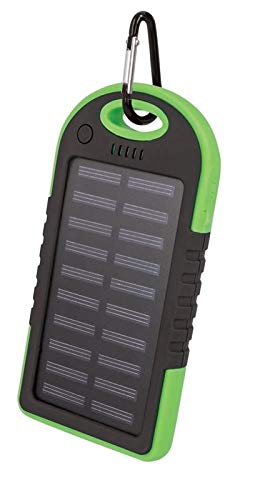
Малюнак 1: Setty Power Bank with Solar Panels. The image displays the power bank in its packaging, highlighting its green and black design, solar panel, and a carabiner clip for portability. The packaging also indicates "SOLAR TRAVEL BATTERY 5000 mAh".
- Панэль сонечных батарэй: Converts sunlight into electrical energy to slowly charge the internal battery.
- USB Output Ports (2): Для зарадкі знешніх прылад.
- Уваходны порт Micro-USB: Для зарадкі самога паўэрбанка.
- Святлодыёдныя індыкатары: Show battery level and charging status.
- Кнопка харчавання: To turn on/off the device and activate the flashlight.
- Ліхтарык: Інтэграваная святлодыёдная лямпа для падсветкі.
- Заціск для карабіна: For attaching the power bank to bags or gear.
5. Настройка
5.1 Пачатковая зарадка знешніх акумулятараў
Before first use, it is recommended to fully charge the power bank via a USB power source.
- Connect the provided Micro-USB cable to the power bank's input port.
- Connect the other end of the USB cable to a USB wall adapter (not included), computer USB port, or other compatible USB power source.
- The LED indicators will illuminate to show the charging progress. Once all LEDs are solid, the power bank is fully charged.
- Пасля завяршэння зарадкі адключыце кабель.
Заўвага: Solar charging is a supplementary feature and is significantly slower than wall charging. For optimal performance, always fully charge the power bank via USB before extended use.
6. Інструкцыя па эксплуатацыі
6.1 Зарадка знешніх прылад
- Падключыце зарадны кабель прылады да аднаго з USB-портаў на знешнім акумулятары.
- Падключыце другі канец кабеля да электроннай прылады (напрыклад, смартфона, планшэта).
- The power bank should automatically begin charging your device. If not, press the power button once to initiate charging.
- Святлодыёдныя індыкатары будуць паказваць пакінуты ўзровень зарада батарэі паўэрбанка.
- Адключайце прыладу, калі яна цалкам зарадзіцца або калі вам больш не трэба яе зараджаць.
6.2 Сонечная зарадка
The integrated solar panel allows for emergency or supplementary charging when no other power source is available.
- Place the power bank with the solar panel facing direct sunlight.
- A dedicated LED indicator (if present) or the main battery indicators may show that solar charging is active.
- Solar charging is slow and dependent on sunlight intensity. It is not intended as the primary charging method.
6.3 LED Indicator Functions
The LED lights indicate the power bank's status:
- Святлодыёды, якія пастаянна свецяцца: Indicate remaining battery capacity. (e.g., 4 LEDs = 75-100%, 3 LEDs = 50-75%, etc.)
- Мігцяць святлодыёды: Indicate the power bank is currently being charged.
6.4 Функцыя ліхтарыка
To use the integrated flashlight:
- Уключыць: Націсніце і ўтрымлівайце кнопку харчавання прыблізна 2-3 секунд.
- Выключыць: Press and hold the power button again for approximately 2-3 seconds.
7. Тэхнічнае абслугоўванне
- Працірайце знешні акумулятар мяккай сухой тканінай. Не выкарыстоўвайце агрэсіўныя хімікаты або абразіўныя ачышчальнікі.
- Keep the solar panel clean and free of dust or debris for optimal solar charging efficiency.
- Захоўвайце павербанк у прахалодным сухім месцы, калі ён не выкарыстоўваецца.
- If storing for extended periods, charge the power bank to at least 50% every 3 months to prolong battery life.
8. Выпраўленне непаладак
| праблема | Магчымая прычына | Рашэнне |
|---|---|---|
| Паўэрбанк не зараджаецца. |
|
|
| Прылада не зараджаецца ад паўэрбанка. |
|
|
| Solar charging is very slow. |
|
|
9. Тэхнічныя характарыстыкі
- Марка: Setty
- Нумар мадэлі: 5900495682062
- Ёмістасць батарэі: 5000 мАг (міліліметраўampда гадзіны)
- Увод: USB (Micro-USB)
- выхад: 2 порта USB
- Выхадны ток: 1 А
- Крыніца харчавання: Solar Powered, USB
- Сумяшчальныя прылады: Computer (and other USB-chargeable devices)
10. Інфармацыя аб гарантыі
Setty products are manufactured to high-quality standards. For specific warranty terms and conditions, please refer to the warranty card included with your purchase or contact your retailer. Keep your proof of purchase for any warranty claims.
11. Падтрымка
If you encounter any issues or have questions regarding your Setty Power Bank that are not covered in this manual, please contact the retailer where you purchased the product or visit the official Setty webсайт для далейшай дапамогі.