
1. Уводзіны
This manual provides essential instructions for the safe and efficient use of your KOAMTAC KDC280 Barcode Data Collector. The KDC280 is a compact and versatile device designed for collecting 1D and 2D barcode data, offering flexible connectivity options via Bluetooth and USB. Please read this manual thoroughly before operating the device and retain it for future reference.
2. Інфармацыя па бяспецы
- Do not expose the device to extreme temperatures, moisture, or corrosive substances.
- Пазбягайце падзення прылады або моцных удараў.
- Не спрабуйце разбіраць або мадыфікаваць прыладу. Гэта прывядзе да анулявання гарантыі і можа прывесці да пашкоджанняў.
- Use only the charging cradle and accessories provided or approved by KOAMTAC.
- Трымайце прыладу далей ад моцных магнітных палёў.
- Утылізуйце батарэі ў адпаведнасці з мясцовымі правіламі.
3. Змесціва ўпакоўкі
Verify that all items are present in your KDC280 package:
- KOAMTAC KDC280 Barcode Data Collector
- USB-ключ Bluetooth
- Зарадная падстаўка
- Кабель USB
- Шнурок
- Кароткае кіраўніцтва

Image: The KOAMTAC KDC280 data collector shown with its charging cradle, USB Bluetooth dongle, and lanyard.
4. Прадукт скончыўсяview
The KDC280 is a miniature barcode data collector capable of reading both 1D and 2D barcodes. It features a small display for user feedback and navigation buttons. Its primary function is to scan and store barcode data or transmit it in real-time to a host device via Bluetooth or USB.
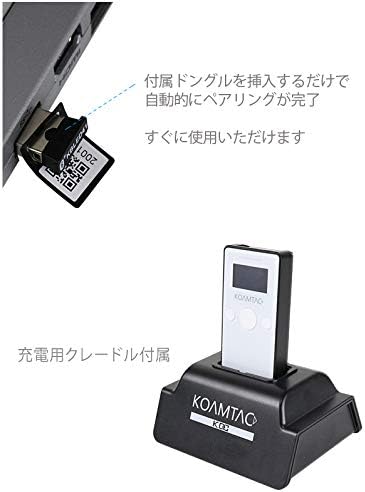
Выява: буйны план view of the KDC280 device, its charging cradle, and the USB Bluetooth dongle.
5. Настройка
5.1. Charging the KDC280
Before initial use, fully charge the KDC280 battery. Place the KDC280 into the charging cradle. Connect the USB cable to the charging cradle and then to a power source (e.g., computer USB port or USB wall adapter). The device's display will indicate charging status.
5.2. Connecting via USB Bluetooth Dongle
For quick and automatic pairing with a host device, use the included USB Bluetooth dongle.
- Insert the USB Bluetooth dongle into an available USB port on your computer or host device.
- Power on the KDC280.
- The KDC280 will automatically detect and pair with the dongle. A confirmation message will appear on the KDC280's display once pairing is successful. The device is then ready for immediate use.

Image: Illustration showing the USB Bluetooth dongle being inserted into a port, enabling automatic pairing with the KDC280. The charging cradle is also visible.
5.3. Connecting via Standard Bluetooth
To connect to a host device without the dongle, follow the standard Bluetooth pairing procedure:
- Ensure Bluetooth is enabled on your host device (e.g., smartphone, tablet, computer).
- On the KDC280, navigate to the Bluetooth menu and select 'Pairing Mode'.
- On your host device, search for available Bluetooth devices. Select 'KDC280' from the list.
- Выконвайце любыя падказкі на экране, каб завяршыць працэс спалучэння.
6. Operating the KDC280
6.1. Уключэнне / выключэнне харчавання
- To power on: Press and hold the power button until the display illuminates.
- To power off: Press and hold the power button until the 'Power Off' option appears on the display, then confirm.
6.2. Сканаванне штрых-кодаў
- Point the KDC280's scanner window at the barcode.
- Press the scan button. A successful scan will typically be indicated by a beep and/or a green LED light.
- The scanned data will appear on the KDC280's display and/or be transmitted to the connected host device.
6.3. Перадача дадзеных
When connected via Bluetooth, scanned data is typically transmitted in real-time to the host application. If operating in batch mode (data stored internally), connect the KDC280 via USB to a computer and use the provided utility software to download the stored data.
7. Тэхнічнае абслугоўванне
7.1. Уборка
- Працярыце прыладу мяккай, damp тканіна. Не выкарыстоўвайце агрэсіўныя хімікаты або абразіўныя ачышчальнікі.
- Ensure the scanner window is clean and free of dust or smudges for optimal scanning performance.
7.2. Сыход за батарэяй
- Пазбягайце частай поўнай разрадкі акумулятара.
- Захоўвайце прыладу ў прахалодным, сухім месцы, калі яна не выкарыстоўваецца працяглы час.
- If the battery performance significantly degrades, contact support for replacement options.
8. Выпраўленне непаладак
8.1. Прылада не ўключаецца
- Ensure the battery is charged. Connect the device to the charging cradle and a power source.
- Праверце, ці правільна націснута і ўтрымліваецца кнопка харчавання.
8.2. Unable to Scan Barcodes
- Check if the scanner window is clean and unobstructed.
- Ensure the barcode is not damaged or poorly printed.
- Verify the device is in the correct scanning mode.
8.3. Connection Issues (Bluetooth/USB)
- Bluetooth: Ensure the KDC280 is in pairing mode or already paired. Check Bluetooth settings on the host device. Restart both devices.
- USB ключ: Ensure the dongle is fully inserted and recognized by the host device. Restart the KDC280 and reinsert the dongle.
- USB-кабель: Try a different USB port or cable. Ensure drivers are correctly installed if required by your operating system.
9. Тэхнічныя характарыстыкі
| Марка | КААМТАК |
| мадэль | KDC280 |
| Сумяшчальнасць штрых-кодаў | 1D і 2D штрых-коды |
| Сувязь | Bluetooth, кабель USB |
| Крыніца харчавання | Працуе ад акумулятара |
| Аксэсуары ў камплекце | USB Bluetooth Dongle, Charging Cradle |
10. Гарантыя і падтрымка
For warranty information, technical support, or service inquiries, please refer to the warranty card included with your product or visit the official KOAMTAC webсайт. Кантактная інфармацыя службы падтрымкі кліентаў звычайна даступная на сайце вытворцы webсайт.