
Itek ITMC30V201FHD
iTek GGC 30-inch Curved Monitor User Manual
Model: ITMC30V201FHD
Сардэчна запрашаем
Thank you for choosing the iTek GGC 30-inch Curved Monitor. This manual provides essential information for setting up, operating, and maintaining your new monitor. Please read it thoroughly before use to ensure optimal performance and safety.
Важныя інструкцыі па бяспецы
To prevent damage and ensure safe operation, please observe the following precautions:
- Не падвяргайце манітор уздзеянню дажджу, вільгаці або экстрэмальных тэмператур.
- Забяспечце належную вентыляцыю вакол манітора. Не блакуйце вентыляцыйныя адтуліны.
- Выкарыстоўвайце толькі адаптар сілкавання, які пастаўляецца з маніторам.
- Пазбягайце размяшчэння цяжкіх прадметаў на шнуры сілкавання.
- Адключыце вілку сілкавання ад разеткі, калі манітор не будзе выкарыстоўвацца працяглы час.
- Не спрабуйце абслугоўваць манітор самастойна. Звяртайцеся па любыя паслугі да кваліфікаванага персаналу.
- Ачысціце экран манітора і casinмяккай сухой тканінай. Пазбягайце выкарыстання абразіўных ачышчальнікаў або растваральнікаў.
Змест пакета
Калі ласка, праверце ўпакоўку на наяўнасць наступных прадметаў:
- iTek GGC 30-inch Curved Monitor
- Падстаўка для манітора (аснова і шыя)
- Адаптар сілкавання і кабель
- Кабель DisplayPort
- Кабель HDMI
- Кіраўніцтва карыстальніка
- Шрубы для зборкі падстаўкі
Прадукт скончаныview
The iTek GGC 30-inch Curved Monitor is designed for an immersive viewing experience, ideal for gaming and professional use. It features a WFHD (2560x1080) resolution, a high 200Hz refresh rate, and a rapid 1ms MPRT response time.

Key Performance Highlights
- 200Hz Refresh Rate & AMD FreeSync Technology: Experience ultra-smooth visuals and tear-free gaming with a high refresh rate and adaptive sync technology.

Figure 2: 200Hz Refresh Rate and AMD FreeSync Technology in action. - Flicker-Free & Low Blue Light: Designed to reduce eye strain during prolonged use, providing a more comfortable viewвопыту.

Figure 3: Flicker-Free and Low Blue Light features for eye comfort. - 1 мс Час водгуку MPRT: Minimizes motion blur and ghosting, crucial for fast-paced games and action sequences.

Figure 4: Rapid Refresh Rate and Response Time for smooth visuals. - Выгнуты дысплей 1800R: The immersive curvature brings the edges of the screen closer to your field of view, enhancing depth perception and reducing distortion.

Figure 5: 1800R Curved Display for an immersive experience.
Настройка
Зборка стэнда
- Асцярожна выміце кампаненты манітора і падстаўкі з упакоўкі.
- Attach the stand neck to the monitor panel using the provided screws. Ensure it clicks securely into place or is fastened tightly.
- Attach the stand base to the stand neck, securing it with the thumb screw or screws from underneath.
- Змесціце сабраны манітор на ўстойлівую, роўную паверхню.
Падключэнне манітора
The iTek GGC monitor offers multiple connectivity options for various devices:
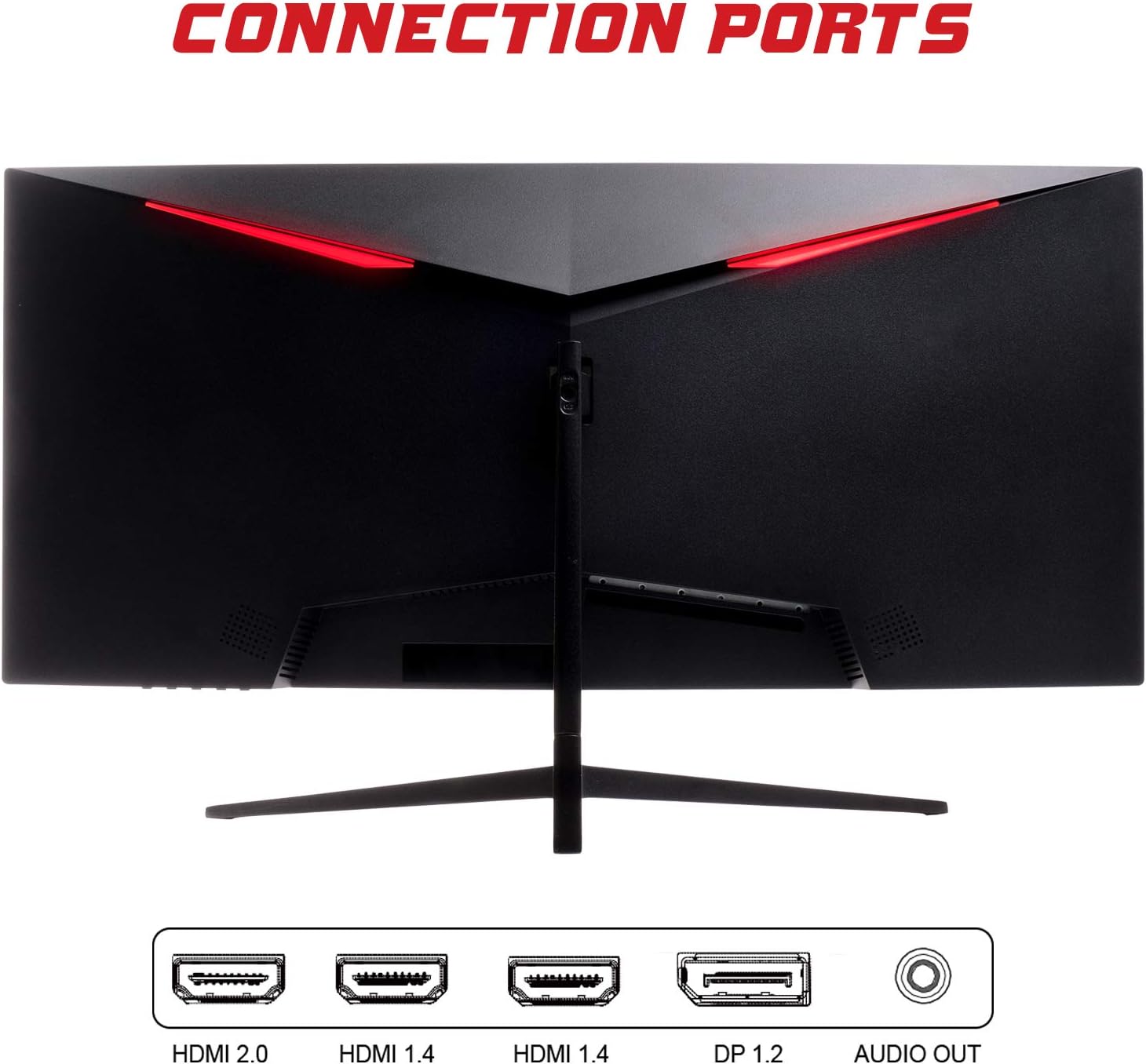
- DisplayPort (DP 1.2): For high-resolution and high-refresh-rate connections to your PC.
- HDMI (HDMI 2.0, HDMI 1.4 x2): Connect to PCs, gaming consoles, and other multimedia devices. HDMI 2.0 supports higher refresh rates at certain resolutions.
- Аўдыёвыхад: Падключыце знешнія дынамікі або навушнікі.
Пасля падлучэння відэакабеля падключыце адаптар сілкавання да манітора, а затым да разеткі.
Кіраванне маніторам
Уключэнне/выключэнне харчавання
Націсніце кнопку харчавання, якая звычайна знаходзіцца ўнізе або на задняй панэлі манітора, каб уключыць або выключыць яго. Індыкатар харчавання загараецца, калі манітор уключаны.
Экраннае меню (OSD).
Экраннае меню дазваляе рэгуляваць розныя параметры манітора. Для навігацыі па меню выкарыстоўвайце кнопкі на маніторы (звычайна размешчаныя на задняй панэлі або ўнізе справа).
- Налады малюнка: Adjust brightness, contrast, sharpness, and gamma.
- Налады колеру: Змяніць каляровую тэмпературу, адценне і насычанасць.
- Выбар уводу: Ручное пераключэнне паміж уваходамі DisplayPort і HDMI.
- Аўдыё: Адрэгулюйце гучнасць гукавога вываду.
- Налады сістэмы: Access language, OSD timeout, and reset options.
- Гульнявыя асаблівасці: Enable/disable FreeSync, adjust response time overdrive, and activate crosshair overlays if available.
Тэхнічнае абслугоўванне
Правільны догляд забяспечвае даўгавечнасць вашага манітора:
- Заўсёды выключайце манітор і адключайце шнур сілкавання ад сеткі перад чысткай.
- Выкарыстоўвайце мяккую тканіну без ворса, каб акуратна працерці экран. Для выдалення ўстойлівых плям злёгку працярыцеampпрацярыце тканіну вадой або мяккім неабразіўным ачышчальнікам для экранаў.
- Ачысціце манітор casinпрацярыце мяккай сухой тканінай.
- Avoid spraying liquids directly onto the screen or casing.
- Do not use benzene, thinner, ammonia-based cleaners, or abrasive materials.
Ліквідацыю непаладак
Калі ў вас узніклі праблемы з маніторам, звярніцеся да наступнай табліцы, каб знайсці распаўсюджаныя праблемы і рашэнні:
| праблема | Магчымае рашэнне |
|---|---|
| Няма ўлады | Ensure the power cable is securely connected to the monitor and the power outlet. Check if the power outlet is working. |
| Няма сігналу / Пусты экран | Verify the video cable (DisplayPort or HDMI) is firmly connected to both the monitor and your computer. Select the correct input source via the OSD menu. Ensure your computer is powered on and not in sleep mode. |
| Мігценне або нестабільнасць выявы | Check the video cable connection. Try a different cable or port. Ensure your graphics card drivers are up to date. Adjust the refresh rate in your computer's display settings. |
| Дрэнная якасць выявы (размытыя, скажоныя колеры) | Adjust brightness, contrast, and color settings in the OSD menu. Ensure the display resolution on your computer matches the monitor's native resolution (2560x1080). |
| Няма гуку з аўдыёвыхаду | Check the audio cable connection to your speakers/headphones. Verify the volume setting in the OSD menu and on your computer. Ensure the correct audio output device is selected in your computer's sound settings. |
Тэхнічныя характарыстыкі
| Асаблівасць | Спецыфікацыя |
|---|---|
| Марка | Ітэк |
| мадэль | ITMC30V201FHD |
| Памер экрана | 30 цалі |
| Тып панэлі | VA |
| Скрыўленне | R1800 |
| дазвол | 2560 x 1080 (WFHD) |
| Суадносіны бакоў | 21:9 |
| Частата абнаўлення | 200 Гц |
| Час водгуку | 1 мс MPRT |
| Яркасць | 350 кд/м² |
| Каэфіцыент кантраснасці | 3000:1 |
| Viewing кут | 178° (гарызантальны/вертыкальны) |
| Сувязь | 1x DisplayPort 1.2, 1x HDMI 2.0, 2x HDMI 1.4, Audio Out |
| Асаблівасці | HDR Ready, FreeSync, Low Blue Light, Flicker Free, VESA Mountable |
| Памеры вырабу (з падстаўкай) | 70.68 х 40.89 х 18.48 см |
| Вага | 6.9 кг |
Энергаэфектыўнасць

For detailed energy consumption information and product registration, please refer to the official EPREL database:
Гарантыя і падтрымка
Your iTek GGC monitor is backed by a manufacturer's warranty. Please retain your proof of purchase for warranty claims.
- Гарантаваная падтрымка прадукту: This product is guaranteed to have support available until at least January 1, 2031.
- For technical support, warranty inquiries, or service requests, please contact iTek customer service through their official webсайт або кантактную інфармацыю, прадастаўленую пры пакупцы.