
1. Уводзіны
Thank you for choosing the iggual QR Barcode Scanner. This device is designed for efficient and reliable scanning of both 1D and 2D barcodes, offering both manual and automatic scanning modes. It features an ergonomic design for comfortable use and broad compatibility with various operating systems. This manual provides essential information for setting up, operating, and maintaining your scanner.
Асноўныя характарыстыкі:
- Ergonomic design with a comfortable trigger button.
- Detects all common 1D and 2D barcodes, including QR codes.
- Supports manual and automatic scanning modes.
- Wired USB connectivity for reliable data transmission.
- Compatible with Windows XP/7/8/10, macOS, Linux, and Android.
2. Змесціва ўпакоўкі
Калі ласка, праверце змесціва пакета, каб пераканацца ў наяўнасці ўсіх прадметаў:
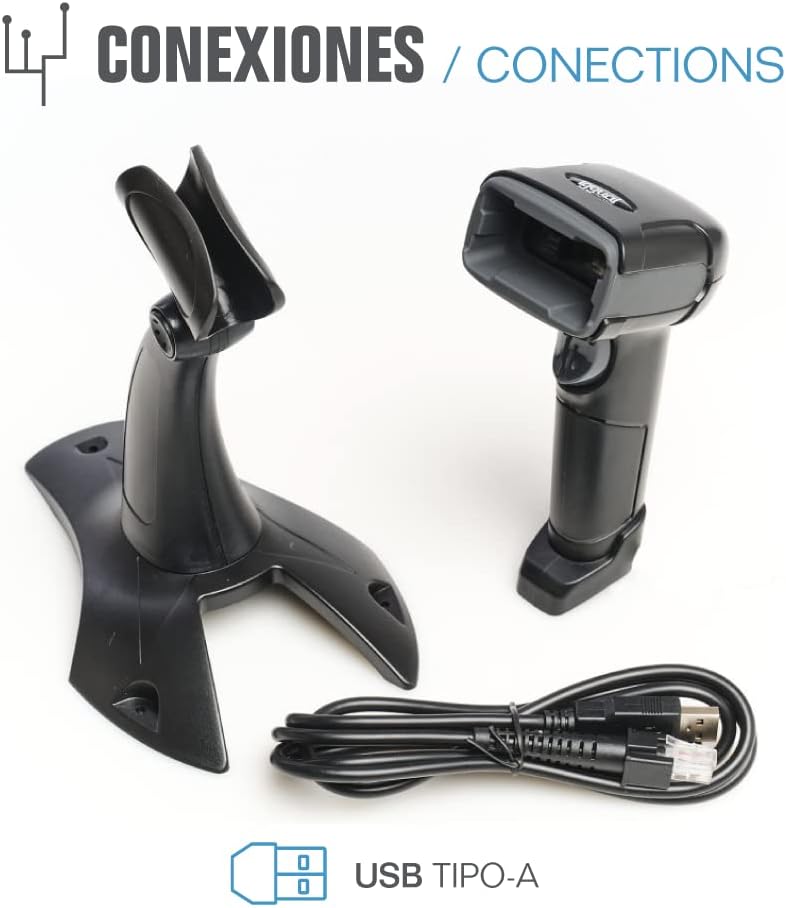
- iggual QR Barcode Scanner (Model IGG315651)
- USB Cable (Type-A)
- Scanner Stand (Optional, depending on package)

Малюнак 2.1: Package contents including the scanner, stand, and USB Type-A cable.
3. Прадукт скончыўсяview
Familiarize yourself with the main components of your iggual barcode scanner:
- Акно сканавання: Зона, дзе счытваюцца штрых-коды.
- Кнопка запуску: Актывуе сканаванне ў ручным рэжыме.
- Порт USB: Для падключэння сканера да кампутара.
- Святлодыёдны індыкатар: Provides visual feedback on scanning status.
- Біпер: Provides audible feedback on scanning status.

Малюнак 3.1: The iggual barcode scanner with its optional stand, highlighting the LED indicator and beeper functionality.
4. Настройка
4.1 Падключэнне сканера
- Connect the USB cable to the USB port on the scanner.
- Падключыце другі канец USB-кабеля да даступнага USB-порта на вашым кампутары або прыладзе.
- The scanner will typically be recognized automatically by your operating system as a standard HID keyboard device. No special drivers are usually required.
4.2 Сумяшчальнасць сістэмы
The iggual QR Barcode Scanner is compatible with a wide range of operating systems:
- Windows XP / 7 / 8 / 10
- macOS
- Linux
- Android

Малюнак 4.1: Operating system compatibility for the iggual barcode scanner.
5. Інструкцыя па эксплуатацыі
5.1 Рэжымы сканавання
Сканер падтрымлівае два асноўныя рэжымы сканавання:
- Ручной рэжым: Press the trigger button to activate the scanner and read a barcode. Release the button after a successful scan.
- Аўтаматычны рэжым: The scanner continuously emits a scanning beam, reading barcodes as they are presented within its field of view without needing to press the trigger. Refer to the full product manual (if available from iggual.com) for instructions on switching between modes, usually done by scanning specific configuration barcodes.
5.2 Падтрымліваемыя тыпы штрых-кодаў
This scanner is capable of reading a wide range of 1D and 2D barcode symbologies, including:
- 2D-коды: QR Code, Maxi Code, MicroPDF, PDF417
- 1D-коды: Code 128, EAN-13, EAN-8, Code 39, UPC-A, UPC-E, Code 93, Interleaved 2 of 5, Codabar, MSI, RSS, etc.

Малюнак 5.1: Scanner capabilities including 200 scans/second, 2D scanning, and supported code types.
5.3 Працэдура сканавання
- Ensure the scanner is properly connected to your host device.
- Адкрыйце праграму, у якой вы хочаце размясціць адсканаваныя дадзеныя (напрыклад, тэкставы рэдактар, электронную табліцу або праграмнае забеспячэнне для POS).
- Point the scanning window at the barcode you wish to read.
- If in manual mode, press and hold the trigger button. If in automatic mode, simply present the barcode.
- A successful scan will be indicated by a short beep and/or a flash of the LED indicator. The scanned data will appear in your active application.
- If the barcode is not read, adjust the distance and angle of the scanner relative to the barcode.
6. Тэхнічнае абслугоўванне
6.1 Ачыстка
- To clean the scanner's exterior, use a soft, damp тканіна.
- For the scanning window, use a lint-free cloth and a mild glass cleaner. Avoid abrasive materials or harsh chemicals that could scratch the surface.
- Сачыце за тым, каб у корпус сканера не патрапіла вадкасць.
6.2 Захоўванне
Калі сканер не выкарыстоўваецца, захоўвайце яго ў прахалодным, сухім месцы, удалечыні ад прамых сонечных прамянёў і экстрэмальных тэмператур.
7. Выпраўленне непаладак
| праблема | Магчымая прычына | Рашэнне |
|---|---|---|
| Сканер не распазнаецца камп'ютарам. | Loose USB connection, faulty USB port, or cable issue. | Ensure USB cable is securely connected. Try a different USB port or cable. Restart the computer. |
| Сканер не счытвае штрых-коды. | Barcode damaged, incorrect scanning angle/distance, scanner in wrong mode, or dirty scanning window. | Check barcode integrity. Adjust scanning angle and distance. Ensure scanner is in the correct mode (manual/automatic). Clean the scanning window. |
| Адсканаваныя дадзеныя адлюстроўваюцца няправільна. | Keyboard layout mismatch or corrupted data. | Ensure your computer's keyboard layout matches the scanner's default output (usually US English). If issues persist, consult the full product manual for advanced configuration. |
8. Тэхнічныя характарыстыкі
| Асаблівасць | Дэталь |
|---|---|
| мадэль | IGG315651 |
| Памеры (Д х Ш х У) | 160 х 80 х 100 мм (6.3 х 3.15 х 3.94 цалі) |
| Вага | 120 г (0.26 фунта) |
| Хуткасць сканавання | 200 сканаванняў у секунду |
| Датчык выявы | 640(H) x 480(V), 256 Grayscale |
| Сувязь | Wired USB (Type-A) |
| Крыніца харчавання | Электрычны шнур (харчаванне ад USB) |
| Аперацыйныя сістэмы | Windows XP/7/8/10, macOS, Linux, Android |
| Падтрымліваюцца штрых-коды | 1D & 2D (QR, Maxi Code, MicroPDF, Code, PDF417, RSS, etc.) |
Малюнак 8.1: Physical dimensions of the iggual barcode scanner.
9. Гарантыя і падтрымка
For warranty information, technical support, or to download the complete product manual with advanced configuration options, please visit the official iggual webсайт або звярніцеся да мясцовага дыстрыбутара.
Афіцыйны Webсайт: www.iggual.com