
1. Уводзіны
The nJoy Aten Pro 1000VA is an advanced Uninterruptible Power Supply (UPS) designed to provide reliable power protection for sensitive electronic equipment. This online double-conversion UPS ensures a continuous, clean power supply, safeguarding your devices against power outagэс, выпtage fluctuations, and surges. It features a pure sine wave output, an LCD display for real-time status, and communication ports for comprehensive management.
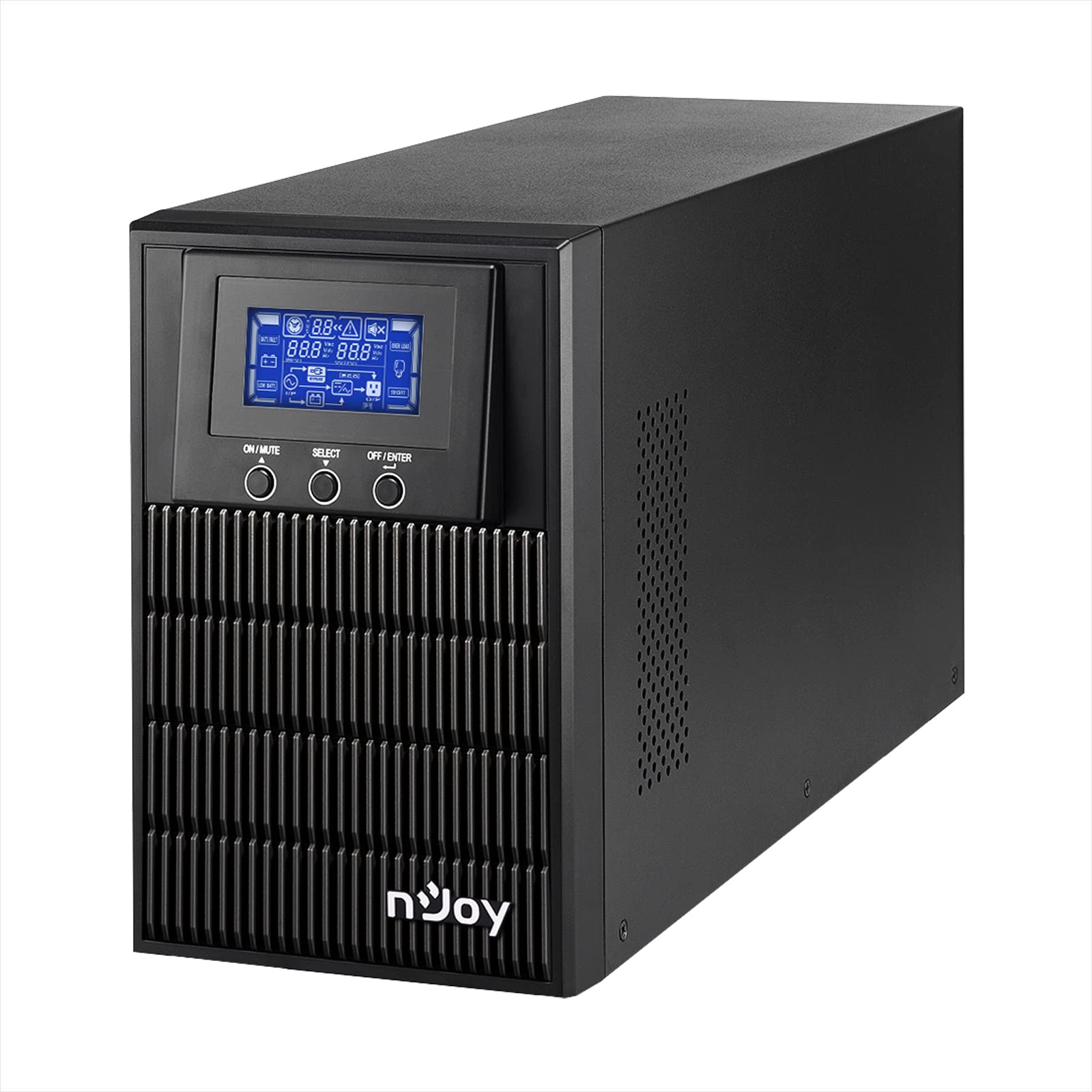
Figure 1: nJoy Aten Pro 1000VA UPS Front View
This image shows the front of the nJoy Aten Pro 1000VA UPS, highlighting its compact tower design and the integrated LCD display panel with control buttons.

Малюнак 2: Асноўныя характарыстыкіview
This image visually summarizes the main features of the nJoy Aten Pro 1000VA UPS, including its online double-conversion technology, 1000VA/900W capacity, dual 12V@9.0Ah batteries, USB interface, LCD display, pure sine wave output, and SNMP capability.
2. Інфармацыя па бяспецы
Please read and follow all safety instructions carefully before installing, operating, or maintaining the UPS.
- This UPS is designed for indoor use only.
- Не адкрывайце бесперабойны блокasing. Унутры няма дэталяў, якія можна абслугоўваць самастойна. Па ўсіх пытаннях абслугоўвання звяртайцеся да кваліфікаванага персаналу.
- Ensure the UPS is connected to a properly grounded AC power outlet.
- Do not block ventilation openings. Maintain adequate airflow around the UPS.
- Пазбягайце размяшчэння бесперабойнага сілкавання пад прамымі сонечнымі прамянямі, побач з крыніцамі цяпла або ў асяроддзях з падвышанай запыленасцю, вільготнасцю або агрэсіўнымі рэчывамі.
- Адключыце бесперабойнае сілкаванне ад крыніцы пераменнага току перад выкананнем любога тэхнічнага абслугоўвання або чысткі.
- Batteries can present a risk of electrical shock and high short-circuit current. Observe the following precautions:
- Зніміце гадзіннік, пярсцёнкі або іншыя металічныя прадметы.
- Выкарыстоўвайце інструменты з ізаляванымі ручкамі.
- Апранайце гумовыя пальчаткі і боты.
3. Асаблівасці і кампаненты прадукту
The nJoy Aten Pro 1000VA UPS is equipped with several features and ports for optimal performance and connectivity.
3.1 Пярэдняя панэль

Малюнак 3: Пярэдняя панэль зверхуview
This image displays the front panel of the UPS, showing the LCD screen that provides real-time status updates and the three control buttons: ON/MUTE, SELECT, and OFF/ENTER.
- ВК-дысплей: Shows real-time status information such as AC mode, battery mode, charge level, battery level, input voltagе, выхtage, overload, fault, and low battery.
- Кнопка УКЛ./БЕЗ ГУКУ: Уключае бесперабойнае сілкаванне або адключае гук сігналізацыі.
- Кнопка ВЫБАР: Навігацыя па меню LCD-дысплея.
- Кнопка ВЫКЛ./УВОД: Выключае бесперабойнае сілкаванне або пацвярджае выбар.
3.2 Задняя панэль

Малюнак 4: Падключэнні на задняй панэлі
This image illustrates the rear panel of the UPS, detailing the various connection ports and components, including RS232, Schuko outputs, circuit breaker, intelligent slot, USB, and AC input.
- Інтэрфейс RS232: For serial communication with a computer.
- Schuko Outputs (3): Connect your critical devices here for battery backup and surge protection.
- Выключальнік: Provides overload protection.
- Intelligent Slot (SNMP): For optional SNMP card for network management.
- Інтэрфейс USB: Для сувязі з кампутарам праз USB.
- Уваход пераменнага току: Connect the UPS to the main AC power supply.
4. Інструкцыі па ўсталёўцы
4.1 Распакаванне і праверка
- Carefully unpack the UPS and inspect it for any shipping damage. If any damage is found, do not install the unit and contact your dealer.
- Verify that all accessories are included: UPS unit, USB cable, RS232 cable, and user manual.
4.2 Размяшчэнне
- Place the UPS in a clean, dry, and temperature-controlled environment.
- Ensure adequate clearance (at least 20 cm) around the UPS for proper ventilation.
- Avoid placing the UPS near water or excessive humidity.
4.3 Першапачатковая зарадка
- Before initial use, connect the UPS to a standard AC power outlet for at least 4 hours to ensure the batteries are fully charged. This will maximize battery runtime.
4.4 Падключэнне абсталявання
- Connect your computer, monitor, and other critical devices to the Schuko output receptacles on the rear panel of the UPS.
- Do not connect laser printers or strip heaters to the UPS outputs, as these devices can draw significant power and overload the UPS.
- Падключыце КБС да насценнай разеткі з дапамогай шнура харчавання, які ўваходзіць у камплект.
4.5 Усталёўка праграмнага забеспячэння (неабавязкова)
For advanced monitoring and management, install the UPS management software on your computer.

Figure 5: UPS Management Software
This image shows a graphical representation of the UPS management software interface, illustrating its capabilities for monitoring UPS status, scheduling operations, and configuring settings across various operating systems like Mac OS, Linux, and Windows.
- Connect the UPS to your computer using either the USB or RS232 cable.
- Install the provided management software (compatible with Mac OS, Linux, Windows).
- The software allows for:
- Real-time status visualization.
- Scheduling of power on/off and battery tests.
- Comprehensive UPS configuration.
5. Інструкцыя па эксплуатацыі
5.1 Уключэнне/выключэнне КБС
- Каб уключыць: Націсніце і ўтрымлівайце ВКЛ/ВЫКЛ button until you hear a beep. The UPS will perform a self-test and then enter AC mode.
- Каб выключыць: Націсніце і ўтрымлівайце ВЫКЛ/УВОД button until the UPS powers down.
5.2 Інфармацыя пра ВК-дысплей
The LCD display provides critical information about the UPS status. Use the ВЫБРАЦЬ кнопку для пераключэння паміж рознымі рэжымамі адлюстравання.
- Рэжым пераменнага току: Паказвае, што бесперабойнае сілкаванне працуе ад сеткі.
- Рэжым батарэі: Indicates the UPS is operating on battery power (during an outagе).
- Узровень зарада: Shows the current load percentage.
- Узровень батарэі: Displays the remaining battery capacity.
- Уваходны кнtage: Current incoming AC voltage.
- Выхад Voltage: Current outgoing AC voltage.
- Перагрузка: Indicates connected equipment exceeds UPS capacity.
- Памылка: Indicates a system error.
- Нізкі зарад батарэі: Warning that battery power is critically low.
5.3 Экарэжым
The Eco Mode feature helps reduce energy consumption. When the input voltage is within the acceptable range, the UPS will bypass the inverter and directly supply power from the utility, increasing energy efficiency. This mode can be configured via the management software.

Figure 6: Key Operational Features
This image highlights three core operational features of the UPS: Pure Sine Wave output for clean power, Zero Transfer Time for seamless power transition, and Eco Mode for energy efficiency.
6. Тэхнічнае абслугоўванне
6.1 Сыход за батарэяй і яе замена
- The UPS uses sealed lead-acid batteries (2 x 12V/9Ah). These batteries are designed for a specific lifespan.
- To maximize battery life, ensure the UPS is always connected to AC power to keep the batteries charged.
- Batteries are user-replaceable by qualified personnel only. Contact NJOY support or a certified technician for battery replacement.
- Утылізуйце старыя батарэі належным чынам у адпаведнасці з мясцовымі правіламі.
6.2 Ачыстка
- Ensure the UPS is turned off and disconnected from AC power before cleaning.
- Use a soft, dry cloth to wipe the exterior of the UPS.
- Не карыстайцеся вадкімі або аэразольнымі ачышчальнікамі.
- Перыядычна чысціце вентыляцыйныя адтуліны, каб прадухіліць назапашванне пылу.
7. Выпраўленне непаладак
If the UPS is not operating correctly, refer to the following table for common issues and solutions.
| праблема | Магчымая прычына | Рашэнне |
|---|---|---|
| Бесперапынны крыніца энергіі (БП) не ўключаецца. | No AC input power; Low battery. | Ensure the power cord is securely connected. Allow the UPS to charge for at least 4 hours. |
| UPS is in battery mode frequently. | Unstable AC input power; High sensitivity setting. | Check the utility power quality. Adjust the UPS input voltage sensitivity via software if necessary. |
| Overload warning on LCD. | Too many devices connected; Connected devices draw too much power. | Disconnect non-essential equipment. Ensure total load does not exceed 900W. |
| Кароткі час працы ад батарэі. | Батарэі не цалкам зараджаныя; тэрмін службы батарэй заканчваецца. | Allow the UPS to charge for 24 hours. Consider battery replacement if batteries are old. |
| UPS emits continuous alarm. | Overload; Battery fault; System fault. | Check LCD for specific error codes. Reduce load. If alarm persists, contact support. |
For issues not listed here, or if problems persist, please contact NJOY customer support.
8. Тэхнічныя характарыстыкі
Detailed technical specifications for the nJoy Aten Pro 1000VA UPS.
| Асаблівасць | Спецыфікацыя |
|---|---|
| Нумар мадэлі | PWUP-OL100AP-AZ01B |
| Ёмістасць | 1000 ВА / 900 Вт |
| Тып ІБП | On-line Double Conversion |
| Намінальны ўваходны аб'ёмtage | 110 – 300 В пераменнага току |
| Намінальны аб'ём выхtage | 230 Vac (± 1% in battery mode) |
| Дыяпазон частот | 40 Гц ~ 70 Гц |
| Выхадныя разеткі | 3 х Шуко |
| Час перадачы (ад пераменнага току да пастаяннага) | Нуль |
| Час пераключэння (з інвертара ў байпас) | 4 мс |
| Парты сувязі | USB, RS232 (Optional: Smart SNMP card) |
| Працоўная тэмпература | 0 ~ 40 °C |
| Эфектыўнасць | да 90% |
| Тып батарэі | 2 x 12V/9Ah Sealed Lead-Acid |
| Памеры (Д х Ш х У) | 28.2 х 14.5 х 22 см |
| Вага | 7 кілаграма |
8.1 Runtime Chart
The following chart illustrates the approximate battery runtime based on the connected load.
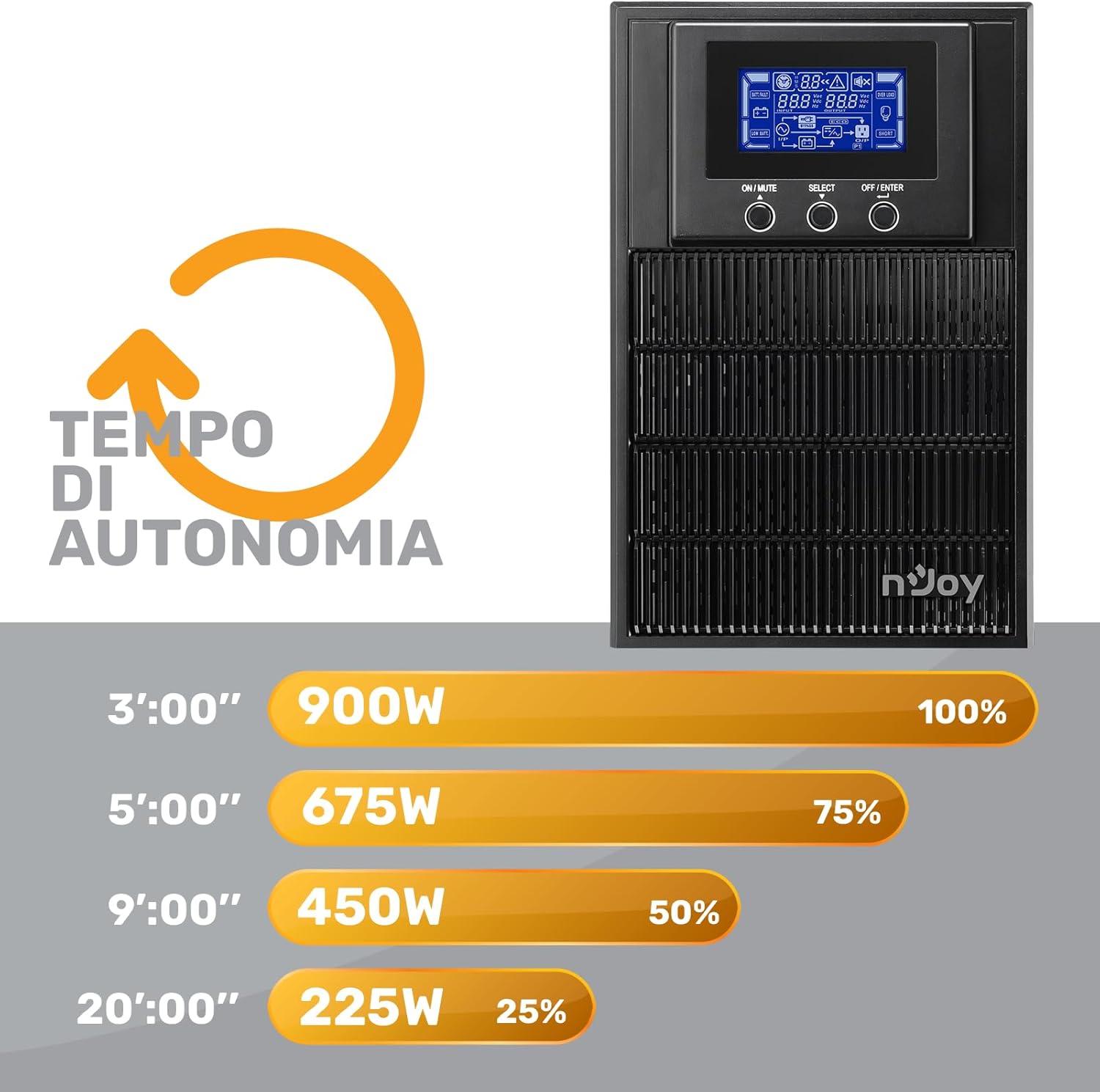
Figure 7: Battery Runtime vs. Load
This graph shows the estimated battery runtime in minutes for the nJoy Aten Pro 1000VA UPS at different load percentages. Для эксample, at 100% load (900W), the runtime is approximately 3 minutes, while at 25% load (225W), it can last up to 20 minutes.
- 100% Load (900W): Approximately 3 minutes
- 75% Load (675W): Approximately 5 minutes
- 50% Load (450W): Approximately 9 minutes
- 25% Load (225W): Approximately 20 minutes
9. Гарантыя і падтрымка
NJOY provides a comprehensive warranty and dedicated customer support for the Aten Pro series.
- Гарантыйны тэрмін: The nJoy Aten Pro UPS comes with a Гарантыя 3 год. Batteries are covered by a Гарантыя 1 год.
- Падтрымка кліентаў: Our professional customer service team is available to provide prompt and quality assistance. If you require help or support before, during, or after your purchase, please do not hesitate to contact NJOY customer service. Refer to your product packaging or the NJOY official webсайт для атрымання канкрэтнай кантактнай інфармацыі.


