
Уводзіны
Thank you for choosing the Lamax X9.1 Action Camera. This manual provides essential information for setting up, operating, and maintaining your camera. Please read it thoroughly before use to ensure optimal performance and longevity of your device. The Lamax X9.1 is designed to capture your adventures in stunning 4K Ultra HD video and 12-megapixel photos, featuring Wi-Fi connectivity and a robust design.
Змест пакета
Please check the package contents upon unboxing. Typical accessories include:
- Экшн-камера Lamax X9.1
- Пульт дыстанцыйнага кіравання
- Воданепранікальны корпус
- Мантажныя аксэсуары
- Кабель USB
- Кіраўніцтва карыстальніка
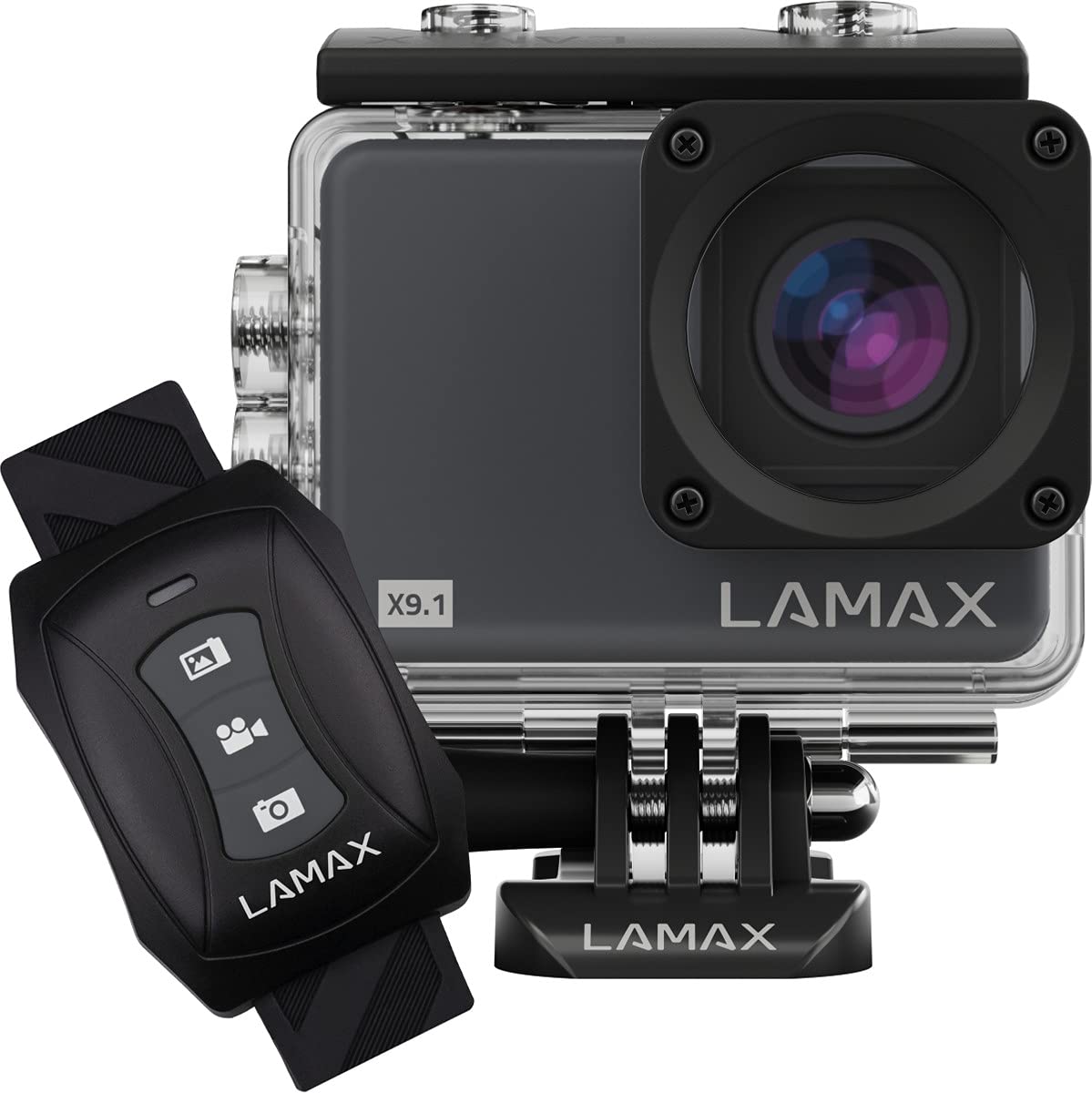
Image: The Lamax X9.1 Action Camera shown alongside its remote control, illustrating the main components.
Камера скончыласяview
Азнаёмцеся з фізічнымі кампанентамі камеры:
- Аб'ектыў: Front-facing optical component for capturing images and videos.
- ВК-экран: 2-inch display on the rear for live view, menu navigation, and playback.
- Кнопка харчавання / рэжыму: Typically located on the front or top, used to power on/off and switch modes.
- Кнопка засаўкі/запісу: Located on the top, used to start/stop recording or take photos.
- Кнопкі навігацыі: Used for menu navigation (Up/Down).
- Порт Micro-USB: Для зарадкі і перадачы дадзеных.
- Порт HDMI: Для падлучэння да знешняга дысплея.
- Слот для карты MicroSD: Для ўстаўкі карты памяці.

Выява: спераду view of the Lamax X9.1 Action Camera, clearly showing the lens and model number.

Выява: Збоку view of the Lamax X9.1 Action Camera, highlighting the Micro-USB and HDMI ports.

Выява: Задняя частка view of the Lamax X9.1 Action Camera, displaying the LCD screen and control buttons.
Настройка
1. Усталёўка і зарадка акумулятара
- Open the battery compartment cover, usually located on the bottom or side of the camera.
- Insert the Lithium-Ion (Li-Ion) battery (1050 mAh) with the contacts facing the correct direction.
- Надзейна зачыніце батарэйны адсек.
- Connect the camera to a power source using the provided Micro-USB cable. The charging indicator will illuminate. A full charge takes approximately 1.84 hours.
2. Усталёўка карты MicroSD
- Locate the MicroSD card slot, typically on the side of the camera.
- Insert a compatible MicroSDHC or MicroSDXC card (up to 64 GB, Class 10 or higher recommended) with the contacts facing down. Push until it clicks into place.
- Каб выняць, зноў націсніце на карту, пакуль яна не выскочыць.
3. Уключэнне / выключэнне харчавання
- Каб уключыць: Націсніце і ўтрымлівайце кнопку харчавання/рэжыму некалькі секунд, пакуль не падсвеціцца экран.
- Каб выключыць: Зноў націсніце і ўтрымлівайце кнопку харчавання/рэжыму, пакуль экран не выключыцца.
4. Waterproof Case Usage
The Lamax X9.1 is waterproof up to 40 meters when enclosed in its waterproof case. Ensure the case is properly sealed before submerging the camera.
- Open the waterproof case latch.
- Акуратна змесціце камеру ў чахол, пераканаўшыся, што яна шчыльна прылягае.
- Close the latch firmly, making sure the rubber seal is clean and free of debris.
- Always test the waterproof case without the camera first to ensure no leaks.

Image: The Lamax X9.1 Action Camera securely placed inside its waterproof housing, shown with the remote control.
Кіраванне камерай
1. Асноўныя элементы кіравання
- Кнопка харчавання / рэжыму: Short press to cycle through video, photo, playback, and settings modes.
- Кнопка засаўкі/запісу: Press to start/stop video recording or take a photo in the respective modes.
- Кнопкі ўверх/ўніз: Used to navigate menu options or zoom (if applicable).
2. Запіс відэа
In video mode, press the Shutter/Record button to begin recording. Press again to stop.
- Рэзалюцыі: Supports 4K Ultra HD (3840 x 2160 pixels), 1080p, 720p.
- Частата кадраў: Up to 120 frames per second (fps) for smooth slow-motion capture.
- Фарматы: H.264, H.265, MP4.
3. Фотаздымка
In photo mode, press the Shutter/Record button to take a picture.
- дазвол: 12 Megapixels (3840 x 2160 pixels).
- Фармат: JPG.
4. Спецыяльныя рэжымы
- Прамежак часу: Зрабіце серыю фотаздымкаў праз зададзеныя прамежкі часу, каб стварыць відэа з паскоранай здымкай.
- Звышпавольны рух: Record high frame rate video for dramatic slow-motion effects.
5. Падключэнне да Wi-Fi
The Lamax X9.1 features Wi-Fi for remote control and file перадача праз праграму для смартфона.
- Уключыце Wi-Fi на камеры праз меню налад.
- Download the official Lamax app (check your camera's packaging or the Lamax website for the correct app name) on your smartphone.
- Connect your smartphone to the camera's Wi-Fi network (SSID and password will be displayed on the camera screen).
- Use the app to control the camera, view жывы footagе, і спампаваць files.
6. Пульт дыстанцыйнага кіравання
The included remote control allows for convenient operation without directly touching the camera.
- Ensure the remote is paired with the camera (refer to the camera's settings menu for pairing instructions).
- Use the dedicated buttons on the remote to start/stop recording or take photos.
Меню налад
Access the settings menu by cycling through modes using the Power/Mode button until you reach the settings icon, or by pressing a dedicated menu button if available. Use the navigation buttons to scroll and the Shutter/Record button to select options.
Звычайныя налады ўключаюць:
- Разрозненне відэа і частата кадраў
- Дазвол фота
- Exposure Compensation (EV)
- Баланс белага (ББ)
- Дата і час
- цыклічны запіс
- Screen Saver/Auto Power Off
- Налады Wi-Fi
- Адфарматаваць SD-карту
Тэхнічнае абслугоўванне
1. Уборка
- Аб'ектыў: Выкарыстоўвайце мяккую тканіну без ворса, спецыяльна прызначаную для аптычных лінзаў. Пазбягайце агрэсіўных хімічных рэчываў.
- экран: Wipe gently with a microfiber cloth.
- Корпус камеры: Выкарыстоўвайце мяккі, damp cloth to clean the exterior. Ensure all ports are closed before cleaning with moisture.
- Воданепранікальны корпус: After use in saltwater, rinse the case with fresh water and let it air dry. Check the rubber seal for any debris or damage.
2. Сыход за батарэяй
- Пазбягайце частай поўнай разрадкі акумулятара.
- Калі камера не выкарыстоўваецца працяглы час, захоўвайце яе з часткова зараджанай батарэяй (каля 50%).
- Не падвяргайце акумулятары ўздзеянню экстрэмальных тэмператур.
3. Захоўванне
Store the camera in a cool, dry place away from direct sunlight and excessive humidity. Remove the battery if storing for a long time.
Ліквідацыю непаладак
Калі ў вас узніклі праблемы з Lamax X9.1, звярніцеся да наступных распаўсюджаных праблем і рашэнняў:
| праблема | Магчымая прычына / рашэнне |
|---|---|
| Камера не ўключаецца. | Battery is depleted. Charge the battery fully. Ensure the battery is inserted correctly. |
| Паведамленне пра памылку SD-карты. | SD card is not inserted correctly, is full, or is corrupted. Reinsert the card, try a different card, or format the card (this will erase all data). Ensure the card is MicroSDHC/XC, up to 64GB, Class 10 or higher. |
| Дрэнны тэрмін службы батарэі. | High-resolution video recording (4K) and Wi-Fi use consume more power. Ensure the battery is fully charged. Consider carrying spare batteries for extended use. |
| Water leakage into the case. | Waterproof case was not sealed properly, or the rubber seal is damaged/dirty. Always check the seal and latch before submerging. |
| Кампутар не распазнае камеру. | Ensure the USB cable is connected securely. Try a different USB port or cable. The camera might need to be in a specific mode (e.g., Mass Storage) to be recognized. |
| Праблемы з падключэннем да Wi-Fi. | Ensure Wi-Fi is enabled on the camera and your smartphone. Check the Wi-Fi password. Move closer to the camera to improve signal strength. |
If the problem persists, perform a factory reset (if available in settings) or contact Lamax customer support.
Тэхнічныя характарыстыкі
| Асаблівасць | Спецыфікацыя |
|---|---|
| Нумар мадэлі | X9.1 |
| Дазвол відэа | Up to 4K Ultra HD (3840 x 2160 pixels) |
| Максімальная частата кадраў | 120 кадраў у секунду |
| Дазвол фота | 12 Megapixels (3840 x 2160 pixels) |
| Дысплей | 2-цалевы (5.08 см) ВК-дысплей |
| Носьбіты інфармацыі | MicroSDHC, MicroSDXC (up to 64 GB) |
| Тып батарэі | Lithium-Ion (Li-Ion), 1050 mAh |
| Час зарадкі | Прыбл. 1.84 гадзіны |
| Сувязь | Wi-Fi, Micro-USB, HDMI |
| Вага | 72 грамаў |
| Памеры (Д х Ш х У) | 60 х 44 х 33 мм |
| Рэйтынг воданепранікальнасці | Up to 40 meters (with waterproof case) |
| Асаблівасці | Time-lapse, Super Slow Motion, Image Stabilization |
Гарантыя і падтрымка
For warranty information and technical support, please refer to the documentation included with your product or visit the official Lamax webсайт. Захоўвайце пацвярджэнне пакупкі для любых гарантыйных прэтэнзій.