
Reloop RP-1000-MK2
Reloop RP-1000 MK2 Professional Belt Drive Turntable System
Кіраўніцтва карыстальніка
1. Уводзіны
This user manual provides comprehensive instructions for the setup, operation, and maintenance of your Reloop RP-1000 MK2 Professional Belt Drive Turntable System. Please read this manual thoroughly before using the product to ensure proper function and to prevent damage.
The Reloop RP-1000 MK2 is designed for both aspiring DJs and HiFi enthusiasts, offering high-quality audio reproduction through its belt-driven mechanism. This design effectively isolates the platter from motor vibrations, ensuring clear, distortion-free sound. The MK2 version features an enhanced top panel construction, improved metallic buttons, and a pre-fitted Ortofon OM Black pick-up system for immediate playback.
2. Інструкцыі па тэхніцы бяспекі
To ensure safe operation and prolong the life of your turntable, please observe the following safety guidelines:
- крыніца харчавання: Connect the unit only to an AC outlet with the correct voltage as indicated on the product. Ensure the power cord is not pinched or walked on.
- Вільготнасць: Не падвяргайце прыладу ўздзеянню дажджу, вільгаці або празмернай вільготнасці. Не стаўце на прыладу прадметы, напоўненыя вадкасцямі, такія як вазы.
- Вентыляцыя: Забяспечце належную вентыляцыю вакол прылады. Не блакуйце вентыляцыйныя адтуліны.
- Крыніцы цяпла: Трымайце прыладу далей ад крыніц цяпла, такіх як радыятары, абагравальнікі, пліты або іншыя прыборы (у тым ліку ampLifiers), якія вырабляюць цяпло.
- Уборка: Clean only with a dry cloth. Avoid using liquid cleaners or aerosols.
- Абслугоўванне: Do not attempt to service the unit yourself. Refer all servicing to qualified service personnel. Servicing is required when the apparatus has been damaged in any way, such as power-supply cord or plug is damaged, liquid has been spilled or objects have fallen into the apparatus, the apparatus has been exposed to rain or moisture, does not operate normally, or has been dropped.
- Размяшчэнне: Place the turntable on a stable, level surface to prevent vibrations and ensure proper tracking.
3. Змесціва ўпакоўкі
Калі ласка, праверце, ці ўсе пералічаныя ніжэй прадметы ўваходзяць у ваш пакет:
- Паваротны стол
- OM Black pick-up system (by Ortofon)
- гуказдымальніка
- Сліпмат
- Супрацьвага
- Шнур харчавання
- Operating Instruction Manual (this document)
If any items are missing or damaged, please contact your retailer or Reloop customer support immediately.
4. Прадукт скончыўсяview
Familiarize yourself with the main components of your Reloop RP-1000 MK2 turntable.

Малюнак 4.1: Пад вуглом view of the Reloop RP-1000 MK2 turntable, showcasing the platter, tonearm, and control panel.
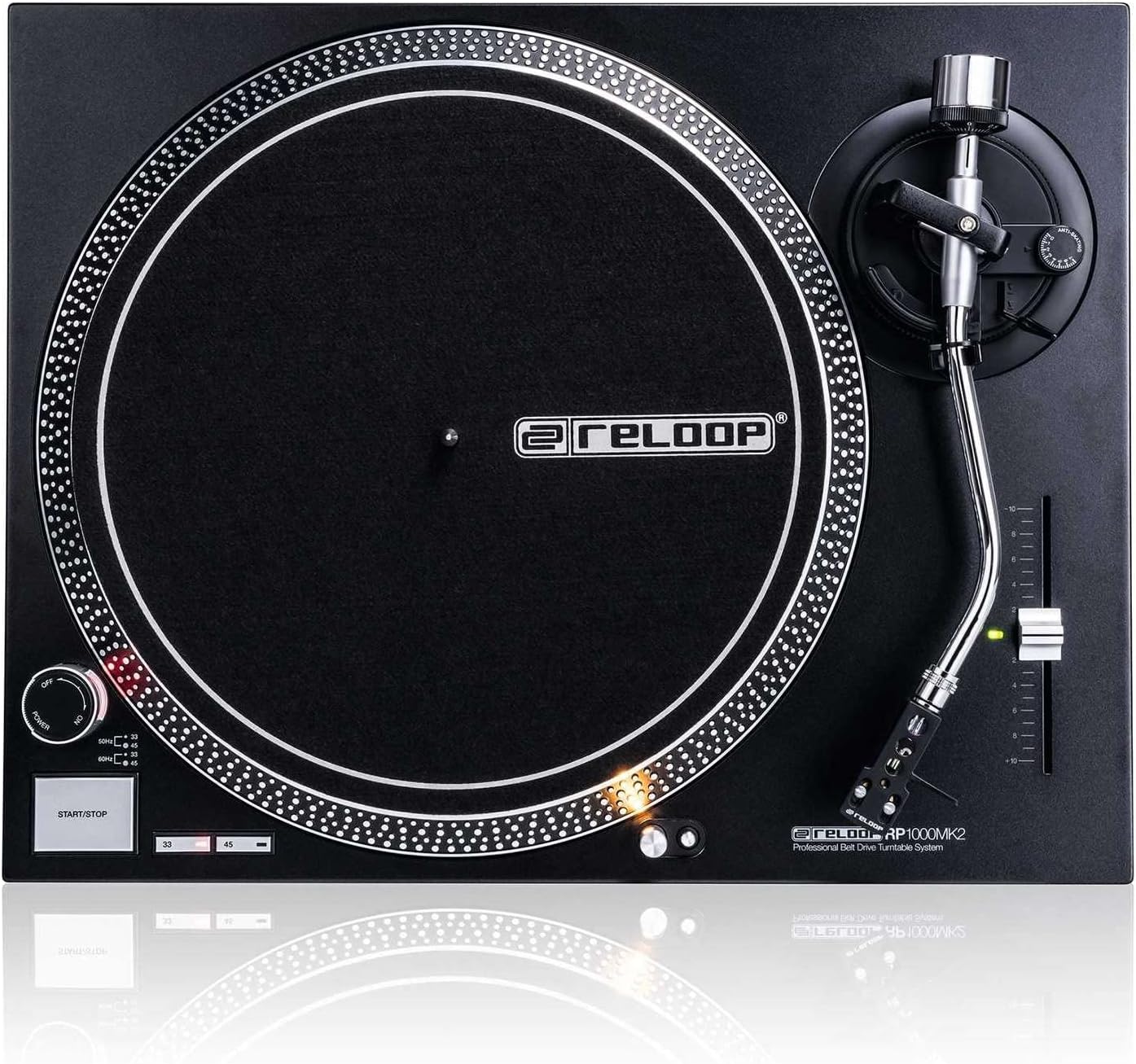
Малюнак 4.2: Зверху ўніз view highlighting the platter, slipmat with Reloop logo, S-shaped tonearm, and pitch control slider.

Малюнак 4.3: падрабязна view of the S-shaped tonearm, headshell, and the pre-fitted Ortofon OM Black pick-up system.
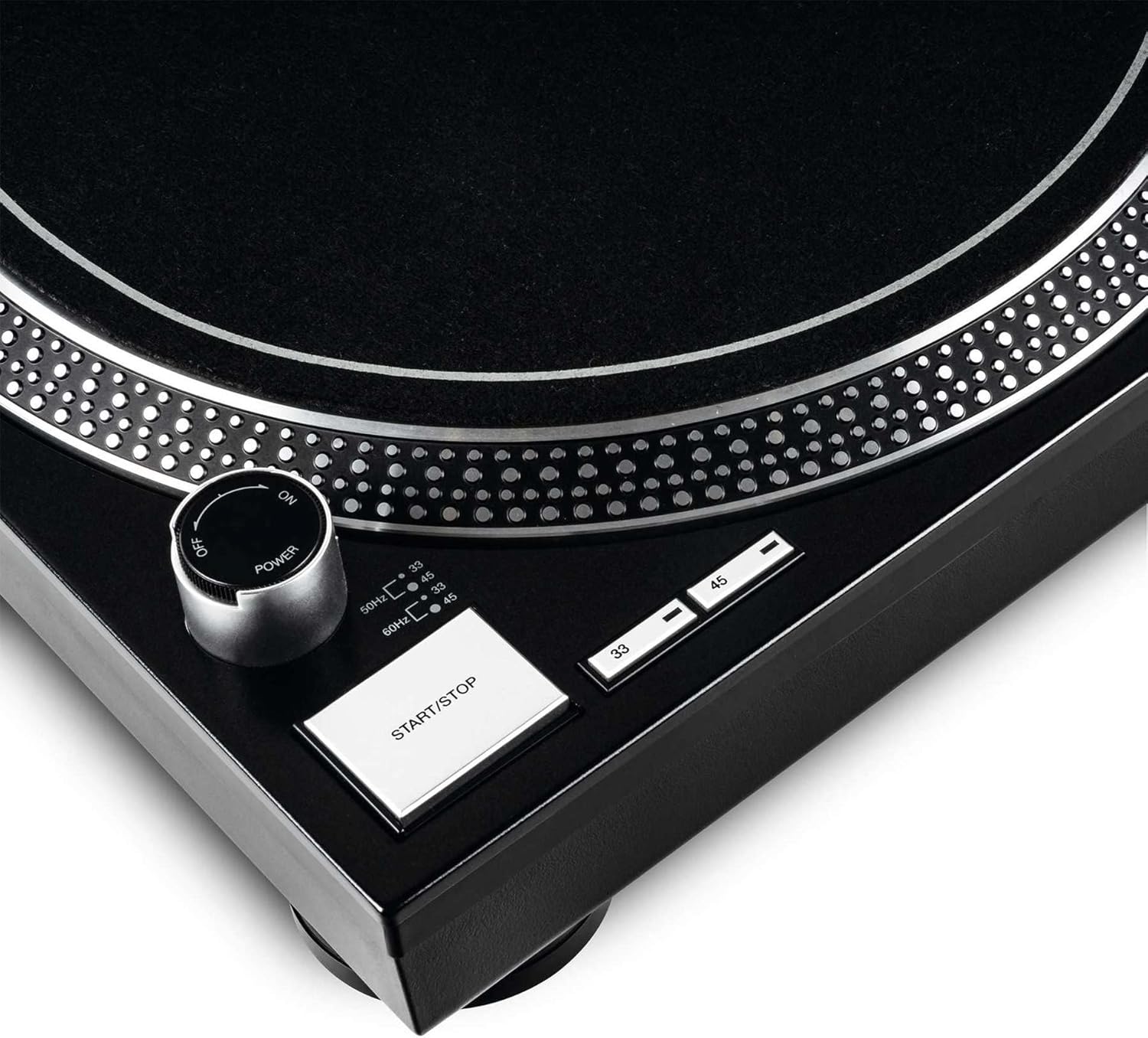
Figure 4.4: Close-up of the power knob, start/stop button, and speed selection buttons (33/45 RPM).
Ключавыя кампаненты:
- Талерка: Precision-engineered, die-cast aluminum platter for stable rotation.
- Toarm: Statically balanced S-shaped tonearm with hydraulic lift and anti-skating mechanism.
- Картрыдж: High-quality OM Black pick-up system by Ortofon, pre-fitted to a headshell.
- Кантроль вышыні: Adjustable slider with a range of +/-10% for fine speed adjustments.
- Speed Select Buttons: Buttons for selecting 33 1/3 RPM and 45 RPM playback speeds.
- Кнопка Пуск/Стоп: Controls the rotation of the platter.
- Target Light: Extendable aluminum target light to illuminate the needle position in dark environments.
- Shock-absorbing Feet: Improve isolation from unwanted vibrations.
5. Настройка
5.1 Распакоўка і размяшчэнне
- Асцярожна выміце ўсе кампаненты з упакоўкі. Захавайце ўпакоўку для наступнай транспарціроўкі або захоўвання.
- Place the turntable on a flat, stable, and level surface, away from direct sunlight, heat sources, and strong magnetic fields.
- Ensure there is sufficient space around the unit for ventilation.
5.2 Усталёўка талеркі і стужкі
- Усталюйце дыск на цэнтральную шпіндзель. Пераканайцеся, што ён надзейна замацаваны.
- Locate the drive belt. Carefully stretch the belt around the inner rim of the platter and hook it onto the motor pulley, which is visible through one of the platter's openings.
- Змесціце фетравы кілімок зверху на талерку.
5.3 Tonearm Setup
The OM Black pick-up system is pre-fitted to the headshell. Follow these steps to balance the tonearm:
- Attach the headshell with the pre-fitted cartridge to the front end of the tonearm. Secure it by turning the locking ring clockwise.
- Place the counterweight onto the rear of the tonearm and rotate it until it is approximately centered.
- Адпусціце тонарм клamp and lower the tonearm lift.
- Carefully adjust the counterweight by rotating it forwards or backwards until the tonearm is perfectly balanced and floats horizontally.
- Once balanced, hold the counterweight steady and rotate only the numbered ring on the front of the counterweight to '0' (zero).
- Rotate the entire counterweight (including the numbered ring) counter-clockwise to set the recommended tracking force for the Ortofon OM Black cartridge, typically between 1.5 to 2.0 grams. Refer to the cartridge manufacturer's specifications for the precise recommended tracking force.
- Set the anti-skating dial to the same value as your tracking force.
- Return the tonearm to its rest and secure it with the clamp.
5.4 Падключэння аўдыё і харчавання
- Connect the RCA audio cables from the turntable's output to the PHONO input of your amplifier or mixer. Ensure correct left (white) and right (red) channel connections.
- Падключыце провад зазямлення ад прайгравальніка да клемы зазямлення на вашым amplifier or mixer to minimize hum.
- Plug the power cord into the turntable's power input and then into a suitable AC power outlet.
6. Інструкцыя па эксплуатацыі
6.1 Асноўныя аперацыі
- Уключэнне: Turn the power knob clockwise to the "ON" position. The platter will not start spinning until the START/STOP button is pressed.
- Выберыце хуткасць: Press the "33" or "45" button to select the desired playback speed according to the record you are playing. The corresponding LED will illuminate.
- Запіс месца: Carefully place a vinyl record onto the platter.
- Start Platter: Press the START/STOP button. The platter will begin to rotate.
- Пазіцыя тонарма: Адпусціце тонарм клamp. Use the tonearm lift lever to raise the tonearm. Carefully move the tonearm over the desired track on the record.
- Ніжні тонарм: Gently lower the tonearm lift lever to allow the stylus to descend onto the record groove.
- Прайграванне: The audio will now play through your connected audio system.
- Спыніць прайграванне: At the end of the record, or when you wish to stop, use the tonearm lift lever to raise the tonearm, return it to its rest, and secure it with the clamp. Press the START/STOP button to stop the platter rotation.
- Выключэнне: Turn the power knob counter-clockwise to the "OFF" position when not in use.
6.2 Using Pitch Control
The pitch control slider allows you to finely adjust the playback speed by +/-10%. Move the slider up or down to increase or decrease the speed. The center detent indicates 0% pitch adjustment (nominal speed).
6.3 Target Light
Press the aluminum target light button to extend the light, illuminating the needle position. This is particularly useful in low-light environments. Press it again to retract the light.
7. Тэхнічнае абслугоўванне
7.1 Чыстка прылады
- Перад чысткай заўсёды адключайце сеткавы шнур.
- Use a soft, dry, lint-free cloth to wipe the surface of the turntable.
- Для ўстойлівых плям злёгку дamp можна выкарыстоўваць тканіну, а затым адразу ж сухую тканіну. Пазбягайце абразіўных ачышчальнікаў або растваральнікаў.
7.2 Сыход за стылусам
- The stylus (needle) is a delicate component. Handle it with extreme care.
- Рэгулярна чысціце стылус мяккай шчоткай, прызначанай для чысткі стылуса, акуратна чысцячы яго ззаду наперад.
- A worn or dirty stylus can damage your records and degrade sound quality. Replace the stylus when signs of wear are apparent (e.g., distorted sound, skipping).
7.3 Замена рамяня
The belt is a wear-and-tear part. If you notice inconsistent speed or the platter not spinning, the belt may need replacement. Contact Reloop support or an authorized service center for replacement belts and instructions.
7.4 Dust Cover Care (if applicable)
If your turntable includes a dust cover, clean it with a soft, damp cloth. Avoid using dry cloths as they can scratch the acrylic surface. Do not use harsh chemicals.
8. Выпраўленне непаладак
Before contacting support, please refer to the following common issues and their solutions:
| праблема | Магчымая прычына | Рашэнне |
|---|---|---|
| No power / Platter not spinning | Power cord not connected; Power switch off; Belt not installed or broken. | Ensure power cord is securely plugged in. Turn power switch ON. Check if the drive belt is correctly installed around the platter and motor pulley. Replace belt if broken. |
| Няма гуку або вельмі ціхі гук | RCA cables not connected correctly; Amplifier/mixer input incorrect; Stylus damaged or dirty; Cartridge not properly seated. | Check RCA connections to amplifier/mixer (PHONO input). Ensure ground wire is connected. Clean stylus. Re-seat cartridge in headshell. |
| Distorted sound / Skipping | Stylus dirty or worn; Tracking force incorrect; Anti-skating incorrect; Turntable not level; Record dirty or damaged. | Clean or replace stylus. Re-adjust tracking force and anti-skating. Ensure turntable is on a level surface. Clean record. |
| Нестабільная хуткасць | Worn or stretched belt; Motor issue. | Inspect the drive belt for wear and replace if necessary. If the issue persists, contact service. |
9. Тэхнічныя характарыстыкі
| Асаблівасць | Апісанне |
|---|---|
| Назва мадэлі | RP-1000 MK2 Professional Belt Drive Turntable System |
| Тып прывада | Пояс прывада |
| Маторная сістэма | Powerful belt-drive motor system absorbs unwanted vibration and noise |
| страва | Precision-engineered, die-cast aluminum platter with stable rotation |
| Хуткасці | 2 selectable speeds (33 1/3 & 45 RPM) |
| Кіраванне шагам | Adjustable range of +/-10% |
| Танармаваць | Statically balanced S-shaped tonearm with hydraulic lift and anti-skate |
| Будаўніцтва | Redesigned metal top panel, tactile buttons, reinforced housing construction, optimized damping features, shock-absorbing feet |
| Памеры (Ш х Г х У) | 17.72 х 13.86 х 5.67 цалі (прыблізна 45 х 35.2 х 14.4 см) |
| Вага | 16.06 фунта (прыблізна 7.3 кг) |
| Сувязь | Analog RCA output, Ground terminal |
| Крыніца харчавання | Corded Electric, 220 Volts (check local voltagэлектронныя патрабаванні) |
10. Гарантыя і падтрымка
10.1 Інфармацыя аб гарантыі
Reloop products are manufactured to the highest quality standards. This product comes with a manufacturer's warranty. Please refer to the warranty card included in your package or visit the official Reloop webпадрабязныя ўмовы гарантыі, якія дзейнічаюць у вашым рэгіёне, глядзіце на сайце.
Захавайце пацвярджэнне пакупкі (чэк або рахунак-фактуру), бо яно спатрэбіцца для любых гарантыйных прэтэнзій.
10.2 Падтрымка кліентаў
Should you encounter any issues not covered in the troubleshooting section, or require further assistance, please contact Reloop customer support or your authorized dealer. Contact information can typically be found on the official Reloop webсайце або на ўпакоўцы вашага прадукту.
For the latest information, FAQs, and support resources, please visit the official Reloop webсайт: www.reloop.com