
1. Уводзіны
This manual provides essential information for the setup, operation, and maintenance of your Blackweb BWC18SB001 2.0 Channel Google Assistant Smart Soundbar. Please read these instructions carefully before using the product to ensure proper functionality and to maximize your audio experience. This smart soundbar integrates speaker functionality with Google Assistant capabilities, enhancing your home entertainment system.
2. Што ў скрынцы
Пры распакаванні пераканайцеся, што ўсе кампаненты наяўныя:
- Чорныweb BWC18SB001 2.0 Channel Google Assistant Smart Soundbar
- Пульт дыстанцыйнага кіравання
- Адаптар сілкавання
- Relevant Audio Cables (e.g., Optical, Aux)
- Кіраўніцтва карыстальніка (гэты дакумент)
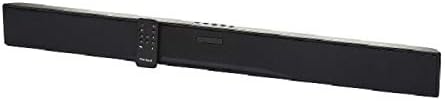
Выява: Чорныweb BWC18SB001 Smart Soundbar, shown with its included remote control. The soundbar is black and rectangular, designed to sit beneath a television.
3. Асаблівасці прадукту
- 2.0-канальны гук: Delivers clear stereo sound for an enhanced listening experience.
- Integrated Google Assistant: Control your soundbar and smart home devices using voice commands.
- Некалькі варыянтаў падключэння: Supports HDMI, Optical, AUX, and Bluetooth for versatile audio input.
- Метады кантролю: Features on-device buttons and a dedicated remote control for easy operation.
- Кампактны дызайн: Designed to fit seamlessly into your home theater setup.
4. Настройка
4.1 Размяшчэнне
Place the soundbar on a stable, flat surface directly in front of your television or mount it on a wall (mounting hardware not included). Ensure there is adequate ventilation around the unit.
4.2 Падключэнне харчавання
- Connect the power adapter to the DC IN port on the back of the soundbar.
- Падключыце іншы канец адаптара сілкавання да насценнай разеткі.
4.3 Аўдыёзлучэнне
Choose one of the following methods to connect your soundbar to your TV or other audio source:
- HDMI (рэкамендуецца): Connect an HDMI cable (not included) from the HDMI ARC port on your TV to the HDMI ARC port on the soundbar. This allows for high-quality audio and control via your TV remote.
- Аптычны: Connect an Optical cable (included) from the OPTICAL OUT port on your TV to the OPTICAL IN port on the soundbar.
- AUX: Connect a 3.5mm audio cable (included) from the AUX OUT port on your TV or audio device to the AUX IN port on the soundbar.
5. Інструкцыя па эксплуатацыі
5.1 Уключэнне/выключэнне сілкавання
- Націсніце кнопку харчавання (U) на саўндбары або пульце дыстанцыйнага кіравання, каб уключыць або выключыць прыладу.
- A green indicator light on the soundbar signifies that it is powered on.
5.2 Рэгулятар гучнасці
- Use the Volume Up (ГУЧНАСЦЬ+) and Volume Down (ГУЧ-) buttons on the soundbar or remote control to adjust the volume.
- Націсніце кнопку адключэння гуку (X) on the remote to mute or unmute the sound.
5.3 Выбар уводу
Націсніце кнопку ўводу (M) on the soundbar or the corresponding input buttons (AUX, OPTICAL, HDMI, Bluetooth) on the remote control to switch between audio sources.
6. Google Assistant Integration
Твой чорныweb soundbar features integrated Google Assistant. To activate, ensure the soundbar is connected to your home Wi-Fi network (refer to the separate Google Home app setup guide for detailed instructions). Once connected, you can use voice commands:
- Say "Hey Google" or "Ok Google" followed by your command.
- Examples: "Hey Google, play music," "Ok Google, what's the weather?" "Hey Google, turn up the volume."
You can also mute the Google Assistant microphone using the dedicated button on the soundbar or remote control if you prefer privacy.
7. Злучэнне Bluetooth
Каб падключыць прыладу Bluetooth:
- Націсніце кнопку Bluetooth (BT) on the remote control or cycle through inputs on the soundbar until "BT" is displayed or indicated. The soundbar will enter pairing mode.
- На мабільнай прыладзе (смартфоне, планшэце, ноўтбуку) уключыце Bluetooth і знайдзіце даступныя прылады.
- Выберыце «Чорны»web BWC18SB001" from the list of devices.
- Пасля спалучэння саўндбар пакажа паспяховае падключэнне, і вы зможаце прайграваць аўдыё са сваёй прылады.
Дыяпазон Bluetooth складае прыблізна 10 метраў (33 футы).
8. Тэхнічнае абслугоўванне
Каб забяспечыць даўгавечнасць і аптымальную прадукцыйнасць вашай гукавой панэлі:
- Уборка: Use a soft, dry cloth to wipe the exterior of the soundbar. Do not use liquid cleaners or abrasive materials.
- Вентыляцыя: Пераканайцеся, што вентыляцыйныя адтуліны не заблакаваныя.
- Асяроддзе: Пазбягайце ўздзеяння на саўндбар экстрэмальных тэмператур, вільготнасці або прамых сонечных прамянёў.
9. Выпраўленне непаладак
- Няма харчавання: Ensure the power adapter is securely connected to both the soundbar and a working wall outlet.
- Няма гуку:
- Check that the soundbar is powered on and not muted.
- Праверце, ці выбрана правільная крыніца ўваходнага сігналу на гукавой панэлі.
- Ensure audio cables (HDMI, Optical, AUX) are securely connected to both the soundbar and your TV/audio source.
- Adjust the volume on both the soundbar and your TV/audio source.
- Bluetooth не падключаецца:
- Пераканайцеся, што саўндбар знаходзіцца ў рэжыме спалучэння Bluetooth.
- Пераканайцеся, што Bluetooth вашай прылады ўключаны і знаходзіцца ў зоне дзеяння.
- Паспрабуйце адлучыць прыладу і зноў падлучыць яе.
- Памочнік Google не адказвае:
- Праверце злучэнне Wi-Fi.
- Ensure the Google Assistant microphone is not muted.
- Verify the soundbar is properly set up in the Google Home app.
10. Тэхнічныя характарыстыкі
| Асаблівасць | Спецыфікацыя |
|---|---|
| Назва мадэлі | BWC18SB001 |
| Тып дынаміка | Саундбар |
| Канфігурацыя канала аб'ёмнага гуку | 2.0 |
| Метад кантролю | Voice, Remote, On-device Buttons |
| Тэхналогія падлучэння | HDMI, Optical, AUX, Bluetooth |
| Дыяпазон Bluetooth | 10 метраў |
| Максімальная выхадная магутнасць дынаміка | 150 ват |
| Рэжым выхаду гуку | Стэрэа, аб'ёмны гук |
| Крыніца харчавання | Правадная электрычная |
| Памеры прадукту | 32 х 2.77 х 3.26 цалі |
| Вага прадмета | 3.97 фунта |
| UPC | 681131237703 |
11. Гарантыя і падтрымка
For warranty information and technical support, please refer to the documentation provided at the time of purchase or visit the official Blackweb webсайт. Захоўвайце пацвярджэнне пакупкі для прэтэнзій па гарантыі.