
1. Уводзіны
The D-Link DWR-930M 4G/LTE Mobile Router is a portable wireless device designed to provide high-speed internet access on the go. It functions as a 4G LTE Cat4 mobile hotspot, enabling you to share a broadband wireless WAN (WWAN) connection via Wi-Fi. This device supports internet speeds up to 150Mbps for downloads and 50Mbps for uploads, allowing up to 8 Wi-Fi devices to connect simultaneously.
Its compact size and rechargeable 3000 mAh Li-ion battery make it suitable for travel and situations requiring an impromptu network. The DWR-930M incorporates a built-in firewall and supports WPA/WPA2 security protocols to protect your data. Charging is facilitated via a Micro-USB port, and device management can be performed using a mobile application.
2. Змесціва ўпакоўкі
Калі ласка, пераканайцеся, што ў вашай пасылцы ёсць наступныя прадметы:
- D-Link DWR-930M 4G/LTE Mobile Router
- Акумулятарная літый-іённая батарэя
- Зарадны кабель Micro-USB
- Кіраўніцтва па хуткай усталёўцы (калі ў камплекце)
Калі якія-небудзь прадметы адсутнічаюць або пашкоджаныя, звярніцеся да прадаўца.
3. Прадукт скончыўсяview
Familiarize yourself with the physical components and indicator lights of your DWR-930M Mobile Router.
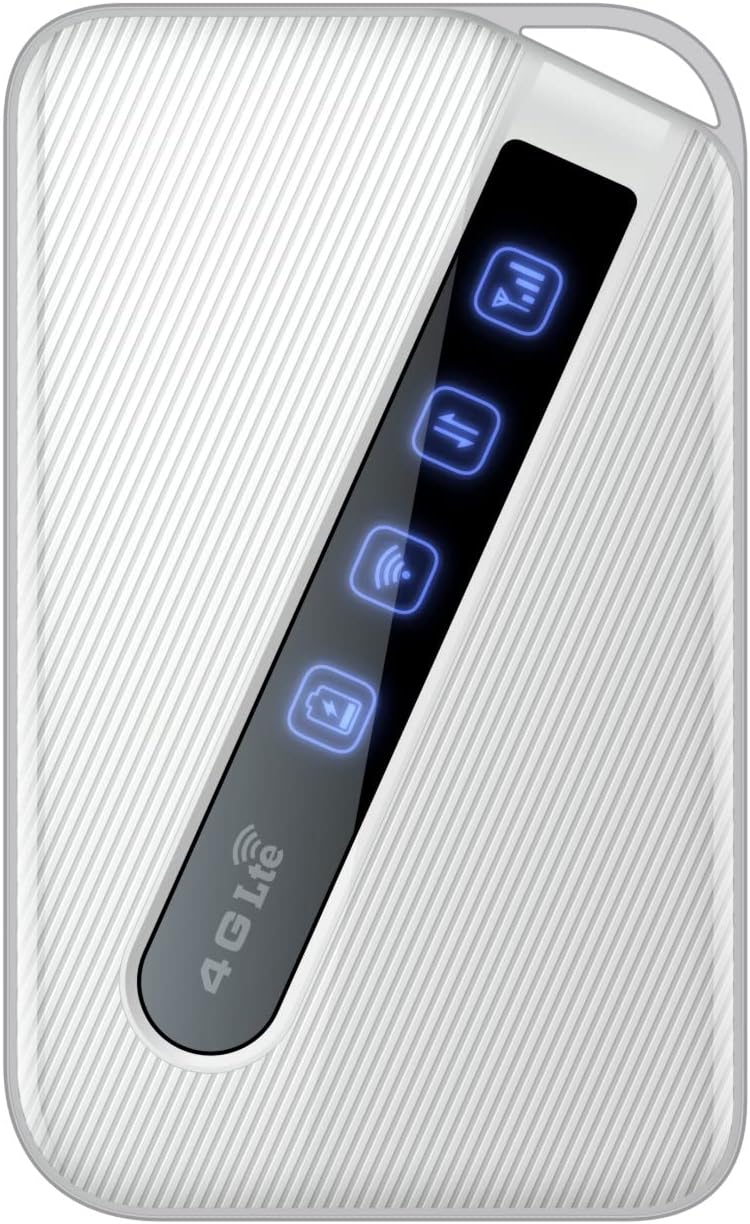
An image of the D-Link DWR-930M 4G/LTE Mobile Router, showing its compact white design and the illuminated indicator panel for signal, network, Wi-Fi, and battery status.
Светавыя індыкатары:
- Індыкатар магутнасці сігналу: Displays the strength of the 4G/LTE network signal.
- Network Type Indicator: Shows the current network connection status (e.g., 4G LTE).
- Індыкатар стану Wi-Fi: Indicates if the Wi-Fi hotspot is active.
- Індыкатар стану батарэі: Паказвае бягучы ўзровень зарада батарэі.
Ports and Slots:
- Слот для SIM-карты: For inserting your data-enabled SIM card.
- Порт Micro-USB: Выкарыстоўваецца для зарадкі прылады.
- Кнопка харчавання: Каб уключыць або выключыць прыладу.
4. Настройка
4.1. Устаўка SIM-карты
- Ensure the DWR-930M is powered off.
- Locate the SIM card slot, typically found under the battery cover or on the side of the device.
- Carefully insert your data-enabled SIM card into the slot with the gold contacts facing down and the notched corner aligned correctly.
- Close the SIM card slot cover or replace the battery cover.
4.2. Зарадка прылады
- Connect the Micro-USB charging cable to the Micro-USB port on the DWR-930M.
- Connect the other end of the cable to a USB power adapter (not always included) or a computer's USB port.
- The battery indicator light will show charging status. Allow the device to fully charge before first use.
4.3. Уключэнне / выключэнне харчавання
- Каб уключыць: Націсніце і ўтрымлівайце кнопку харчавання, пакуль не загарыцца індыкатар.
- Каб выключыць: Націсніце і ўтрымлівайце кнопку харчавання, пакуль не пагаснуць індыкатары.
5. Аперацыя
5.1. Падключэнне прылад да Wi-Fi
- Ensure the DWR-930M is powered on and the Wi-Fi indicator is active.
- On your Wi-Fi enabled device (smartphone, tablet, laptop), open the Wi-Fi settings.
- Scan for available Wi-Fi networks.
- Select the network name (SSID) of your DWR-930M (usually printed on a label inside the battery compartment or on the device itself).
- Enter the Wi-Fi password (WPA/WPA2 key), also found on the device label.
- Your device should now be connected to the internet via the DWR-930M.
5.2. Доступ да Web Інтэрфейс кіравання
Для дадатковых налад і канфігурацыі вы можаце атрымаць доступ да параметраў маршрутызатара webінтэрфейс кіравання на аснове.
- Connect your device to the DWR-930M's Wi-Fi network.
- Адкрыйце a web браўзер (напрыклад, Chrome, Firefox, Edge).
- У адрасным радку ўвядзіце IP-адрас маршрутызатара па змаўчанні (звычайна
192.168.0.1or192.168.1.1) and press Enter. Refer to your device's label or quick start guide for the exact IP address. - Enter the default username and password (often
adminдля абодвух або пазначана на этыкетцы прылады). - You can now configure settings such as Wi-Fi name, password, security, and network preferences.
6. Тэхнічнае абслугоўванне
6.1. Сыход за батарэяй
- Пазбягайце ўздзеяння на прыладу экстрэмальных тэмператур.
- Не пакідайце акумулятар цалкам разраджаным на працяглы час.
- For optimal battery life, charge the device regularly.
6.2. Абнаўленне прашыўкі
Periodically check the D-Link support website for firmware updates for your DWR-930M. Firmware updates can improve performance, add new features, and enhance security. Follow the instructions provided with the firmware update carefully.
6.3. Уборка
Use a soft, dry cloth to clean the exterior of the device. Do not use liquid cleaners or aerosols, as they may damage the device.
7. Выпраўленне непаладак
This section addresses common issues you might encounter with your DWR-930M Mobile Router.
| праблема | Магчымае рашэнне |
|---|---|
| Няма падключэння да Інтэрнэту |
|
| Немагчыма падключыцца да Wi-Fi |
|
| Павольная хуткасць інтэрнэту |
|
| Акумулятар не зараджаецца |
|
8. Тэхнічныя характарыстыкі
Key technical specifications for the D-Link DWR-930M 4G/LTE Mobile Router:
| Асаблівасць | Дэталь |
|---|---|
| Назва мадэлі | DWR-930M |
| Тэхналогія падлучэння | USB, Wi-Fi |
| Стандарт бесправадной сувязі | 802.11b, 802.11g, 802.11n |
| Клас дыяпазону частот | Двухдыяпазонны |
| Data Speeds | Up to 150Mbps Downlink, 50Mbps Uplink (4G LTE Cat4) |
| акумулятар | 1 Lithium Ion battery required (included), 3000 mAh |
| Памеры прадукту | 10.3 х 1.3 х 6.3 см |
| Вага | 360 г |
| Сумяшчальныя прылады | Ноўтбук, персанальны камп'ютар, смартфон, планшэт |
| Рэкамендуемае выкарыстанне | Падарожжа, Адкрыты |
9. Гарантыя і падтрымка
D-Link products are backed by a limited warranty. For specific warranty terms and conditions applicable to your region, please refer to the warranty card included with your product or visit the official D-Link webсайт.
For technical support, product registration, or to download the latest drivers and firmware, please visit the D-Link support portal:
When contacting support, please have your product model number (DWR-930M) and serial number ready.