
Уводзіны
This manual provides essential instructions for the safe and efficient operation of your KINGONE K9 Super Bass Portable Bluetooth Speaker. Please read this manual thoroughly before using the device and retain it for future reference.
The KINGONE K9 is a portable Bluetooth speaker featuring powerful stereo sound, multiple input options including Bluetooth, MicroSD, and AUX, and convenient touch controls. It also supports hands-free calling and NFC for easy pairing.
Змест пакета
Пераканайцеся, што ўсе прадметы прысутнічаюць у пасылцы:
- KINGONE K9 Super Bass Portable Bluetooth Speaker
- Зарадны кабель Micro USB
- Аўдыёкабель 3.5 мм (AUX)
- Кіраўніцтва карыстальніка (гэты дакумент)
Прадукт скончаныview
The KINGONE K9 speaker is designed for portability and high-quality audio. Below is an image illustrating the speaker and its packaging.
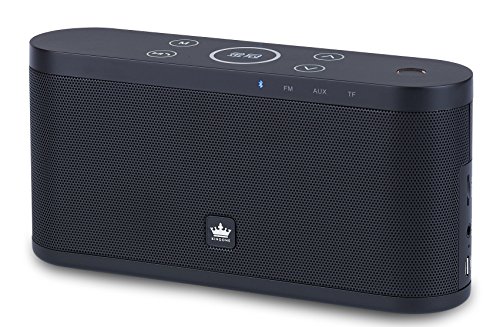
Image: The KINGONE K9 Super Bass Portable Bluetooth Speaker (left) shown next to its metallic-finish packaging (right).
Асноўныя характарыстыкі:
- Падключэнне Bluetooth 4.0: Supports A2DP, AVRCP, HFP, HSP profiles for stable wireless audio streaming.
- NFC Падтрымка: For quick and easy pairing with compatible devices.
- Некалькі рэжымаў прайгравання: Bluetooth, MicroSD card, and AUX input.
- Гучная сувязь: Built-in microphone for answering phone calls.
- Сэнсарныя элементы кіравання: Intuitive touch-sensitive buttons for volume, track navigation, and play/pause.
- Powerful Stereo Sound: 2 x 5W output for a rich audio experience.
- Партатыўны дызайн: Compact dimensions and a 2200mAh battery for extended use.
Элементы кіравання і функцыі
The speaker features touch-sensitive controls located on the top panel. Familiarize yourself with these controls for optimal use:
- Кнопка харчавання: Націсніце і ўтрымлівайце на працягу 3 секунд, каб уключыць/выключыць харчаванне.
- Кнопка прайгравання/паўзы: Tap to play or pause audio. During a call, tap to answer/end.
- Павялічыць гучнасць (+): Tap to increase volume.
- Памяншэнне гучнасці (-): Tap to decrease volume.
- Next Track (>>): Націсніце, каб перайсці да наступнага трэка.
- Previous Track (<<): Націсніце, каб перайсці да папярэдняга трэка.
- Кнопка рэжыму (M): Tap to switch between Bluetooth, MicroSD, and AUX input modes.
Настройка
1. Зарадка дынаміка
- Падключыце зарадны кабель Micro USB да зараднага порта дынаміка.
- Connect the other end of the USB cable to a DC 5V USB power source (e.g., computer USB port, USB wall adapter).
- Індыкатар зарадкі загарыцца.
- Charging typically takes 4-5 hours for a full charge. The indicator light will change or turn off once fully charged.
2. Уключэнне / выключэнне харчавання
- To power on, press and hold the Power button for approximately 3 seconds until you hear an audible prompt.
- To power off, press and hold the Power button for approximately 3 seconds until you hear an audible prompt.
3. Спарванне Bluetooth
- Ensure the speaker is powered on and in Bluetooth mode (indicated by a flashing blue LED). If not, press the 'M' (Mode) button to switch to Bluetooth mode.
- Уключыце Bluetooth на мабільнай прыладзе (смартфоне, планшэце, ноўтбуку).
- Пошук available Bluetooth devices. You should see "KINGONE K9" in the list.
- Select "KINGONE K9" to pair. Once paired, the speaker will emit an audible confirmation, and the blue LED will stop flashing and remain solid.
- Пры ўключэнні дынамік аўтаматычна падключыцца да апошняй спалучанай прылады, калі Bluetooth прылады актыўны і знаходзіцца ў зоне дзеяння.
4. Спалучэнне NFC (для сумяшчальных прылад)
- Ensure NFC is enabled on your compatible smartphone or tablet.
- Power on the KINGONE K9 speaker.
- Gently tap your NFC-enabled device against the NFC area on the speaker (refer to the speaker's diagram for exact location, usually marked with an NFC logo).
- Your device will prompt you to confirm the pairing. Accept the connection.
5. Падключэнне да ўваходу AUX
- Падключыце адзін канец аўдыёкабеля 3.5 мм да порта AUX на дынаміку.
- Connect the other end of the 3.5mm audio cable to the headphone jack or audio output port of your external audio device.
- Націсніце кнопку «M» (рэжым) на дынаміку, каб пераключыцца ў рэжым AUX.
- Audio will now play through the speaker from your connected device. Control playback and volume from your external device.
6. Прайграванне з карты MicroSD
- Устаўце карту MicroSD (TF) з аўдыё ў фармаце MP3 files into the MicroSD card slot on the speaker.
- Press the 'M' (Mode) button to switch to MicroSD card mode.
- Дынамік аўтаматычна пачне прайграваць аўдыё files з карты.
- Use the speaker's touch controls for play/pause, next track, and previous track.
Інструкцыя па эксплуатацыі
Рэгулятар гучнасці
- Tap the 'Volume Up (+)' button to increase the volume.
- Tap the 'Volume Down (-)' button to decrease the volume.
Track Navigation (Bluetooth/MicroSD modes)
- Tap the 'Next Track (>>)' button to skip to the next song.
- Tap the 'Previous Track (<<)' button to go back to the beginning of the current song or to the previous song.
Званок без рук
- When a call comes in while connected via Bluetooth, the speaker will ring.
- Tap the 'Play/Pause' button to answer the incoming call.
- Tap the 'Play/Pause' button again to end the call.
- To reject an incoming call, press and hold the 'Play/Pause' button for a few seconds.
Тэхнічнае абслугоўванне
- Трымайце дынамік далей ад вады, вільгаці і экстрэмальных тэмператур.
- Працірайце дынамік мяккай сухой тканінай. Не выкарыстоўвайце абразіўныя ачышчальнікі або растваральнікі.
- Пазбягайце падзення дынаміка або моцных удараў.
- Калі дынамік не выкарыстоўваецца працяглы час, захоўвайце яго ў прахалодным, сухім месцы і перыядычна зараджайце, каб падтрымліваць яго працаздольнасць.
Ліквідацыю непаладак
- Няма харчавання:
- Пераканайцеся, што дынамік цалкам зараджаны.
- Праверце кабель зарадкі і адаптар харчавання на наяўнасць пашкоджанняў.
- Няма гуку:
- Павялічце гучнасць як на дынаміку, так і на падлучанай прыладзе.
- Ensure the speaker is in the correct input mode (Bluetooth, AUX, MicroSD).
- If using Bluetooth, ensure the device is properly paired and within the 10-meter operating range.
- If using AUX, ensure the 3.5mm cable is securely connected to both devices.
- Адключэнне Bluetooth:
- Перамясціце прыладу бліжэй да дынаміка.
- Пераканайцеся, што паміж дынамікам і прыладай няма перашкод.
- Turn off and on Bluetooth on your device, then try re-pairing.
- Элементы кіравання не адказваюць:
- Пераканайцеся, што дынамік уключаны.
- Try restarting the speaker.
Тэхнічныя характарыстыкі
| мадэль | K9 |
| Версія Bluetooth | 4.0 |
| Bluetooth Profiles | A2DP, AVRCP, HFP, HSP |
| Працоўны дыяпазон | Да 10 метраў (33 футаў) |
| Выходная магутнасць | 2 x 5 Вт (усяго 10 Вт) |
| Канфігурацыя канала | 2.0 Стэрэа |
| Параметры ўводу | Bluetooth, MicroSD (TF Card), AUX (3.5mm) |
| Ёмістасць батарэі | 2200 мАг |
| Уваход для зарадкі | 5 В пастаяннага току (Micro USB) |
| Час зарадкі | 4-5 гадзін |
| Памеры (Д х Ш х У) | 22 см х 12 см х 15 см (прыблізна) |
| Вага | 1.5 кг (прыбл.) |
| Метад кантролю | Дакранацца |
| Асаблівасці | NFC, Hands-free Calling, Portable |
Інфармацыя па бяспецы
- Do not expose the speaker to direct sunlight, heat sources, or open flames.
- Do not disassemble, repair, or modify the device yourself. This may void the warranty and cause damage.
- Захоўваць у месцах, недаступных дзецям.
- Утылізуйце выраб і яго батарэю адказна ў адпаведнасці з мясцовымі правіламі.
- Avoid listening at high volumes for prolonged periods to prevent hearing damage.
Гарантыя і падтрымка
Каб атрымаць інфармацыю аб гарантыі або тэхнічнай падтрымцы, звярніцеся да дакументацыі, прадстаўленай пры куплі, або звярніцеся да прадаўца. Захоўвайце пацвярджэнне пакупкі для прэтэнзій па гарантыі.