
Уводзіны
Thank you for choosing the NEC NP-MC372X Portable Projector. This manual provides essential information for the safe and efficient use of your projector. Please read these instructions thoroughly before operating the device and retain them for future reference. The NEC NP-MC372X is an XGA LCD projector designed for clear and bright presentations, offering 3700 lumens of brightness and a native resolution of 1024x768.
Інфармацыя па бяспецы
Заўсёды выконвайце наступныя меры бяспекі, каб пазбегнуць пажару, паражэння электрычным токам або траўмаў:
- Не блакуйце вентыляцыйныя адтуліны. Забяспечце дастатковую прастору вакол праектара для належнай цыркуляцыі паветра.
- Не глядзіце непасрэдна ў аб'ектыў праектара, калі ён уключаны.amp уключаны, бо яркае святло можа пашкодзіць вочы.
- Не стаўце праектар на няўстойлівую каляску, падстаўку або стол.
- Unplug the projector from the power outlet before cleaning. Use a dry cloth for cleaning.
- Звяртайцеся да кваліфікаванага абслугоўваючага персаналу.
Змест пакета
Праверце, ці ўсе пералічаныя ніжэй прадметы ўваходзяць у вашу ўпакоўку:
- NEC NP-MC372X Portable Projector
- Сілавы кабель
- Кабель HDMI
- Пульт дыстанцыйнага кіравання
Прадукт скончаныview
The NEC NP-MC372X is a versatile projector featuring an LCD display, 1024x768 native resolution, and 3700 lumens brightness. It includes a 1.2x zoom lens and offers a lamp life of up to 10,000 hours. Connectivity options include Dual HDMI, VGA, and USB.
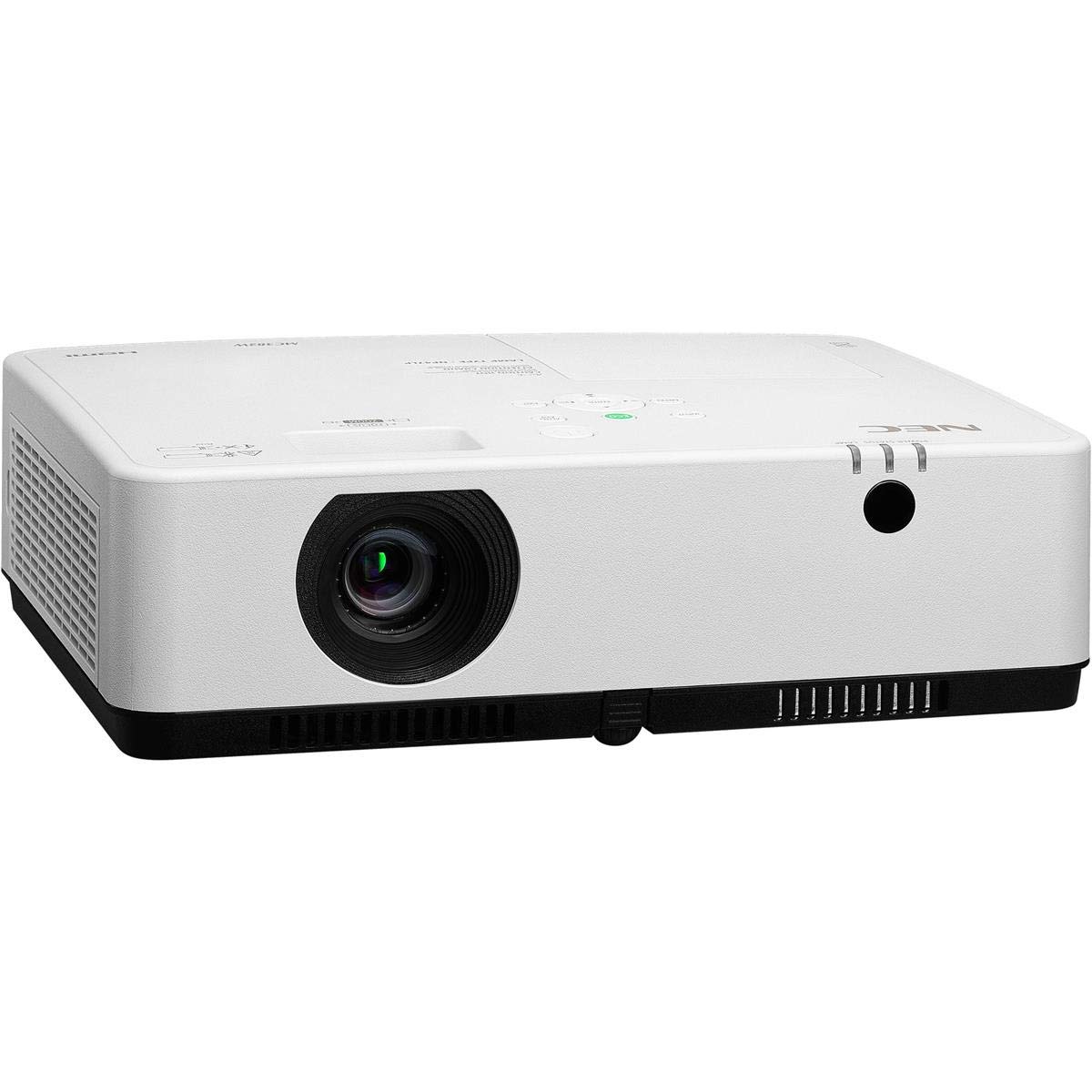
Малюнак 1: Пярэдняя і верхняя часткі view of the NEC NP-MC372X Portable Projector, showing the lens and control panel.

Малюнак 2: Спераду view of the projector, highlighting the projection lens.

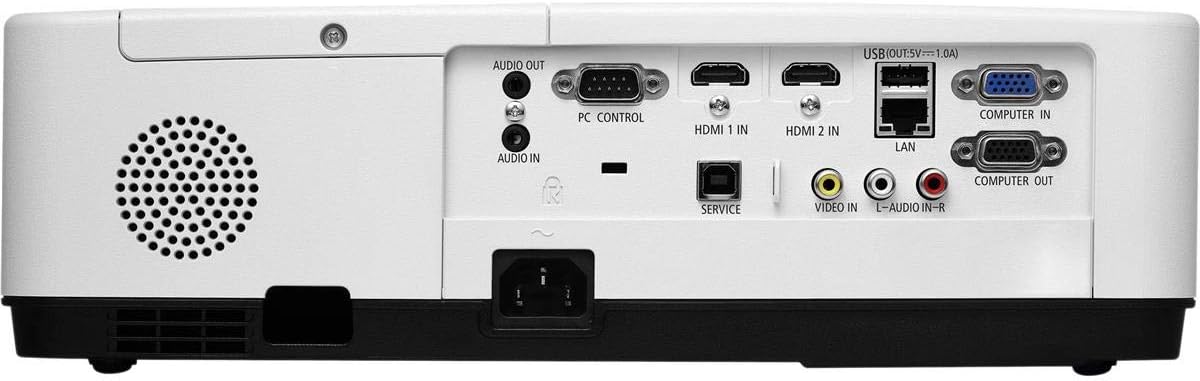
Малюнак 3: Задняя частка view of the projector, displaying the various input and output ports including HDMI, VGA, USB, LAN, and audio connections.
Малюнак 4: бок view of the projector, showing the ventilation grille for heat dissipation.
Настройка
Фізічнае размяшчэнне
Place the projector on a stable, flat surface or mount it securely. Ensure the projector is positioned at an appropriate distance from the screen to achieve the desired image size. Maintain clear space around the projector for ventilation.
Падключэнне прылад
Refer to Figure 3 for port locations. Connect your source device (e.g., laptop, gaming console) to the projector using one of the following methods:
- HDMI: Use an HDMI cable to connect to either HDMI 1 IN or HDMI 2 IN.
- VGA: Use a VGA cable to connect to COMPUTER IN. For audio, connect a 3.5mm audio cable to AUDIO IN.
- USB: Connect a USB device to the USB port for direct media playback.
- LAN: Падключыце кабель Ethernet да порта LAN для падключэння да сеткі.
Уключэнне/выключэнне
1. Connect the power cable to the projector and a power outlet.
2. Press the power button on the projector or the remote control to turn on the projector.
3. To turn off, press the power button again. Confirm shutdown when prompted.
Інструкцыя па эксплуатацыі
Basic Operation with Remote Control
Use the included remote control to navigate menus, select input sources, and adjust settings. Point the remote control towards the projector's remote sensor.
Выбар крыніцы ўводу
Press the 'Input' button on the remote control or projector control panel to cycle through available input sources (HDMI 1, HDMI 2, Computer In, USB).
Карэкціроўка выявы
- Фокус: Паварочвайце кольца факусоўкі на аб'ектыве, пакуль выява не стане рэзкай.
- Маштаб: Use the zoom ring on the lens to adjust the image size without moving the projector. The projector features a 1.2x optical zoom.
- Карэкцыя трапецеідальных скажэнняў: If the image appears trapezoidal, use the keystone correction function in the projector menu to square the image.
Асаблівасці
- Multi Presenter: This feature allows multiple users to connect and display content wirelessly from their devices. Refer to the on-screen menu for setup instructions.
- USB Viewer Capability: Insert a USB drive into the USB port to directly view photos, videos, and documents without a connected computer.
- Субтытры: Enable closed captioning for compatible video sources through the projector's menu settings.
Тэхнічнае абслугоўванне
Lamp Замена
Праектар лamp has an operating life of up to 10,000 hours. When the lamp reaches the end of its life, a warning message will appear. Consult a qualified service technician for lamp replacement to ensure proper installation and safety.
Уборка
- Знешні выгляд: Працярыце праектар casinпрацярыце мяккай, сухой тканінай без ворса. Для ўстойлівых плям злёгку працярыцеampen тканіна з вадой.
- Аб'ектыў: Use a professional lens cleaning kit or a soft, dry cloth specifically designed for optical lenses. Avoid harsh chemicals.
- Паветраны фільтр: Рэгулярна правярайце і чысціце паветраны фільтр, каб прадухіліць назапашванне пылу, які можа паўплываць на прадукцыйнасць іamp life. Refer to the projector's on-screen menu for filter usage time.
Ліквідацыю непаладак
Калі ў вас узнікнуць праблемы, паспрабуйце наступныя рашэнні, перш чым звяртацца ў службу падтрымкі:
- Няма выявы: Ensure all cables are securely connected. Verify the correct input source is selected. Check if the lens cap is removed.
- Няма гуку: Confirm audio cables are connected (if applicable). Adjust volume on both the projector and the source device.
- Пульт дыстанцыйнага кіравання не працуе: Check the batteries in the remote. Ensure there are no obstructions between the remote and the projector's sensor.
- Выява размытая: Adjust the focus ring on the lens. Ensure the projection surface is flat.
- Папярэджанне аб перагрэве: Ensure ventilation openings are not blocked. Clean the air filter if necessary.
Тэхнічныя характарыстыкі
| Асаблівасць | Спецыфікацыя |
|---|---|
| Марка | NEC |
| Назва мадэлі | MC372X |
| Нумар мадэлі | NP-MC372X |
| Тып дысплея | ВК |
| Роднае дазвол | 1024 x 768 (XGA) |
| Яркасць | 3700 люмен |
| Тэхналогія падлучэння | HDMI, USB, VGA, LAN |
| маштабаванне | 1.2x аптычны |
| Тэрмін службы крыніцы святла | 10,000 гадзін |
| Ватtage | 267 watts (typical 120V) |
| Тып кантролера | Пульт дыстанцыйнага кіравання |
| Вага прадмета | 7.1 фунта |
| тtage | 120 вольт |
| UPC | 805736070248 |
Гарантыя і падтрымка
The NEC NP-MC372X Portable Projector comes with a 3-гадовая абмежаваная гарантыя. For warranty claims or technical support, please contact NEC customer service. You can find contact information on the official NEC webна сайце або праз прадаўца вашага прадукту.